
Best Audio Monitors for Video Editing in 2026: A Guide
Disclosure: We may earn a commission when you buy through links on this page, at no extra cost to you. As an Amazon Associate I earn from qualifying purchases. Learn more

Find audio monitors for video editing that keep dialogue clear and music honest, with price tiers, woofer sizes, inputs and placement explained simply.
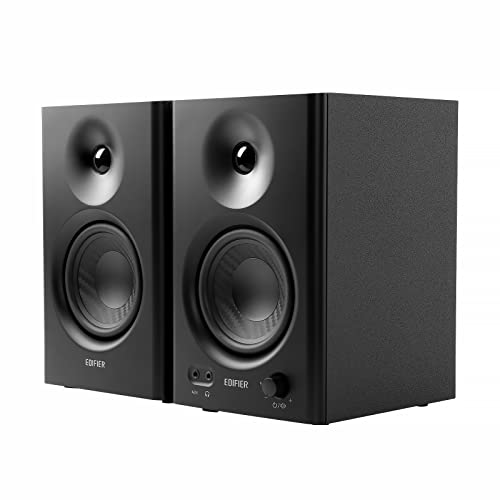
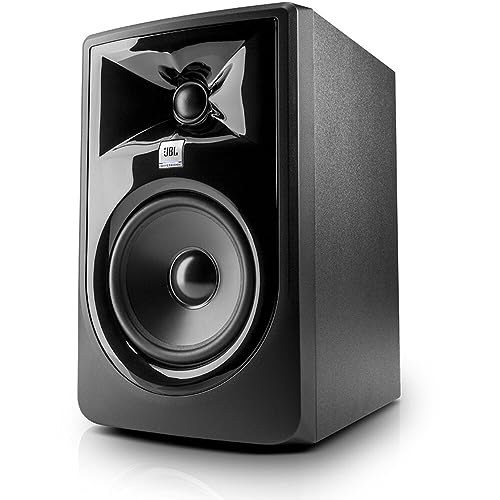
An edit can look polished while the sound still misleads you. Laptop speakers hide low rumble and thin out music. The best audio monitors for video editing give you a flatter, more honest view of your timeline audio, so dialogue and effects translate well to televisions and phones. The product table below shows where extra money helps most.
Start with your room and usual work, not the largest speaker you can afford. People searching for the best audio monitors for video projects often cut dialogue in a small room, close to the screen. That setup shapes woofer size, port style and budget.



Who Should Buy Which Audio Monitors for Video Work?
Your subjects and listening distance should decide the pair. A voice led channel, a short film and a review room place different demands on bass and clarity.
Dialogue Led Editors in Small Home Rooms
You cut interviews, filmed podcasts and spoken pieces at a close desk. Choose a compact pair with a woofer of about 3 to 5 inches and clear midrange. Front port models suit you well, since your desk often stands close to a wall and modest power is enough at close range.
Editors Cutting Music and Effects for Short Films
You balance voices against scores, room tone and quiet ambience, and errors in the low end change the mood of a scene. Choose a woofer of about 5 to 8 inches with clean power for dramatic peaks, plus room adjustment controls.
Editors Sharing a Larger Room for Client Reviews
You play cuts for clients who sit farther back than your chair. Choose larger monitors with a woofer of about 6 to 8 inches and a wide sweet spot. Stands behind the desk often beat desk placement here, and balanced inputs help with longer cable runs.
Key Features to Compare
Compare accuracy first, then size, connections and room fit. Choosing the best audio monitors for video editing means matching those points to your desk, not chasing power ratings.
Flat Frequency Response and Clear Dialogue
Frequency response describes how evenly a speaker plays low, middle and high sounds. A flat response adds little color, so a voice balanced in your room should stay balanced for viewers. Dialogue lives mostly in the midrange, and a smooth midrange helps you set voice levels against music. Avoid models with lifted bass and sharp treble, since that color hides mix problems.
Woofer Size Matched to Room and Listening Distance
The woofer handles bass and much of the lower voice range. Woofers of about 3 to 4 inches suit close listening and speech, but roll off early in the bass. About 5 inches fits most home edit desks, while about 6 to 8 inches serves larger rooms. A bigger woofer in a tiny room can sound boomy.
Front Port or Rear Port and Distance From the Wall
Many compact monitors use a port, an opening that extends bass from a small cabinet. A front port fires toward you and lets the speaker sit closer to a wall with less change in bass. A rear port usually needs about 8 to 12 inches of clear space behind the cabinet. On a shallow desk, front port designs are easier to place.
Balanced and Unbalanced Inputs for Your Computer and Interface
Powered monitors accept a line level signal from an audio interface, a mixer or a computer output. Balanced inputs on TRS or XLR connectors reject hum along the cable, which matters near computers and drives. Unbalanced RCA inputs work for short runs, but collect noise more easily. Budget for two matching cables.
Room Adjustment Controls for Desks and Corners
Small switches on the back panel let you trim bass or treble to suit placement. A speaker near a wall gains extra bass from that surface, and a bass trim can restore balance. Treble trim helps in bright bare rooms or dull soft rooms. Set the controls after placement and change one at a time.
Stereo Imaging, Sweet Spot and Listening Fatigue
A matched pair should place voices in the center and spread music in a stable space between the speakers. That imaging helps you pan sounds and spot a voice drifting off center. The sweet spot is the seat where both speakers reach your ears evenly. Smooth treble matters too, since harsh high sounds cause fatigue.
What Each Price Tier Buys You for Video Editing Audio
Price buys bass extension, cleaner volume and better controls. The tiers below describe pairs. Cables, stands or an interface may sit outside that price.
Budget Pair for a First Edit Desk
Pairs at about $100 to $200 usually offer a woofer of about 3 to 4 inches, simple RCA or TRS inputs and few room controls. They already beat laptop speakers by a wide margin for dialogue clarity. Expect limited deep bass. This tier suits spoken content and social clips.
Midrange Pair With Stronger Bass and Room Controls
Pairs at about $200 to $500 often step up to a woofer of about 5 inches, balanced inputs and useful bass and treble trims. Bass reaches lower and voices stay clear at higher volume. Most home edit suites gain the most per dollar here. If you also choose the picture side of the desk, see our guide to the best monitors for video editing to keep screen and sound choices separate.
Premium Pair for Larger Rooms and Longer Sessions
Pairs at about $500 to $1500 bring larger woofers, stronger cabinets, lower noise and finer room correction. You hear subtle reverb tails and small level changes with less effort. The gain is refinement, and it pays off when clients review in the room.
Choosing Audio Monitors for Your Editing Setup
Two common setups deserve a closer look, because each changes what you should buy.
Best Computer Audio Monitors for Video Editing
A computer based edit desk places the speakers about 2 to 4 feet from your ears. Choose nearfield models with balanced inputs to resist computer noise and a cabinet that fits beside your display. If you are building the whole desk, see our guide to the best computer monitors for video editing for the screen side, then set the speakers at ear height.
Best 3 Inch Audio Monitors for Video Editing
The best 3 inch audio monitors for video editing suit tiny desks and speech only work where space matters more than deep bass. Their small woofers keep voices clear at close range, but scores sound light, so check low parts on headphones before export. Choose a front port pair if the desk touches a wall. For photo and film projects on the same desk, see our guide to the best monitors for photo and video editing for the visual side.
Common Mistakes to Avoid
- Buying a large woofer for a tiny room gives boomy bass that hides dialogue errors.
- Placing speakers flat on a desk below your ears blurs voices and shrinks the stereo image.
- Pushing a rear port cabinet against a wall overloads the low end and muddies music.
- Using unbalanced cables beside computers and drives adds hum that masks quiet room tone.
- Judging a mix only at loud volume leads you to set dialogue too low for viewers.
- Setting the two speakers at different distances makes centered voices lean to one side.
Care and Maintenance for Audio Monitors
Keep cabinets out of direct sun, and dust cones and tweeters with a soft dry cloth. Never press on a cone or dome, and keep drinks away. Power the monitors down after the computer or interface, and power them up before it, so switch on thumps stay quiet.
Check cables twice a year for crackle when moved, and replace a damaged cable rather than wiggling it into place. Keep rear ports and vents clear of dust. If one speaker develops buzz or a drifting level, have it serviced, since small faults make level judgments unreliable.
Audio Monitors: Your Questions Answered
What features matter most in audio monitors for video editing work?
Flat response and clear midrange matter most, because they decide how honestly you hear dialogue. Next, look at inputs that match your interface and controls that suit your walls. One point buyers miss is the noise floor. A quiet pair lets you hear edit clicks and low room tone at the low volumes many editors use late in the day.
What size audio monitor should video editors choose for a small room?
Most small rooms work best with a woofer of about 5 inches. That size gives usable bass for music cues while staying controlled near walls. If your desk is under about 3 feet deep, a 4 inch pair can be easier to place. Leave room to form a triangle between the two speakers and your head, with each side roughly equal.
Do video editors need a subwoofer with audio monitors?
No, most video editors do not need a subwoofer to start. Dialogue, most music cues and online delivery sit within the range of a good 5 inch pair. Add one later only for film work with real low effects. A poorly placed subwoofer makes bass vary wildly as you move your head.
Should video editors place audio monitors flat on a desk?
No, raising audio monitors off the desk usually improves clarity right away. Desk surfaces reflect sound into your ears a moment after the direct sound, which smears voices. Foam pads or short stands lift the tweeters to ear level and reduce that reflection. Angle each speaker inward until a centered voice sits firmly in the middle.
How long do audio monitors for video editing usually last?
A good powered pair often serves for about 8 to 12 years of regular use. The amplifier electronics usually age before the drivers do, especially in warm rooms with blocked vents. Leave space behind the cabinets and keep volume below the point of strain. When the two sides start to differ in tone, replacement matters more than age.
The Bottom Line
Match woofer size to your room, demand a flat response for dialogue and buy the inputs your desk needs. Spend into the midrange tier if you can, for balanced connections and cleaner volume. Check your finalists in the product table above.
With those points settled, the best audio monitors for video editing become an easy choice rather than a gamble. Your edits will sound consistent on televisions, laptops and phones.


