
Best Asus Graphics Cards for Every Need: How to Pick the Right One for 2026
Disclosure: We may earn a commission when you buy through links on this page, at no extra cost to you. As an Amazon Associate I earn from qualifying purchases. Learn more

Pick the best asus graphics cards by matching cooling, VRAM, card size, and power supply needs to how you game, study, or create.
There is no single Asus card that suits every PC, because a gaming rig, a study desk, and a video editing workstation ask for very different things from a GPU. This guide helps you choose best asus graphics cards by starting with how you actually use your computer, then matching the chip tier, memory, cooling, and size to that job.
Use the comparison table below to see how current options differ on price and key specs at a glance. Then read on for the details that listings rarely explain, such as power supply needs, case clearance, and what each Asus product line is really built to do.


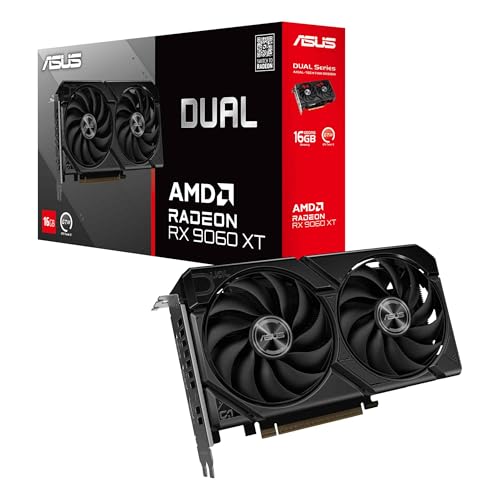


Who Should Buy Which Asus Graphics Cards?
Asus sells several lines that share the same GPU chips but differ in cooling, size, noise, and price. The right choice depends less on the badge and more on your resolution, your case, and how many hours a day the card will work under load. Start with the group below that sounds most like you.
Gamers and Power Users
If you play demanding games at 1440p or own a high refresh monitor, you need a mid tier or higher GPU with strong cooling and enough VRAM to hold modern game textures without stutter. A higher frame rate only feels smooth when the card can hold it steady, so look for larger coolers and solid power delivery. If you are comparing brands and tiers more broadly, see our guide to the best graphics cards for gaming for context on where each chip class sits.
Students and Everyday Users
For schoolwork, streaming, web use, and light games, you do not need a flagship card at all. An entry level Asus GPU or even a capable CPU with built in graphics can run office apps, video calls, and older or lighter titles comfortably while using little power. Spending less here leaves budget for a good NVMe SSD and enough DDR5 memory, both of which you will feel every day in load times and multitasking. Quiet fans and a compact two slot design matter more for a dorm or bedroom desk than raw speed.
Remote Workers and Creators
Video editors, streamers, and 3D artists should weigh VRAM size, encoder quality, and display outputs as heavily as gaming speed. More VRAM lets editing timelines and large project files stay smooth, and multiple monitor outputs support a main display plus a reference screen. Reliability matters too, because a card that runs for long renders needs stable drivers and cooling that stays composed for hours. Asus creator focused lines trade flashy lighting for a cleaner look that fits a professional desk.
Key Features to Compare
Listings throw dozens of numbers at you, but only a handful decide whether a card feels fast, quiet, and trouble free in your build. Comparing the best asus graphics cards comes down to the chip tier first, then the cooling, memory, and support wrapped around that chip. The factors below explain what each one changes in daily use.
GPU Tier and VRAM for Your Resolution
The GPU chip sets your ceiling for frame rate, and resolution decides how much chip you need. At 1080p, a modest card can run most games at high settings, while 1440p asks for a clear step up in both chip power and memory. High end 4K builds need the strongest tiers plus generous VRAM, because 4K textures and effects fill memory fast. As a plain rule, 8 GB of VRAM is a floor for new gaming cards, 12 GB or more suits 1440p well, and creators working with large files should want 16 GB or more.
Cooling and Thermals
Two cards with the same GPU can run at very different temperatures because cooler size and fan design differ. Larger heatsinks with two or three fans move heat away with slower, quieter fan speeds, and many Asus models stop their fans entirely when the card is idle or lightly loaded. Your case airflow matters just as much, since a cooler can only work with the air it gets. Leave intake fans unobstructed, keep a clear path from front to back, and expect higher temperatures in a sealed or cramped case no matter which card you buy.
CPU and GPU Pairing
A graphics card can only deliver frames as fast as the rest of the system allows, so pairing matters. A very strong GPU beside an old, slow CPU will often sit underused in games that lean on the processor, a problem usually called a bottleneck. The reverse pairing wastes money too, because a weak card holds back a fast new CPU at high settings. Match tiers sensibly, keep at least a modern mid range CPU beside a mid range or higher GPU, and remember that fast storage and memory help frame consistency even though they rarely raise average frame rate on their own.
Warranty, Support, and Build Quality
Asus cards typically carry a warranty of one to three years depending on region and line, and you should confirm the exact term and registration steps before you buy. Build quality shows up in board stiffness, backplate support, and connector fit, all of which matter on heavy cards that hang in a slot for years. Good cable routing inside your case keeps power leads from pressing on fans or panels. Save your receipt and box, because warranty service usually asks for proof of purchase and safe shipping packaging.
Noise Levels and Coil Whine
Fan noise under load is a common complaint, yet listings rarely describe it well. Bigger fans spinning slowly are generally quieter than small fans spinning fast, and a fan curve you can adjust in software lets you trade a little temperature for a calmer room. Some cards also produce coil whine, a faint buzzing that changes with frame rate and is more noticeable in quiet rooms and menu screens. Capping frame rate near your monitor refresh rate often reduces it, and a closed case placed under the desk helps too.
How to Check Size, Power, and Compatibility Before You Buy
Most returns and build day surprises come from fit and power, not performance, so check these points before ordering. Measure the open space from the rear of your case to the first obstruction, then compare it with the card length in the listing, leaving a little room for power cables. Count the expansion slots the card covers as well, because thick coolers can block the slot below them. This step is essential for small form factor PCs, where a card that fits on paper may still choke airflow or foul a side panel.
Next, check your power supply. Each card lists a recommended wattage, and your unit should meet or exceed it with the correct power connectors free and reachable. A quality 80+ Gold unit from a known maker is a sensible match for mid range and higher cards, and using the supplied adapter exactly as directed matters on models with newer connectors. Finally, confirm your motherboard has a free PCIe x16 slot and that your CPU and board generation will not hold the card back in the games or apps you run most.
If budget is your main limit, it helps to see the wider value picture before you narrow to one brand. Our guide to the best affordable graphics cards explains which corners you can cut safely and which ones, such as power supply quality, you should never cut. Readers who are still choosing between chip makers may also want to see our guide to the best radeon graphics cards to compare the AMD side of the market on price and features.
Common Mistakes to Avoid When Buying Asus Graphics Cards
- Choosing by price alone, because the cheapest card with a given chip often has the loudest cooler and the shortest warranty.
- Buying far more GPU than your monitor can show, because frames above your refresh rate at your resolution add cost without visible benefit.
- Skipping the case measurements, because a card that is too long or too thick simply will not install, no matter how good the price looks.
- Ignoring the power supply rating and connectors, because an undersized or aging unit can cause shutdowns under load and hard to trace crashes.
- Forgetting VRAM when planning to keep the card for years, because rising texture sizes make small memory buffers feel old sooner than the chip itself.
- Comparing only boost clock numbers between brands, because real frame rates depend far more on the chip tier and cooling than on small clock gaps.
How to Make Your Asus Graphics Card Last Longer
Dust is the slow enemy of every graphics card, so clean your case filters and fans about every three months, or sooner in homes with pets or carpet. Hold fan blades still while you use canned air, and never spin them hard with a vacuum. Check temperatures now and then with a free monitoring tool, and treat a steady rise over months as a sign to clean again or improve case airflow.
Keep drivers current through the official Asus or chip maker download pages, and update your motherboard BIOS only when a fix or support note actually applies to your hardware. Avoid sudden power loss where you can, since a decent surge protector is cheap insurance for the whole PC. If temperatures stay high after cleaning, fresh thermal paste on an older card can help, but opening the cooler may affect warranty terms, so check your coverage first and leave the job to a service shop if you are unsure.
Asus Graphics Cards: Your Questions Answered
What Asus graphics card do I need for 1440p gaming?
For 1440p gaming, choose a mid range or higher Asus graphics card with at least 12 GB of VRAM and a cooler with two or three fans. That pairing holds high settings in most current games while staying reasonably quiet. If you use a 165 Hz or faster monitor, step up one chip tier, because holding a very high frame rate at 1440p takes notably more power than reaching 60 frames per second at the same resolution.
Do Asus graphics cards fit in small form factor PCs?
Some Asus graphics cards fit small form factor PCs, but you must check length, thickness, and height against your case limits before buying. Asus sells compact dual fan models made for tight cases, yet even those need clear airflow and room for power cables. A useful extra check is the space above the card, because a snug side panel can trap hot air and raise temperatures even when the card technically fits.
How long do Asus graphics cards usually last?
An Asus graphics card usually lasts five years or more of normal use, and many keep working well beyond that as a second PC or hand me down part. Fans are the most common wear item, so rising noise is often the first sign of age. Performance age is different from working life, since a card may still run perfectly yet no longer hit high settings in the newest games at your resolution.
Should I choose air cooling or liquid cooling for an Asus graphics card?
Choose air cooling for an Asus graphics card in most builds, because a good air cooler is simpler, costs less, and has no pump or hoses to maintain. Liquid cooled models suit very tight cases or owners who want the lowest possible noise in high end 4K builds and accept extra cost and setup care. Whichever you pick, case airflow decides the final result more than the cooler style alone, so budget for decent case fans either way.
How much VRAM does an Asus graphics card need for gaming?
An Asus graphics card needs at least 8 GB of VRAM for comfortable 1080p gaming today, with 12 GB a safer choice for 1440p and for keeping the card longer. Games with very large texture packs can exceed 8 GB even at settings the chip itself could otherwise run, which causes stutter rather than a simple drop in frame rate. If you also record or stream gameplay, extra VRAM headroom helps the encoder and game share the card smoothly.
Final Thoughts
Start with your resolution and the work you actually do, then pick the chip tier and VRAM that fit, and only then compare Asus lines on cooling, noise, size, and warranty. Use the product table above to confirm current prices and exact dimensions before you order, and cross check the wider market in our guide to the best graphics cards ranked if you want a brand neutral view. Readers comparing every category can also see our guide to the best computer graphics cards for more context. Chosen this way, the best asus graphics cards for you is simply the one that fits your case, your power supply, and your budget without paying for speed you will never see.


