
Best Arc Soundbars of 2026: Complete Buying Guide
Disclosure: We may earn a commission when you buy through links on this page, at no extra cost to you. As an Amazon Associate I earn from qualifying purchases. Learn more

Compare ARC soundbars by channels, eARC support, dialogue clarity and bass, with sizing, setup and care guidance to match a bar to your TV and room.
An ARC soundbar connects to the HDMI port on your TV labeled ARC, so TV sound reaches the bar through one cable and the TV remote still controls volume. Shoppers seeking best arc soundbars usually want clearer speech than TV speakers give and fuller bass for films, without a rack of separate equipment.
This guide covers the choices that change what you hear, from channel layout to subwoofer style, plus the setup steps that keep the link working. Use the comparison table below to line up formats, sizes and prices once you know which features matter most.






Who Should Buy an ARC Soundbar?
ARC bars suit viewers who watch through the TV itself and want the TV to stay in charge of sound routing.
Movie Watchers Who Want Fuller Sound at Home
If films sound thin through your TV speakers, a bar with a separate subwoofer gives voices more body and effects more weight while every source reaches the bar through one cable. A wider bar also spreads front sound so action feels less pinned to the screen center.
Viewers Who Struggle to Hear Dialogue Clearly
If you rewind scenes or raise volume just to catch speech, choose a bar with a dedicated center channel and a voice mode. The center channel anchors speech to the screen, and the voice mode lifts the range where consonants sit, so words stay clear at lower volume. This group gains more from a three channel layout than from extra bass.
Apartment and Small Room Listeners
If seating sits close to the TV and neighbors are near, a compact all in one bar without a separate subwoofer fits the scale. It improves clarity and stereo width over TV speakers, keeps the floor clear, and avoids bass traveling through shared walls. A night mode that trims loud peaks while keeping speech forward also helps here.
Key Features to Compare
When you compare best arc soundbars side by side, start with the connection itself, because it sets the ceiling for every format your TV can pass along.
ARC and eARC Bandwidth and Audio Formats
Plain ARC carries compressed surround formats such as Dolby Digital and DTS, which covers broadcast TV and most streaming apps well. eARC adds far more bandwidth, so the TV can pass uncompressed tracks and object based formats such as Dolby Atmos from apps or a connected player. If your TV has an eARC port, choose a bar with eARC so the link does not limit the track.
Channel Layout and the Center Channel
Channel numbers describe how many directions of sound the system aims to cover. A two channel bar improves stereo and clarity, a three channel bar adds the center speaker that carries most dialogue, and a 5.1 setup adds surround channels plus a subwoofer. A third number, as in 5.1.2, marks height channels that bounce sound off the ceiling for Atmos effects. Match layout to room and seating first.
Separate Subwoofer and Bass Control
Bass gives explosions, scores and room tone their weight, and a separate wireless subwoofer moves that work out of the slim bar so the bar can focus on speech and detail. Wireless placement lets you try a corner or a spot beside seating until bass sounds even rather than boomy. Look for a subwoofer level control so you can calm bass at night, and see our guide to the best soundbars and subwoofers for pairings.
HDMI CEC and TV Remote Control
HDMI CEC is the control link that travels over the same cable as the sound. It lets the bar wake with the TV, sleep when the TV sleeps, and follow the TV remote for volume. Each TV brand gives this feature its own menu name, so switch it on at both ends after setup. When it works well, the bar remote can stay in a drawer.
Extra Inputs and Wireless Streaming
Beyond the ARC port, useful extras include an optical input for an older TV, a spare HDMI input for a console or player, and Bluetooth or WiFi for music from a phone. A spare HDMI input also helps when the TV has few ports, since the player can connect to the bar and pass picture through. For judging pure sound quality, see our guide to the best sounding soundbars.
Types of ARC Soundbars Compared
Most ARC bars fall into three shapes, and the right shape depends on room size and seating spread.
All in One Bars Without a Separate Subwoofer
These single bars hold every speaker in one cabinet, so setup is fast and the area under the TV stays clear. They suit bedrooms and small living rooms, and they focus on clarity rather than deep bass. Budget minded readers can see our guide to the best affordable soundbars for lower price bands.
Bars With a Separate Wireless Subwoofer
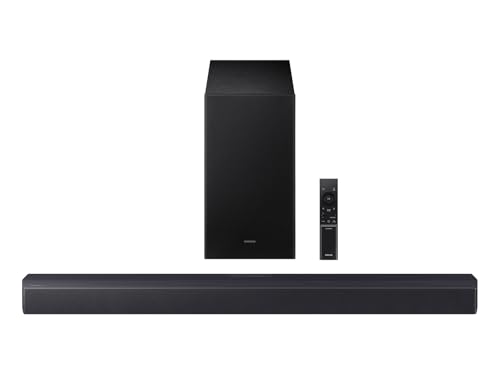
This common step up pairs a bar with a wireless subwoofer placed on the floor nearby. The bar handles speech and front detail while the subwoofer covers low effects, so films gain scale without rear speakers or cable runs. The subwoofer still needs a power outlet and clear space around its driver.
Surround Sets With Rear Speakers
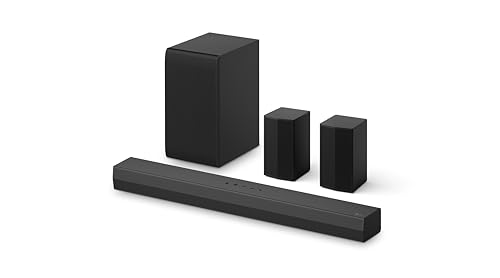
Fuller sets add two rear speakers, bundled or sold as an add on, so effects and ambience can come from behind seating. This type rewards a sofa clear of the back wall, since the rears need space and power beside or behind it. Each rear needs its own outlet even when its audio link is wireless.
Best HDMI Arc Soundbars
The best hdmi arc soundbars stand out on three points beyond plain ARC. The port should be eARC ready, so the bar can accept the fullest track your next TV sends. The bar should decode the formats you actually watch, including Dolby Atmos if your streaming plan offers it. CEC behavior should be stated clearly, since smooth remote control is the daily benefit here. For more, see our guide to the best soundbars with hdmi arc.
Setting Up an ARC Soundbar With Your TV
Setup follows a short order, and doing the steps in sequence avoids most silent bar problems.
- Use the TV port labeled ARC or eARC, not a standard HDMI port, and the bar port labeled TV or ARC.
- In the TV sound menu, set output to ARC or HDMI and set digital audio format to pass through or auto.
- Turn on HDMI CEC in both menus so power and volume follow the TV remote.
- Center the bar under the screen with its front edge near the stand front, so the cabinet does not reflect sound into the TV.
- Play a scene you know from your main seat, then set bass and dialogue levels once, at normal volume.
Check bar height against the bottom of the screen, since a tall bar can block the TV remote sensor or cover the lowest part of the picture. If it does, choose a lower bar, raise the TV if its feet allow, or mount the bar on the wall below the TV.
Common Mistakes to Avoid
- Plugging into a standard HDMI port instead of the ARC port, which leaves the bar silent because the TV sends no sound there.
- Buying an eARC bar for a plain ARC TV and expecting full Atmos from TV apps, which the older link cannot carry.
- Choosing a bar taller than the space under the screen, which blocks the remote sensor and forces awkward workarounds.
- Pushing the subwoofer into a corner at full bass level, which makes dialogue sound muddy at normal volume.
- Judging speech clarity in a loud store demo, which hides the low volume dialogue problems you face at home.
- Skipping the TV audio format setting, which can leave surround sources playing as plain stereo with no warning.
Care and Maintenance for an ARC Soundbar
Wipe the cabinet and grille with a dry or slightly damp soft cloth, and keep sprays off the speaker cloth so residue does not build up in the weave. Leave vents clear and avoid stacking consoles on the bar, since trapped heat shortens electronic life. Reseat the HDMI plugs if sound drops, because a partly seated plug causes many brief cutouts.
Frequently Asked Questions About ARC Soundbars
Does an ARC soundbar need a special HDMI cable?
An ARC soundbar works with a standard high speed HDMI cable for plain ARC. For eARC, use a cable the maker confirms supports eARC, since the added bandwidth needs better wiring. Keep runs short and avoid sharp bends at the plugs. If sound drops after a cable change, swap the cable first.
Can an ARC soundbar work with a TV that has no ARC port?
Yes, most ARC soundbars also accept an optical cable, which carries sound from older TVs well. You lose the CEC link, so volume needs the bar remote or a learning remote setup. Optical limits you to compressed formats, which still covers broadcast and most streaming sound.
Why does an ARC soundbar fall out of sync with the picture?
Sync drift usually comes from TV picture processing taking longer than the audio path. Most bars include an audio delay setting, and raising it in small steps until speech matches lip movement fixes most cases. Turning off motion smoothing can also help, since that processing adds delay.
How long should an ARC soundbar last in daily use?
A soundbar has few moving parts beyond its speaker cones, so many years of daily use is normal when vents stay clear and volume stays below constant distortion. Weak points are usually the remote, the cable and aging streaming apps rather than the speakers.
Is a wider ARC soundbar always better for a big TV?
No, width alone does not decide sound quality for a big TV. A wider bar spreads stereo further, which suits wide seating, but a narrower three channel bar with a strong center speaker often gives clearer dialogue in a single sofa room. Match the bar to your seating spread first.
Final Thoughts
Start with the link your TV offers, plain ARC or eARC, then choose the channel layout that fits your seating and the subwoofer style your room can handle. Those decisions shape daily viewing more than long feature lists. The best arc soundbars for your home are the ones in the product table above whose formats, size and controls match this guide.


