
Best Aftermarket CPU Coolers by Budget: Smart Choices for 2026
Disclosure: We may earn a commission when you buy through links on this page, at no extra cost to you. As an Amazon Associate I earn from qualifying purchases. Learn more

Learn how the best aftermarket cpu coolers differ by price tier, cooling type, and case fit, with a clear checklist for choosing the right one for your PC.
Prices for CPU coolers stretch from under $30 to well over $200, and the listings rarely explain what the extra money actually buys you. A louder fan, a taller tower that blocks your memory slots, or a radiator that will not fit your case can turn a good deal into a return. This guide walks you through best aftermarket cpu coolers by budget, so you know which upgrades matter and which ones you can safely skip.
You will learn how air and liquid cooling compare at each price tier, how to check socket and case fit before you order, and how much cooling your processor truly needs. The comparison table below gathers the key options in one place, and the sections after it explain how to read those numbers for your own build.


Choosing by Budget Tier
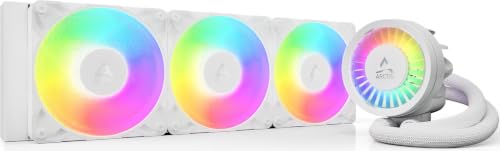
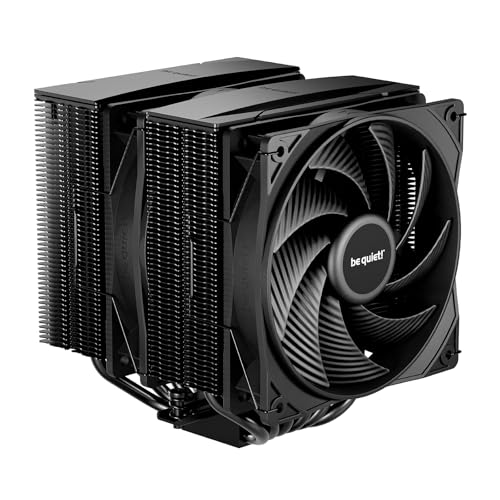
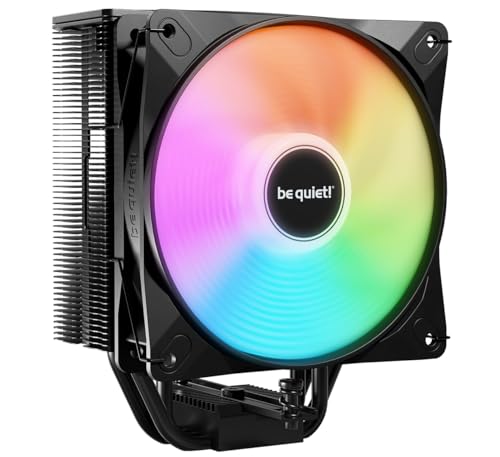
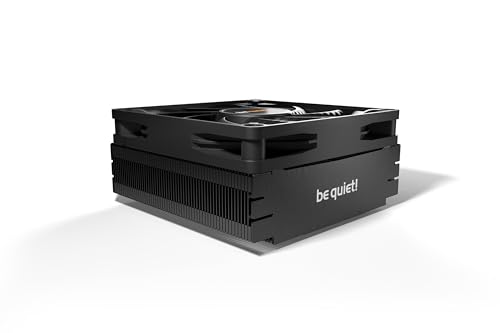
Rather than naming specific models, this section describes the type of cooler that makes sense at each budget level. Use it as a profile of what to look for in the product table above, then match the profile to your processor, case, and noise tolerance.
Budget Tier
A budget cooler in the range of around $25 to $45 usually means a single tower air cooler with four heat pipes and one 120 mm fan. That sounds modest, yet it is a large step up from the small stock cooler bundled with many processors, because the bigger fin stack moves more air at lower fan speeds. It suits mainstream six core and eight core chips used for gaming and office work. The main limits are noise under full load and less headroom for overclocking, so plan on stock settings.
Midrange Tier
The midrange, around $50 to $90, is where dual tower air coolers and 240 mm liquid coolers live. You get two fans, more heat pipes, better mounting hardware, and quieter operation at the same temperature. This tier fits most gaming builds, including hotter processors that boost for long sessions. If you are comparing formats at this level, our guide to the best cpu liquid coolers explains when a radiator earns its keep over a large air tower.
Premium Tier
Premium coolers, around $100 to $200 and above, bring 360 mm radiators, dual tower designs with refined fans, and extras such as small status displays. The cooling gain over midrange is real but smaller than the price jump suggests, and it matters most for flagship processors, sustained rendering work, or a build where silence is a priority. Check pump noise and warranty length here, because a long warranty protects a part with more moving pieces.
What Your Money Gets You at Each Price Tier
Budget Tier: What to Expect
At the budget tier you should expect a simple tower, basic mounting brackets, and a fan that does its job without much polish. Temperatures on a mainstream processor will be far better than a stock cooler, but the fan may become audible during long gaming sessions. Packaging is plain and spare thermal paste may not be included, so keep a small tube on hand. For a 65 watt processor in a ventilated case, this tier is honestly enough for most people.
Midrange Tier: The Sweet Spot for Most Buyers
Midrange money buys surface area and fan quality, the two things that lower both temperature and noise at once. Mounting systems get sturdier, instructions improve, and many models include brackets for both major socket families in the box. This is also where low profile options for compact cases become competent rather than desperate. If you are building inside a compact case, see our guide to the best small cpu coolers for height limits and clearance advice before you choose.
Premium Tier: When Spending More Pays Off
Spending more pays off when your processor draws high power for hours, when your room runs warm, or when you want the fans to stay nearly silent under load. Premium liquid coolers also free up space around the socket, which helps in tight builds with tall memory. What premium money does not buy is a faster computer on its own. A cooler only unlocks performance your processor can already deliver, so pair this tier with a chip that can actually use the headroom.
Features Worth Paying For (and Ones to Skip)
RAM and Storage (DDR5, NVMe SSD)
Your cooler shares tight space with your memory, so RAM clearance is a genuine buying feature, not a footnote. Tall heat spreaders on DDR5 kits can collide with a wide tower or its front fan, forcing you to raise the fan and change the cooler height. Check the cooler maker clearance figure against your memory height before ordering. Storage matters less directly, though a hot NVMe SSD under a cramped low profile cooler benefits from the airflow a well placed case fan provides.
Case Size, Airflow, and Aesthetics
Measure before you buy. Note your case maximum cooler height for air towers, and radiator mounting points for liquid coolers, in ATX, mATX, and ITX cases alike. A 360 mm radiator needs a front or top mount that many compact cases simply lack. Airflow direction matters too, since a tower that exhausts toward the rear case fan keeps heat moving in one clean path. Lighting is a taste choice that adds cost without cooling, so pay for it only if you will see it through a window panel.
Upgradability and Standard Parts
A cooler can outlive two or three processor upgrades if the maker supports new sockets with fresh mounting kits. Favor brands that publish bracket support and sell adapter kits at fair prices, and keep your original mounting hardware in a labeled bag. Standard 120 mm or 140 mm fans are easy to replace when a bearing wears out. Proprietary fan shapes and sealed pumps are harder to service, which is a real long term cost to weigh against a lower purchase price.
CPU and GPU Pairing
Match cooler capacity to processor heat, not to the graphics card, but remember both share the air inside your case. A powerful GPU raises case temperature during 1440p gaming, which makes your CPU cooler work harder for the same result. Builders focused on quiet frames often start with our overview of the best coolers for cpu to balance the whole system. As a rule, a midrange cooler plus good case fans beats a premium cooler trapped in a sealed box.
Long Term Costs to Factor In
The purchase price is only part of ownership. Budget for a tube of thermal paste for remounts, replacement fans after several years, and the electricity a system draws when a weak cooler lets fans spin fast all day. Liquid coolers carry pump wear, so a five or six year warranty has real value compared with a two year one. Air coolers have almost no failure points beyond the fan, which is why many builders keep one as a spare. Factor in your time as well, because a cooler that is easy to mount saves frustration at every upgrade.
Aftermarket CPU Coolers: Your Questions Answered
How long will a gaming PC stay relevant?
A well balanced gaming PC usually stays relevant for about four to six years at settings that gradually step down from high to medium. The graphics card ages fastest, while the processor and cooler often carry into a second build. Choosing a cooler with mounting support for newer sockets extends that life, because you can move it to your next motherboard instead of buying cooling twice.
Air or liquid cooling: which is better?
Neither is better for everyone, because each wins on different terms. Air cooling is simpler, cheaper at equal performance, and nearly impossible to ruin through leaks or pump failure. Liquid cooling moves the radiator to the case edge, which helps in compact builds and can run quieter with large radiators. If you want a deeper format comparison, our guide to the best air coolers for cpu covers tower sizing in detail.
How much RAM do I need for gaming?
For gaming alone, 16 GB remains workable, while 32 GB gives comfortable room for streaming, voice chat, and a browser full of tabs at the same time. Memory speed helps some titles more than others, but capacity shortfalls cause stutter that no cooler can fix. Whatever kit you choose, confirm its height against your cooler clearance, since tall spreaders are the most common fit surprise in a new build.
Is it cheaper to build or buy a prebuilt PC?
Building your own PC is usually cheaper at the same performance level, and it lets you choose a proper cooler instead of the minimal unit many prebuilt systems ship with. Prebuilt machines save time and include a single warranty for the whole system, which some buyers value more than the savings. Watch prebuilt listings closely, because cooling and power supply quality are the two areas where corners are most often cut.
What GPU do I need for 1440p?
A current midrange graphics card handles 1440p well at high settings in most games, especially with upscaling turned on. The cooler connection is heat: a stronger GPU warms the case air, so your CPU cooler and case fans share a heavier load. Plan airflow as a system, with intake at the front and exhaust at the rear and top. If you prefer liquid for that layout, see the best cpu aio coolers guide for radiator placement advice.
Wrapping Up
Start with fit, because a cooler that clears your case and memory is the only kind worth pricing. Then match capacity to your processor heat output, and let noise tolerance decide between a large air tower and a radiator. For most builds, the midrange delivers the best aftermarket cpu coolers value, with premium tiers reserved for flagship chips and silence seekers. Look back at the product table above, apply the tier profiles to your shortlist, and buy once with confidence.


