
Best 3D Projectors of 2026: Complete Buying Guide
Disclosure: We may earn a commission when you buy through links on this page, at no extra cost to you. As an Amazon Associate I earn from qualifying purchases. Learn more

What to know before buying the best 3d projectors: active and passive 3D, glasses, sources, brightness, resolution and room setup.
The best 3d projectors let you watch 3D movies and games on a screen far bigger than most TVs, but 3D projection works differently from regular projection. You need a projector that supports 3D, compatible glasses, and a 3D source such as a 3D Blu-ray player or a PC. This guide explains how 3D works, what to look for, and what to avoid. The product table below lists current models that support 3D.
Because few new projectors list 3D support, it is worth confirming this feature on the product page before you buy.

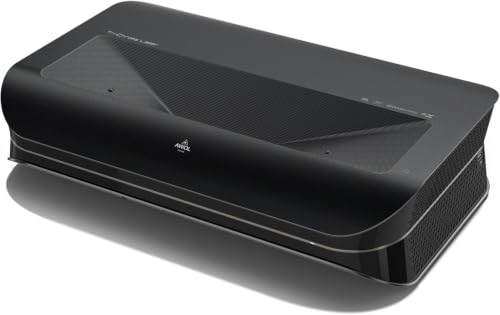

How 3D Projectors Work
Active Shutter 3D
Most home projectors use active shutter 3D. The projector alternates left and right eye images very quickly, and battery powered glasses open and close in sync. This method gives full resolution to each eye. Many DLP projectors use DLP Link, which syncs the glasses through flashes in the image, while 3LCD models often use an infrared emitter.
Passive 3D
Passive 3D uses lightweight polarized glasses and a special screen. It is common in cinemas but rare in home projectors. See our guide to the best passive 3d projectors if you prefer that approach.
What You Need Besides the Projector
You will need compatible glasses, a 3D source, and an HDMI cable that supports 3D. Check that your Blu-ray player or game console outputs 3D, and that your receiver passes the 3D signal.
Who Should Buy a 3D Projector?
Movie Fans with 3D Blu-ray Collections
If you own 3D Blu-ray discs, a projector with 3D support gives you the large screen experience that cinemas offer, in a darkened room at home.
Gamers and PC Users
Some games and PC software support stereoscopic 3D. A projector with low input lag and 3D support suits this niche, but check the compatibility with your graphics card.
Home Theater Builders
If you are building a dedicated room, a 3D capable projector gives you the most flexibility for movies, sports, and games on a large screen.
Key Features of the Best 3D Projectors
Brightness
3D glasses cut the light reaching your eyes, so brightness matters more than for 2D. Look for at least 2,000 lumens for a dark room, and more if some light remains. Higher brightness also helps with larger screens.
Resolution
Full HD 1080p is the minimum for a sharp 3D image, and 4K models give finer detail. Some 4K models offer 3D at 1080p. Our guides to the best 4k 3d projectors and the best 3d projectors 1080p look at each tier.
Refresh Rate and Input Lag
3D requires at least 120 Hz processing to alternate images smoothly. Low input lag is important for games, and a game mode helps.
Projection Technology
DLP projectors have sharp images and good 3D support through DLP Link. 3LCD projectors offer bright, colorful images without the rainbow effect some viewers notice with DLP. Laser light sources last longer and keep brightness steady.
Throw Distance and Placement
The throw ratio determines how far the projector must be from the screen. Ultra short throw projectors sit near the wall, while standard models mount on the ceiling or sit on a table across the room. Measure your space and check the throw distance before you buy.
Ports and Connectivity
You need an HDMI input that supports 3D, and extra HDMI ports help if you connect a console, Blu-ray player, and streaming device. Wi-Fi and built in apps are useful for everyday streaming.
Setting Up a 3D Home Theater
A good picture depends on the room as much as on the projector. Choose a room you can darken, since ambient light washes out 3D images and makes the glasses look dim. Painting walls a dark neutral color and using a screen sized for your seating distance improve contrast. As a rule of thumb, sit about 1.5 to 2 times the screen width from the screen.
Screen Choice
A white matte screen is a safe choice for active shutter 3D. A screen with modest gain brightens the image, while very high gain screens can narrow the viewing angle. Passive systems require a special polarization preserving screen, so check compatibility.
Calibration
Switch to a cinema or 3D picture mode, and adjust brightness and contrast with a test disc or a free calibration video. Because the glasses reduce light, many viewers raise lamp or laser output for 3D and lower it again for regular movies.
Audio
A soundbar or a surround receiver makes a bigger difference than most upgrades. Make sure your receiver passes the 3D video signal through to the projector, or connect the player directly to the projector and use an audio return or a separate audio output to the receiver.
Common Mistakes to Avoid
- Assuming a 4K or smart projector also supports 3D, when many new models do not.
- Forgetting to buy compatible glasses, which are usually sold separately.
- Using a room with too much ambient light, so 3D images look dim.
- Ignoring the source, since you need 3D discs or content to use the feature.
- Buying a low lumen projector, which makes 3D look dark through the glasses.
For broader comparisons, our guides to best quality projectors and 3d hd projectors cover related options.
Tips to Get the Most from Your 3D Projector
- Charge or replace the glasses batteries before a movie.
- Dim the room, and use a screen with good gain for a brighter image.
- Keep vents clear so the projector stays cool, and clean the filter if it has one.
- Use a quality HDMI cable, and keep cable runs short.
- Take breaks during long 3D sessions, and stop if you feel eye strain.
Frequently Asked Questions
Do I need special glasses for a 3D projector?
Yes. Active shutter models need battery powered glasses that match the projector's sync system, and passive models need polarized glasses.
Can any projector show 3D?
No. The projector must support 3D formats and a fast refresh rate. Check the specifications for 3D support before buying.
Is 4K better for 3D?
4K gives sharper detail, but many 4K projectors reduce 3D to 1080p. Brightness and the quality of the glasses matter as much.
Where do I get 3D content?
3D Blu-ray discs, some games, and some PC software support 3D. Broadcast 3D is largely gone, so your own discs are the main source.
Can 3D cause eye strain or headaches?
Some viewers feel discomfort during 3D. Take breaks, and stop if you feel unwell. Ask your doctor if you have concerns about vision.
The Bottom Line
Confirm 3D support first, then choose brightness, resolution, and throw distance for your room. Use the product table above to compare current models. The best 3d projectors give you a cinema style experience at home when you pair them with the right glasses and content.


