
BenQ TK710STi Review: Honest Pros, Cons & Who It's For (2026)
Disclosure: We may earn a commission when you buy through links on this page, at no extra cost to you. As an Amazon Associate I earn from qualifying purchases. Learn more

Thinking about the BenQ TK710STi? Our honest BenQ TK710STi review covers everyday pros and cons, who it suits, and smarter alternatives if it's not a fit.
If your living room is too small for a standard projector but you still want a picture far bigger than a TV, this benq tk710sti review is for you. The TK710STi is a short throw laser projector built for everyday family use. The comparison table below puts its headline specs in context, and if you are still weighing up the category itself, start with our guide to the best projector options for home rooms.
Below, we look at how it fits real households: placing it in a living room or home office, sharing it with kids and guests, and paying for it over the years you own it.




Quick Verdict for Household Use
The TK710STi suits homes that want a big image from a short distance, with a laser light source that asks for very little upkeep. It makes the most sense for shared rooms where the lights are rarely fully off, and less sense if you want the deep blacks of a dedicated theater.
- Best for: small to midsize living rooms, family movie nights, and casual gaming.
- Skip if: your room is long enough for a cheaper standard throw model, or you prize contrast in total darkness above all else.
BenQ TK710STi: Key Specs
- Resolution: 4K UHD image, sharp enough that seating distance becomes the limit in most rooms.
- Light source: laser, listed at 3,200 ANSI lumens, with no lamp to swap.
- Throw: short throw optics that give a large image from a short distance, so check the maker throw chart against your wall.
- Gaming: the listing quotes about 4 ms input lag at 1080p and 240 Hz.
- Smart features: Android TV built in, with HDR10 and HLG support, plus HDMI inputs for consoles and a soundbar.
Taken together, the specs describe a bright, flexible living room projector rather than a specialist theater machine. Brightness and throw distance matter most, because they decide where the unit can live.
First Impressions and Build
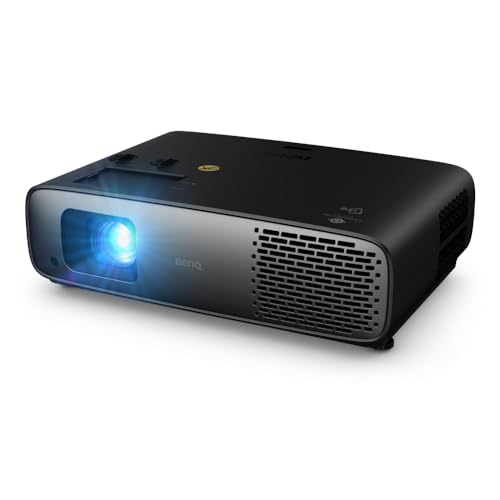
The TK710STi has a compact, boxy case that looks at home on a media shelf and does not dominate the room the way larger projectors can. The finish is neutral, the lens sits protected at the front, and one person can carry it easily between rooms.
Practical touches matter more than styling here. Adjustable feet help you level the picture, and the remote is simple enough for guests to use without a tutorial. Mounting points on the underside let you fix it to a ceiling later.
How It Performs in Everyday Home Use
This section walks through what your household will actually judge: picture, brightness, apps, and sound.
Picture Quality
The 4K image looks clean and detailed with films, streaming shows, and sports, and text stays readable when you mirror a laptop for a presentation. Colors look natural in the standard picture modes, and skin tones avoid the waxy look cheaper projectors can give. Because it uses a DLP chip, fast motion in football or racing stays tidy with little blur. In a dark room, black levels are respectable for this class.
Brightness and HDR
The listed 3,200 ANSI lumens is the headline here, and it means daytime sports or kids shows stay watchable with curtains open, even if contrast takes a hit. Evening viewing with a lamp on is comfortable, which suits families who rarely watch in a fully black room. HDR10 and HLG content gets sensible tone mapping, so bright highlights hold detail instead of blowing out. A proper screen gives punchier color than a bare wall.
Smart Platform and Apps
The projector has Android TV built in, so streaming apps, voice search, and casting live inside the unit rather than on a separate stick. Setup walks you through WiFi and your Google account in a few minutes. If you prefer another platform, the HDMI ports accept a streaming stick or console just as easily, and the projector remembers picture settings per input, a small mercy in a shared home.
Sound
The built in speaker handles news, kids shows, and casual viewing without complaint, and dialogue stays clear at normal volumes. It was never going to fill a room during an action film, though, and bass is more hinted at than felt. Most households will pair the projector with a soundbar, which keeps one remote for volume. Fan noise is present in bright modes during quiet scenes, so seat the unit a little away from the sofa.
Features You Will Actually Use
The zoom ring gives you a modest range of image sizes from one spot, which saves moving furniture when you first set up. Picture modes per input mean the console keeps its low lag game settings while the streaming input keeps its film settings. The low lag game mode is the feature families quietly use most, since a big screen makes split screen racing a shared event.
Rear projection and ceiling mount settings are there if the room layout changes. Automatic keystone helps when the unit sits at an angle, though the mistakes section below explains why it is a backup, not the plan.
Living With It: Setup, Cleaning and Upkeep
Setup is mostly measuring. Work out your screen size, place the unit the right distance from the wall, level it, then use zoom and focus until the image fills your screen. Join WiFi and run the picture wizard. Most households go from box to first film in under an hour.
Upkeep is light because the laser engine is sealed against dust better than older lamp designs. Blow dust off the lens with a hand blower, wipe it only with a clean microfiber cloth, and keep the vents clear, because warm air needs a clear path out.
BenQ TK710STi Pros and Cons to Weigh
- Like: a big image from a short distance, which opens up rooms a normal projector cannot serve.
- Like: brightness that holds up for sports and family viewing with some light in the room.
- Like: no lamp changes, so the routine is close to set and forget.
- Like: low input lag that makes casual gaming on a huge screen feel responsive.
- Do not like: built in sound that most movie lovers will want to replace with a soundbar.
- Do not like: black levels that wash out as room light rises, like every bright living room projector.
- Do not like: a modest zoom range, so placement distance still has to be measured with care.
Is the BenQ TK710STi Right for Your Household?
Families in apartments or compact houses gain the most, because the short throw turns a low shelf into a cinema spot without a projector looming behind the sofa. Households that share one screen for sports, films, and work presentations will use its brightness daily. A home office that doubles as a guest room also suits it, since the unit can come out for movie night and go back on a shelf in the morning.
Skip it if your room is long, dark, and used only for films, where a standard throw model buys more contrast for the same money, or if you want a unit that sits inches from the wall.
How the BenQ TK710STi Compares
Three broad types compete for the same spot. Standard throw lamp models cost less up front and suit long rooms, but they sit far back and need a lamp change at some point. Ultra short throw models sit inches from the wall and look tidy, yet they cost more and demand a flat wall or fixed screen; our hisense px3-pro review shows how that style works in practice.
Portable smart projectors trade brightness and sharpness for grab and go convenience, and our hisense c2 ultra review covers that end of the market. The TK710STi sits between these poles: brighter and sharper than a portable, cheaper than most ultra short throw setups, and far easier to place in a small room.
Price, Deals and Warranty
Street pricing in the US currently lists at about $2,000, moving with seasonal sales events, so watch the big discount weeks rather than buying on a random Tuesday. Price the whole setup too: mount, screen, and a long enough HDMI cable. BenQ warranty terms differ by region and treat the light source differently from the body, so read the current terms and keep the receipt.
Common Buying Mistakes to Avoid
- Guessing the throw distance, then finding the image overflows your wall because short throw magnifies small measuring errors.
- Planning a screen size your seating distance cannot support, so viewers sit too close and see a soft, tiring picture.
- Ignoring window light on the wall you chose, because direct sun will wash out even a bright projector at midday.
- Budgeting only for the projector and forgetting the mount, screen, cables, and sound upgrade it will likely need.
- Relying on keystone correction to fix a badly placed unit, because digital correction throws away resolution and softens text.
Cost of Ownership and Care
The laser light source is the big ownership win: no lamp budget, and brightness that fades slowly over years rather than dropping off a cliff. Running costs are mostly electricity, modest for evening use, plus small items such as remote batteries. If the built in apps feel slow years from now, a fresh streaming stick refreshes the smart side for little money.
Protect the purchase with simple habits. Use a surge protector in storm prone areas, cover the unit in dusty homes, and keep a spare HDMI cable in a drawer for the night one fails without warning.
Frequently Asked Questions
How do you clean the BenQ TK710STi?
Let the unit cool fully and unplug it before you touch the lens, because a warm lens and a damp cloth are a poor mix. Use a hand blower first to lift dust without contact, then a dry microfiber cloth only if marks remain, and never spray cleaner onto the glass. In homes with pets, wipe the cabinet vents monthly with a dry cloth, since pet hair gathers there first and quietly chokes airflow.
What is a cheaper alternative to the BenQ TK710STi?
The honest savings come from changing category, not from a rival badge. A 1080p short throw model or a lamp based standard throw projector can cost far less, and you give up 4K detail, laser convenience, or both. Buying refurbished is another route, but check the light hours and the return window before you pay, because a worn light source is the one fault listing photos cannot show.
How long does the BenQ TK710STi last?
The laser light source is rated in the tens of thousands of hours, so at a few hours of viewing a day it should outlast the rest of your living room tech. The parts that age first are the cooling fans and the built in smart software, both of which you can work around. Brightness dims gradually across the life of the unit rather than failing suddenly.
What are common BenQ TK710STi problems?
Most complaints trace back to the room, not the projector: HDMI handshake hiccups with older AV receivers, which a newer cable and a firmware update usually settle, and focus that looks off because the unit sits on a soft surface. A smaller group of viewers notice rainbow flashes on DLP images, worth checking during the return window. Note when any fault happens, because heat related shutdowns follow a pattern support teams can act on.
Is the BenQ TK710STi worth it?
It is worth it when your room is short, your viewing includes lights on sports and family shows, and you value skipping lamp changes. The value case strengthens as screen size grows: past 100 inches, a projector setup undercuts the cost per inch of a comparable TV by a wide margin. It is harder to justify in a long theater room, where the same budget buys stronger contrast.
Final Thoughts
The TK710STi earns its place by solving a placement problem: a huge, bright picture in a room that cannot spare the depth a normal projector demands. Weigh it against the product table above, measure your wall twice, and budget for the sound upgrade most families end up wanting. If that sounds like your household, the benq tk710sti review verdict is simple: this is an easy big screen upgrade for a small living room. Prices and availability can change, so check the product page before ordering.


