
Anker Nebula Cosmos 4K SE Review: Honest Pros, Cons & Who It's For (2026)
Disclosure: We may earn a commission when you buy through links on this page, at no extra cost to you. As an Amazon Associate I earn from qualifying purchases. Learn more

Thinking about the Anker Nebula Cosmos 4K SE? Our honest Anker Nebula Cosmos 4K SE review covers everyday pros and cons, who it suits.
A big screen changes movie night, but a projector only earns its place if it fits the room you already have. This anker nebula cosmos 4k se review looks at the Cosmos 4K SE as a living room, bedroom and home office projector for shared family use, not as a gaming rig or a dedicated theater build. It walks through picture, sound, setup, running costs and the trade offs spec sheets skip. The comparison table below puts the headline numbers in one place.
The Cosmos 4K SE is a standard throw projector with a 4K picture, a hybrid light source that pairs LED with laser, Dolby Vision support and Google TV built in. If you are still deciding whether a projector suits your home at all, our best projector guide covers the wider field first. Here the focus stays narrow: what this model asks of your room, your light and your budget.


Quick Verdict: Who This Projector Suits Most
In short, this anker nebula cosmos 4k se review lands on a clear position. The Cosmos 4K SE suits families who want one projector for films, sport and streaming in a room that can be dimmed, and who value simple setup over a permanent install. It is less convincing where daylight floods in all day, or where the only spot sits inches from the wall.
- Best for: shared family viewing, film nights, and casual streaming on a screen of about 100 inches.
- Skip if: your room stays bright, you want an ultra short throw design, or you expect deep bass without extra speakers.
Anker Nebula Cosmos 4K SE: Key Specs
These maker supplied figures shape daily use. Treat them as a starting point, not a promise of what every room will deliver.
- Resolution: 4K UHD picture at 3840 by 2160 pixels.
- Brightness: 1,800 ANSI lumens.
- Light source: hybrid LED and laser, with no lamp to replace.
- HDR: Dolby Vision and HDR10 support.
- Platform: Google TV with a voice remote and the main streaming apps.
- Image size: up to 200 inches, set by throw distance.
First Impressions and Build
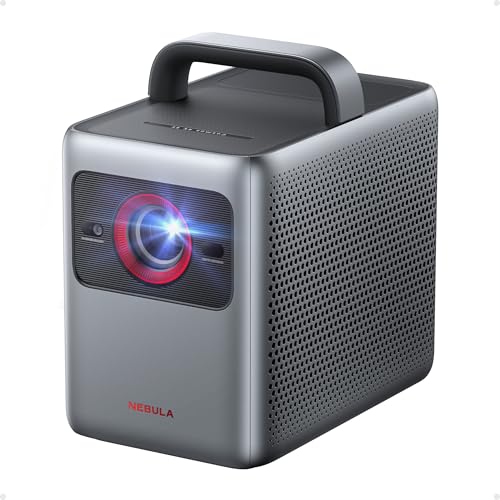
The Cosmos 4K SE looks like home equipment rather than office gear. The body is a compact box with a soft fabric style finish, a recessed lens that stays protected on a shelf, and side vents that need clear air around them. It moves easily between rooms, yet sits steady on a stand or low cabinet.
Ports sit at the back, including HDMI for a console or streaming stick, USB for media, and audio output for headphones or a speaker. The remote is simple, with a voice button for search, and most households will use the unit on furniture, not a ceiling mount. That suits renters and rooms with more than one purpose.
How It Performs in Everyday Home Use
Picture Quality
The 4K picture is the main reason to pay for this model over a 1080p unit. On a screen of about 100 inches, detail holds up from a normal sofa distance, with clean edges, readable text and natural colour. The hybrid light source holds colour and brightness together.
Brightness and HDR
At 1,800 ANSI lumens, this projector is built for dim rooms, not for competing with midday sun. With curtains drawn or lights low, the picture looks punchy and sport stays easy to follow. In a bright open plan room the image washes out, and no setting fully fixes that. Dolby Vision support is a genuine plus at this price, because supported films get scene by scene tone mapping that keeps highlights and dark corners in balance. HDR10 content also looks solid.
Smart Platform and Apps
Google TV is built in, so the projector works on its own without a separate streaming stick. The main apps are present, including Netflix, and each family member can have a profile. Voice search is the fastest way to find a film, and you can cast from a phone for photos and clips. The interface can slow down when apps update in the background, so strong WiFi in the viewing room matters.
Sound
The two built in speakers are better than the thin sound many buyers expect from a projector. Dialogue stays clear at normal volume, and a bedroom or small living room is filled without strain. What you do not get is weight: action scenes lack the low end that makes explosions feel physical. Fan noise is present in bright modes, though it sits behind the speakers during most content. For film heavy homes, a soundbar over HDMI or Bluetooth is the obvious upgrade.
Features You Will Actually Use
The automatic setup tools are the features most owners will touch every week. Auto focus sharpens the picture after the unit is moved, automatic keystone squares the image at an angle, and screen fit matches the picture to a screen border. Obstacle avoidance steers the image around wall fittings, and wall colour adaptation adjusts the picture on a painted wall. A projector pulled out for film night is ready in moments.
Brightness adaptation adjusts output to suit the room light, which keeps evening viewing comfortable without manual tweaks each time the lamps change.
Living With It: Setup, Cleaning and Upkeep
First setup is mostly placement. Put the projector on a stable surface facing your wall or screen, far enough back for the size you want, then let the automatic tools square and focus the image. Leave space around the side vents, because blocked airflow makes the fans work harder and louder. A small stand at the right height saves daily adjustment.
Upkeep is light. Dust the case and vents with a dry cloth, store the unit in a closed cupboard when unused for weeks, and install software updates when offered, because they carry app fixes as well as new features.
Anker Nebula Cosmos 4K SE: What Works and What Does Not
Judged as a shared family projector, the balance of strengths and limits looks like this.
- Works well: sharp 4K picture with Dolby Vision, simple automatic setup, a complete smart platform, and sound that covers casual viewing.
- Works well: a lamp free light source, a tidy design that suits living spaces, and easy moves between rooms.
- Falls short: brightness that needs a dimmed room, limited bass from the built in speakers, and fan noise in quiet scenes.
- Falls short: a standard throw design that needs real distance from the wall.
Is the Cosmos 4K SE Right for Your Household?
For a family living room that doubles as a cinema after dark, yes, provided you can close curtains and give it a wall or screen of about 100 inches. The automatic setup means whoever sets it up gets a square picture, and bedroom viewers suit it too, because built in sound and apps keep the setup to one box and a remote.
Home office users can show slides on a far bigger canvas than a monitor, though text at the edges softens under heavy keystone correction. Skip it if your only room is bright all day, if you want the projector inches from the wall, or if competitive gaming is your top concern.
How the Cosmos 4K SE Compares
The useful comparison is by design type. Ultra short throw laser TVs sit inches from the wall and pair with special screens, which suits permanent installs but costs more. Lamp based projectors can cost less at first, yet they add lamp swaps over time. The Cosmos 4K SE sits in the middle: a movable standard throw unit with no lamp costs.
If the other designs tempt you, our hisense px3-pro review covers a laser TV style model that lives close to the wall, while our hisense c2 ultra review looks at a portable lifestyle design you can carry from room to room. The real choice is position, permanence and price, rather than picture quality alone.
Price, Deals and Warranty
Street prices usually land about $1,100 to $1,300, with the lower end appearing during big sale events in autumn and around holidays. Prices and availability can change, so check the product page before ordering. The unit carries a standard limited warranty, and the exact term is worth confirming at checkout.
Common Buying Mistakes to Avoid
- Buying for a bright room with no curtains, then blaming the projector when the picture washes out at midday.
- Choosing a screen size before measuring throw distance, so the picture ends up wrong for the wall.
- Expecting cinema level bass from built in speakers, instead of planning a soundbar for action heavy viewing.
- Forgetting extras in the budget, such as a screen, a stand or mount, and longer cables.
- Placing the projector where cushions or cabinet walls block the vents, which raises fan noise and heat.
Cost of Ownership and Care
Running costs stay low. Electricity use is modest for evening viewing, and the lamp free light source removes the replacement lamp cost that lamp based models carry every few years. Likely spending is a screen or stand at the start, perhaps a replacement remote, and cleaning cloths you probably own already.
Care habits protect that value. Keep the vents clear, store the unit somewhere dry, and avoid moving it while it is still hot after a long film, because heat and knocks are unkind to optics and fans.
Your Questions, Answered
How do you clean the Anker Nebula Cosmos 4K SE?
Clean it when the unit is cool and unplugged. Wipe the lens gently with a dry microfiber cloth in small circles, and never spray cleaner onto the lens itself, because liquid can creep past the edges. Use a soft brush or a hand squeeze air blower for vent dust rather than a vacuum, which can pull dust deeper inside. If a mark will not lift, breathe lightly on the glass and wipe again.
What is a cheaper alternative to the Anker Nebula Cosmos 4K SE?
A 1080p home projector is the main cheaper route, and the saving is real. What you give up is fine detail on large screens, Dolby Vision support, and often brightness, so the picture looks softer once you pass about 80 inches. If your screen stays modest, that trade can make sense. At 100 inches viewed from a sofa, the step up to 4K is what you notice every night.
How long does the Anker Nebula Cosmos 4K SE last?
The light source is rated in the tens of thousands of hours, so at a few hours of viewing a day it should outlast the smart platform inside the projector. In practice, heat and dust decide real lifespan more than the light source does, and units in a cabinet with poor airflow age faster than units on an open stand. Expect the apps to feel dated first, at which point a cheap streaming stick restores the experience.
What are common Anker Nebula Cosmos 4K SE problems?
Most reports come down to setup and network issues rather than faults. Automatic screen fit can struggle on patterned or dark painted walls, leaving edges slightly off until you adjust them by hand. Apps may ask you to sign in again after a system update, and weak WiFi causes buffering that looks like a projector fault. Focus can drift a little if the unit is bumped, which auto focus fixes once you run it again.
Is the Anker Nebula Cosmos 4K SE worth it?
It is worth it when you compare cost per inch with a very large TV. A screen of about 100 inches from this projector costs far less than a TV of the same size, and you can put the projector away afterwards. It is not worth it if you mostly watch in daylight, or if a permanent, always ready TV suits your habits better.
Final Thoughts
The Cosmos 4K SE makes sense as a shared family projector: sharp 4K picture, Dolby Vision, automatic setup and sound that covers everyday viewing, in a box that moves between rooms and asks little upkeep. Its limits are equally clear, namely a dim room requirement, modest bass and a standard throw layout. Check your light control and throw distance against the product table above before you decide. That is the honest summary of this anker nebula cosmos 4k se review: a capable all rounder for homes that watch after dark.


