Epson Workforce ES-580W Wireless Color Duplex Desktop Document Scanner
Disclosure: We may earn a commission when you buy through links on this page, at no extra cost to you. As an Amazon Associate I earn from qualifying purchases. Learn more
Highlights
- EFFORTLESS WIRELESS SCANNING — With a 4.3 in touchscreen and wireless connectivity this high-speed document scanner sends scans straight to your smartphone, tablet, computer, or cloud storage account1 so your data is available where you need it
- SPEEDY PAPER HANDLING — 100-sheet Auto Document Feeder (ADF) allows desktop scanner to handle various paper types and sizes in one go; Designed for reliability
- NO COMPUTER NEEDED — Wireless scanner also allows you to save scanned documents directly to USB, email or popular cloud services¹ like Dropbox, Evernote, Google Drive, and OneDrive without a computer
- QUICK ORGANIZATION — High-speed Epson desk scanner digitizes documents at up to 35 pages per minute2; Also operates as a double-sided scanner, capturing both sides of documents with Single-Step Technology
- SIMPLE FILE MANAGEMENT — Document scanner with feeder allows the creation of searchable PDFs with Optical Character Recognition (OCR) and converts scans to editable Word or Excel files effortlessly; Designed for home and office document scanning
- INTELLIGENT COLOR AND IMAGE ADJUSTMENTS — Color scanner supports auto crop, blank page deletion, background removal, dirt detection, and paper skew correction; Delivers clean, clear scans using Epson Image Processing Technology
Why You'll Love It
- Scan wirelessly to smartphones, tablets, computers, or cloud storage for easier access across devices
- Load up to 100 sheets into the feeder to process document batches together
- Capture both sides of a document in one pass with single-step duplex scanning
- Scan at up to 35 pages per minute to keep document organization moving
- Create searchable PDFs and editable Word or Excel files with built-in OCR
- Automatically improve scan appearance with cropping, skew correction, and blank-page removal
Pros
- +100-sheet automatic document feeder
- +Single-step double-sided scanning
- +Standalone scanning without a computer
- +Searchable PDFs and editable file conversion
- +Automatic image and color adjustments
Cons
- -100-sheet feeder requires batch planning for larger collections
Detailed Review
The Epson ES-580W is a wireless duplex document scanner built for people who want to turn paper records into organized digital files without making every scanning session a computer-dependent task. Its standout advantage is the combination of a 100-sheet automatic document feeder, double-sided scanning, and standalone wireless operation. That combination makes it worth considering for home offices, small businesses, and anyone regularly working through paperwork that needs to be stored, shared, or converted into editable documents.
Paper handling is a central part of its design. The automatic document feeder holds up to 100 sheets, allowing a collection of documents to be loaded together rather than handled individually. Scanning speeds reach up to 35 pages per minute, and Single-Step Technology captures both sides of a document. This is particularly useful when organizing paperwork that contains information on both sides, since the scanner is designed to capture the complete document during the same scanning process. It also supports various paper types and sizes, giving it flexibility for different document collections.
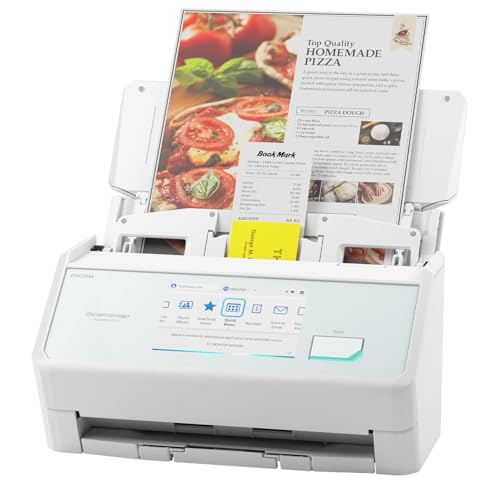
Wireless functionality gives this scanner several ways to fit into an existing document workflow. Its 4.3-inch touchscreen provides an onboard control interface, while wireless connectivity allows scans to be sent to smartphones, tablets, computers, and cloud storage accounts. More notably, a computer is not required for every scanning task. Documents can be saved directly to USB, emailed, or sent to services including Dropbox, Evernote, Google Drive, and OneDrive. This makes the machine useful for people who prefer to organize files through their existing digital accounts rather than managing every scan on a desktop computer.
File conversion and image processing add another layer of usefulness. Optical Character Recognition allows the creation of searchable PDFs and conversion into editable Word or Excel files. That matters when the goal is more than keeping a picture of a paper document. The scanner also offers automatic cropping, blank-page deletion, background removal, dirt detection, and paper skew correction through Epson Image Processing Technology. These adjustments are intended to help produce cleaner digital documents with less manual correction after scanning.
There are practical considerations, however. The 100-sheet feeder is convenient for batches, but collections larger than its capacity will need to be handled in separate loads. Its desktop design is also directed toward an established scanning space rather than a portable, handheld workflow. Wireless destinations, touchscreen controls, and file conversion provide flexibility, but buyers should make sure the available connection and storage options match their preferred document system. Verdict: This duplex document scanner is a strong fit for home-office users and businesses that regularly digitize paperwork, especially those who value double-sided scanning, searchable files, and computer-free operation. Buyers who only scan occasionally or need a portable scanning solution should consider a simpler or more portable alternative.
Who Should Buy It
A great fit if you:
- You regularly process invoices, forms, correspondence, or other paperwork and want to digitize batches together.
- You frequently handle double-sided documents and want both sides captured during the same scanning process.
- You prefer saving documents directly to cloud accounts, USB storage, or email without relying on a computer for every task.
- You need searchable PDFs or editable Word and Excel documents rather than image-only digital copies.
- You manage paperwork across multiple devices and want wireless scanning to smartphones, tablets, and computers.
Consider something else if you:
- You only scan a small number of documents occasionally and would be better served by a simpler document scanner.
- You need to scan documents while moving between locations and would prefer a portable handheld scanning alternative.
Before You Buy
Confirm on the listing:
- Check the scanner's physical dimensions and compare them with the desktop space where you intend to keep and operate it.
- Confirm that your preferred smartphone, tablet, or computer works with the wireless scanning options you intend to use.
- Check whether the cloud services you already use are supported by the available scanning workflow, particularly if you depend on a specific destination.
- Review the current package contents and any setup, connection, or power requirements before completing your purchase.
How to compare your options: Start with document volume and the type of paperwork you regularly handle. The 100-sheet feeder and speed of up to 35 pages per minute make this model worth considering for batch scanning, while single-step duplex capture is useful when both sides contain information. Next, compare file management options. Searchable PDFs, editable Word and Excel conversion, and direct cloud or USB saving are meaningful advantages if your workflow involves more than simply storing scanned images. Finally, consider whether wireless and standalone operation are features you will actually use. Paying attention to these priorities will help you choose a scanner that matches your everyday document habits rather than focusing on speed alone.
Getting the Most From It
Start by deciding where your scanned documents should go. If you primarily organize paperwork through a cloud account, familiarize yourself with the supported destinations and choose a consistent filing approach. If you prefer keeping files locally, consider whether direct USB saving better suits your workflow. Establishing a destination before scanning makes it easier to keep digital paperwork organized.
Make use of the automatic document feeder when working through collections. Group documents into manageable batches, keeping the 100-sheet capacity in mind. For paperwork containing information on both sides, use the duplex scanning capability so both sides are captured through Single-Step Technology.
Choose the appropriate output format for the job. Searchable PDFs are useful when you want to find information within saved documents, while editable Word or Excel conversions are worth considering when you need to work with document content afterward. OCR gives you these additional file management possibilities.
Finally, become familiar with the image adjustment options. Automatic cropping, background removal, blank-page deletion, dirt detection, and skew correction can help prepare cleaner digital files. If you have specific cleaning or maintenance questions, follow the manufacturer's care instructions rather than assuming a particular cleaning method.
FAQ
Can the Epson ES-580W scan without a computer?
Yes. It can save scans directly to USB, email, and supported cloud services without requiring a computer for the scanning process. Its touchscreen and wireless functionality provide additional ways to manage document destinations.
Does it scan both sides of a document?
Yes. Single-Step Technology captures both sides of documents during the same scanning process. This is useful for paperwork where information appears on the front and back.
Can it create searchable PDF files?
Yes. Its Optical Character Recognition functionality supports searchable PDFs and conversion into editable Word or Excel files. These options are useful when you want to find or work with document content after scanning.
How many sheets can the automatic feeder hold?
The automatic document feeder holds up to 100 sheets. Larger collections can be divided into separate batches, and the scanner supports various paper types and sizes.
What comes in the box, and how do I clean it?
The available product description does not identify the complete package contents or provide cleaning instructions. Check the current listing and manufacturer's instructions for included items, setup guidance, and recommended care procedures.
Product Details
| ASIN | B08P3ZT5WH |