Epson
Epson Workforce ES-50 Compact & Lightweight Mobile Document Scanner | For Computers including PC and Mac Receipt and Document Scanner USB Powered
Disclosure: We may earn a commission when you buy through links on this page, at no extra cost to you. As an Amazon Associate I earn from qualifying purchases. Learn more
Highlights
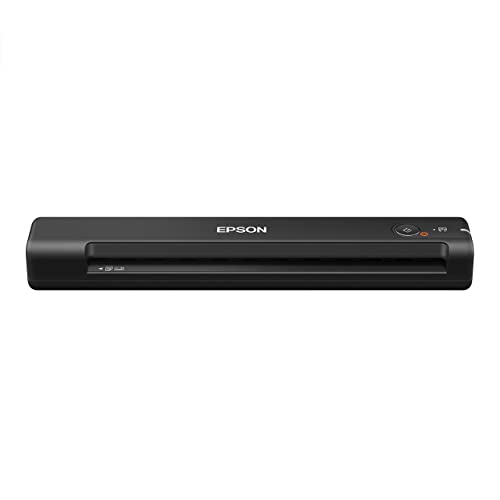
- PORTABLE SCANNER FOR USE ON-THE-GO — The fastest and lightest mobile single-sheet-fed compact document scanner in its class¹
- QUICK DOCUMENT SCANNING ― This Epson ultra-fast scanner scans a single page as quickly as 5.5 seconds²; Windows and Mac compatible
- VERSATILE PAPER HANDLING ― Portable scanner scans documents up to 8.5 x 72 in; Also easily digitizes receipts and ID cards to make accounting, bookkeeping, and organizing simpler
- INTUITIVE, HIGH-SPEED SOFTWARE — Epson ScanSmart Software³ is a smart tool allowing you to easily scan, review, and save; Stay organized easily with the help of this Epson scanner
- EASY SETUP — USB-powered connect to your computer for quick and simple scanning; No batteries or external power supply required to operate portable document scanner; Standard Connectivity: USB 2.0
- POWERFUL DOCUMENT SCANNING — Includes Nuance Optical Character Recognition (OCR) to create searchable PDFs and editable Word and Excel files
- FLEXIBLE COMPATIBILITY — Scan to the cloud⁴; Scan files directly to online storage accounts with the included software; Included Twain driver compatible with virtually any imaging software
- SIMPLE SCANNING PROCESS - Epson scanner's automatic feeding mode combines multi-page scans into one file; Scanner automatically accepts each new sheet as it's inserted
Why You'll Love It
- USB-powered operation connects directly to a PC or Mac without requiring batteries or a separate power supply
- Scans a single page in as little as 5.5 seconds for quicker document digitizing
- Handles receipts, ID cards, and documents up to 8.5 x 72 inches
- OCR converts scanned documents into searchable PDFs and editable Word or Excel files
- ScanSmart software helps review, organize, and save documents through a straightforward scanning process
- Automatic feeding mode combines successive single-sheet scans into one multi-page file
Pros
- +Compact, lightweight design
- +USB-powered, no separate power supply
- +Windows and Mac compatibility
- +Searchable PDFs and editable files
- +Supports receipts and ID cards
Cons
- -Requires a USB connection to a computer
- -Single-sheet feeding rather than batch loading
Detailed Review
The Epson ES-50 mobile document scanner is designed for people who want to digitize paperwork without making room for a larger scanning setup. Its compact, lightweight construction makes it suitable for a desk where space is limited or for someone who needs a scanner they can move between work locations. Rather than relying on batteries or a separate power supply, it draws power through its USB connection to a computer. That straightforward approach makes it particularly relevant to home office users, independent professionals, and anyone who regularly needs digital copies of paper documents.
Speed is one of its main attractions. Epson states that a single page can be scanned in as little as 5.5 seconds, making it practical for routine paperwork such as receipts, forms, and individual documents. It handles paper up to 8.5 x 72 inches, along with receipts and ID cards. This range of document types gives it a useful role beyond simply creating digital copies of standard pages. Someone organizing business paperwork, bookkeeping records, or personal documents can use the same scanner for several kinds of everyday items.
The included Epson ScanSmart software provides a process for scanning, reviewing, and saving documents. An especially useful addition is Nuance Optical Character Recognition, or OCR. Instead of limiting scanned pages to images, the software can create searchable PDFs and editable Word and Excel files. This matters when the goal is to find information inside stored documents or work with digitized content afterward. The included TWAIN driver also supports compatibility with virtually any imaging software, while the included software provides options for scanning directly to online storage accounts.
Its feeding arrangement is worth understanding before buying. This is a single-sheet-fed scanner, so pages are inserted individually rather than loaded together as a stack. Automatic feeding mode accepts each new sheet as it is inserted and combines multi-page scans into one file. That gives users a way to organize longer documents without treating every page as an entirely separate finished file, but it still involves feeding the pages one at a time. The USB 2.0 connection also means the scanner operates as a computer-connected device rather than as a standalone battery-powered unit.
Verdict: The Epson ES-50 mobile document scanner makes sense for buyers who regularly digitize receipts, ID cards, and individual documents and value OCR, compact dimensions, and simple USB-powered operation. It is a particularly sensible choice for organized paperwork and occasional multi-page scanning, but shoppers who routinely process large stacks of paper should consider a scanner designed around batch document feeding instead.
Specifications
- Brand: Epson
- Model: WorkForce ES-50
- Product type: Mobile single-sheet-fed document scanner
- Power source: USB-powered
- Connectivity: USB 2.0
- Operating system compatibility: Windows and Mac
- Maximum document dimensions: 8.5 x 72 inches
- Single-page scanning speed: As quickly as 5.5 seconds
- Supported document types: Documents, receipts, and ID cards
- Included software: Epson ScanSmart
- OCR: Nuance Optical Character Recognition
- Supported file outputs: Searchable PDFs and editable Word and Excel files
- Additional software compatibility: Included TWAIN driver
Who Should Buy It
A great fit if you:
- Keep business receipts and want a straightforward way to turn paper records into searchable digital files.
- Work with individual forms, ID cards, and documents and prefer a compact scanner over a larger setup.
- Use a Windows PC or Mac and want a scanner powered directly through its computer connection.
- Need to convert scanned paperwork into editable Word or Excel files for further organization and document work.
- Regularly organize multi-page paperwork and want successive individual scans combined into one file.
Consider something else if you:
- Frequently digitize large stacks of paperwork and would benefit more from a batch-loading document scanner.
- Want to scan without connecting to a computer and would be better served by a standalone or battery-powered model.
Before You Buy
Confirm on the listing:
- Check the scanner's physical dimensions against your available desk space and storage area, particularly if you intend to move it between locations.
- Confirm that your computer supports the required USB connection and that your operating system is compatible with the included software and drivers.
- Review the package contents to confirm which software, drivers, and other items are included with the scanner.
- Check whether the document sizes and paper types you regularly handle fall within the stated supported formats, especially for unusually long documents.
How to compare your options: For this type of scanner, concentrate on feeding method, supported document dimensions, connection requirements, and available file formats. The ES-50 offers individual sheet feeding, USB-powered operation, Windows and Mac compatibility, and OCR for searchable and editable documents. Consider how often you scan paperwork and whether feeding each page individually fits your routine. If your priority is processing stacks of documents with less manual involvement, compare options with a different feeding arrangement. If document organization and editable output matter more, pay close attention to OCR and software compatibility.
Getting the Most From It
Start by connecting the scanner to your computer through its USB connection. Install and familiarize yourself with the included Epson ScanSmart software and TWAIN driver, paying attention to the available scanning and saving options. Confirm that the software works with your computer before making it part of your regular paperwork routine.
Organize the documents you intend to digitize before scanning. Separate receipts, ID cards, and longer documents so you can choose an appropriate workflow for each type. Since the scanner feeds one sheet at a time, prepare successive pages in the order you want them to appear in the finished document.
Make use of the OCR capabilities when searchable or editable files are more useful than simple scanned images. Choose searchable PDFs for document storage or Word and Excel output when you need editable content. Review the resulting files before saving them into your chosen folders or online storage accounts.
For ongoing care, follow the manufacturer's instructions for handling and cleaning the scanner. Keep your digital filing process consistent, and use the automatic feeding mode when combining successive pages into one multi-page file will make a document easier to organize.
FAQ
Does the Epson ES-50 work with both Windows and Mac?
Yes, it supports both Windows and Mac computers. It connects through USB, and an included TWAIN driver provides compatibility with virtually any imaging software.
Can it scan receipts and ID cards?
Yes, it supports receipts and ID cards as well as documents. This makes it useful for digitizing different kinds of everyday paperwork.
Can it create searchable PDFs and editable documents?
Yes, its included Nuance OCR can create searchable PDFs and editable Word and Excel files. These options are useful when you want to find or work with information after scanning.
Does the scanner need batteries or a separate power adapter?
No, it is USB-powered and connects directly to a computer. It does not require batteries or an external power supply to operate.
Can it scan multiple pages into one document?
Yes, automatic feeding mode combines successive scans into one file. However, it accepts each sheet individually, so pages must be inserted one at a time rather than loaded as a stack.
Product Details
| Brand | Epson |
| ASIN | B07KQZWPYN |