ASUS
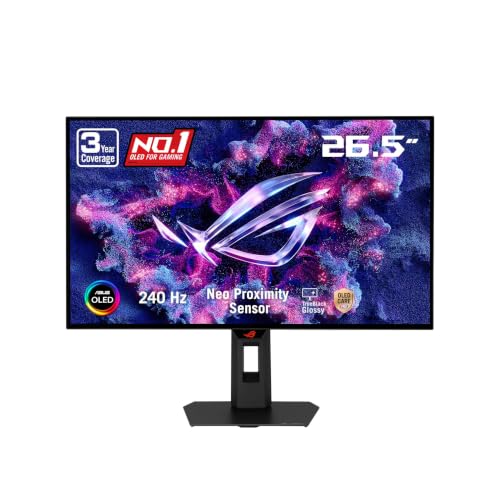
ASUS ROG XG27AQDMGR 27 Inch 1440p 240Hz Glossy OLED HDR Gaming Monitor
Disclosure: We may earn a commission when you buy through links on this page, at no extra cost to you. As an Amazon Associate I earn from qualifying purchases. Learn more
Highlights
- High-Performance QHD OLED Display: 26.5-inch QHD (2560 x 1440) TrueBlack Glossy WOLED gaming monitor with 240 Hz refresh rate and 0.03ms response time
- Advanced OLED Protection Technology: ASUS OLED Care Pro functions with Neo Proximity Sensor that precisely detects when the user is away, switching to a black screen to reduce the risk of burn-in
- Exceptional HDR and Color Accuracy: VESA DisplayHDR 400 True Black compliance, 99% DCI-P3 gamut, true 10-bit color, and Delta E < 2 color difference for astonishing HDR performance
- Intuitive Monitor Control Software: Exclusive ASUS DisplayWidget Center application allows users to easily access OLED Care Pro functions and adjust monitor settings using a mouse
- AI-Enhanced Gaming Features: ROG Gaming A.I technology with AI-powered features to enhance users' gaming experience
- Comprehensive Warranty Coverage: 3 years warranty with ARR and burn-in coverage
- Ultra-Fast Response Time: 0.03ms gray-to-gray response time ensures smooth motion clarity and eliminates ghosting during fast-paced gaming sessions
- Free 3-month Adobe Creative Cloud Subscription: Receive complimentary access with the purchase of this product (offer valid to 8/31/2028)
Why You'll Love It
- Ultra-fast motion clarity from a 240 Hz refresh rate and 0.03ms response time
- Deep contrast and vivid color performance certified by VESA DisplayHDR 400 True Black standards
- Exceptional color accuracy featuring 99 percent DCI-P3 gamut coverage and true 10-bit color depth
- Automated screen blanking via a proximity sensor to reduce the risk of OLED burn-in
- Desktop monitor control and settings adjustment through the companion ASUS DisplayWidget Center software
- Three-year warranty coverage that includes advanced replacement and protection against burn-in
Pros
- +Rapid 240 Hz refresh rate with 0.03ms response time
- +High color accuracy with 99 percent DCI-P3 gamut
- +Proximity sensor automatically dims screen to prevent burn-in
- +Three-year warranty includes burn-in protection
Cons
- -Proximity sensor requires an unobstructed view of user
- -Software adjustments require compatible desktop system
Detailed Review
The ASUS ROG XG27AQDMGR is a 26.5-inch QHD gaming monitor designed for players who demand extreme speed alongside high visual precision. Built around a glossy WOLED panel, this display delivers sharp 2560 x 1440 resolution paired with a rapid 240 Hz refresh rate. It targets competitive gamers and visual enthusiasts who need immediate pixel response without sacrificing image depth or color authenticity.
Visual performance is driven by a 0.03ms gray-to-gray response time that practically eliminates motion ghosting during high-speed action. The panel meets VESA DisplayHDR 400 True Black standards and covers 99 percent of the DCI-P3 color gamut with true 10-bit color depth. Factory calibration ensures a color difference rating of Delta E under 2, making color rendering exceptionally faithful across games and media creation workflows.
OLED displays require active care to maintain long-term image uniformity, and this model integrates ASUS OLED Care Pro features directly into the hardware and software. A Neo Proximity Sensor monitors the area in front of the screen, automatically switching to a black display when you step away to minimize static image retention. Monitor settings and protective maintenance tools can be adjusted directly through the ASUS DisplayWidget Center desktop application using your mouse, alongside ROG Gaming A.I features tuned to assist gameplay.
Trade-offs should be kept in mind when considering this setup. The glossy screen finish provides deep contrast, but user positioning and room light sources can create noticeable reflections depending on your environment. Furthermore, while the monitor includes a complimentary three-month Adobe Creative Cloud subscription valid through August 2028, unlocking full color accuracy and software features requires using the desktop application rather than on-screen controls alone. The listing does not specify speaker specifications or video port counts, so buyers should check connections beforehand.
Verdict: This monitor is ideal for competitive players and content creators seeking elite motion clarity alongside top-tier color representation. Supported by a three-year warranty that includes burn-in protection, it offers long-term reliability for demanding gaming builds.
Specifications
- Screen Size: 26.5-inch
- Resolution: QHD (2560 x 1440)
- Panel Type: TrueBlack Glossy WOLED
- Refresh Rate: 240 Hz
- Response Time: 0.03ms (gray-to-gray)
- Color Accuracy: Delta E < 2, 99% DCI-P3 gamut, true 10-bit color
- HDR Certification: VESA DisplayHDR 400 True Black
- Protection System: ASUS OLED Care Pro with Neo Proximity Sensor
- Control Software: ASUS DisplayWidget Center
- Warranty: 3 years (includes ARR and burn-in coverage)
- Included Bonus: 3-month Adobe Creative Cloud subscription (valid through 8/31/2028)
Who Should Buy It
A great fit if you:
- Play fast-paced competitive titles that benefit from a 240 Hz refresh rate and 0.03ms gray-to-gray response time.
- Require precise color accuracy for creative work with 99 percent DCI-P3 gamut coverage and Delta E under 2 color accuracy.
- Want peace of mind against image retention with automated proximity sensing and a three-year warranty covering burn-in.
Consider something else if you:
- Prefer a matte screen surface to reduce ambient light reflection in bright room setups.
- Do not intend to install desktop software to manage monitor settings and protective functions.
Before You Buy
Confirm on the listing:
- Check whether the included cable types match your existing computer graphics card outputs.
- Confirm your desk depth allows clear line of sight for the built-in Neo Proximity Sensor to function properly.
- Verify that your computer operating system supports the ASUS DisplayWidget Center control software.
- Measure your physical desk footprint to ensure a 26.5-inch monitor fits comfortably in your layout.
How to compare your options: Focus on panel technology, refresh capability, and protective feature sets when evaluating desktop displays. If you prioritize deep black levels and immediate pixel transitions, a WOLED display with a 240 Hz refresh rate delivers significant advantages over standard LCD panels. Ensure any candidate monitor offers robust heat or burn-in management features and warranty terms that specifically cover image retention.
Getting the Most From It
Position the monitor so that the Neo Proximity Sensor on the frame has an unobstructed line of sight to your seating position, allowing it to correctly detect when you step away and trigger screen blanking.
Install the ASUS DisplayWidget Center application on your computer to easily adjust color profiles, configure OLED Care Pro maintenance cycles, and manage monitor settings using your mouse instead of hardware buttons.
If you plan to use creative applications, redeem your included three-month Adobe Creative Cloud subscription before the August 2028 expiration date to explore color-critical photo or video workflows.
Keep the display clean by gently wiping the glossy screen surface using a clean, soft cloth as recommended in your product documentation, avoiding harsh chemical cleaners.
FAQ
Does this monitor come with burn-in coverage?
Yes, the monitor is backed by a 3-year warranty that explicitly covers burn-in along with advanced replacement coverage.
How does the automatic screen protection work?
The integrated Neo Proximity Sensor detects when you leave your desk and automatically switches the panel to a black screen to reduce the risk of image burn-in.
Can I adjust monitor settings without using the physical buttons?
Yes, you can use the downloadable ASUS DisplayWidget Center application to manage monitor settings and OLED care features using your mouse.
What color specs does this display offer for creative tasks?
It features true 10-bit color, 99 percent DCI-P3 color gamut coverage, VESA DisplayHDR 400 True Black compliance, and a factory-calibrated Delta E color difference of less than 2.
What video inputs or built-in speakers does the monitor include?
The provided product specifications do not list the specific port selection or speaker configuration, so you should check the detailed listing details prior to purchasing.
Product Details
| Brand | ASUS |
| ASIN | B0FWHPY1GJ |