SANSUI
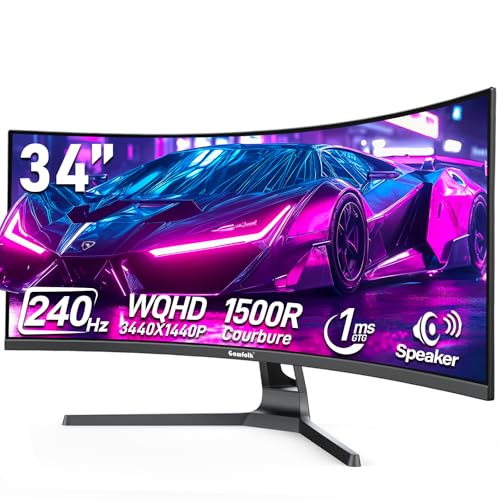
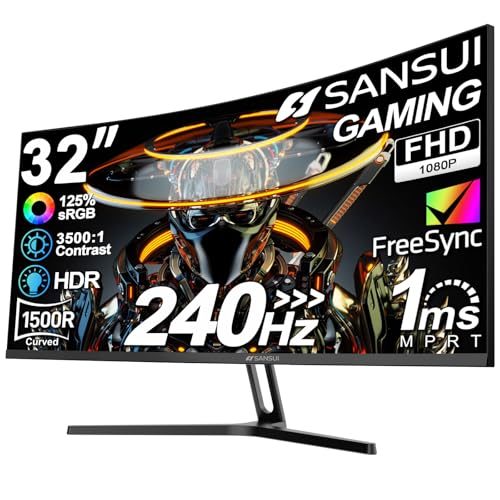
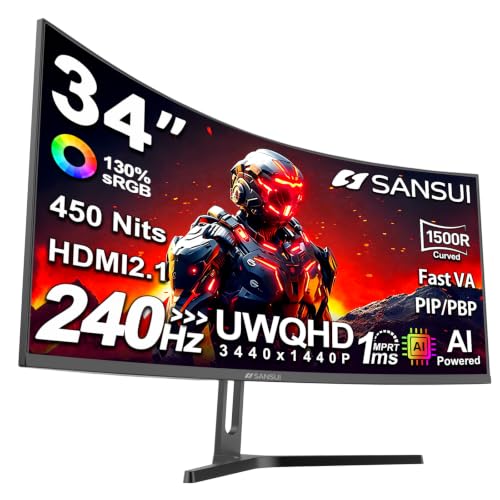
SANSUI 34 Inch Curved Monitor 240Hz UWQHD 3440×1440 Gaming Monitor
Disclosure: We may earn a commission when you buy through links on this page, at no extra cost to you. As an Amazon Associate I earn from qualifying purchases. Learn more
Highlights
- 34 Inch Curved 240Hz UWQHD(3440*1440) Fast VA Ultrawide 21:9 HDR400 Gaming Monitor with AI Crosshair and AI Bluelight.
- Performance: 240Hz Refresh Rate | MRPT 1ms Response Time | Freesync | AI PQ(Visual Enhance) | Ultra Vivid(Weak/Middle/Strong) | AI Crosshair | AI Bluelight | Sniper Scope | Game Mode | VRR( Support xBOX,PS,Switch,can only be used when connected to HDMI2.1)
- Ergonomic Stand: PIP/PBP | Tilt -5°~15°(+/-2°) | VESA Compatible (100x 100mm) | 178° Wide Viewing Angle | Durable Metal Stand
- Ports: HDMI2.1*2 (Up to 2k 240Hz) | DP 1.4 X 2 (Up to 2k 240Hz) | Earphone |No speakers
- Warranty: SANSUI 34-inch 240Hz Curved gaming monitor support money-back and free replacement warranty from order date within 30 days and lifetime technical support.
Why You'll Love It
- Expansive 34-inch ultrawide 21:9 screen delivers immersive viewing for gaming and multitasking
- Ultra-smooth motion with a fast 240Hz refresh rate and 1ms response time
- Sharp 3440x1440 UWQHD resolution brings out crisp visual detail
- Modern display features include HDR400, AI Crosshair, AI Bluelight, and Sniper Scope
- Flexible connectivity options with two HDMI 2.1 ports and two DisplayPort 1.4 inputs
Pros
- +High 240Hz refresh rate
- +Ultrawide UWQHD resolution
- +Multiple HDMI 2.1 and DP 1.4 ports
- +VESA mount compatible
- +Ergonomic tilt adjustment
Cons
- -No built-in speakers
- -VRR requires HDMI 2.1 connection
Detailed Review
The SANSUI 34-inch curved gaming monitor provides an expansive 21:9 ultrawide display designed for gamers and content creators who need maximum screen real estate. By combining a 3440x1440 UWQHD resolution with a curved Fast VA panel, it fills your field of view for immersive simulation games, fast-paced shooters, or side-by-side productivity work. If you are looking to step up from a standard 16:9 screen to an ultrawide setup without sacrificing competitive display speeds, this monitor is built for that purpose.
Performance is a major focal point for this display. It delivers a fast 240Hz refresh rate alongside an MPRT 1ms response time, helping eliminate motion blur during quick turns and rapid action. Support for FreeSync and Variable Refresh Rate (VRR) helps keep frames tear-free when paired with modern consoles like Xbox, PlayStation, or Switch, as well as gaming PCs. Built-in gaming visual tools, including AI Crosshair, Sniper Scope, Game Mode, AI PQ visual enhancement, and Ultra Vivid modes (with weak, middle, and strong settings), allow you to tailor the picture to match your preferred genres.
Physical flexibility is handled through a durable metal stand that supports screen tilt from -5° to 15° (+/-2°). The 178° wide viewing angles ensure consistent visual clarity even when viewing the screen from the side. For task management, PIP (Picture-in-Picture) and PBP (Picture-by-Picture) features allow you to display content from separate inputs simultaneously. On the back, connection options include two HDMI 2.1 ports, two DisplayPort 1.4 inputs, and an earphone audio output jack.
There are a few key trade-offs to keep in mind based on the specs. The monitor does not feature integrated internal speakers, so you will need to rely on the earphone jack or an external audio system. Additionally, the manufacturer notes that Variable Refresh Rate (VRR) capabilities can only be used when connected via HDMI 2.1. Maximum output up to 2K at 240Hz is supported across both the HDMI 2.1 and DP 1.4 inputs.
Verdict: This SANSUI monitor is a strong pick for PC and console gamers seeking high-speed 240Hz performance on a curved 34-inch ultrawide canvas. It offers a solid mix of speed, sharp UWQHD resolution, and useful display tools for anyone wanting to upgrade their desk setup.
Specifications
- Screen Size: 34 inches
- Panel Type: Fast VA Curved (178° viewing angle)
- Aspect Ratio: 21:9 Ultrawide
- Resolution: UWQHD (3440x1440)
- Refresh Rate: 240Hz
- Response Time: MPRT 1ms
- HDR Standard: HDR400
- Stand Ergonomics: Tilt -5° to 15° (+/-2°)
- VESA Mounting: 100x100mm
- Ports: 2x HDMI 2.1, 2x DisplayPort 1.4, 1x Earphone Jack
- Audio: No built-in speakers
Who Should Buy It
A great fit if you:
- Play fast-action PC or console games that benefit from high frame rates up to 240Hz.
- Want an immersive 21:9 curved screen layout to replace dual-monitor desk arrangements.
- Plan to view multiple input sources at once using built-in PIP or PBP display modes.
- Intend to mount your monitor using a standard 100x100mm VESA wall or desk arm system.
Consider something else if you:
- Require integrated internal speakers directly built into the monitor chassis.
- Need full VRR functionality over connections other than HDMI 2.1.
Before You Buy
Confirm on the listing:
- Check your desk space to ensure a 34-inch curved ultrawide monitor fits comfortable in your room.
- Verify that your graphics card or gaming console supports HDMI 2.1 or DP 1.4 output to achieve up to 240Hz.
- Confirm what cables (such as HDMI or DisplayPort) are included in the package box before setting up.
- Measure your VESA mounting hardware if you plan to install it on a monitor arm instead of the included stand.
How to compare your options: Focus on display size, refresh rate, and connection types when comparing ultrawide monitors. If ultra-smooth motion in fast games is your priority, high refresh rates like 240Hz paired with 1ms response times are essential metrics. Check whether the screen offers modern ports like HDMI 2.1 if you intend to plug in current-generation gaming consoles alongside a PC.
Getting the Most From It
When setting up the monitor, place it on a stable surface using the durable metal stand or attach it to a sturdy arm using the 100x100mm VESA mount pattern. Adjust the stand tilt between -5° and 15° to align the center of the screen comfortably with your line of sight.
To achieve the full 240Hz refresh rate, ensure you connect your device using either the HDMI 2.1 or DisplayPort 1.4 ports with compatible cables. If you plan to use Variable Refresh Rate (VRR) on supported gaming consoles, make sure to plug your video cable specifically into one of the HDMI 2.1 ports.
Explore the built-in visual features in the monitor settings menu. You can toggle AI Crosshair or Sniper Scope for competitive games, select AI Bluelight filtering for extended sessions, or adjust visual enhance settings like Ultra Vivid to match your media preferences.
FAQ
Does this monitor have built-in speakers?
No, this model does not include built-in speakers. Audio output is available through the integrated earphone jack so you can connect headphones or desktop speakers.
What is the maximum refresh rate supported by the ports?
Both the HDMI 2.1 ports and the DisplayPort 1.4 connections support up to 2K resolution at 240Hz.
Can I use VRR with gaming consoles?
Yes, Variable Refresh Rate (VRR) supports devices like Xbox, PS, and Switch, but it can only be used when connected via the HDMI 2.1 ports.
Can I mount this monitor on an arm?
Yes, it supports standard VESA mounting with a 100x100mm hole pattern on the back of the panel.
Does it support viewing two devices at once?
Yes, it includes PIP (Picture-in-Picture) and PBP (Picture-by-Picture) modes for managing multiple video inputs on one screen.
Product Details
| Brand | SANSUI |
| ASIN | B0F2TB1KNV |