POJTK
POJTK Wireless Rechargeable Ergonomic Mouse, Bluetooth+USB A+Type C(3 in 1) Connection, Up
Disclosure: We may earn a commission when you buy through links on this page, at no extra cost to you. As an Amazon Associate I earn from qualifying purchases. Learn more
Highlights
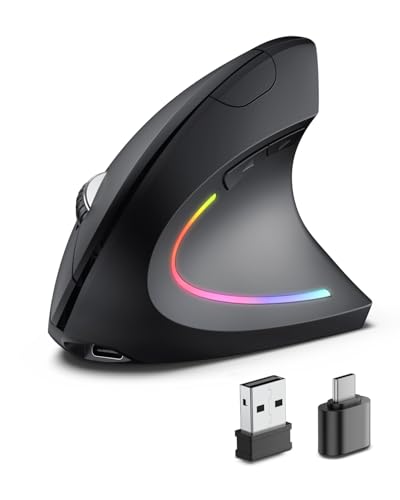
- 【Multiple connection methods】This vertical ergonomic mouse uses three connection methods: Bluetooth 5.3+2.4GHz USB A+USB C, which can switch seamlessly between two devices without repeatedly plugging and unplugging the USB receiver. When connecting devices via Bluetooth, you can save a USB A or Type C port. It is very suitable for devices without USB ports. When using the 2.4GHz USB connection mode, you only need to plug in the USB receiver to quickly connect. It is equipped with both USB A and USB C receivers. When there is only a Type C interface on the device, plug the USB C receiver into the USB A receiver, and then plug it into the Type C interface of the device to use it.
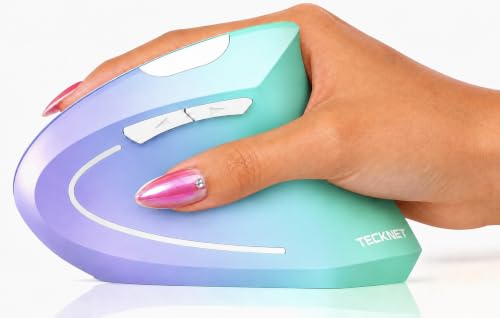
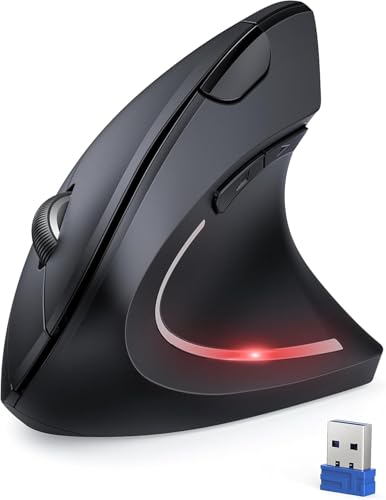
- 【Vertical ergonomic design】POJTK ergonomic mouse adopts a scientific vertical design, with an angle of 58 degrees to the desktop. It fits the curvature of the palm very well, encourages a healthy and neutral "handshake" posture, and provides ultimate comfort. Promote smoother movement, reduce stress on the wrist and arm, and relieve wrist muscle fatigue and pain.
- 【Rechargeable Mouse】The wireless vertical mouse is rechargeable and does not require additional batteries, saving the cost of purchasing batteries. After a full charge, it can be used for 1-3 months, depending on usage habits and daily usage time. If it is idle for ten minutes, the mouse will enter standby mode to extend the battery life. You only need to click any button once to wake up the mouse. (When using the mouse for the first time, please fully charge it before. To protect the mouse battery from damage, please don't use a fast charger to charge the mouse.)
- 【5-level adjustable high DPI】The vertical mouse with advanced optical tracking technology has 5 levels of adjustable DPI, up to 4800DPI (800/1600/2400/3200/4800). High numerical DPI provides higher sensitivity than ordinary optical mice, ensuring that the mouse can achieve accurate tracking on various surfaces.
- 【Silent Mouse】The carpal tunnel mouse has 6 buttons and adopts a silent design, and there is almost no sound when clicking. It is very suitable for use in quiet environments such as offices, homes, conference rooms, libraries, etc., effectively avoiding disturbing colleagues, family or strangers. The front and back shortcut keys can quickly and conveniently enter or exit web pages, improving browsing efficiency. (Note: The front and back shortcut keys cannot be used in macOS)
- 【Wide Compatibility】 This ergonomic computer mouse is compatible with a variety of systems, including Windows, Linux, macOS, Unix and other systems. Compatible with most devices on the market, including laptops, desktops, PCs, Macbooks, Chormebooks, tablets and other devices. It is also suitable for devices equipped with USB A or Type C ports. Eliminate the worry of incompatibility with your device.
Why You'll Love It
- Switch between two devices easily using Bluetooth 5.3 or 2.4GHz wireless receivers
- Encourages a neutral 58-degree handshake posture to relieve wrist muscle fatigue and strain
- Rechargeable battery lasts one to three months on a full charge with auto-sleep
- Adjust pointer sensitivity across five levels up to 4800 DPI for smooth surface tracking
- Silent click buttons let you work in quiet spaces without disturbing others nearby
- Plugs into both standard USB-A and modern Type-C ports with included adapters
Pros
- +Versatile Bluetooth and dual USB receiver connectivity
- +Ergonomic 58-degree vertical angle
- +Rechargeable battery lasts up to three months
- +Quiet click design with 6 buttons
- +Broad compatibility with multiple operating systems
Cons
- -Side shortcut buttons do not work on macOS
- -Fast chargers cannot be used for recharging
- -Receiver setup requires nesting USB-C into USB-A
Detailed Review
The POJTK Wireless Rechargeable Ergonomic Mouse is a vertical optical mouse designed to reduce wrist and arm stress during long computing sessions. Featuring a 58-degree vertical angle, it places your hand into a natural handshake posture that helps relieve wrist muscle fatigue. It suits office workers, students, and home users who want an ergonomic peripheral that works across multiple devices.
Connectivity is a strong point, offering Bluetooth 5.3 alongside a 2.4GHz wireless connection with both USB-A and USB-C receiver options. This allows you to switch between two devices without unplugging hardware, making it handy for modern laptops that only feature Type-C ports. For tracking, the optical sensor features five adjustable DPI levels (800, 1600, 2400, 3200, and 4800) so you can tailor cursor speed and sensitivity to your preferences across different surfaces.
Daily operation is quiet thanks to silent-click switches across its 6-button layout, making it well-suited for libraries, shared offices, and home workspaces. Power comes from a built-in rechargeable battery that runs for 1 to 3 months depending on usage habits. To conserve energy, the mouse enters a standby mode after ten minutes of inactivity, waking back up with a single click of any button.
There are a few functional limitations to keep in mind based on your setup. While the mouse works with Windows, macOS, Linux, and Unix, the front and back navigation buttons are not supported on macOS. Additionally, the manufacturer notes that fast chargers must not be used to recharge the battery to avoid damage, and the mouse should be fully charged before its first use.
Verdict: The POJTK vertical mouse is a practical, ergonomic option for anyone needing multi-device connectivity, quiet clicking, and relief from wrist strain. It is especially suitable for PC and multi-OS users who want flexible wireless pairing without constantly swapping disposable batteries.
Who Should Buy It
A great fit if you:
- Experience wrist fatigue and prefer a 58-degree handshake grip
- Need to switch between two computers using Bluetooth and 2.4GHz wireless
- Use laptops that only have USB Type-C ports
- Work in quiet environments like libraries, open offices, or shared spaces
Consider something else if you:
- Rely heavily on side forward and back navigation buttons while using macOS
- Prefer using fast chargers to power up your computer accessories
FAQ
How do I connect the mouse to a computer with only USB-C ports?
Plug the included USB-C receiver adapter into the USB-A receiver, then insert the combined unit directly into your device's Type-C port.
How long does the battery last and how does sleep mode work?
A full charge provides between 1 and 3 months of use depending on daily habits. If left idle for 10 minutes, the mouse enters standby mode, which you can wake by clicking any button.
Can I charge this mouse with a fast charger?
No, you should not use a fast charger because it can damage the internal battery. It is also recommended to fully charge the mouse before using it for the first time.
Do all six buttons work on Apple Mac computers?
The main mouse functions work across macOS, but the front and back shortcut buttons cannot be used on Mac systems.
Product Details
| Brand | POJTK |
| ASIN | B0G32KBWGC |