Tecknet
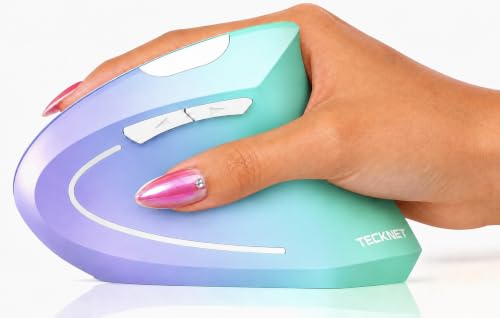
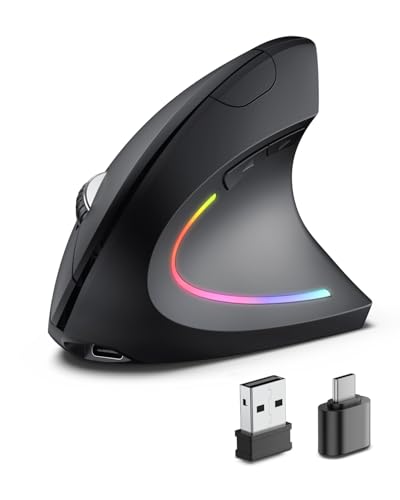
TECKNET 2.4G Ergonomic Mouse Vertical Wireless 4800 DPI Carpal Tunnel Mouse
Disclosure: We may earn a commission when you buy through links on this page, at no extra cost to you. As an Amazon Associate I earn from qualifying purchases. Learn more
Highlights
- ARM PROTECTION: The ergonomic vertical mouse allows you to adjust your arm and wrist for a comfortable position and less stress. An adaptation period of 1-2 weeks is recommended for optimal comfort.
- PRECISE CONTROL: With 5 Adjustable DPI 4800/3200/2400/1600/800, providing higher sensitivity for smooth and precise tracking.
- SILENT CLICKS: Clicking noise is reduced by more than 90%, avoiding disturbing others and ensuring your office or home work not be interrupted.
- EASY TO USE: Just plug the 2.4G receiver for 49ft connection distance.The vertical mice requires an available USB-A port. An adapter may be needed for computers with only USB-C ports.
- ENERGY SAVING: The computer mice will enter sleep mode after 8 minutes of inactivity, press the left or right button to wake it up. The erqonomic mice is required 2XAAA batteries(not included).
- WIDE USE: The ergo mouse is compatible for various computer s such as laptop, desktop, pc, and Systerms such as Windows 11/10/8/7/XP/Vista/Linux.
- 2 SIDE BUTTONS: The forward/backward buttons will greatly improve your work efficiency when browsing websites/emails. (Note: The side buttons are not suitable for Mac systems).
- 36 MONTH SUPPORT: If you encounter any problems in using the product, feel free to reach out to the TECKNET friendly customer service, enjoying 36-Month Support(Registered Only).
- Red Indicator Light: The LED light will flash red when you switch different DPI and when the battery is low.
- FOR Right Hand: Please measure you right palm for the great fit.Suitable palm length: 6.7-8.3 in (17-21 cm), Palm Width: 3.5-4.7 in (9-12 cm)
Why You'll Love It
- Vertical shape positions your arm and wrist naturally to reduce everyday working strain
- Five selectable sensitivity settings up to 4800 DPI provide precise, responsive cursor tracking
- Quiet click design reduces over 90 percent of noise to keep workspaces distraction free
- Plug-and-play USB receiver delivers an untethered wireless range of up to 49 feet
- Built-in sleep mode conserves battery power after eight minutes of idle time
Pros
- +Over 90 percent quieter clicking buttons
- +Adjustable DPI from 800 to 4800
- +Generous 49-foot wireless operating distance
- +Side navigation buttons for fast browsing
- +Automatic energy-saving sleep timer
Cons
- -Requires two AAA batteries that are not included
- -Side buttons do not work on Mac systems
- -Designed only for right-handed users
- -Requires a USB-A port or separate adapter
Detailed Review
The TECKNET 2.4G Ergonomic Vertical Wireless Mouse is designed to promote a natural arm and wrist posture during long computer sessions. Built specifically for right-handed users with palms measuring 6.7 to 8.3 inches long and 3.5 to 4.7 inches wide, its upright design helps alleviate wrist strain. Getting fully accustomed to the vertical orientation typically takes an adaptation period of one to two weeks.
Daily navigation is handled smoothly with five adjustable sensitivity levels: 800, 1600, 2400, 3200, and 4800 DPI. An integrated LED light flashes red to indicate your current DPI switch, while also doubling as a low-battery alert. Additionally, the quiet button switches cut clicking noise by more than 90 percent, making it suitable for quiet office settings or shared spaces at home.
Connecting the mouse is straightforward via the included 2.4G USB receiver, which supports a wireless range of up to 49 feet. Two dedicated side buttons allow quick forward and backward navigation through web pages and emails on compatible operating systems. To preserve power, the unit enters an automatic sleep mode after eight minutes of inactivity, waking up instantly when you press either the left or right button.
A few practical limitations exist based on your setup. The mouse requires two AAA batteries to operate, which are not included in the box. Computers with only USB-C ports will need a separate adapter to use the USB-A receiver. While it works across Windows 11, 10, 8, 7, XP, Vista, and Linux, the two side navigation buttons are not supported on Mac operating systems.
Verdict: The TECKNET Vertical Mouse is a solid, quiet option for right-handed Windows and Linux users who want an ergonomic grip with customizable tracking speeds. It is an effective desktop companion if you have standard USB-A ports and do not mind supplying your own AAA batteries.
Specifications
- Connection: 2.4G wireless (USB-A receiver)
- Wireless Range: Up to 49 ft
- DPI Settings: 800 / 1600 / 2400 / 3200 / 4800 DPI
- Power Source: 2 x AAA batteries (not included)
- Auto Sleep: After 8 minutes of inactivity
- Hand Orientation: Right hand
- Suitable Palm Dimensions: Length 6.7-8.3 in (17-21 cm), Width 3.5-4.7 in (9-12 cm)
- System Compatibility: Windows 11/10/8/7/XP/Vista, Linux
- Support: 36-Month Support (registration required)
Who Should Buy It
A great fit if you:
- Use your right hand and want an upright grip to position your arm more naturally.
- Work in quiet office or home environments where silent clicks are necessary.
- Need adjustable tracking speeds for standard office navigation or detailed tasks.
- Run Windows or Linux computers equipped with a standard USB-A port.
Consider something else if you:
- Are left-handed or have hand measurements outside the recommended palm size range.
- Rely heavily on Mac navigation shortcuts, as the side buttons do not work on Mac systems.
- Prefer a rechargeable mouse that does not require disposable AAA batteries.
FAQ
How does the mouse wake up from sleep mode?
The mouse enters sleep mode after 8 minutes of inactivity to save energy. You can wake it back up by pressing either the left or right button.
Does this mouse work on Apple Mac computers?
The basic mouse functions work, but the two side forward and backward buttons are not suitable for Mac systems.
What kind of batteries does it use?
It requires 2 AAA batteries, which are not included in the package.
How do I know when the battery is running low or when DPI changes?
The built-in red indicator LED will flash when you switch between DPI levels and will also flash red when the battery power is low.
Product Details
| Brand | Tecknet |
| ASIN | B0F7XHX6R9 |