ProtoArc
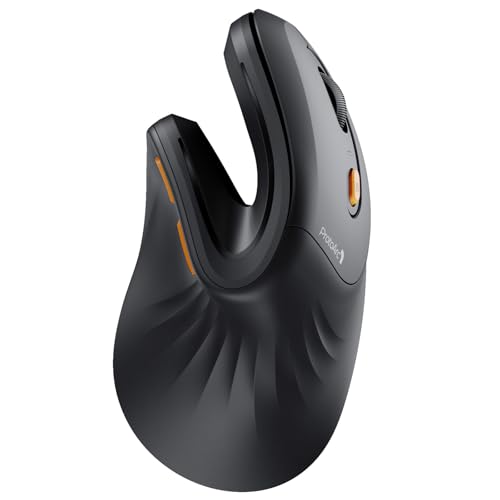
ProtoArc EM11 NL Wireless Ergonomic Vertical Mouse, Rechargeable, Black
Disclosure: We may earn a commission when you buy through links on this page, at no extra cost to you. As an Amazon Associate I earn from qualifying purchases. Learn more
Highlights
- Connection Guide: This mouse pairs via Bluetooth or the included USB-A receiver only. Note: A USB-C receiver is not included. The Type-C cable is for charging
- Connect up to 3 Devices: This ergonomic wireless mouse features dual Bluetooth connectivity and 2.4G USB-A connectivity modes for simultaneous connection of up to 3 different devices, and is compatible with Windows 8, Windows 10 or higher, Mac OS X 10.12 or higher, and Android 4.3 or higher
- Rechargeable Ergonomic Mouse: The Bluetooth Vertical Mouse has a built-in 500mAh Li-Ion battery that can be conveniently recharged using the included Type-C cable(The Type-C cable is for charging only)
- Ergonomic Vertical Design: The ergonomic mouse wireless keeps your wrist naturally straight, putting your forearm and wrist in a more natural and relaxed position, which can reduce discomfort and strain, helping to improve productivity and reduce the risk of repetitive strain injuries compared to a standard mouse. Warm tips: We encourage you to relax your palm and hold the mouse naturally when using a vertical mouse
- Perfect Fit for Small to Medium Hands: Designed specifically for hand lengths under 7.5 inches (19.05 cm), the EM11 NL reduces wrist strain by aligning with your natural grip. Please measure the size before ordering for a better fit and more comfort
- Learning curve: Since it takes a learning curve to get used to the shape when using our ergonomic mouse for the first time, it may cause inconvenience to your mouse grip, We recommend that you take 1-2 weeks to get used to it, as many users find that it will help reduce the pressure and pain on your wrist caused by long-term use of the mouse and improve comfort
- Adjustable Dpi & High Performance: 1000/1600/2400 DPI levels provide higher sensitivity than standard optical mice for precise optical tracking; with the back and forward buttons, you can easily navigate websites and increase work efficiency. Note: All buttons are not programmable and the forward and back buttons are not compatible with Mac OS systems
- Quiet Clicking: The silent click sound of the left and right mouse buttons help you focus on your work, Note:the middle scroll wheel and and the back/forward buttons are not silent
Why You'll Love It
- Upright vertical design keeps your wrist straight to reduce strain and fatigue
- Connects up to three devices across dual Bluetooth channels and a 2.4G USB receiver
- Sized specifically to comfortably fit hands measuring under 7.5 inches long
- Built-in 500mAh rechargeable battery eliminates the need for disposable AA batteries
- Three adjustable DPI settings let you switch tracking speeds up to 2400 DPI
- Silent primary buttons let you click quietly in shared workspaces
Pros
- +Connects with up to 3 devices
- +Rechargeable 500mAh built-in battery
- +Quiet left and right clicks
- +Customizable sensitivity with 3 DPI levels
- +Sized specifically for small to medium hands
Cons
- -Forward and back buttons do not work on Mac
- -Buttons are not programmable
- -Scroll wheel and side buttons are not silent
Detailed Review
The ProtoArc EM11 NL Wireless Ergonomic Vertical Mouse provides an upright grip designed to keep your forearm and wrist in a relaxed posture. It addresses wrist discomfort from extended computer use, specifically catering to users with hand lengths under 7.5 inches (19.05 cm).
For daily productivity, the mouse allows you to pair and toggle between up to three separate devices using two Bluetooth channels and one 2.4G USB-A wireless receiver. It works across Windows 8 or higher, Mac OS X 10.12 or higher, and Android 4.3 or higher. An internal 500mAh lithium-ion battery recharges via an included Type-C cable, which operates solely as a charging cord rather than a wired data connection.
Precision tracking is managed through three adjustable optical sensitivity levels at 1000, 1600, and 2400 DPI. For working in quiet environments, the primary left and right click buttons are muted to prevent clicking noise. Web navigation is streamlined with built-in forward and back thumb buttons.
There are a few functional limitations to keep in mind before buying. The buttons are not programmable, and the forward and back navigation buttons do not function on Mac OS systems. Additionally, quiet clicking applies only to the main left and right switches; the scroll wheel and side buttons produce standard click sounds. The upright posture also comes with an expected 1 to 2 week learning curve while your hand adapts to the vertical orientation.
Verdict: The ProtoArc EM11 NL is a practical choice for small to medium-handed users seeking a multi-device vertical mouse to ease wrist tension. It is particularly well suited for multi-screen Windows and Android setups that benefit from silent primary clicks.
Specifications
- Hand Size Fit: Under 7.5 inches (19.05 cm)
- Battery Capacity: 500mAh Li-Ion rechargeable
- Connectivity: Dual Bluetooth and 2.4G USB-A
- DPI Settings: 1000 / 1600 / 2400 DPI
- Compatibility: Windows 8+, Mac OS X 10.12+, Android 4.3+
- Charging Interface: USB Type-C (charging only)
Who Should Buy It
A great fit if you:
- Have hand lengths under 7.5 inches and want an upright grip to reduce wrist strain
- Need to switch between up to three computers, tablets, or phones throughout the day
- Prefer a rechargeable mouse that powers up with a Type-C cable
- Work in quiet spaces where muted left and right clicks prevent distractions
Consider something else if you:
- Rely heavily on side navigation buttons while using a Mac OS computer
- Need programmable macros or fully silent scroll wheel and side buttons
- Have hands larger than 7.5 inches in length
FAQ
Can I use this mouse as a wired mouse with the charging cable?
No. The included Type-C cable is designed strictly for charging the internal 500mAh battery, and wireless pairing via Bluetooth or the USB-A receiver is required for data.
Do the side buttons work on Apple computers?
No. While the mouse is compatible with Mac OS X 10.12 or higher, the forward and back navigation buttons do not work on Mac operating systems.
Are all the buttons on this mouse silent?
Only the main left and right buttons feature quiet clicking. The middle scroll wheel and the side forward and back buttons make regular clicking sounds.
Product Details
| Brand | ProtoArc |
| ASIN | B0CX18LHWS |