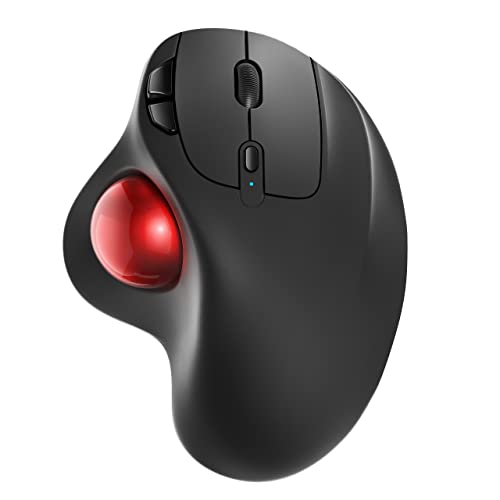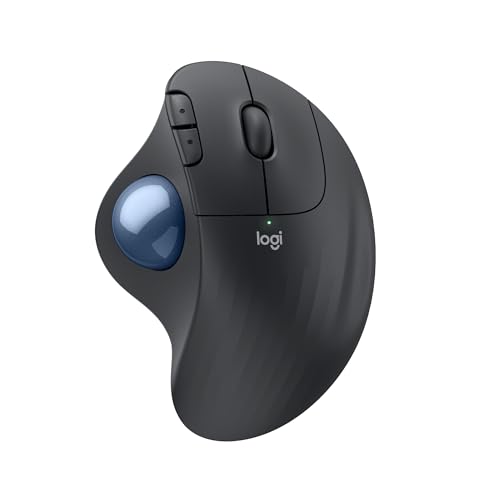
Logitech Ergo M575S Wireless Bluetooth Trackball Mouse - Graphite Blue Ball
Disclosure: We may earn a commission when you buy through links on this page, at no extra cost to you. As an Amazon Associate I earn from qualifying purchases. Learn more
Highlights
- Less Movement, More Comfort: The sculpted shape of the ERGO M575S wireless trackball mouse keeps your hand relaxed for hours of smooth, precise tracking with thumb control - now with quiet clicks
- 25% less muscle strain in your forearm (1): This wireless ergonomic mouse has been developed with Logi Ergo Lab experts, user-tested and certified by ergonomists for all-day comfort
- Improved forearm posture (1): The ergonomic shape of the ERGO M575S supports your hand and realigns your forearm into a better posture throughout the day; a good fit for most hand sizes
- Work it your way: Experience enhanced control with 3 customizable buttons, time-saving shortcuts, and Smart Actions; adjust the cursor speed to your preference with the Logi Options plus App (2)
- Save space with thumb control: With the ERGO M575S, you can move your cursor without moving your hand, making it ideal for small or space-saving setups and for use on any surface
- Easy to Connect, Long Battery Life: Connect your ergonomic wireless mouse using Bluetooth or the included Logi Bolt USB receiver; enjoy up to 18 months of battery life (AA battery included) (3)
- Made with recycled plastic: The plastic parts in the ERGO M575S Bluetooth trackball mouse are made of certified post-consumer recycled plastic (Graphite: 52%, Off-White: 21%) (4)
- Complete your setup: Pair the ERGO M575S with the Wave Keys ergonomic keyboard, featuring a cushioned palm rest that places your hands, wrists, and forearms in a natural typing position
- Note: In case of Wireless mouse, the USB receiver will be provided inside or along with the mouse Note You can clean the trackball by ejecting the ball from the ball cage.
Why You'll Love It
- Navigate tightly packed desks without moving your hand thanks to stationary thumb trackball control
- Reduce forearm muscle strain by 25 percent with an ergonomically certified sculpted hand support
- Work quietly in shared environments using integrated quiet-click buttons
- Enjoy up to 18 months of battery life from a single included AA battery
- Connect conveniently via Bluetooth wireless or the included Logi Bolt USB receiver
- Personalize workflow using three customizable buttons and the Logi Options plus application
Pros
- +Certified ergonomic shape reduces forearm strain
- +Thumb control works on any surface
- +Dual connectivity via Bluetooth or USB receiver
- +Long 18-month battery life with included AA
- +Quiet-click switches keep workspace peaceful
- +Made with certified post-consumer recycled plastic
Cons
- -Requires manual trackball removal for cleaning
- -App required for custom shortcuts and speed adjustments
- -Relies on disposable AA battery rather than recharging
Detailed Review
The Logitech Ergo M575S is a wireless ergonomic trackball mouse built to minimize arm movement and promote comfortable desktop navigation. Developed alongside Logi Ergo Lab experts and certified by ergonomists, its sculpted shape supports the natural posture of your hand and forearm. Because the device relies entirely on thumb-driven cursor navigation, it solves the challenge of working on crowded desks or uneven surfaces where standard mice struggle.
Daily comfort is anchored by a design that delivers 25 percent less forearm muscle strain compared to traditional setups. The trackball stays stationary, allowing you to guide the pointer across your display without shifting your wrist or arm. For everyday productivity, quiet-click buttons prevent noise distractions, while three customizable buttons can be mapped to custom shortcuts and Smart Actions through the Logi Options plus app. Cursor sensitivity is also easily adjustable in the software to match your workflow speed.
Connecting the mouse is straightforward, offering either Bluetooth or the included Logi Bolt USB receiver. Power is supplied by a single AA battery, which comes in the box and delivers up to 18 months of operating life. When it comes to materials, the graphite model incorporates 52 percent certified post-consumer recycled plastic, whereas the off-white version uses 21 percent.
Prospective buyers should note a few operational details. While thumb control eliminates arm travel, it requires regular maintenance; you will occasionally need to pop the ball out of its cage to clear out dust. Customizing button shortcuts or dialing in pointer tracking also depends directly on using the Logi Options plus desktop application.
Verdict: The Logitech Ergo M575S is an excellent option for office workers, students, and home professionals seeking relief from forearm fatigue or working in tight desk spaces. Its combination of long battery life, quiet operation, and certified ergonomic support makes it a dependable daily tool.
Specifications
- Connectivity: Bluetooth, Logi Bolt USB receiver
- Battery Life: Up to 18 months
- Battery Type: 1x AA battery (included)
- Material Composition: Certified post-consumer recycled plastic (52% Graphite, 21% Off-White)
- Customization: 3 customizable buttons via Logi Options plus App
- Hand Fit: Sized for most hand sizes
Who Should Buy It
A great fit if you:
- Work at a compact desk or lack room for moving a traditional mouse.
- Want an ergonomically certified shape that reduces forearm muscle strain.
- Need a quiet mouse for shared workspaces or late-night tasks.
- Prefer the flexibility of dual Bluetooth and USB receiver connections.
Consider something else if you:
- Prefer a mouse that recharges via a USB cable instead of using AA batteries.
- Dislike manually ejecting trackballs to clean the internal ball cage.
FAQ
How do you clean the trackball?
You can easily clean the trackball by ejecting the ball directly from its internal cage.
What connection methods are available?
The mouse connects wirelessly through Bluetooth or by using the included Logi Bolt USB receiver.
How long does the battery last?
It provides up to 18 months of power using a single AA battery, which is included in the package.
Can I customize the button shortcuts?
Yes, you can configure 3 customizable buttons, set up Smart Actions, and adjust cursor speed using the Logi Options plus app.
Product Details
| ASIN | B0BBQ3ZYNY |