Nulea
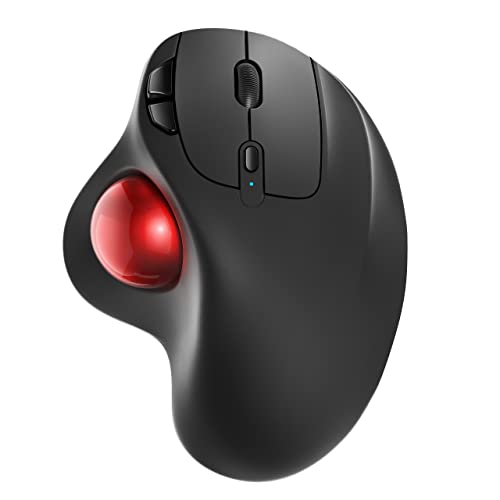
Nulea M501 Wireless Trackball Mouse Ergonomic Thumb Control,4 DPI Levels
Disclosure: We may earn a commission when you buy through links on this page, at no extra cost to you. As an Amazon Associate I earn from qualifying purchases. Learn more
Highlights
- Ergonomic Design with Smooth Thumb Control: Move your cursor by the smooth trackball instead of moving your wrist and arm. Let the easy and smooth thumb control help you reduce your muscle stress. The optimal angle of the trackball mouse allows you to keep your palm in a natural position for all-day comfort.
- Precise Tracking with Adjustable DPI: Nulea trackball mouse provides precise cursor movement for exceptional accuracy and control. With the smooth trackball, you can be more productive on the move on almost any surface, any workplace. Especially on the narrow space, such as the messy desktop, couch, bed, small writing board on a chair, etc.
- True Wireless Freedom: Connect up to 3 devices by either bluetooth or USB dongle. Switch easily between them by the button on the bottom to improve your efficiency. KINDLY REMINDER: The 2.4G USB receiver is stored at the bottom of the wireless trackball mouse.
- Rechargeable Battery: (For your best experience, please fully charge the bluetooth trackball mouse before your first use) The built-in rechargeable battery has a long battery life enables you to say goodbye to dry cell batteries. Please Note: 1. Please use our included charging cable to charge the wireless trackball mouse 2. Do not use a fast charger to charge the trackball mouse. (Directly use the computer USB port or a 5V charger to charge the bluetooth trackball mouse).
- 6 Button High Performance: Nulea trackball mouse bluetooth is designed with thoughtful ergonomic details and an elegant curved shape. Plus the back and forward button, you can operate easily with higher productivity as well as added comfort. Note: All buttons on this wireless trackball mouse are not programmable!
Why You'll Love It
- Navigate using smooth thumb control to keep your arm and wrist still
- Switch between 4 DPI levels to adjust tracking accuracy across different workspaces
- Pair with up to 3 devices simultaneously using Bluetooth or the included USB dongle
- Work in tight spaces since the stationary base does not need desk clearance
- Avoid buying dry cells thanks to the built-in rechargeable battery
- Browse efficiently with six dedicated buttons including back and forward controls
Pros
- +Connects to 3 devices via Bluetooth or USB
- +Works well in tight or messy spaces
- +Built-in rechargeable battery
- +Thumb-operated ball keeps arm stationary
- +Four selectable DPI tracking levels
Cons
- -Buttons are not programmable
- -Cannot use fast chargers for recharging
- -Requires included cable and 5V port
Detailed Review
The Nulea M501 Wireless Trackball Mouse is designed for users who want precise navigation without constantly sliding a mouse across a desk. By replacing standard arm and wrist movement with a smooth thumb-controlled trackball, this mouse keeps your palm at an angled, natural posture throughout the workday. It is particularly helpful for anyone working in cramped quarters, from messy desks to small lap desks, couches, or beds.
Versatility is a core strength of this setup. The M501 features four adjustable DPI levels, letting you tailor cursor sensitivity for fine detail work or quick screen navigation. It also supports up to three separate devices via Bluetooth and a 2.4G USB receiver. You can toggle between your computer, laptop, or tablet using a dedicated switch on the underside, where the USB dongle also stores away neatly during travel.
The mouse includes six high-performance buttons, adding dedicated forward and back controls to streamline web browsing and document navigation. Power comes from an internal rechargeable battery, eliminating the need for disposable dry cells. Recharging is handled via the included charging cable plugged directly into a standard computer USB port or a 5V charger.
There are a few operational trade-offs to keep in mind. None of the six buttons are programmable, so you are limited to their default factory functions. Additionally, the internal battery cannot be charged with modern fast chargers; it requires a standard 5V power source or PC port to prevent damage.
Verdict: The Nulea M501 is an excellent pick for multi-device multitaskers and anyone dealing with limited desk space. If you need stationary thumb navigation and simple multi-device pairing without custom macro software, this mouse delivers reliable daily performance.
Who Should Buy It
A great fit if you:
- Work on crowded desks, soft surfaces, or narrow workspaces.
- Frequently switch between multiple computers or tablets.
- Prefer moving a cursor with your thumb rather than sliding your arm.
- Want an integrated rechargeable battery instead of disposable cells.
Consider something else if you:
- Rely on custom macro software and fully programmable mouse buttons.
- Prefer charging all your gear with high-speed fast chargers.
FAQ
How do I connect the mouse to my computer?
You can connect via Bluetooth or by plugging the included 2.4G USB receiver into your computer. The receiver is stored inside a slot on the bottom of the mouse.
Can I customize or remap the buttons?
No, all six buttons on this trackball mouse are fixed and not programmable.
How should I recharge the battery?
Use the included charging cable plugged directly into a computer USB port or a standard 5V wall charger. Do not use fast chargers.
How many devices can I use at the same time?
You can connect up to 3 devices simultaneously using Bluetooth and the USB dongle, switching between them with the bottom button.
Product Details
| Brand | Nulea |
| ASIN | B09HHHDZZG |