Best Soundbars Under $200 (2026 Buying Guide)
Disclosure: We may earn a commission when you buy through links on this page, at no extra cost to you. As an Amazon Associate I earn from qualifying purchases. Learn more
Today, with TVs becoming more and more thinner in dimension, their sound quality has become poorer and getting a soundbar for your television as an add-on has become almost mandatory. Soundbars sit under your television or mount on your wall and help to amplify the audio quality of your television. Soundbars also come with several other features that provide you with the best audio experience. There is no need to break your bank to buy a high-quality soundbar, you can easily get one for below $200 and augment your home-audio experience. Read on to know more about the best under $200 soundbars on the market.

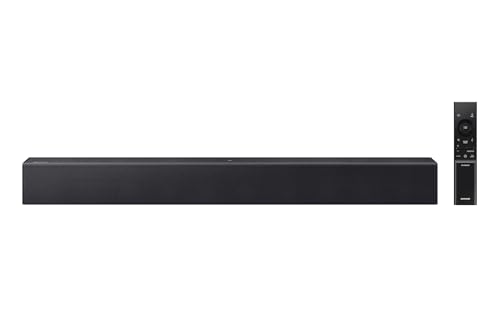
Top 5 Soundbars Under $200
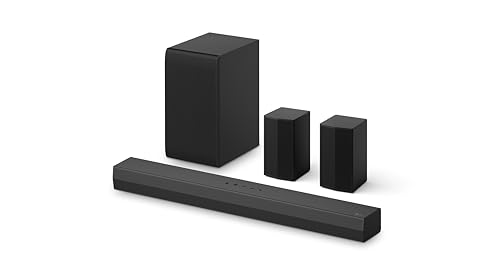
LG S40TR 4.1ch Soundbar with Wireless Subwoofer

With 4.1 channels, wireless rear surround speakers and a wireless subwoofer, this is the most immersive setup on our list at around $200. It's a strong pick if you want a home-theater feel without running speaker wire around the room, and LG TV owners can control it with the TV remote.
Key features:
- Channels: 4.1ch with wireless rear surround speakers
- Subwoofer: Wireless
- Audio: Dolby Audio, AI Sound Pro
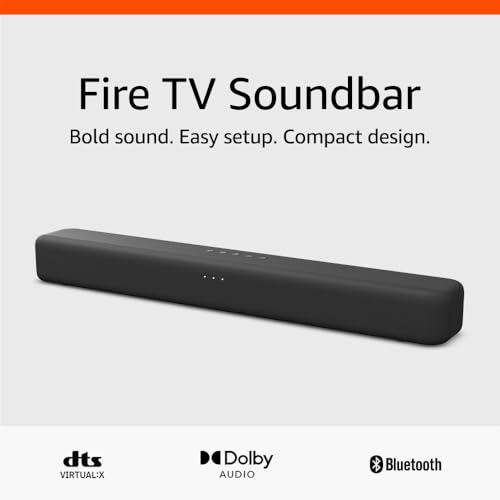
Amazon Fire TV Soundbar with DTS Virtual:X
Built by Amazon specifically to pair with Fire TV devices, this soundbar is the most reviewed option in our list and offers a genuinely simple setup process if you already have a Fire TV in your entertainment center.
Key features:
- Audio: DTS Virtual:X and Dolby Audio support
- Setup: Simplified pairing with Fire TV devices
- Connectivity: Bluetooth, HDMI ARC, optical
Sony S100F 2.0ch Soundbar with Bass Reflex Speaker
Sony is a trusted name in home audio, and this all-in-one soundbar (no separate subwoofer box to place) is the most reviewed pick in this entire roundup by a wide margin, which speaks to how many living rooms it has quietly worked well in.
Key features:
- Design: Single all-in-one bar, no separate subwoofer
- Audio: Bass reflex speaker with integrated tweeter
- Connectivity: Bluetooth, optical, USB
VIZIO 2.1 Soundbar with Dolby Atmos and Wireless Subwoofer
VIZIO packs Dolby Atmos and DTS:X support into a compact 2.1 setup here, which is a rare find at this price point. The wireless subwoofer adds real low-end punch without extra cables running across the room.
Key features:
- Audio: Dolby Atmos and DTS:X support
- Subwoofer: Wireless
- Channels: 2.1
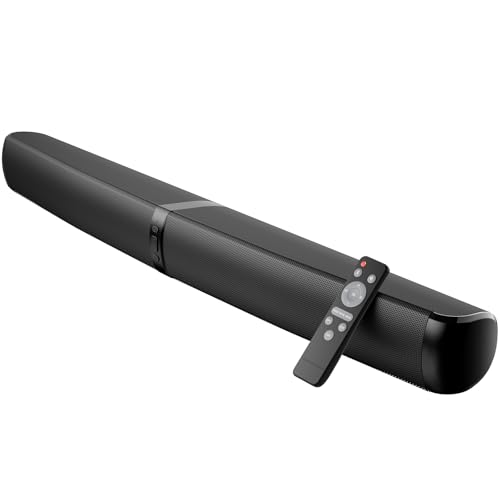
MZEIBO Soundbar with Detachable Design
Rounding out the list, this budget-friendly soundbar has a detachable design that lets you split the two channels apart for a wider stereo image, a neat trick you don't usually see below the $100 mark.
Key features:
- Design: Detachable left/right channels for a wider stereo spread
- Power: 90W output
- Connectivity: Bluetooth, ARC, optical, AUX
How Do Soundbars Work?
Soundbars provide sound in the same way as a standard speaker. A soundbar is basically a one-speaker set up which allows you to boost your television’s inbuilt speaker without investing in a large configuration. Apart from just for your TV, you can use the soundbar to play music from any other compatible devices in your home. The most important part is that most soundbars have an in-built amplifier that allows them to be a one-speaker installation. Soundbars are extremely convenient, they are compact and provide a wide variety of sound and are a great option if you want high-quality sound without taking up a lot of space.
Why Do You Need a Soundbar?
The paper-thin televisions today cannot produce the quality of sound you want from them, which is why soundbars have become must haves for the home entertainment setup in your home. Today, you don’t have to spend a lot to buy a good quality soundbar and you can get a pretty decent one for under $200 and setting it up is also super easy. All you need to do is plug it into your TV and you’re good to go. Today, with TVs becoming thinner, several companies have started manufacturing soundbars and there are a plethora of choices out there.
Types of Soundbars
There are 3 types of soundbars:
Active Soundbar
An active soundbar includes all that you need – speakers, an amplifier, a subwoofer, a processor and connection ports in a single box. It can be placed on the console or be wall mounted.
Passive Soundbar
This requires a separate audio-video receiver for signal processing, amplification and connection ports. The passive soundbar can be kept on the console or you can mount it on the wall.
Soundbase
This is a standalone speaker, which acts as a pedestal for your television and also improves the sound quality. The soundbase is usually placed under the TV on the console.
Soundbars
A soundbar as we have discussed earlier is a compact and convenient solution that can be placed in front of your TV to boost its sound. You can get a soundbar on its own or one with an external subwoofer. Subwoofers produce more depth in the sound in terms of the base and the power. Soundbars can be single bars that are equipped with speakers; however, these days, you have soundbars with various audio options such as surround sound.
Home Theatre Speakers
Home theatre speakers, on the other hand, come in sets and let you have a surround sound setup. You can set up several speakers around the room, which lets you get the sound from all sides. However, home theatre speakers are more expensive, they are more complex to set up and take up more room. You can also choose the kind of surround sound effect you want with home theatre speakers.
Type of Soundbar
As we have already discussed, soundbars are classified on the basis of their design – active and passive soundbars. In active soundbars, the speakers, amplifier, etc. are housed in a single bar, whereas, in a passive soundbar, the amplifiers are outside the unit. Both active and passive soundbars differ in their audio quality and setup process. Active soundbars are easier to install, while passive soundbars offer an excellent way to control the audio. You must decide on the type of soundbar that will work best for you.
Bluetooth Connectivity
Connecting the soundbar is not the only way to connect it, you can also connect the soundbar to your smartphone or tablet. However, for this, your soundbar must be Bluetooth compatible and then you can stream audio directly from your device. So, Bluetooth connectivity is a very important function that you must check for when buying a soundbar.
Subwoofer
If you want a complete experience of all kinds of audio effects, then you should opt for a soundbar with a subwoofer. A subwoofer is an external device that comes along with the soundbar and delivers enhanced sound effects.
Dimensions
Soundbars come in varied shapes and sizes; however, not all of them will fit your television or your stand. So, you must opt for a soundbar that will fit well with your current TV setup.
Installation
Choose a soundbar that is easy to set up. Most of the models available today are designed for easy installation and usually, soundbars do not have many wires or speakers like a regular sound system. Typically, you have only a single cable that will connect the soundbar to your TV or any other device.
Dos
- Ensure that the soundbar is around the same width as your television. This will help to camouflage the soundbar and enable it to integrate with your setup seamlessly.
- Ensure that there is a minimum of 1-meter space between both sidewalls and the soundbar. This will ensure that the sound is reflected and dispersed in a balanced manner.
- Most soundbars do not cover low and mid frequencies very well, so buying a subwoofer along with the soundbar may be a good idea, as this will help to provide a richer and fuller sound.
- Follow the manufacturer’s instructions on mounting the soundbar carefully. A solidly mounted soundbar will provide better sound.
Don’ts
- Subwoofers and speakers produce better sound when they are in the open, so don’t place your soundbar in a cupboard or closed shelf.
- Before you buy a soundbar, don’t forget to try it out at a local store, even if you plan to buy it online.
FAQs
Can I use a TV remote to control the soundbar after connecting it to the TV?
To be able to use your TV remote to control the soundbar, your TV and soundbar must be synced and usually, it is simpler and more cost effective to have 2 different remotes.
If the soundbar is mounted on the wall, will the sound be better?
Mounting the soundbar on the wall does not necessarily guarantee better sound. Ensure that there is sufficient space around the soundbar and make sure that the speakers are not covered. As long as there is clear space in front of the speakers, there will not be a difference in the sound if your soundbar is on the cabinet or shelf or mounted on the wall.
Can the soundbar be installed vertically?
While the soundbar can be installed vertically, you will lose the surround sound design that you get by mounting the soundbar horizontally.
Can I add speakers to my soundbar?
Some of the newer models of soundbars come along with additional speakers that are part of the system, which makes it closer to the sound of a home theatre. The only other way in which you can add wireless speakers is if the soundbar has a multi-room capability and this is a great option if would want a multi-room audio system in your home.
Conclusion
Now, you don’t have to spend a lot of money on a full-fledged sound system to enjoy a great audio experience on your TV. Soundbars have now completely revolutionized sound systems and shrunk them into sleek and compact devices that offer the same incredible sound effect. Buying a soundbar has many benefits and the soundbars that we have reviewed in our article are known for their reliable performance. So, before buying a soundbar for your home, do check out the soundbars in our reviews before deciding on the best one for your TV.