
Best Card Reader for Game Cameras in 2026: Which Type Is Right for You?
Disclosure: We may earn a commission when you buy through links on this page, at no extra cost to you. As an Amazon Associate I earn from qualifying purchases. Learn more

Choose the best card reader for game cameras by comparing phone adapters, USB readers and viewers on speed, compatibility and price.
Pulling a memory card from a game camera should be the easy part of your scouting routine. Instead, you face phone adapters, USB readers, viewers with built in screens, and wireless options, all promising fast access to your photos and video. This guide compares each type clearly so you can match the reader to how you actually check cameras in the field and at home. Choosing a best card reader for game cameras option comes down to your phone, your card format, and how much sorting you do before heading back out.
The product table gathers current readers in one place. Note which devices you already own, because the right reader works with your current phone or laptop.


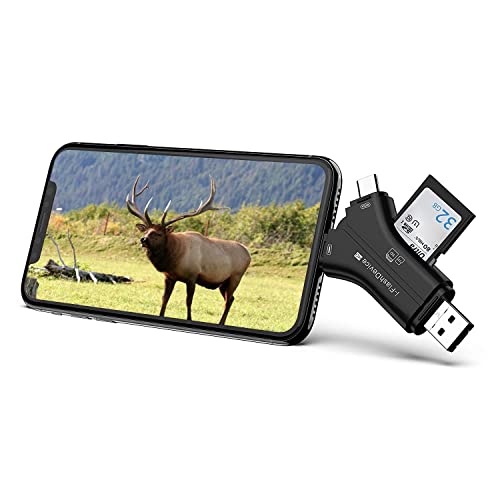


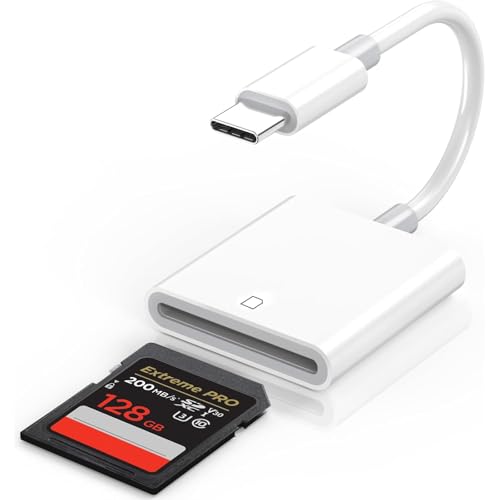

Types of Card Readers Compared
Four broad types cover almost every game camera setup. Simple USB readers plug into a laptop and move files quickly. Phone adapters connect a card straight to your handset so you can view shots beside the camera. Standalone viewers add their own screen and controls. Wireless and app based readers send files without removing the card at all. Prices overlap a lot, from under $20 for a basic adapter to around $60 or more for a viewer with a large screen, so type and workflow matter more than price alone.
Phone Adapters for Checking Shots in the Field
A phone adapter has a card slot on one end and a phone connector on the other, either USB C or a Lightning style plug. You insert the card, open your photo app or a file viewer, and scroll through images on a screen you already carry. The big strength is immediacy. You can confirm a camera is aimed well, delete a card full of wind blown grass shots, and share one good photo right from the stand.
The limits are compatibility and patience. Your phone must support the adapter and the file format your camera writes, and large video files can load slowly on older handsets. Battery drain is real when you review hundreds of clips. This type suits hunters and land managers who check many cameras on foot and want answers on the spot, without carrying extra gear.
USB Readers for Laptop Transfers at Home
A USB reader plugs into a laptop or desktop and treats your memory card like a small drive. Transfer speeds are usually the fastest of any type, especially with USB 3.0 or USB C connections, so backing up a full season of video takes minutes rather than an hour. Most models read both full size SD cards and micro SD cards, which covers nearly every game camera sold.
The trade off is that you see nothing until you get home. If a camera was pointed at the ground for two weeks, you learn about it late. This type suits you if you swap cards at each camera, bring the used cards home, and prefer to sort, rename, and archive files on a big screen with a real keyboard. It is also the simplest backup tool, since copying to a laptop and an external drive gives you two copies of every file.
Standalone Viewers With a Built In Screen
A standalone viewer is a small device with its own screen, buttons, and battery. You slide the card in and browse photos and video without a phone or laptop. Screens range from small panels that confirm a shot exists to larger ones that let you judge antler detail. Many viewers also play video with sound and let you delete single files or format a card in the device.
Viewers cost more and add one more item to charge and carry. Screen quality varies, and a dim panel is hard to read in bright sun. This type suits users who do not want to depend on a phone, who share cameras with family members of different tech comfort levels, or who check cameras from a truck or cabin with no computer nearby. If you often hand the viewer to a hunting partner so both of you can review the same card, the shared screen earns its place.
Wireless and App Based Readers
Wireless readers either create a small local network your phone joins or work with cameras that send files through an app. The appeal is leaving the card in place and avoiding worn card slots and lost cards. Some setups let you change camera settings while you transfer, which saves a second trip into the settings menu at the tree.
Speed is the weak point. Wireless transfers of large video files can be slow, and range is short, so you still visit each camera. This type suits a few cameras near a house or cabin where convenience beats speed.
Phone Adapters vs USB Readers: Which Should You Choose?
These two types cover most buyers, so compare them on five points. For viewing speed, the phone adapter wins because you see photos within seconds of pulling the card. For transfer speed to permanent storage, the USB reader wins by a wide margin. For cost, both start under $25, though dual slot USB readers with metal bodies cost a bit more. For durability, a short USB reader with no cable survives pocket and pack abuse better than a thin adapter cable. For battery impact, the USB reader uses your laptop, while the adapter drains your phone.
Choose the phone adapter if your main question at each camera is simple: is it working, and did anything visit? Choose the USB reader if your main task is archiving and studying many files. Many experienced users own both, using the adapter for quick checks and the reader for end of season backups. If you also run trail cameras for security or research, see our guide to the best card reader for trail cameras for workflow ideas that carry over well.
How to Choose the Right Card Reader
Features That Matter for Game Cameras
Game cameras write many small photo files and fewer large video files, often at night and in bursts. Your reader needs a slot that matches your card, support for the file system your camera uses, and an app or program that shows video without extra downloads. Look for stated support for SDXC cards, since most modern cameras use cards from 32 GB up to 256 GB or more. A reader limited to older SDHC cards may refuse a large card even though the slot looks identical. Check the fine print for capacity limits before you buy, and keep your camera firmware current so file formats stay standard. Pairing the reader with the right card matters too, and our guide to the best sd card for game cameras explains speeds and capacities in plain terms.
Connectors and Compatibility
Start with the port on the device you will use most. Newer phones and laptops use USB C, older Apple phones use Lightning, and many desktops still offer USB A ports. Adapters that include two connectors solve mixed households but add bulk. Next, confirm your phone operating system allows external storage access and can display your camera video format, which is usually MP4 or AVI. If your camera records in AVI and your phone will not play it, a viewer or laptop reader is the safer choice. Finally, think about cases and mounts. A thick phone case can block a short adapter plug, so a short cable style adapter may seat more reliably in the field.
Battery Life and Charging
Readers draw power in different ways. Phone adapters and USB readers borrow power from the host device, so a long review session can pull a noticeable share from a phone that you also need for navigation and calls. Carry a small power bank on full day camera runs. Standalone viewers have their own rechargeable batteries, often good for several hours of browsing, and most charge over USB C. Charge a viewer the night before a run, just as you would the camera batteries. A viewer that dies mid route leaves you guessing, so a model with a simple battery gauge is worth having.
Transfer Speed and File Handling
Speed ratings only help if the whole chain supports them. A fast reader cannot move files faster than a slow card allows, and an old USB 2.0 port caps even quick gear. For photo only checks, almost any reader feels fine. For 4K video or long video clips, look for USB 3.0 or better and a card with a strong write and read rating. File handling matters as much as raw speed. A good setup lets you select a date range, copy whole folders, and safely eject the card. Always eject before pulling the card out, because removing it mid write is the most common way users corrupt a card and lose a month of scouting data.
Card Readers for Specific Needs
SD Card Readers for Game Cameras
An SD card reader for game cameras means a reader built around the SD slot itself rather than a screen or wireless link. For this specific need, judge three things: a slot that grips both SD and micro SD cards without a loose adapter sleeve, honest support for large SDXC capacities, and a connector that matches your main device. A plain, well made SD reader is often the most reliable tool in your pack, and it pairs naturally with the cameras covered in our guide to the best game cameras.
If your cameras send photos to your phone on their own, keep a reader as a backup, because a card pull is the fastest way to recover files when a signal drops. Readers for this wider family overlap with the options in our guide to the best sd card reader for trail cameras.
Care and Maintenance Tips
Treat the reader and your cards as one system. Keep cards in a hard case, not loose in a pocket with keys and grit, and keep the reader slot covered so dust stays out. Format cards in the camera after you back up the files, because cameras write their own folder structure most reliably. Label each card with the camera location using a fine marker on the label side. That one habit saves real time when three cards come home in the same pocket. Retire cards that produce repeated errors, since a failing card costs far more in lost photos than a replacement costs in dollars.
FAQs
What features matter most in card readers for game cameras?
Card fit, capacity support, and connector match matter most. Confirm the reader accepts your SD or micro SD cards at their full capacity, plugs into your phone or laptop without extra adapters, and plays your camera video format. A rugged body and a cap or case for the slot are useful extras for field use in dust and light rain.
Is a smartphone enough instead of a card reader?
A smartphone alone is not enough, because most phones have no SD slot. You still need an adapter to connect the card, or a camera that sends files wirelessly. Once connected, a modern phone screen is excellent for judging photos. The limits are storage space on the phone and slower handling of very large video files.
Which type of card reader is better for low light photos?
The reader does not change your night photos, but the screen you judge them on does. A larger viewer screen or a laptop shows infrared images with more detail than a small viewer panel. Brightness control helps too, since night shots look washed out on a screen set too bright. Judge borderline photos at home before deleting them.
How much should I spend on my first card reader?
About $15 to $30 covers a solid phone adapter or USB reader with the right connector and large card support. Spend more, around $40 to $70, only when you want a standalone viewer with a bigger screen. Very cheap no name readers can work, but flimsy slots and vague capacity limits make them a poor match for cards holding a full season of photos.
What specs matter most for beginners choosing a card reader?
Beginners should check four specs: card type, maximum supported capacity, connector type, and transfer standard such as USB 3.0. If all four match your camera and your phone or laptop, the reader will work. Skip extra features like built in storage until your routine is set, and spend the savings on a spare quality memory card instead.
The Bottom Line
Match the type to your routine first: phone adapter for instant field checks, USB reader for fast home archiving, viewer for phone free browsing, and wireless for a few nearby cameras. Then confirm card capacity support and the right connector. The product table pulls those choices together so you can compare at a glance. Pick the best card reader for game cameras for the way you already scout, and your card checks will stop being the slow part of the day.


