Best Cameras for Synology in 2026: Which Type Is Right for You?
Disclosure: We may earn a commission when you buy through links on this page, at no extra cost to you. As an Amazon Associate I earn from qualifying purchases. Learn more

Compare camera types for a Synology NAS by compatibility, resolution, night vision and power, with a clear checklist for home and business recording.
Many cameras record well on their own yet never appear inside Surveillance Station, which makes choosing one confusing. The best cameras for synology setups start with confirmed compatibility, then match resolution, power and placement to each room and yard. Use the comparison table below to compare types once you know which factors matter most.
Think first about where each camera will watch, how it will connect, and how long recordings stay kept. A wired driveway camera and a wireless hallway camera place very different demands on your network and drives.




Who Should Buy Which Camera for a Synology NAS?
Your group below sets the priorities for camera count, drive space and installation effort.
Homeowners Who Want Local Recording Without a Subscription
You want video on your own drives, with phone alerts and no monthly plan for basic recording. Start with two to four fixed cameras for doors and the driveway. Choose wired models where cable is easy to run, add one wireless model where drilling is not practical, and value clear night images over very high resolution.
Small Business Owners Watching Several Areas at Once
You need tills, entrances, stock rooms and parking areas covered at once, often for long hours. Favor wired cameras for steady recording, and choose a NAS with enough drive bays for weeks of footage. Consistent models simplify settings and training.
Owners of Remote Property and Outbuildings
You watch a barn, a rental, a gate or a second home you cannot visit each day, so reliability matters more than extra features. Choose weatherproof housings and strong night range. Use a wired run where you can, or place a wireless camera close to the router.
Key Features to Compare
Compare in this order, because a camera that Surveillance Station cannot add cannot use its other strengths.
Surveillance Station Compatibility and Protocols
Check the exact model on the Synology support list before you buy, and confirm which features it supports. Some add with full native support, while others connect through ONVIF or a generic RTSP stream with fewer controls. Native support may allow motion settings, audio or camera movement inside Surveillance Station, while a basic stream may give live view and recording only. For network models in depth, see our guide to the best ip cameras for synology.
Resolution, Sensor Size and Field of View
Resolution sets how much detail you see when you enlarge a recorded frame. A 4K video feed can show faces and plates farther away, but it fills drives faster. A 2K or 1080p feed often suits a porch or small room. A wide view of about 100 to 130 degrees covers a yard with fewer cameras, while a narrower view concentrates detail on a door. Larger sensors handle dim scenes more cleanly at the same resolution.
Night Vision and Low Light Performance
Most cameras use infrared light after dark, giving black and white images at a stated range of about 50 to 100 feet for many home models. Some keep color in low light with a sensitive sensor, though they still need light from a porch lamp or street light. Match range to your longest view, and avoid aiming at a nearby reflective wall, which can wash out the image center.
Power and Connection Options for Synology Setups
Wired cameras powered over the network cable, often called PoE, carry power and video on one cable and record most steadily. Plug in wireless cameras suit rooms where cable is hard to reach, but depend on signal strength through walls. Battery models are easiest to place and hardest to keep recording all day, since frequent motion drains them sooner. Test signal at the exact mounting spot first.
Motion Detection, Audio and Smart Alerts
Detection can run on the camera or inside Surveillance Station, and the support listing tells you which events your model can send. Person and vehicle detection cuts false alerts from trees and shadows, which makes a busy street view usable. A built in microphone adds sound, and a speaker adds two way talk through the DS Cam app on supported models. Check local rules on audio recording and on filming beyond your property first.
Lens Choice, Optical Zoom and Camera Movement
A fixed lens is simple and usually best for a door or a small room. A varifocal lens lets you adjust the view during installation, which helps when the mount sits farther from the target than expected. Optical zoom enlarges without the softness of digital zoom, and suits long driveways and large halls. Pan and tilt models cover a wide area from one point, but look only one way at a time, so fixed cameras guard key doors better.
Picking the Right Camera Type for Different Synology Uses
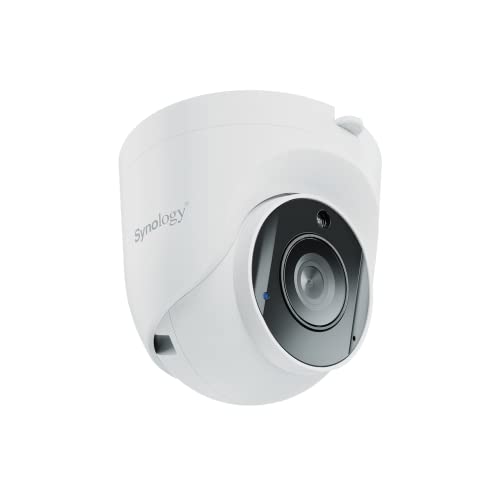
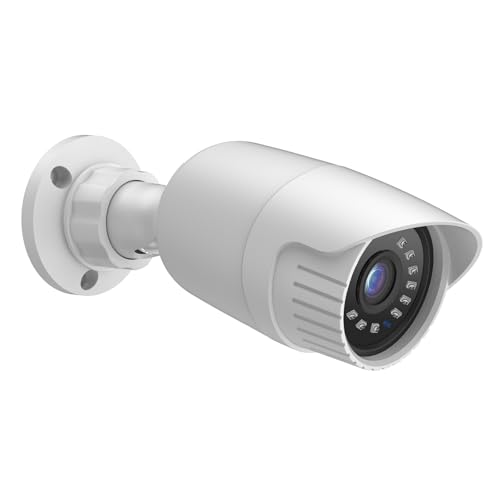
Shape comes before brand. Bullet cameras are easy to aim and visible as a deterrent, turret and dome cameras sit close to a ceiling and resist tampering, and pan and tilt cameras suit open indoor spaces. Wired outdoor models cost about $60 to $250, wireless indoor models about $50 to $200, and motorized outdoor models about $150 to $600. If image detail matters most, see our guide to the best quality cameras.
Best Security Cameras for Synology: Which Type Works Best
For security use, wired turret or bullet cameras are usually strongest, since they record around the clock and keep a fixed view of an entry point. Look for a weather rating such as IP66 or IP67 outdoors, night range covering the full approach, and event detection that Surveillance Station can receive from that model.
Best Wireless Security Cameras for Synology
Wireless models work best indoors or under a covered porch, close to the router for a steady signal on the 2.4 GHz band most models use. Choose a plug in model for continuous recording, and reserve battery models for low traffic spots such as a side gate. Confirm the model can stream continuously to a NAS, since some battery cameras only wake for short cloud clips.
How to Set Up Cameras with a Synology NAS
Update Surveillance Station first, then give each camera a fixed network address so the NAS finds it after a restart. Add one camera at a time, test live view and recording, and only then mount it. For the software side in detail, see our guide to the best cameras for synology surveillance station.
Plan storage before you add a second camera. One camera recording all day at 1080p may use about 15 to 30 GB per day, depending on bit rate and scene activity, and higher resolution uses more. Set a retention limit per camera, and note that most NAS units include two camera licenses, with an extra license needed for each camera beyond that number.
Common Mistakes to Avoid
- Buying a camera that is not on the Synology support list leaves you with a limited stream or no connection at all.
- Choosing a battery camera for a busy entrance leads to missed events once frequent motion drains the charge.
- Mounting a camera too high makes faces small and hard to identify in recorded footage.
- Ignoring drive space when you raise resolution fills the NAS early and overwrites your oldest recordings sooner.
- Placing a wireless camera at the edge of router range causes dropouts that break recordings into short gaps.
- Recording audio or filming a neighbor property without checking local rules can create legal trouble for you.
Care and Maintenance for Cameras on a Synology System
Clean each lens with a soft lens cloth every few months, and more often near a road or coast where dust and salt build up. Clear spider webs from the housing, since webs near the lens glow under infrared light and trigger false alerts. Check mounts and cable entries yearly for looseness and water entry.
Update camera firmware and Surveillance Station when updates appear, and test playback afterward. Export any important clip before it reaches your retention limit, because the system deletes the oldest footage automatically.
Frequently Asked Questions
Do all IP cameras work with Synology Surveillance Station?
No, not all IP cameras work fully with Surveillance Station. Listed models connect with the widest feature set, while many other network cameras add through ONVIF with reduced controls. The maker product page often states ONVIF conformance and profiles.
How many cameras can one Synology NAS support?
The number depends on your NAS model, its processor and the total bit rate of your cameras. Small home units handle a handful, while larger units are rated for dozens. Lowering frame rate on overview cameras helps fit more cameras on a modest unit, since a wide yard view changes slowly.
How much NAS storage does continuous recording to a Synology NAS need?
Storage needs change with resolution, frame rate and scene activity. A quiet hallway uses far less space than a street view with constant movement at the same settings. Use the storage estimate inside Surveillance Station before you buy drives, and leave spare room so a busy week does not shorten retention for all cameras at once.
Can wireless cameras record to a Synology NAS all day?
Yes, plug in wireless cameras can record all day if the model allows continuous streaming and the signal holds. Battery models differ, because most sleep between events to save charge. For all day recording without cable, a plug in wireless camera near an outlet is safer than a battery model on a small solar panel.
Which camera type is better for low light recording to a Synology NAS?
A camera with a larger sensor and an infrared range matched to your scene is usually better in low light. Turret and bullet models often carry stronger infrared lights than small indoor models. Placement helps too, since aiming away from a bright porch light avoids glare that darkens the rest of the frame.
The Bottom Line
Start with the support list, then choose by connection, night range and storage cost rather than resolution alone. Wired fixed cameras cover most doors and driveways, wireless plug in models fill indoor gaps, and motorized models suit large spaces. Check your shortlist against the product table above.
When you compare best cameras for synology choices with those points in mind, the right type for each spot becomes clear, and your NAS records every view you planned.