
Best Cameras for Quadcopters: A 2026 Checklist for Aerial Video
Disclosure: We may earn a commission when you buy through links on this page, at no extra cost to you. As an Amazon Associate I earn from qualifying purchases. Learn more

Compare cameras for quadcopters by weight, sensor size, gimbal fit and video quality, with a simple checklist for stable aerial filming and stills.
A camera changes what your quadcopter can carry, how long it stays in the air, and how steady your footage looks. The best cameras for quadcopters match your frame, your payload limit, and the flying you do most. Use the comparison table below to check weight, sensor, and mounts first.
This guide uses a checklist built for flight. You will see how weight, stabilization, lens angle, power, and storage work together in the air.


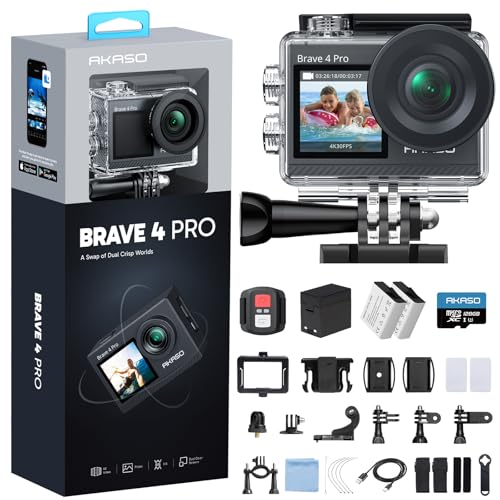


Who Should Buy a Camera for a Quadcopter?
Start with the flying you actually do, because the right camera for slow scenic work can be wrong for fast flying.
Creators Filming Landscapes and Travel from the Air
You fly slowly, frame a scene, and care most about clean detail and smooth motion. Choose a larger sensor, a three axis gimbal fit, and 4K video with a choice of frame rates. Accept a little more weight if your frame lifts it with ease, because steady footage gains more from stabilization than from a small saving in grams.
FPV Pilots Who Fly for Speed and Control
You fly through gates, trees, and tight lines, and you need a clear live view with very low delay. Choose a light camera with a wide lens, a strong case, and a feed that stays stable as the signal weakens. Weight, delay, and crash strength matter more than recording quality here.
Owners Adding a Camera to a Bare Quadcopter Frame
You own a frame that came without a camera, and you want recording without a full rebuild. Choose a camera with a common mount, low power draw, and a body that fits between your frame plates. Measure the nose and check the connector type before you order, because many returns come from a camera with no room to sit flat.
Key Features to Compare
Compare these factors in order, because a camera that fails on weight or mounting will not help you no matter how strong its sensor looks. Use this order to rank the best cameras for quadcopters for your frame.
Weight and Payload Limit
Every gram you add shortens flight time and makes the motors work harder. Weigh the camera with mount, cable, and card, then compare that total with the maker guide for your frame and keep a margin for wind. A small quadcopter may lift a camera and still fly poorly, with slow climbs and a hot battery. If two cameras record alike, choose the lighter one, because lighter setups respond faster.
Sensor Size and Clarity From the Air
A larger sensor gathers more light, so it holds detail in shadow and stays cleaner at dawn and dusk. A one inch sensor will usually beat a much smaller sensor in dynamic range, even at the same megapixel count. Megapixels alone tell you little, since bit rate and lens quality shape the image more.
Stabilization and Gimbal Fit
Stabilization decides whether footage looks calm or shaky, because a quadcopter vibrates and tilts with wind and throttle. A three axis gimbal removes the most motion and suits slow scenic work, but it adds weight and needs room to move. Electronic stabilization crops the image a little and suits light action style cameras. Check that the mount can tilt to your angle, since a fixed level mount limits low passes and top down shots.
Lens, Field of View and Focus
Most cameras in this class use a fixed wide lens, so you choose the view when you buy rather than zooming in flight. A very wide view suits fast flying and tight spaces, while a narrower view makes distant subjects look larger. Most have no true optical zoom, and digital zoom crops the picture and loses detail. Focus is often fixed for distance, while autofocus can hunt in low light, so fixed focus is often safer.
Battery, Power and Recording Time
Some cameras run on their own battery, and others draw power from the flight battery through a cable. A separate battery keeps wiring simple but adds weight and one more pack to charge. Power from the quadcopter saves that weight, yet a cable fault can stop recording. Check recording time per charge in your planned mode, because 4K at a high frame rate drains a small pack far faster than 1080p.
Mounts, Durability and Weather Sealing
A camera only helps if it stays attached and survives normal knocks. Common mounts include an action camera tab, a screw mount, and a slide in tray for a gimbal, so confirm that your frame or adapter matches. A sealed case shrugs off light rain and dust, while an open board camera needs dry weather. A replaceable lens cover saves money, because covers take the first hit in a landing.
Camera Types for Quadcopters Compared
Cameras for this use fall into three broad types. Built in systems arrive tuned to the frame, with gimbal, app, and transmitter working together. Separate action style cameras record on their own and move between frames. Small FPV cameras put the live feed first, so they weigh little and respond fast. If you shoot stills too, see our guide to the best cameras for photography for ground based choices.
Fit matters as much as type. Measure the nose, check the cable run, and confirm the propellers stay out of the frame at your tilt angle. Do a short hover test in calm air first. Our guide to the best digital cameras explains sensor and lens terms in plain language.
- Does total weight with mount and card stay well under the payload guide?
- Does the mount match your frame, gimbal, or adapter without forcing an angle?
- Can you start recording easily before takeoff, with gloves or cold hands?
- Does the live view reach your screen or goggles with low delay?
- Is your memory card fast enough for the video mode you use most?
- Can you power the camera for a full session on one charge plan?
- Is the lens protected or easy to replace after a rough landing?
Matching a Camera to Your Kind of Flying
Two common goals call for different checks, even when cameras look alike in a listing.
Best 4K Cameras for Quadcopter: What to Check Before You Buy
When you judge the best 4k cameras for quadcopter recording, look past the 4K label to frame rate, bit rate, and heat. A camera that records 4K at 60 frames per second gives smoother motion and room to slow footage down, but it uses more power and card space. Check that it holds that mode for a full flight without stopping to cool.
Best Filming Cameras for Quadcopters: What Smooth Footage Needs
The best filming cameras for quadcopters combine steady stabilization, a natural field of view, and color you can grade without breaking the image. Choose a flatter color option if you edit, or standard color if you share clips as they are. Sound matters little in the air, so judge by motion and light handling.
Common Mistakes to Avoid
- Buying a camera that is too heavy for the frame leaves short flights and hot motors.
- Ignoring propeller shadows ruins wide shots with dark flicker at the edges.
- Using a slow memory card causes recording to stop or files to corrupt.
- Mounting a camera with a loose mount adds vibration blur no setting can remove.
- Flying in rain with an unsealed camera risks water damage to lens and board.
- Chasing top resolution while ignoring stabilization gives sharp footage that is hard to watch.
Protecting a Drone Camera From Crashes and Dust
Clean the lens with a soft lens cloth after each session, because dust and bug spots bake on in a warm car. Store the camera in a dry padded case with the lens cover on. If you are new to this setup, see our guide to the best starter cameras for simple habits that transfer well.
Check mount screws and the case for cracks after any hard landing, and replace a bent mount before the next flight. Format the memory card in the camera itself, and copy files off soon after you fly.
FAQs
What features matter most in cameras for quadcopters?
Weight, mount fit, and stabilization matter most, because a camera you cannot lift or hold steady will not record well at any resolution. Weigh your full setup on a kitchen scale, mount and card included. Once weight and fit pass, compare sensor size and frame rates.
Can you mount a smartphone on a quadcopter instead of a dedicated camera?
You can on a large frame with a proper clamp, but a smartphone is heavy, wide, and easy to damage in a landing. Its screen is hard to read in sun, and an alert can interrupt recording. A dedicated camera is lighter and mounts firmly, so it suits regular flying better.
How much should you spend on a first camera for a quadcopter?
Most first time buyers do well at about $100 to $250, which covers a light camera with solid 4K video and a replaceable lens cover. Shoppers looking for the best cameras for quadcopter flying on a tight budget should fund the mount and card first. Spend more only for a larger sensor or a gimbal.
Which camera setup is better for low light flights with a quadcopter?
A larger sensor with a lower frame rate is better, because each frame gets more time to gather light and the image stays cleaner. Use 24 or 30 frames per second at dusk instead of 60, and fly slowly. Check local rules before flying near dark, since many areas limit flight after sunset.
How fast does a memory card need to be for 4K quadcopter video?
A card rated for fast sustained writing is essential, because 4K video writes a steady stream that a slow card cannot match. Look for a microSD card rated U3 or V30 or higher, and size it for your whole session. Test your longest planned clip at home before a trip.
The Bottom Line
Put weight and mount fit first, then choose stabilization and sensor size for the way you fly. A light, firm, steady setup will beat a heavy high spec setup. Use the product table above to confirm weight and mounts before you order.
When you judge best cameras for quadcopters by that order, the right choice becomes clear. Pick the simplest setup that lifts easily and records smoothly.


