
Best Cameras for Daycare in 2026: Matching the Right Model to Your Routine
Disclosure: We may earn a commission when you buy through links on this page, at no extra cost to you. As an Amazon Associate I earn from qualifying purchases. Learn more

Not all cameras fit every routine. See which best cameras for daycare match how you actually use them, what features to prioritize, and what to skip.
There is no single camera that suits every daycare room, because a toddler classroom, a preschool playground and a mixed age home program all move at a different pace. The best cameras for daycare are the ones your staff will actually pick up, aim quickly and share from with confidence. Use the comparison table below to match camera type, handling and price to your daily routine.
Think first about the moments you record most. Most programs need clear photos of activities, art projects and first steps for family updates, plus short clips from songs and outdoor play. A camera that is brilliant for posed portraits may be slow for a child who never sits still, so the sections below start with your routine and only then turn to specs.



Who Should Buy Which Cameras for Daycare?
Choose by who holds the camera and how many children are in front of it.
Daycare Teachers Documenting Activities and Milestones
You need speed and simplicity while you supervise the room. Choose a compact camera with a strong auto mode, fast startup and a screen you can read at arm length. A moderate zoom lets you capture a child across the rug without leaving your group. Prioritize a secure grip, because your other hand often holds a book, a cup or a small hand.
Home Daycare Providers Working Alone With Small Groups
You switch between cooking, crafts and outdoor play without another adult to spare. Choose a light, tough camera that survives a knock from a table edge and wipes clean after sticky fingers touch it. Simple controls matter more than deep menus, and a battery that lasts the full day saves you hunting for a charger at pickup time. A wrist strap keeps the camera reachable yet off the floor.
Center Directors Equipping Several Classrooms at Once
You need consistency more than standout specs. Choose the same easy model for each room so any teacher can swap rooms and shoot without learning new menus. Look for shared chargers, labeled memory cards and a simple routine for moving photos to one secure folder. Several modest cameras usually serve families better than one advanced camera that only one teacher enjoys using.
Key Features to Compare
Compare each feature by asking how it performs at child height, in room light and during a moment that lasts two seconds.
Features That Matter Most in a Busy Daycare Room
In a daycare room a camera gets bumped, grabbed and set down in paint and snack crumbs, so a sturdy body and a protected lens matter as much as image quality. Choose controls a substitute teacher can learn in minutes and no loose lens cap that can become a hazard. Keep batteries and memory cards away from children, because if a child swallows a battery or a small card, you should seek emergency medical help at once and then talk with their clinician about any further care.
Sensor Size and Clean Indoor Images
A larger sensor usually gathers more light and holds detail better indoors, while a very small sensor can look grainy when you crop a group shot. Many rooms do well with a one inch sensor in a compact body, which balances clean images with a camera teachers will carry. APS C and larger sensors give finer detail, but bodies and lenses grow bigger and cost more. Megapixels alone tell you little, so judge sensor size together with lens quality.
Autofocus and Image Stabilization for Moving Children
Children turn, run and duck without warning, so autofocus that tracks faces and eyes saves more photos than any portrait setting. Look for face detection, a burst mode for playground action and a shutter that responds without a long pause. Image stabilization steadies your hands when you shoot while standing or kneeling, which keeps faces in group photos readable. If a camera needs several taps before it focuses, your moment is already gone.
Video Capabilities for Short Updates to Families
Short clips show songs, first steps and playground games in a way still photos cannot, so choose clear 4K video or clean full HD if your sharing system shrinks files anyway. A microphone that picks up a small voice over room noise matters more than long record times, because most updates run under a minute. Look for a record button you can find by touch, so you keep your eyes on the children.
Low Light Performance in Nap Rooms and Indoor Play Spaces
Much daycare life happens away from bright windows, in nap rooms, halls and indoor play spaces on rainy days. A bright lens, described by a low f stop number, lets the camera use faster shutter speeds and lower ISO settings, which means less blur and less grain. Sensor size helps here, but the lens decides much of the result. Avoid a harsh flash for resting children, because soft room light looks calmer and disturbs the room less.
Choosing the Right Camera Type for Your Daycare Routine
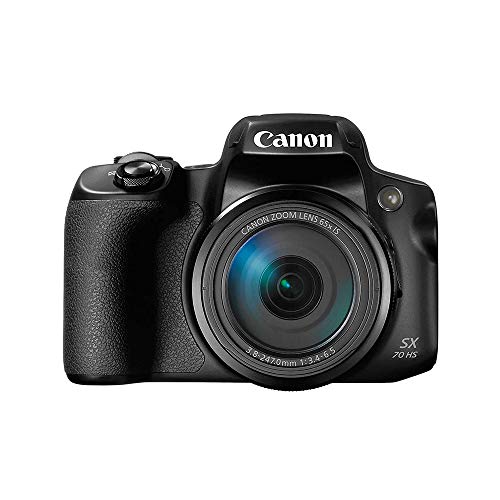
Point and shoot compacts suit most rooms. They start fast, fit in an apron pocket and ask little of a busy teacher, and tougher weatherproof versions suit sand, water play and light rain. Their zoom gives useful magnification from the edge of the yard, so you can frame a child on a climber without crossing the play space. For more camera types, see our guide to the best digital cameras.
Interchangeable lens cameras suit a program that takes milestone portraits and group photos for displays. They offer larger sensors and lens choices, but they cost more, need more training and feel bulky during active supervision. Vlogging cameras focus on filming the person holding them, so their creator tools rarely earn their price in a classroom. If portraits are a priority, see our guide to the best cameras for photography for background on lens choice.
A camera for photos is not a room monitoring system. If your goal is watching a room for safety checks, see our guide to the best security cameras for daycare, because fixed monitoring cameras follow different rules and placement needs. If build quality is your main worry, see our guide to the best quality cameras for context on solid construction.
That is why comparing best cameras for daycare by type first makes the spec sheet easier to read.
Common Mistakes to Avoid
These errors cost money or leave you with photos families cannot use.
- Choosing the highest megapixel count leaves you with a slow camera that still blurs every moving child.
- Buying one advanced camera for a whole center means most rooms go without photos when that camera is busy elsewhere.
- Ignoring battery life leaves the camera dead before afternoon pickup, when many family moments happen.
- Storing photos on loose unlabeled cards makes it easy to mix up children and share the wrong image with a family.
- Leaving straps, batteries and small accessories within reach of toddlers creates a safety risk and a damaged camera.
Care and Maintenance for Daycare Cameras
Wipe the lens with a soft lens cloth, never your shirt, because grit on fabric can scratch the glass and leave marks on every photo. Wipe the body after crafts and meals, and keep food away from the charging area. Check the strap each week, because a worn strap often fails without warning.
Carry a charged spare battery and a spare card, and store the camera in a dry, padded bag on a high shelf that children cannot reach. Charge batteries in a staff only area, download photos on a set schedule and clear cards only after the copies are safe.
Cameras for Daycare: Your Questions Answered
What features matter most in a camera for daycare photo sharing?
Fast autofocus, simple auto controls and good indoor image quality matter most for daycare photo sharing. Add one point the spec sheet rarely shows: build sharing into your routine. Check each child photo permission before you send an image, name files by date and room, and keep a short log so families receive updates evenly.
Is a smartphone enough instead of a dedicated camera for daycare?
Yes, a smartphone can be enough for a very small program, but a dedicated camera often works better across a full center. Phones get pulled away for calls and messages, and personal devices raise harder questions about where photos of children live. A shared classroom camera keeps images on program equipment and under one clear policy.
How much should a daycare spend on its first classroom camera?
A daycare should expect to spend about $150 to $400 for a solid first classroom camera, with tougher models often costing more. Put some budget aside for a spare battery, cards and a padded bag, because those small items decide whether the camera is ready each morning. One reliable camera per room usually beats one costly camera shared across a building.
Which camera type is better for low light in daycare classrooms?
A compact camera with a one inch sensor and a bright lens is usually better for low light in daycare classrooms than a basic compact with a tiny sensor. For evening events, add support rather than raising ISO alone: rest your elbows on a table, move closer to a window and shoot during a quiet song instead of during active play.
What camera specs matter most for daycare staff with little photography experience?
Startup speed, face detection and a clear auto mode matter most for daycare staff with little photography experience. Skip deep manual controls at first and learn two habits instead: tap the screen on the child face and hold the camera still for a breath after you press the shutter. Those habits improve more photos than a long spec list during the first month.
Final Thoughts
Start with your routine, then choose the camera type, then compare sensor, focus and light handling in that order. One simple camera in every room, used daily and stored safely, will give families a fuller picture than a single advanced model. Use the product table above to check type, zoom and price.
When you judge best cameras for daycare by the moments you need to capture, the right choice becomes practical rather than impressive. Pick the camera your busiest teacher can use with confidence, and let the photos, not the spec sheet, prove the decision.


