
Best Call Center Headsets for 2026: Budget, Midrange, and Premium Bands
Disclosure: We may earn a commission when you buy through links on this page, at no extra cost to you. As an Amazon Associate I earn from qualifying purchases. Learn more

Compare the best call center headsets across three budget bands, with plain advice on microphones, full shift comfort, connections, and long term costs.
Call center headsets run from about $25 wired sets to about $300 wireless ones, and the gap is not about fashion. This guide to the best call center headsets sorts the shelf into three budget bands and shows where the money actually changes a workday: the microphone, the fit across a full shift, and the connection to your phone system. The comparison table below lays the bands side by side so you can start with the price line that matches your team.
A headset is the one tool an agent touches on every call, so small gains in clarity and comfort repeat hundreds of times a week. Read the bands first to set your ceiling, then read the features to see which ones earn their cost inside that ceiling. Match both to the desk phones and computers you already run, because the right plug matters more than any single feature.


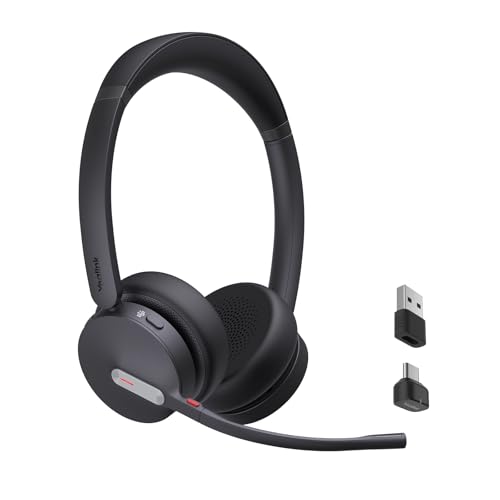


What Your Money Gets You at Each Price Band
Starter Band: Around $25 to $60
The starter band is wired, simple, and honest about its limits. Expect a basic boom microphone, light padding, and a fixed cable ending in a USB plug or a standard jack. Sound is clear enough for ordinary calls, and the build suits training rooms, spare desk sets, and teams replacing headsets often.
What you give up is refinement: the microphone passes more room noise to the caller, and the headband and cushions wear sooner under daily use. For short shifts and backup duty, this band is the sensible floor.
Working Band: Around $60 to $150
The working band is where most full time agents should land. Microphones gain real noise reduction, so callers hear the agent instead of the room. Cables get stronger, cushions get thicker and easier to replace, and USB models add call controls on the cord or the ear cup. Wireless sets enter at the top of this band for agents who stand, file, or confer away from the desk.
Durability improves in ways that show up across a year: fewer frayed cords, fewer cracked sliders, fewer early replacements.
Premium Band: Around $150 to $300
Premium money buys freedom and focus. Wireless range covers a whole floor, batteries last across long shifts, and many sets connect to a desk phone and a computer at once. Wearer side noise cancelling strengthens, which helps an agent concentrate in a loud room even though it does nothing for the caller.
Parts like cushions, batteries, and boom arms are more often replaceable, which stretches the life of the set. Supervisors and agents on premium support lines feel the difference most; everyone else should weigh it against the working band first.
Features Worth Paying For
The Microphone Decides the Job
Start every comparison with the microphone, because the caller hears the mic, not your speakers. A good call center microphone picks up the voice at close range and rejects the room around the agent: keyboards, neighboring calls, and air handling hum. Boom length and placement matter, since a mic that sits at the corner of the mouth captures a steadier voice than one that floats by the cheek.
Look for a mute control you can find by touch, and for tuning that favors voice clarity over music style bass. If your desk also handles ordinary phone duty between queues, the wider shortlist of best headsets for calls covers lighter use cases in the same spirit.
Comfort Across a Full Shift
A call headset is worn for a whole shift, so weight and clamp pressure are fit facts, not comfort extras. A set that feels fine for ten minutes can ache by hour six if the headband squeezes or the ear cup traps heat. One ear designs keep one ear open to the room and suit agents who confer with neighbors; two ear designs block more room noise and help focus.
Cushion material matters over a long day: smooth covers wipe clean between agents, while fabric covers breathe better for a single wearer. Glasses wearers should favor softer cushions and a looser clamp.
Connections Decide What It Fits
Plug and platform classes decide what a headset fits before any feature does. Desk phones often need a quick disconnect cable or a specific jack, while computers take USB or a standard plug. The wired classes gathered under best usb headsets for call centers suit computer based calling, since USB carries power and call controls in one cable.
Wireless sets add a base station or a small receiver, and the cordless classes in best wireless headsets for call centers suit agents who move during calls. Check your phone system first, because an amplifier or a different cable can cost as much as the headset itself.
Noise Cancelling for Loud Rooms
Two different features hide under one label. Microphone noise reduction cleans what the caller hears, and it belongs in every band. Wearer side cancelling quiets the room for the agent, and it lives mostly in the premium band.
In a loud floor with dozens of voices, the wearer side version protects concentration and lowers the urge to raise call volume. Our notes on best noise cancelling headsets for call centers compare the classes. Buy it for the room you have, not the room in the brochure.
Volume Limiting and Safe Listening
Call work means hours of voices at close range, so output limits are a working feature, not a footnote. Volume limiting classes cap how loud a call can get, which guards against sudden line noise and shouted greetings across a long shift. Parents of young agents and team leads alike should treat a stated limit as a real buying point. Keep personal volume habits in the same picture: the lowest level that stays clear is the right setting, and breaks away from the headset help across a full day of calls.
Controls You Can Reach Without Looking
Agents run their headsets by touch, so control layout is a daily feature rather than a spec sheet extra. Volume and mute controls should sit where the hand falls naturally, on the cord or the ear cup, with shapes you can tell apart without glancing down mid sentence. Answer and end buttons on USB and wireless sets can tie into common calling platforms, which saves the reach for a mouse between calls. A small busy light on the ear cup or desk base earns its keep in open rooms, signaling to coworkers that you are on a call before they start talking.
A Closer Look at One Budget Line
Best Call Center Headsets under 150
The under 150 line is where value peaks for most teams, and three criteria sort it quickly. Put microphone noise reduction first, because every dollar there improves what callers hear. Put connection match second: a USB wired set that plugs straight into your computers beats a fancier set that needs adapters. Put cushion comfort third, and favor models with replaceable pads.
Entry wireless sets crowd the top of this line; choose them only when agents truly leave the desk mid call, since wired sets at the same price usually carry the better microphone.
Long Term Costs to Factor In
The purchase price is only the first line of the real cost. Ear cushions flatten and crack, cables fray at the plug, and wireless batteries fade after enough charge cycles. Teams that share headsets across shifts should budget for cushion swaps and cleaning supplies as routine running costs, the same way guides written for the wearers themselves, such as our notes on best headsets for call center workers, keep stressing replaceable parts. A set with spare parts available often outlasts a cheaper sealed set by years, which quietly makes the working band cheaper per year than the starter band for full time use.
Warranty length and support channels belong in the same math. A headset that fails in month two costs a replacement plus the scramble of a spare from the drawer. Premium bands sometimes include longer coverage and faster swaps, which matters when a whole floor runs one model. Keep one or two spare sets per team regardless of band; a dead headset at the start of a shift costs more in lost calls than the spare ever will.
Standardizing on one model per floor pays off quietly. Training gets simpler, spare cushions and cables fit every desk, and a team lead can swap a faulty set in seconds instead of hunting for the right adapter. Where headsets are shared between shifts, assign cushions per person rather than per desk; the pads are the part that touches skin all day, and personal sets stay cleaner and last longer. That small policy costs little and removes the most common complaint about shared gear.
Questions Answered
Wired or wireless: which is better for call center work?
For a fixed desk, wired is usually better value, because the same money buys a stronger microphone and zero charging routine. Wireless earns its price when the job involves standing, filing, or walking to a printer mid call. Call quality itself is comparable in the working band and above, so decide by movement, not by sound. Also count the base station and receiver in the wireless budget, since the headset price alone understates the full setup.
Is noise cancelling worth paying for on a call center headset?
Microphone noise reduction is worth paying for almost always, because callers judge your company by how clean your voice sounds. Wearer side cancelling is worth it in loud, open rooms and optional in quiet offices. One point buyers miss: cancelling at the ear does nothing for the caller, and cancelling at the mic does nothing for your own focus. Price the two features separately and buy each only where your room demands it.
How long should a call center headset last before replacement?
A working band set in daily service commonly lasts about two to three years before cushions, cables, or batteries give out. Shared headsets wear faster, because three shifts of use land on one set of pads. Replace cushions on a schedule rather than on failure; flat pads hurt comfort and seal long before they tear. When repair parts stop being available for your model, that, more than age, is the honest signal to plan a replacement round.
Can one headset connect to a desk phone and a computer at the same time?
Yes, premium wireless sets often pair with a base that links both, and some wired sets switch between two sources with a small hub. The practical gain is real for agents who take phone calls and join video meetings in the same hour. Check the base, not just the headset, because the dual connection lives in the base station. In lower bands, expect to unplug and replug, which is a fair trade if one source dominates your day.
Does a USB headset sound better than a jack plug headset?
A USB headset often sounds cleaner on calls because it carries its own sound processing and sidesteps a weak computer jack. It can also put mute and volume controls on the cord, which agents use constantly. A quality jack plug set on a good phone can match it for voice, though. The bigger difference is consistency: USB behaves the same on every computer, while jack performance varies with the machine it plugs into.
Final Thoughts
Choose the band by shift length and movement, then spend inside it on the microphone first, the fit second, and the connection third. The product table above lines the classes up so those three checks take minutes, not days. For most full time desks, the working band of best call center headsets delivers the clearest calls and the lowest cost per year, while premium wireless earns its keep only where agents truly roam.


