Best Broadcast Headsets: A First Time Buyer's Guide for 2026
Disclosure: We may earn a commission when you buy through links on this page, at no extra cost to you. As an Amazon Associate I earn from qualifying purchases. Learn more

Shopping for the best broadcast headsets for the first time? Learn the terms, compare options, and avoid rookie mistakes with this easy guide.
Choosing the best broadcast headsets for your first booth is easier once you know what the job actually demands. A broadcast headset pairs headphones with a boom microphone, so you can hear the program and the producer while speaking clearly to the audience. Use the product table to match each model to your booth, studio or field position.
This guide starts with the basics, then walks through the microphone, the earcups, the connectors and comfort. It ends with setup steps and common rookie mistakes.



Broadcast Headsets 101: The Basics
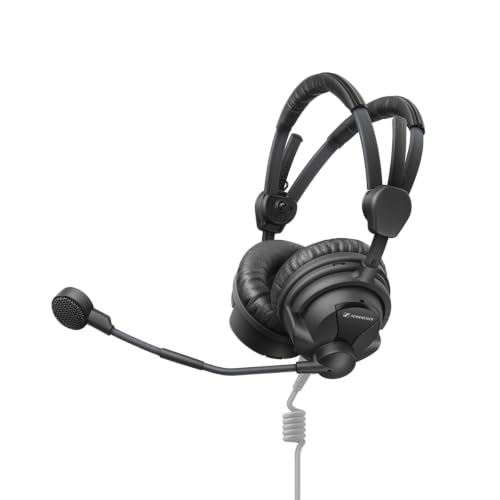
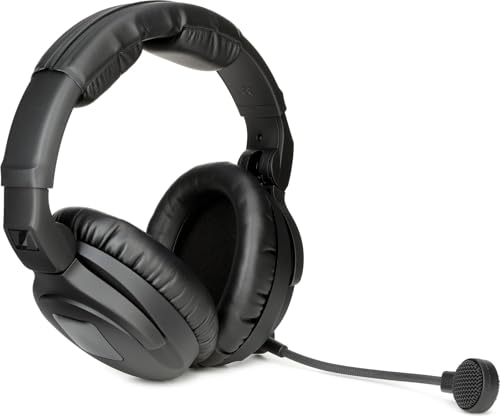
A broadcast headset does two jobs at once. The headphones carry the program feed, the director and your co host, while the boom microphone carries only your voice to the mixing console or intercom system. Keeping both jobs in one fitted unit leaves your hands free for notes, controls and cues.
Most models are wired and built for a fixed position in a booth, a studio or a production truck. That focus separates them from entertainment headsets made for music or play at home. If immersive play is your goal instead, see our guide to the best virtual reality headsets for that very different kind of listening.
Who Should Buy a Broadcast Headset?
Your role on the production decides the earcup style, the microphone type and the connector you need. Start from the seat you will actually occupy.
Sports Commentators and Play by Play Announcers
You talk for hours while crowd noise rises and falls around you. Choose double sided earcups for stronger isolation, a dynamic boom microphone that rejects sound from the sides, and clear headphone volume so you can hear your partner between plays. A sturdy headband matters, because you will adjust it often while following fast action.
Studio Hosts and News Presenters
You work in a quieter room, but your voice is the product, so clarity comes first. A lighter headset with soft pads suits long desk sessions, and a microphone tuned for speech keeps your delivery even when you turn toward a guest or a monitor. Ask your engineer which connector your desk panel expects before you order.
Producers, Directors and Sideline Crew on Intercom
You listen more than you speak, and you often need one ear open for the room around you. A single sided model lets you hear the intercom in one ear and nearby people with the other. Look for a boom you can swing up to mute and a cable that tolerates movement.
Key Features to Compare
When you compare best broadcast headsets side by side, work through the six factors below in order. They decide how you sound, how well you hear and how long you can work.
Boom Microphone Type and Pickup Pattern
The microphone is the reason this product exists, so start here. Dynamic microphones need no power, handle loud booths well and suit most commentary work. Electret and condenser types can sound more detailed, but they need power from the console or beltpack. A cardioid pattern picks up your voice from the front and rejects crowd and room noise from the sides, which keeps your speech clear without raising the gain.
Single Sided or Double Sided Earcups
Double sided models cover both ears with closed back cups that block outside sound by physical sealing rather than electronics. That passive isolation helps in stadiums and busy studios. Single sided models leave one ear uncovered for crew who must hear the room. Readers whose main need is quiet travel or office listening can see our guide to the best noise cancelling headsets, because that job rewards a different design.
Connectors and Intercom Compatibility
A headset only works if it plugs into your system and matches its wiring. Common endings include a combined plug, separate headphone and microphone plugs, and four pin or five pin connectors for intercom beltpacks. Check the pin wiring and impedance your panel or beltpack expects, since two plugs that look alike can be wired differently. If you shop more broadly, see our guide to the best quality headsets for general build points.
Headphone Tuning for Clear Speech
Broadcast headphones should favor the voice range over deep bass. A frequency response that keeps the midrange clear helps you judge your own delivery and hear instructions without turning the volume up. Drivers that sound exciting for music can mask consonants and tire your ears over a long event. Choose a balanced tuning, then set a modest volume and keep it steady through the whole broadcast.
Comfort, Weight and Ear Pads for Long Events
A headset that feels fine for five minutes can ache after three hours on air. Look for even clamp pressure, a padded headband that spreads weight, and ear pads large enough to sit around your ears instead of pressing on them. Leatherette pads seal better and wipe clean, while fabric pads feel cooler in hot booths. If you wear glasses, check that the pads seal without pushing the frames into your skin.
Cable Length, Detachable Parts and Build
Your cable must reach the panel or beltpack with slack to turn your head, yet stay short enough to avoid chair wheels and feet. Coiled cables stretch and then pull back neatly, while straight cables suit fixed desks. Detachable cables, replaceable ear pads and replaceable windscreens extend service life, because those parts wear first. Simple intercom models cost about $100 to $250, while full commentator models often cost about $250 to $600.
Setting Up Your Headset Before the First Broadcast
Plug the headset into your beltpack or panel, then put it on with the boom on the side your system and your notes expect. Bend the boom so the microphone sits near the corner of your mouth, and fit the headband so the cups seal without squeezing.
Ask the engineer for a level check before air. Speak at your normal volume, listen for your own voice in the headphones, and adjust the sidetone or headphone level until it sounds natural. Test the talk channel, the mute action and the program feed before air.
Common Mistakes to Avoid
- Buying a headset with the wrong connector leaves it silent until you find an adapter or a replacement cable.
- Choosing a consumer gaming or music headset gives you a microphone that picks up the whole booth and muddies your voice.
- Picking double sided cups for sideline crew work blocks room sound that the wearer needs to hear for safety and cues.
- Wearing the boom too far from your mouth forces the engineer to raise the gain and lets crowd noise rise with your voice.
- Ignoring glasses, hats or long hair during fitting leads to a broken seal, weak isolation and soreness during a long event.
Care and Maintenance for Broadcast Headsets
Wipe the ear pads and headband after each use with a cloth that is barely damp, then let them dry fully before storage. Sweat and makeup shorten pad life, so clean pads gently and replace them once the surface cracks or the seal feels thin. Wash or replace the microphone windscreen often, because it collects moisture from speech.
Coil the cable loosely without tight bends, and never wrap it around the headband under tension. Inspect plugs for bent pins and frayed strain relief, and keep the headset in a padded case away from heavy gear. Store it in a dry place so the drivers and the microphone stay protected between events.
Frequently Asked Questions
Do broadcast headsets need a special connector for an intercom beltpack?
Yes, a broadcast headset often needs the exact connector and wiring your beltpack uses. Beltpacks differ by pin count and by which pin carries the microphone, the headphones and the ground. Adapters exist for some combinations, but they can add bulk and a weak point at your hip. Carry a photo of your beltpack socket when you shop, and confirm the wiring diagram rather than trusting the plug shape alone.
Should a commentator choose a single sided or double sided broadcast headset?
A commentator should usually choose a double sided broadcast headset for isolation and for hearing a partner in both ears. The exception is a booth with a live engineer giving spoken cues in the room, where one open ear can help. Try your usual broadcast position during a rehearsal if you can, because stadium noise and studio noise reward different choices in practice.
Why are most broadcast headsets wired instead of wireless?
Most broadcast headsets are wired because a cable gives instant, steady audio with no codec delay and no battery that can fade during an event. Wireless systems built for production do exist for roaming reporters, but they add a transmitter, a receiver and a frequency plan. Consumer wireless links can also drop when many devices share a crowded venue, so booth roles stay wired for reliability.
How close should the boom microphone sit to the mouth on a broadcast headset?
The boom microphone on a broadcast headset should sit about a thumb width from the corner of your mouth, slightly to the side. Placing it at the corner keeps breath bursts off the capsule while your voice stays strong and even. Recheck the position after you laugh, shout or turn sharply, because a boom that drifts forward can boom and distort on loud words.
Can a broadcast headset be used for podcasting or remote commentary at home?
Yes, a broadcast headset can work well for podcasting and remote commentary at home with the right interface. Many home interfaces expect a dynamic microphone input and a standard headphone output, so you may need a cable that splits the combined plug into two. The reward is a consistent voice sound in untreated rooms, because the close boom placement leaves less room echo in your recording.
Final Thoughts
Start with the connector your system requires, then choose the microphone pattern and the earcup style that fit your role. Comfort comes next, because the clearest headset fails if you cannot wear it to the final whistle. Use the product table to check connectors, earcup style and price.
The best broadcast headsets reward buyers who match the tool to the booth, the beltpack and the length of the event. Pick the simplest model that fits your system, learn its setup once, and it will serve broadcast after broadcast.