Best Bose Speakers for PC: Desktop Setup and Connection Guide 2026
Disclosure: We may earn a commission when you buy through links on this page, at no extra cost to you. As an Amazon Associate I earn from qualifying purchases. Learn more
Best Bose speakers for PC: desktop pairs, Bluetooth models and soundbars, with connection options, placement tips and setup advice for your desk.
Bose is best known for compact speakers that sound bigger than they look, which suits a desk. The best Bose speakers for PC use depend on how you connect them, how much space you have and whether you mostly work, game or watch video. A pair built for desktops behaves differently from a portable Bluetooth speaker or a TV soundbar placed under a monitor.
This guide explains the options, how each connects to a computer, and how to place speakers so the sound is clear at close range. The product table above lists Bose models that work in a PC setup.


Three Ways to Use the Best Bose Speakers for PC
Desktop Stereo Pair
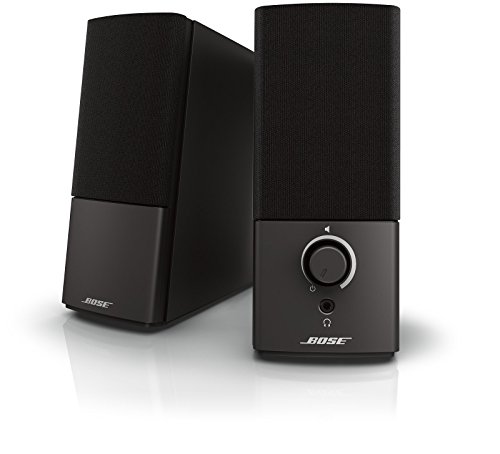
A dedicated pair of desktop speakers plugs straight into the computer's audio output and a power outlet. They give true left and right separation, a small control pod for volume and a headphone jack. This is the most natural fit for a desk, and the best choice for gaming, music and calls.
Portable Bluetooth Speaker
A portable speaker connects wirelessly and can sit beside a laptop or move to another room. It saves cable clutter and works from a battery. A single speaker gives mono sound, so you lose stereo separation, but some models can pair with a second unit.
Soundbar Under the Monitor
A compact soundbar sits in front of the monitor and fills the desk with sound from one unit. Models made for TVs usually include an optical, HDMI or aux input. Check what ports your computer has before you buy.
Connection Options
- 3.5 mm aux: the simplest connection, supported by nearly every PC and laptop.
- Bluetooth: convenient for laptops, but can add a small delay that you may notice in games and video.
- Optical or HDMI: useful for soundbars when your graphics card or monitor offers it.
- USB audio: not common on Bose models, so check the manual.
A wired connection is the best choice for gaming and video editing, where timing matters.
Placement for Clear Sound
Place the speakers at ear height or angle them slightly toward you. Sit about as far from each speaker as they are from each other, so the sound forms an even triangle. Keep them away from walls and corners, which can boom, and do not place them behind a monitor or inside a shelf.
If you have a small desk, short stands or foam pads reduce vibration and keep the sound clear.
Choosing by Use
For Work and Video Calls
A desktop pair or a small portable speaker with a built in microphone works well. Clear voices and low volume clarity matter more than bass.
For Music
Look for a pair with good stereo separation and a smooth midrange. Bose tuning tends toward warm, full sound, with controlled bass.
For Gaming and Movies
Use a wired connection to avoid delay. A soundbar or a desktop pair with a subwoofer adds weight to explosions and music.
Setup Tips
- Set your PC volume to a moderate level and use the speaker control for fine adjustments, to avoid distortion.
- Choose the right output device in your operating system sound settings after connecting.
- Route cables away from power leads to reduce hum.
- Update firmware on Bluetooth models, and keep them away from Wi-Fi routers.
Care
A little care keeps your Bose speakers for PC sounding clean for years, so these habits are worth keeping.
Dust the grilles with a dry cloth, keep drinks away from the desk edge and avoid cleaning sprays. Coil cables loosely and do not bend them sharply at the plug. For battery models, avoid leaving them in a hot room for long periods.
Sound Settings That Help on a PC
Computers offer sound controls that make a small speaker pair sound better. Turn off enhancements you do not need, set the output to stereo, and keep the system volume at a moderate level so the speaker amplifier does not clip. If the music sounds thin, check that the operating system is not set to a headphone profile.
Equalizer settings can also help. Lower the bass a little if the desk makes the sound boomy, and raise the treble slightly if voices in calls sound muffled. Small changes are enough, and the right level depends on your desk and room.
Using Bose Speakers With a Laptop
Laptop users often move between a desk and a couch. A portable speaker works well in that case, since it connects to the laptop by Bluetooth and goes with you. At a desk, a wired connection gives steadier sound for video calls and games. Keep the laptop and speaker close together to keep the Bluetooth signal strong, and avoid placing the speaker next to a router.
Budget and Value Thoughts
Desktop pairs and portable speakers cover a wide price range. Spend more where it changes daily use: clean sound at low volume, a good control layout and a design that fits your desk. Skip features you will not use, such as voice assistants if you only play music from a PC. Compare dimensions as well, since a speaker that is too wide can block a monitor stand or keyboard tray.
Frequently Asked Questions
Do Bose speakers work with any PC?
Most do, through aux or Bluetooth. Check the available inputs on your model and your computer.
Is Bluetooth good enough for PC use?
For music and calls, yes. For fast games and video, a wired connection avoids lag.
Do I need a subwoofer?
Not for most desk setups. A subwoofer adds bass for movies and games but takes space.
Can I use a TV soundbar with a monitor?
Yes, if it has an input your computer can use, such as aux, optical or HDMI.
Final Thoughts
Decide how you connect, how much desk space you have and what you listen to most. A wired desktop pair is the simplest route, while a Bluetooth model gives flexibility. Use the product table to compare the models that fit. For a related guide, see our best Bose computer speakers. The best Bose speakers for PC are the ones that fit your desk, connect cleanly and sound clear at close range.