Best Bluetooth Wireless Portable Keyboards: A Checklist and Buying Guide for 2026
Disclosure: We may earn a commission when you buy through links on this page, at no extra cost to you. As an Amazon Associate I earn from qualifying purchases. Learn more

Use this checklist to choose the best bluetooth wireless portable keyboards by layout, switch feel, battery life, and build quality for work and travel.
A portable keyboard has to do two jobs that pull against each other. It must be small and light enough to travel, yet solid and comfortable enough for hours of real typing. If you are sorting through best bluetooth wireless portable keyboards, a checklist keeps that balance in view, so a slim shape does not hide a cramped layout or a weak battery.
This guide sets out the criteria that matter, the price tiers that follow from them, and the warning signs of a poor buy. Use it alongside the product table below, and score each board against the same points before you spend.





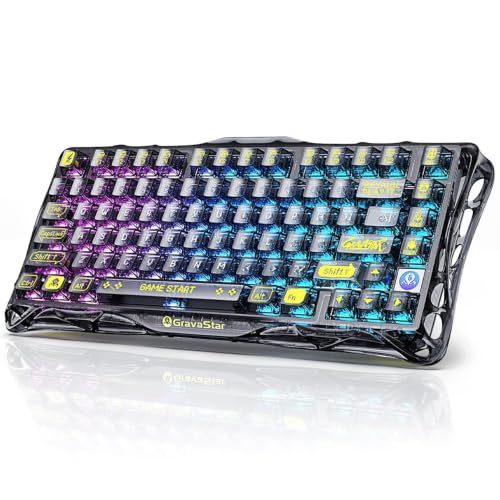
How to Evaluate Bluetooth Wireless Portable Keyboards
Measuring for Size and Portability
Measure your bag and your desk before anything else. A compact board is often about 11 to 13 inches wide, while wider layouts with a number pad reach 15 inches or more. Weight tells the travel story: under about 1.5 lb feels easy in a daily bag, while anything near 2 lb belongs to a desk first board that travels now and then.
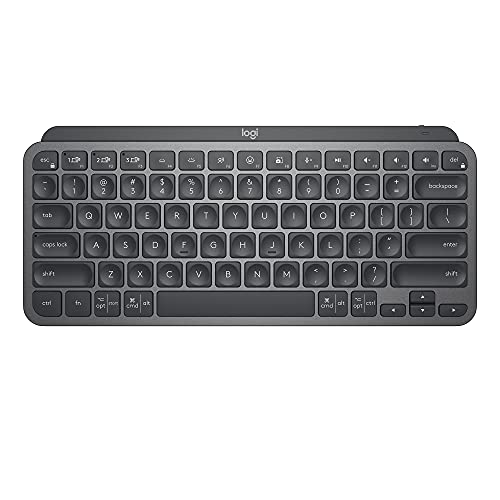
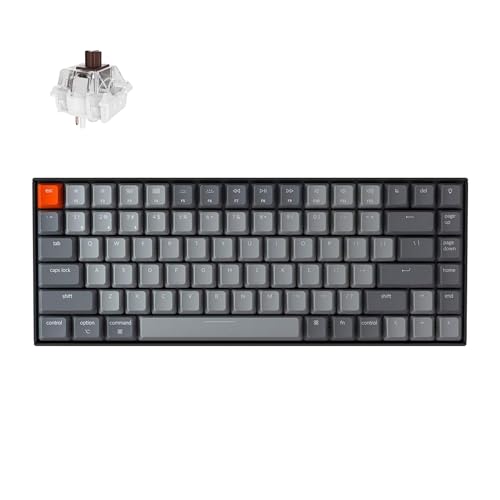
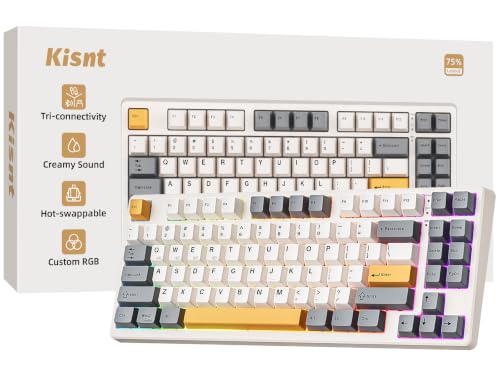
Layout is the real trade off. A 75 percent layout keeps arrow keys and a function row in a tight frame, a 65 percent layout drops the function row, and a full layout keeps the number pad at the cost of size. Count the keys you use weekly. If you live in spreadsheets, the number pad earns its space; if you write and browse, a 75 percent board usually balances size and speed best.
Wired vs Wireless (2.4GHz, Bluetooth)
Most portable boards offer three links: Bluetooth, a 2.4GHz receiver, and a USB C cable. Bluetooth is the travel friendly choice because it needs no dongle and pairs with phones and tablets. Its latency is higher than the other two, which you will not notice while typing but might feel in fast games. The 2.4GHz receiver gives a steadier, quicker link for a laptop, at the cost of one USB port and a small dongle to lose.
Battery life follows the link. Bluetooth sips power, and makers often rate boards for weeks or even months of typing per charge with lighting off. Backlighting cuts that figure sharply. A wired mode matters as a backup: it lets you type while charging and saves you when a battery dies before a deadline. Note that polling rate, which describes how often the board reports input, matters mainly for gaming boards.
Durability and Warranty
Durability shows in the switches, the frame, and the fine print. Mechanical switches are often rated for tens of millions of presses, and hot swappable sockets let you replace one failed switch instead of the whole board, which suits a keyboard you plan to keep for years. A metal top plate or a dense frame resists flex when you type hard on a train tray or a cafe table.
Warranty length is the maker promise behind those claims. One year is the floor; two years is a good sign. Read what the warranty covers, because some exclude batteries and keycaps. Also check that spare keycaps and a replacement cable are easy to buy, since small parts fail long before switches do on a travel board.
Compatibility (PC, Mac, Console)
A portable board often serves several devices, so compatibility is a core criterion. Look for a physical switch or a simple key shortcut that swaps between Windows and Mac layouts, with both sets of keycap legends included or printed. Confirm the board pairs with at least three Bluetooth devices if you move between a laptop, a tablet, and a phone during the day.
Console support is narrower. Many boards work with consoles for menus and chat typing but not inside every game, and rules vary by platform. If console use matters, confirm it on the maker page for your exact system. Drivers should be optional for basic use: a board that types fully with no software installed is safer for work laptops with locked settings.
Weight and Build Quality
Build quality is what your fingers report after an hour. PBT keycaps resist shine and keep their texture far longer than basic ABS caps, and legends that are printed through the cap rather than on top will not fade. A slight flex in the frame is normal on thin boards, but creaks, rattles, and uneven key feel are not.
Weight interacts with stability. A very light board can slide on a smooth desk unless its rubber feet grip well, while a heavier board plants itself but adds up in a bag. For travel, look for a case or cover in the box or as a cheap add on, because keys pressed for hours in a packed bag can wear switches and drain the battery if the board wakes.
Ergonomics, Size, and Grip Style
Ergonomics on a flat portable board come down to height, angle, and key spacing. A low profile board keeps wrists nearer to neutral for many people, while flip out feet that raise the back can help others. If your wrists ache, a slight tent or a split layout helps more than any foot angle, but split boards travel poorly, so be honest about your priority.
Key spacing should stay near standard on the main block even on compact boards. Squeezed keys cause typos that no switch quality can fix. If you type with a palm down, relaxed style, a board with a soft, quiet switch suits you; fingertip typists who strike lightly often prefer a crisper tactile switch. When pain persists beyond simple setup changes, talk with a clinician or an ergonomics professional about your workstation as a whole.
Customization and Software
Customization ranges from simple media keys to full remapping and macros. For work, the valuable features are modest: remap a few keys, save profiles to onboard memory so they travel between computers, and adjust or disable the backlight. Software that stores settings on the board itself beats software that must run at all times, especially on a work laptop you do not control.
RGB lighting is personal taste, and on a portable board it trades against battery life in a direct way. A board that runs for months with lighting off may last days with bright effects on. Decide which you value before you buy, and check whether the board remembers your lighting choice after sleep, a small detail that saves daily annoyance.
Price Tiers That Pass Our Checklist
Mid Range Tier
The middle tier, often about $70 to $120, is the sweet spot for most travelers and hybrid workers. Expect a 75 percent layout, hot swappable mechanical or quality low profile switches, PBT keycaps, three Bluetooth pairings plus a 2.4GHz receiver, and battery life measured in weeks. The frame feels solid, and the warranty usually reaches two years.
Choose this tier if the board will be your main keyboard at home and on the road. It is the level where the daily annoyances disappear: no lag you can feel while typing, no fading legends, and no dongle juggling between devices.
Budget Tier
Value boards, often about $35 to $70, cover the basics well for writing, study, and travel. You typically get a compact layout, Bluetooth pairing for two or three devices, and a cable backup, with membrane or entry mechanical switches. What you give up is keycap quality, frame stiffness, and sometimes Mac legends or a receiver.
Buy at this tier with your eyes on two things: standard key spacing and a warranty of at least one year. A value board with honest specs makes a fine spare or student keyboard. Many readers comparing the wider field of the best wireless bluetooth keyboards will find this tier is where prices cluster.
Heavy Use Tier
The upper tier, often about $120 to $200, suits people who type all day and game at night. Gains include a metal frame, premium switches with crisp feel, fast 2.4GHz links with high polling rates, larger batteries, and deep remapping with onboard profiles. These boards weigh more, so they suit a desk that travels weekly rather than a bag that travels daily.
Heavy use also wears keycaps and cables first, so confirm spares are sold. If your work is typing alone, this tier is a luxury; if your board is your main tool for eight hours a day, the build and warranty can pay for themselves in comfort and lifespan.
Quick Buyer Checklist
- Does the layout keep every key you use weekly, at near standard spacing?
- Does the board fit your bag, and is the weight honest for daily carry?
- Can it pair with all your devices over Bluetooth, with a cable backup?
- Are the keycaps PBT, or at least easy to replace?
- Does battery life fit your habits with your lighting choice?
- Is there a Windows and Mac layout option if you use both?
- Is the warranty at least one year, with battery terms in plain words?
- Does it come with a case, or can you buy one that fits?
Red Flags to Watch For
- Missing layout details. If the listing hides the layout percentage or key count, expect surprises.
- Battery claims with no conditions. Life quoted without noting lighting or link type is marketing, not data.
- No stated switch type. Vague words about feel, with no switch name or rating, signal a cheap build.
- Software required for basics. A board that cannot type or pair without an app is a risk on locked work laptops.
- Short or unclear warranty. Under one year, or water and battery terms you cannot find, should stop the purchase.
If portability is your only goal and typing feel is secondary, a folding board may serve better than any of these tiers, and our guide to the best portable keyboards covers that smaller category on its own terms.
Setup and Care Tips
Charge the board fully, pair your main device first, and label each Bluetooth channel so switching becomes habit. Keep firmware updated through the maker app or site when updates are offered. Clean the board weekly with a soft brush or short bursts of canned air, and wipe keycaps monthly with a cloth dampened with water, not soaked. A quality desk mat also steadies a light board and softens its sound.
Bluetooth Wireless Portable Keyboards: Your Questions Answered
Are mechanical keyboards worth it?
For most typists, yes, if the price gap is modest. Mechanical switches feel consistent for years, can be replaced one at a time on hot swappable boards, and come in quiet, tactile, and clicky styles to match your space. They do make a board thicker and heavier than a membrane model. If you travel ultralight and type in short bursts, a good membrane board from the wider field can still serve you well.
What DPI do I need?
You do not need any DPI, because DPI measures a mouse sensor, not a keyboard. The keyboard figure people mean is polling rate, and for typing even the standard rate is instant. Gamers who want the fastest response should use the 2.4GHz or wired mode with a high polling rate where offered. If a listing for a keyboard boasts DPI, it has likely copied text from a mouse bundle, which is a care sign worth noting.
Does it work with Mac and console?
Most boards in this class work with Mac over Bluetooth, and the better ones add a layout switch and Mac keycaps. Console support is partial: typing in menus and chat is common, while in game use depends on the console and the title. Check the maker page for your exact console before you count on it, and keep the cable nearby, since a wired link is the most widely accepted option. Shoppers who need a matched set should see our guide to the best wireless keyboards and mice.
Wired or wireless: which is better for gaming?
For gaming, a 2.4GHz receiver or a cable is better, because both give lower and steadier latency than Bluetooth. Bluetooth remains fine for turn based games and all typing. Serious players should also value a board that keeps its settings in onboard memory, so profiles survive a move to another computer. If you buy one board for work and play, that dual nature is exactly what the best wireless keyboard and mouse combos also try to balance.
Wrapping Up
Rank layout fit, switch feel, and battery honesty first, and let lighting and extras fight for what is left of the budget. The right board disappears under your hands, at your desk and in your bag. Compare the best bluetooth wireless portable keyboards in the product table against the checklist, and choose the tier that matches how many hours a day your fingers will actually spend on it.