
Best Bluetooth Microphones: Matching the Right Model to Your Routine for 2026
Disclosure: We may earn a commission when you buy through links on this page, at no extra cost to you. As an Amazon Associate I earn from qualifying purchases. Learn more

Compare the best bluetooth microphones by voice clarity, battery life, and connection type so you choose the right style for calls, video, and travel.
There is no single microphone that suits every voice, room, and routine. A clip on model that works beautifully for a walking interview will frustrate a teacher in a large classroom, and a handheld model built for events can feel bulky at a desk. Choosing well starts with how and where you actually speak, which is why the best bluetooth microphones for you depend on your use first and specs second.
This guide walks through the main styles, the features that change how you sound, and the mistakes that lead to muffled or dropped audio. Use the comparison table below to narrow your shortlist, then read the sections that match your routine.


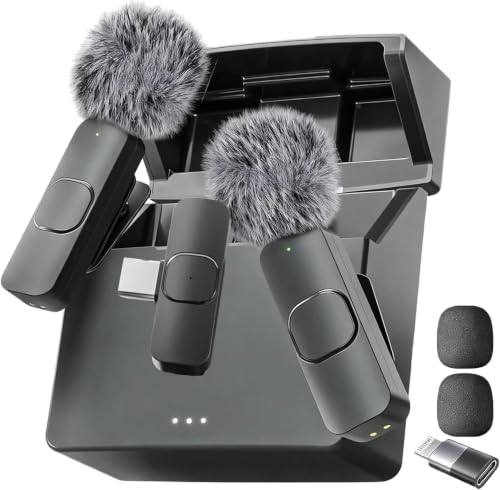
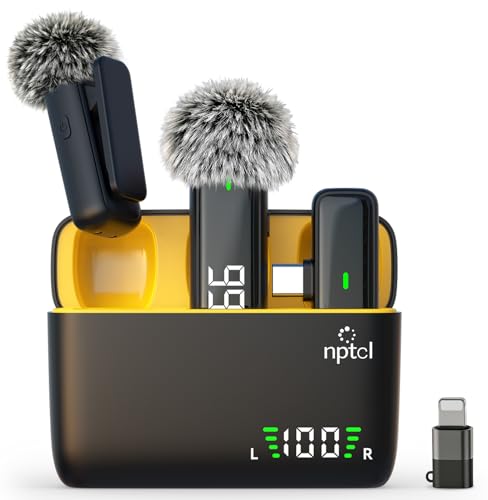


Who Should Buy the Best Bluetooth Microphones?
Your daily routine decides the shape, pickup pattern, and connection style you need. The four groups below cover most buyers. Find the one that sounds most like you, note the features it prioritizes, and carry those priorities into the product table above when you compare options.
For Gamers and Power Users
You talk for hours in fast moving games, streams, and group chats where a delayed or garbled callout costs your team. Prioritize low latency modes, often labeled for gaming models, so your voice stays in step with the action on screen. A microphone with a clear mute control and a stable link to your PC or console matters more than extra range you will never use.
If you prefer hearing the game and your teammates through the same gear, see our guide to the best headsets with microphone for options that combine listening and speaking in one unit. Standalone microphone buyers should still check that the receiver works with their platform before ordering.
For Remote Workers and Creators
You spend your day on video calls, webinars, lessons, or recorded clips where people judge your work partly by how you sound. Prioritize clean voice pickup in a normal room, a receiver that connects without fuss, and multipoint support if you switch between a laptop and a phone during the day. Consistent audio from call to call builds trust faster than any camera upgrade.
If you want your voice and your listening in a single worn device for back to back meetings, see our guide to the best bluetooth headsets with microphone for that format. Creators recording on the move should look for a second microphone in the box or an easy way to add one for interviews.
For Students and Everyday Users
You need a microphone for online classes, club meetings, family calls, and the occasional presentation, and you need it to simply work each time. Prioritize simple pairing, dependable battery life, and a price that leaves room in a tight budget. A single clip on or compact handheld model covers most student needs without a complicated receiver setup or a bag full of cables.
For group study sessions or a small room presentation where everyone needs to hear and be heard, see our guide to the best bluetooth speakers with microphone for that shared format. Individual students recording lectures or voice notes will usually get clearer results from a microphone worn or held close to the speaker.
For Travelers and Commuters
You record, teach, or take calls in changing places, from hotel rooms to busy streets to rented cars. Prioritize a small case, light weight, and a build that shrugs off being tossed in a bag every day. Battery life matters more on the road because you cannot count on finding an outlet between sessions, and a USB charging cable you already carry saves space.
Wind and street noise are your biggest enemies outdoors. Look for a foam cover or a furry windscreen in the box, and try your setup outside before an important recording. A model with a higher water resistance rating also gives peace of mind when weather turns during a walking tour or an outdoor class.
Key Features to Compare
Spec sheets list plenty of numbers, but only a handful change how you sound and how the microphone fits your day. Work through the five factors below in order when you compare the best bluetooth microphones for your own routine. Together they explain most of the price gap between a basic model at around $40 and a fuller kit at about $100 to $250.
Microphone Quality
Microphone quality is how faithfully the capsule captures your voice and how much room noise it lets in. A microphone held or clipped close to your mouth almost always sounds clearer than a distant one, because your voice arrives louder than the noise around you. Pickup pattern matters too. Models that focus on sound from the front suit a single speaker, while wider pickup suits two people sitting side by side.
Listen for sample recordings made in ordinary rooms, not studios, when listings provide them. Note whether voices sound thin, boomy, or natural, and whether keyboard clicks and fan hum push into the recording. Noise reduction processing can soften steady background hum, but heavy processing sometimes clips soft words, so balance matters more than the strongest setting.
Sound Quality and Tuning
Sound quality for a microphone is mostly about frequency response, which describes how evenly it captures low, mid, and high parts of your voice. Human speech lives mainly in the mid range, so a microphone tuned flat or gently lifted there will sound clear on calls and in recordings. A strong bass lift can make a voice sound warm up close, yet muddy when you move or turn your head.
Tuning also affects how you monitor yourself. If your setup lets you hear your own voice through headphones, the size and tuning of those headphone drivers change what you hear, not what your audience hears. Judge the microphone by recordings played back on a neutral device, and remember that a small equalizer adjustment in your meeting or recording app can fix mild brightness or dullness.
Connectivity, Bluetooth Version, Codecs, and Wired Options
Connectivity decides how your microphone talks to your phone, camera, or computer. Newer versions such as Bluetooth 5.3 generally hold a steadier link and use power more efficiently than older versions, which helps in busy buildings full of wireless signals. Range ratings assume open space, so expect less through walls, and keep the receiver in sight of the microphone when you can.
The codec is the method used to compress and send your audio. Common options such as SBC and AAC suit speech well, and for voice work a stable link beats a fancy codec name every time. Multipoint lets a microphone or receiver stay paired to two devices at once, handy when a call moves from laptop to phone. Some kits also include a wired connection through USB or a 3.5 mm cable, which removes wireless delay and battery worries for desk recording.
Comfort, Fit, and Weight
Comfort decides whether you will actually wear the microphone for a full lesson, service, or event. Clip on models should grip fabric firmly without pulling thin shirts out of shape, and the clip or magnet should hold when you turn, gesture, or walk. Handheld models should balance in the hand without feeling top heavy, since a tiring grip leads to a wandering microphone position and uneven volume.
Weight listings rarely tell the whole story. A slightly heavier clip on unit with a secure magnet can feel better than a lighter one that swings on its cord. If you wear the microphone over glasses, a scarf, or a uniform, check photos of the clip and cord path. Small fit frustrations repeat every single day, so they deserve as much attention as audio specs.
Battery Life and Charging
Battery life claims describe the microphone transmitter, the receiver, or both, so read which part a number refers to before you compare. A transmitter that runs about 6 to 10 hours covers a teaching day or a long event, while shorter runtimes can still suit brief daily calls. Cases that recharge the units between uses stretch total time away from an outlet, which travelers value most.
Charging speed matters when you forget to plug in. A quick top up before a session can save a recording, so check whether the case or the units charge over USB C with a cable you already own. Remember that cold weather and maximum volume monitoring can shorten real runtime, and plan a wired backup for sessions you simply cannot repeat.
Common Mistakes to Avoid When Buying Bluetooth Microphones
Most disappointments come from a short list of avoidable errors. Read these before you order, and check your shortlist against each one.
- Choosing by price alone, because the cheapest model often costs you clear audio on every call you make.
- Ignoring microphone placement, because even a capable microphone sounds distant and echoing when it sits far from your mouth.
- Skipping a compatibility check, because a receiver built for phones may not connect to your camera or older laptop.
- Forgetting about wind protection outdoors, because moving air can overwhelm speech and ruin an otherwise good recording.
- Overlooking the return policy and warranty, because fit and room acoustics vary and you may need an easy exchange.
Tips to Get the Most From Your Bluetooth Microphone
A few habits protect your audio quality and extend the life of the gear. Keep firmware updated through the maker app or support page, since updates often improve connection stability and noise handling. Store the microphone and receiver in their case to protect the capsule, clip, and charging contacts from dust, pressure, and stray metal objects in your bag.
Clean the grille, foam cover or windscreen, and clip regularly with a dry or slightly damp cloth, following the maker instructions for your model. Charge the units before they sit unused for weeks, and store them partly charged rather than fully drained. Before any important session, record a short test in the actual room, listen back with headphones, and adjust placement while you still have time to fix problems.
Frequently Asked Questions
Is ANC Worth the Extra Cost on a Bluetooth Microphone?
ANC is worth paying for only when you regularly record or call from noisy places. On a microphone, noise cancellation processing reduces steady sounds such as air conditioning, traffic hum, and crowd murmur so your voice stands out. It helps less with sudden sounds like a door slam. If your rooms are already quiet, save the money and invest in better placement or a second microphone for interviews instead.
Do Bluetooth Microphones Need a Special Codec for Clear Speech?
No, Bluetooth microphones do not need a special codec for clear speech. Standard codecs carry the frequency range of the human voice with room to spare, and clarity depends far more on microphone placement and room noise. Where codec choice does matter is delay. If you record video, pick a kit with a low latency mode or a wired receiver option so lips and voice stay in sync on playback.
Do Wired Microphones Sound Better Than Bluetooth Microphones?
Wired microphones can sound slightly cleaner because the signal skips wireless compression entirely. In practice, a well placed Bluetooth model is hard to tell apart on calls, lessons, and social video, where convenience and freedom to move matter more. Choose wired for studio style desk recording at a fixed spot. Choose wireless when you walk, teach, present, or film away from your device and need your hands free.
What IP Rating Do Bluetooth Microphones Need for Outdoor Use?
Most outdoor users do fine with splash resistance rather than full waterproofing. A rating such as IP67 means the unit resisted dust and a short dip in shallow water, which is more than rain duty requires. Lighter ratings that guard against splashes suit walking tours and outdoor classes. Whatever the rating, dry the microphone before charging, because moisture on the contacts can cause damage the rating does not cover.
How Long Does a Bluetooth Microphone Battery Last?
A Bluetooth microphone battery typically lasts about 6 to 10 hours of active use per charge. Runtime drops when noise reduction runs at full strength, when the link struggles through walls, or when cold weather saps the cells. Charging cases add several full recharges, stretching a travel weekend without an outlet. Check whether a quoted figure covers the transmitter alone or the transmitter and receiver together, since sellers present this differently.
Final Thoughts
Start with your routine, then weigh voice clarity, connection stability, and battery life in that order. Gamers need low delay, remote workers need consistent call audio, students need simple and affordable gear, and travelers need a tough little case and long runtime. The product table above pulls those tradeoffs into one view so you can compare styles side by side without rereading every listing.
When you match the format to the way you actually speak each day, the best bluetooth microphones stop being a confusing spec contest and become a simple fit decision. Pick the style that serves your main use, run a short test recording when it arrives, and adjust placement before your first important session.


