
The Best Bamboo Tablets: A Complete Buying Guide for 2026
Disclosure: We may earn a commission when you buy through links on this page, at no extra cost to you. As an Amazon Associate I earn from qualifying purchases. Learn more

Compare the best bamboo tablets by pen feel, active area size, software fit, and connectivity with this clear buying guide for artists and note takers.
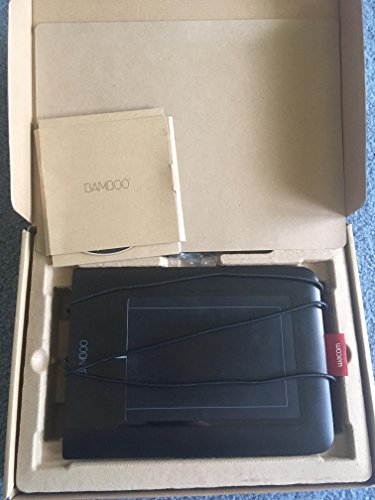
Bamboo is the name of a long-running line of pen tablets from Wacom. Bamboo pen tablets let you draw, paint, retouch photos, and mark up documents with a pen on a pad while your work appears on your computer screen. Shoppers often feel stuck because spec sheets list numbers that say little about how a tablet actually feels to draw on. The best bamboo tablets share three traits: a pen that tracks smoothly without lag, a drawing surface sized for your monitor and desk, and drivers that behave well with the apps you already use.
Use the comparison table below for a quick scan of sizes, pen pressure levels, and connection types. Then read the guide sections to match those specs to your art style, your computer, and your budget before you order.



Three Buyer Levels at a Glance
Regular Home Artists
This level suits artists who draw several times a week and want a tablet that will stay useful for years. Expect a medium active area, a battery free pen with high pressure sensitivity, tilt recognition for shading, and reliable drivers with regular updates. Shortcut buttons on the tablet or pen save constant trips to the keyboard. This tier usually costs around $100 to $250 and is the safest choice if you are upgrading from a tiny starter pad or returning to digital art after a break.
Students and Casual Users
This level suits students, hobbyists, and teachers who mainly sketch, take handwritten notes, or retouch family photos. You typically get a small or medium surface, a comfortable pen with at least a few thousand pressure levels, and wired USB C connection that simply works. What you give up is tilt support, extra shortcut keys, and premium surface texture. Prices around $40 to $100 make this tier ideal for testing whether pen input fits your workflow before you commit to a larger, costlier model later.
Working Illustrators and Editors
This level targets working illustrators, photo editors, and designers whose income depends on pen accuracy. These tablets add large active areas, excellent pen calibration, low activation force so light strokes register, and sturdy aluminum or reinforced builds. Wireless connectivity and multi device pairing help tidy studio desks. Expect around $250 to $400, and budget for a stand and a spare pen nib pack as well. The gain is subtle but real: smoother diagonal lines, fewer driver quirks, and a surface that still feels even after years of daily drawing.
How to Choose the Best Bamboo Tablets: Buying Guide
Computer and Software Fit
A pen tablet does very little computing itself, so your computer decides how smooth large files feel. For sketching and note taking, almost any recent laptop copes easily, while painting on huge canvases with many layers benefits from 16 GB of RAM. Check driver support for your exact operating system before you buy, because pen features depend on the driver. Windows and macOS get the fullest support, and some models also work with ChromeOS and Android for basic drawing.
Ports and Connectivity
Most bamboo tablets connect by USB C cable, which is dependable, lag free, and needs no charging. Wireless models use Bluetooth or a small USB receiver and free your desk from cables, at the cost of occasional pairing fuss and a battery to recharge. Confirm your computer has the right port or budget for a simple hub, since many thin laptops now ship with USB C only. A detachable cable is a quiet plus, because a worn cable is far cheaper to replace than a whole tablet.
Battery Life in Real World Use
The pens on quality bamboo tablets are battery free, powered by the tablet surface itself, so the pen never needs charging and is always ready. Only wireless tablets carry a battery, and a typical charge lasts several full workdays of drawing. If you hate managing chargers, a wired model removes the issue entirely. For travel, note that wireless convenience matters less than a cable that coils neatly into your bag. Either way, keep the pen in its holder so nibs do not wear down loose in a pocket or drawer.
Weight and Portability
Small tablets weigh well under a pound and vanish into a laptop sleeve, which suits students moving between classes. Medium models, the most popular size, balance portability with enough drawing room for arm movement. Large tablets anchor a studio desk and rarely travel well. Think about your monitor too: a small tablet mapped to a huge display makes fine control twitchy, while a large tablet on a small laptop screen feels sluggish. If you shop for younger students as well, our guide to the best tablets for kindergarteners covers the very different needs of small children.
Pen Feel, Drawing Surface, and Build
Pen feel is where bamboo tablets earn their reputation, so weigh it heavily. Look for 4,096 or 8,192 pressure levels, a pen weight that rests naturally in your hand, and a side button you can reach without shifting grip. Surface texture should add slight tooth, like paper, without eating nibs quickly. A slim, rigid body with rubber feet stays planted during energetic strokes. Spare nibs in the box signal that the maker expects real use, and a nib removal tool makes swaps a ten second job.
Bamboo Tablets vs Other Options
2 in 1 Convertibles
A 2 in 1 convertible lets you draw directly on the screen, which feels intuitive for beginners and makes selecting small interface items easy. The trade offs are price, hand heat on the display, and your palm and sleeve dragging across your artwork. Shoppers weighing screen based drawing often compare best pc tablets as an all in one route. A separate bamboo tablet keeps your hand off the screen, costs far less, and upgrades independently of your computer, which suits most desk based artists.
Ultraportables
Thin laptops with pen support pack everything into one device for travel, and they shine for people who present, annotate, and sketch in meetings. Still, their pens are usually smaller, their drawing areas match a cramped screen, and repairs cost more when one part fails. A bamboo tablet paired with the laptop you already own gives a larger, cheaper, and more repairable drawing setup. Choose the ultraportable route only when drawing away from your desk is a weekly habit, not a rare treat.
Budget Laptops
A cheap laptop plus a mouse is the lowest cost way to start digital art, but a mouse cannot vary line weight with pressure, which limits expressive drawing. Adding a value tier bamboo tablet to that same laptop unlocks pressure, tilt on some models, and far better retouching control for very little money. This pairing is the classic student setup for good reason. If your budget forces a choice, keep the modest laptop and add the tablet, rather than stretching for a costly pen display.
Tips to Get the Most From Your Bamboo Tablet
- Map the active area to your screen. Full mapping suits large tablets, while a reduced area speeds up small, precise work and reduces arm travel.
- Keep drivers and firmware updated. Most pen glitches after an operating system update are fixed by the newest driver release.
- Set the pen buttons thoughtfully. Assign undo and brush size changes first, since those two actions save the most time.
- Use a padded sleeve when commuting. Pressure on the surface in a packed bag can damage the drawing area over time.
- Replace nibs before they feel sharp. A worn, pointed nib can scratch the surface, while a fresh nib restores the paper like feel.
- Clean the surface with a dry cloth. Skin oils build up and change pen glide, so a weekly wipe keeps strokes consistent.
Before ordering, it also helps to read a general overview of the best tablets to purchase if you are still deciding between a pen pad, a pen display, and a standalone tablet for your household.
Frequently Asked Questions
How many pressure levels do I need?
Most hobby work looks good with 2,048 levels, while 4,096 or 8,192 levels give finer control over line weight for detailed illustration. More levels matter less than a pen that tracks smoothly and a driver that works in your art app.
Does a bamboo tablet work with a Mac or Windows PC?
Most models work with both after you install the driver from the maker's website. Check your exact operating system version in the product details before you buy.
Is a small or medium tablet better?
Small tablets suit laptops, notes and photo retouching, while medium tablets give more arm room for sketching and painting on a larger monitor. Choose by the size of your screen and desk.
Do I need to charge the pen?
No. Pens on pad-style tablets are battery free and powered by the tablet surface, so the pen is always ready.
How long should a bamboo tablet last?
A well kept bamboo tablet commonly lasts five years or more, since it has few moving parts and the pen needs no battery. Nibs are consumables and may need replacing every few months under daily use. Driver support is the real lifespan limit, so favor makers with a record of updating drivers for new operating systems. Store the tablet flat, keep the cable unbent at the connector, and it should outlast the computer it serves.
Wrapping Up
Choose by active area size, pen feel, and driver support for your computer, and the rest becomes detail. Match the tier to how often you draw, then check the product table above for current options in that range. Picked with those priorities in mind, the best bamboo tablets feel less like gadgets and more like a favorite sketchbook that never runs out of pages.

