
Best Backpacks for Gaming Laptops: Buying Guide for 2026
Disclosure: We may earn a commission when you buy through links on this page, at no extra cost to you. As an Amazon Associate I earn from qualifying purchases. Learn more

Best backpacks for gaming laptops compared by sleeve size, padding, weight balance and charger space for daily carry and travel.
A gaming laptop is bigger, heavier and hotter than an everyday notebook, so an ordinary school bag often fails it. The best backpacks for gaming laptops pair a deep padded sleeve with a stiff back panel, strong zippers and room for a bulky power brick. This guide explains how to check fit, protection and comfort before you buy.
Use the table of picks below to see typical styles and prices, then work through the checks that follow to match a bag to your exact machine.


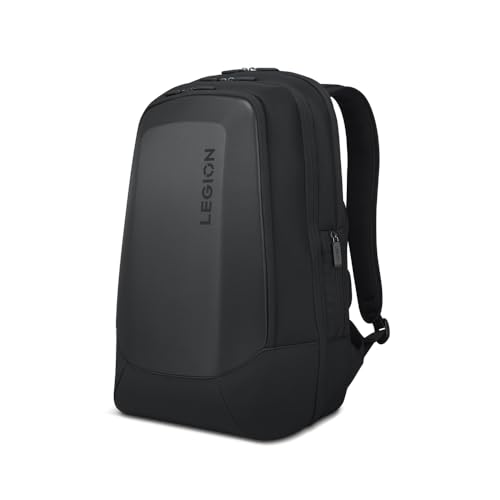


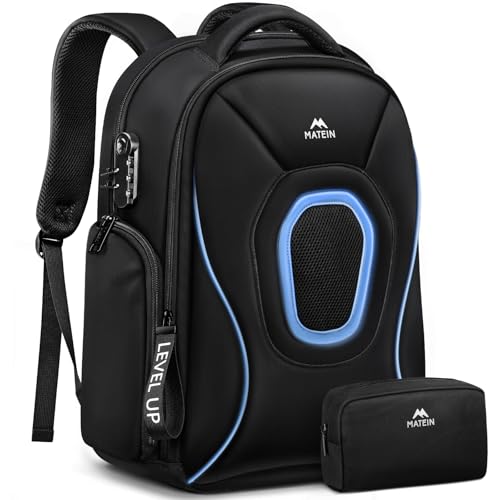
Measure Before You Shop
Gaming laptops commonly come in 15, 16, 17 and 18 inch sizes, but the case matters more than the screen. Measure width, depth and thickness, then add room for any sleeve or skin you use. Compare those numbers with the bag's stated laptop compartment rather than its label. A sleeve that is too tight stresses zips and corners, while one that is too large lets the machine slide and knock against the frame.
Many gaming bags are built for 17 inch machines and some for 18 inch models. Check that the sleeve opens wide enough to slide the laptop in and out without lifting it over a ridge.
Key Features to Compare
Padding and Shell Protection
Look for thick foam on all sides and a raised base that keeps the laptop off the ground when you set the bag down. Hard shell and armored fronts resist impacts best, while soft fabric bags are lighter and flexible. Reinforced corners matter because bags usually land on an edge first.
Weight Distribution and Straps
A gaming laptop and charger can weigh over ten pounds, so padded wide straps, a sternum strap and a firm back panel are not optional. Load lifters and a waist strap help on longer walks. Keep the laptop against your back and place the charger in its own pocket low in the bag.
Ventilation and Cable Access
Never carry a laptop that is still hot or running. Let it cool, shut it down and pack it. Mesh back panels help you stay cool, and a charger pocket separated from the sleeve stops the brick pressing against the screen. Some bags add a USB passthrough port for a power bank, which is handy for phones but does not replace a laptop charger.
Room for Gear
Check for a pocket for a mouse, a headset, a controller and cables. A 25 to 35 liter bag holds a laptop plus accessories and a change of clothes for a weekend. A slimmer bag suits laptop only commuting, and a larger one suits LAN parties or travel.
Weather Resistance and Zippers
Water resistant fabric and covered zippers protect electronics in rain. A smooth, strong zipper matters on a full bag, since a failure is expensive. Anti theft pockets against the back add security on trains and in crowded events.
Bag Types Compared
Armored hard shell bags offer the most impact protection and a distinct gamer look, but they are heavier and less flexible. Brand backpacks designed for specific laptop lines tend to fit those machines well and include tailored pockets. Extra large travel backpacks add TSA friendly openings and luggage straps for frequent flyers. Slim business packs suit lighter 15 inch gaming laptops and office use.
Packing and Carrying Tips
Pack the laptop first, then fit the charger and cables around it rather than forcing everything in at once. Keep small items in side pockets, and close the main compartment without pulling on the zip. On travel days use both shoulders and the sternum strap. Before a trip, do a test pack at home and walk around for a few minutes to see whether the straps sit evenly.
For other everyday options, see our guide to the best laptop backpack.
Who Needs Which Style
Students who carry a gaming laptop to class need capacity for books and a bag that survives crowded halls, so a mid size pack with strong straps and a quick access front pocket works best. Frequent travelers benefit from clamshell openings, luggage pass through straps and sizes that meet cabin limits. Players who attend events and LAN parties need extra room for a headset, controllers, a mouse and cables, along with a rugged shell for jostling crowds.
Office workers who also game after hours can choose a slimmer, neutral looking pack that suits meetings and still protects a thicker machine. Think about where the bag spends most of its time, and choose the style that suits that setting rather than the most aggressive look.
Care and Longevity
Empty the bag regularly and shake out crumbs and dust that wear the lining. Wipe the exterior with a damp cloth, brush grit from zipper tracks and let a wet bag dry fully before storing it. Check strap stitching and the sleeve padding every few months, since early fraying is easier to fix than a snapped strap. Keep the bag out of prolonged direct sun, which fades fabric and weakens coatings. A good gaming laptop backpack should protect an expensive device for several years of daily use.
Common Mistakes to Avoid
- Buying a bag labeled for a 17 inch laptop without checking the sleeve depth for a thick gaming machine.
- Overloading side pockets, which throws the bag off balance and strains zippers.
- Ignoring strap padding on a bag that will carry a heavy laptop and charger daily.
- Packing a laptop that has not cooled down.
- Skipping rain protection for a machine that commutes in all seasons.
Frequently Asked Questions
Will a standard laptop backpack fit a gaming laptop?
Sometimes, but gaming laptops are thicker and wider than most ultrabooks. Check the stated sleeve dimensions and read the size notes carefully before ordering.
Do I need a hard shell gaming backpack?
Only if you often carry the laptop in crowded or rough settings. A well padded soft bag with a raised sleeve base protects well for most commuters.
Where should the charger go?
Use a separate pocket lower in the bag so the brick does not press on the screen. Wrap the cable loosely to avoid bending the connector.
What size bag do I need?
For a laptop and accessories, 25 to 35 liters is usually enough. Choose smaller for laptop only carry and larger for travel with a change of clothes.
Can I take a gaming laptop backpack on a plane?
Many fit overhead bins and some fit under the seat. Check airline limits, and use a TSA friendly lay flat design if you want quick screening.
Final Thoughts
Measure the laptop, check padding and strap quality, and leave room for the charger and accessories. The best backpacks for gaming laptops protect a costly machine and stay comfortable on long carries. Compare the picks in the table above with these checks before you order.

