Best August Smart Lock (2026): Retrofit Types and Setup
Disclosure: We may earn a commission when you buy through links on this page, at no extra cost to you. As an Amazon Associate I earn from qualifying purchases. Learn more

Best August Smart Lock guide: compare retrofit models by wifi or bridge setup, door sensor, battery life and rental friendliness.
Choosing an August lock sounds simple until you compare the lineup side by side. The models look alike, yet they differ in how they connect, whether they need a separate bridge, and how much control you get when you are away from home. This guide to finding the best august smart lock for your door compares the types in the range by reliability, voice assistant and smart home compatibility, and ease of installation, so you can match a lock to your door and your routine instead of paying for features you will never open in the app.
The product table below lists current August locks. After it, you will find the criteria that matter most, from deadbolt compatibility to battery life and subscription costs. If you are still weighing August against other brands, our guide to the best smart lock options across brands is a useful wider comparison first.


The Main Types at a Glance
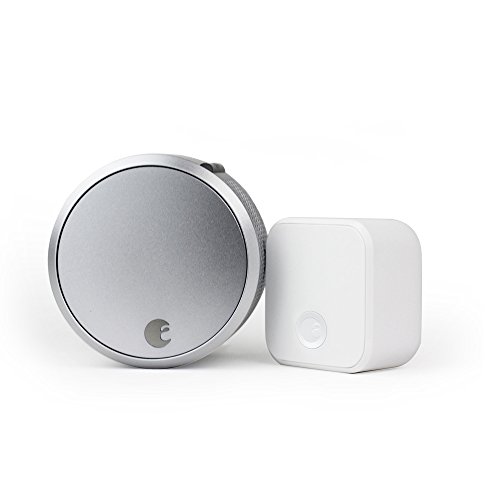
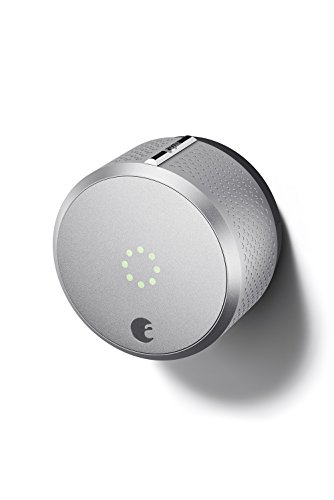
August built its name on retrofit locks, and that idea shapes the whole range. A retrofit model replaces only the thumb turn on the inside of your door and works with the deadbolt you already have, so your exterior hardware and your existing keys stay exactly as they are. Within that approach, the lineup splits into a few clear types.
- Wifi built in: the lock connects straight to your home network, so you can lock, unlock, and check status from anywhere without extra hardware near the door.
- Bluetooth with a separate bridge: the lock talks to a small bridge plugged into a nearby outlet, and the bridge provides the remote access and voice assistant link.
- Bluetooth only: the simplest setup, controlled from your phone while you are within range of the door, with no remote access away from home.
Your choice comes down to one question: do you need to control the door when nobody is home? If yes, you need wifi in the lock or a bridge in the box. If you mainly want the door to lock itself behind you, the simpler types do that job for less money.
How We Chose the Criteria in This Guide
Because this guide compares types rather than naming winners, the criteria below are the ones that separate a lock you enjoy from one that frustrates you. We weighed locking reliability and accurate door status reporting first, then compatibility with Alexa, Google Assistant, Apple HomeKit, and Matter ready hubs. Installation effort, battery demands, subscription costs, and how the app handles your data round out the list. These points come from manufacturer specifications and the patterns that show up again and again in verified buyer feedback.
How to Choose the Right Smart Lock
Type
Start with the lock style that fits your door and your living situation. A retrofit August model suits renters and anyone who wants to keep their current deadbolt, keys, and exterior look, and it also suits doors where building rules limit hardware changes. A full replacement deadbolt lock swaps both sides of the door and often adds a keypad on the outside, which August retrofit models do not provide on their own. If a keypad matters to you, compare your options against our guide to the best deadbolt smart lock designs before you commit to a retrofit only setup.
Features Worth Paying For
Auto lock is the feature most owners value daily, because the door secures itself after a delay you set in the app. A door sensor that reports whether the door is fully closed, not just locked, adds real peace of mind. Guest access with scheduled codes or app invites suits cleaners, dog walkers, and family who visit often. Activity logs that show who came and went are worth having, while novelty extras you check once and forget are not. Readers who host paying guests can also see our guide to the best smart lock for airbnb for access features built around short stays.
Ecosystem Compatibility
Check that the lock works with the voice assistant and smart home platform you already run, whether that is Alexa, Google Assistant, or Apple HomeKit. A lock that joins your existing routines, such as locking every door when you arm your alarm or say goodnight, feels far more useful than one that lives in a separate app you must remember to open. Matter support is still rolling out across the category, so confirm the exact model supports it rather than assuming the whole brand does. Once you pick a model, our walkthrough on how to set up a smart lock covers pairing and account steps in order.
Wired Versus Battery Power
August locks run on batteries, and no model in the lineup needs wiring into your door or frame. That keeps installation simple, but it means battery habits decide how reliable the lock feels. Models with wifi built in draw more power than bluetooth only versions, so they need fresh batteries more often. Keep a spare set in the house, turn on low battery alerts in the app, and remember that cold weather shortens battery life on doors that face the outdoors. Your physical key still works from outside if the batteries run flat, so you will not be locked out.
Subscriptions and Local Storage
Core locking, unlocking, and guest access on August locks work without a monthly plan, which keeps the running cost at zero for most households. Paid extras in this category usually involve video history on a separate doorbell camera rather than the lock itself, so read any plan description carefully before assuming the lock needs one. Activity history lives in the app and in your account online rather than on the lock, which means losing your phone does not erase your records, but a strong account password matters.
Privacy and Security
A smart lock guards your home, so treat its account like a bank account. Use a unique password, keep the app and lock firmware updated, and review the list of users with access every few months, removing anyone who no longer needs entry. Guest access should use time limits wherever the app allows them, so a code or invite expires on its own. Check what data the app collects, such as entry logs and location based auto unlock, and switch off any sharing you do not use. Physical security still counts too, and the lock is only as strong as the deadbolt and door frame behind it.
How Much Should You Spend?
Expect to pay about $100 to $150 for a basic retrofit lock with bluetooth control and app based guest access. Models with wifi built in or a bridge included usually land at about $150 to $230, and that step up buys remote control and voice assistant support. Paying more than about $230 makes sense mainly when you are bundling a lock with a keypad or a doorbell camera for a fuller entry setup. Watch for sale pricing during major shopping events, since this category is discounted often, and factor in a year of batteries, which costs only a few dollars.
The August Smart Lock Lineup Explained
The lineup makes more sense once you see what every model shares. All of them attach to a single cylinder deadbolt on the inside of the door, keep your existing exterior hardware in place, and leave your current keys working. That shared design is why the front door of your home looks unchanged from the street, a point our guide to the best smart lock for front door setups treats as a priority for curb appeal and for rental rules. August publishes a compatibility list of deadbolt brands its locks fit, so check your deadbolt brand and shape against that list before ordering.
The differences sit in connectivity and size. The slimmer models with wifi built in suit doors where a bridge would have no outlet nearby, while bridge based models can be kinder to battery life because the lock itself only handles short range bluetooth. Installation takes a screwdriver and roughly fifteen minutes for most doors, and the app walks you through calibration so the lock learns the locked and unlocked positions. If you want the full sequence before you start, read our guide on how to install a smart lock and keep your old thumb turn in case you ever move.
Care and Maintenance
Good upkeep is mostly about power and software. Replace all batteries at the same time with fresh ones from the same pack, since mixing old and new cells makes low battery warnings unreliable. Open the app every month or two to accept firmware updates, which often improve connection stability and battery use. Check that the door still closes smoothly, because a door that sags or sticks forces the motor to work harder and drains the batteries faster. If the lock starts sounding strained, realign the door or strike plate first before blaming the lock itself.
FAQ
What is the best august smart lock for a rental home?
For a rental, choose a retrofit model, since it leaves the landlord deadbolt, keys, and exterior hardware untouched and can be removed at move out with no marks beyond the original screw holes. Confirm your lease allows it, keep the original thumb turn for refitting later, and pick wifi or a bridge if you need to let in a repair person while you are away. Document the door condition with photos before you install anything.
Is August a good smart lock brand?
August is a well established name in retrofit locks, and its main strength is focus: the brand does one style of lock and pairs it with a mature app. The trade off is range, since you will not find built in keypads or fingerprint readers in this lineup the way some rival brands offer them. Buyers who want their existing keys and door look preserved tend to rate the approach highly, while buyers who want an all in one replacement shop elsewhere.
Which August smart lock should I buy if my door has no outlet nearby?
Choose a model with wifi built into the lock itself, because a bridge based setup needs a powered outlet within bluetooth range of the door, usually in the same room or a nearby hallway. Entry doors that open from a garage, a porch, or a stairwell often lack that outlet, which rules the bridge out. Built in wifi also means one less device drawing power and one less item to troubleshoot when remote access stops working.
How long does a smart lock last?
The hardware itself should serve for many years, since the motor and gearing see only a few cycles a day in a typical home. What ages faster is support: app features and security updates depend on the maker continuing to back the model, and batteries are a consumable you will replace several times a year on wifi models. A lock that starts missing firmware updates or losing its connection often points to aging electronics rather than a worn bolt, and that is the point where replacement makes more sense than repair.
Is a smart lock worth it for a house with kids?
For many families, yes, because children lose keys far more often than they lose access to a household app account managed by a parent. Auto lock removes the worry of a door left unsecured after school, and activity alerts tell you a child arrived home. Give each family member their own app profile so the log stays accurate, and keep one physical key with a trusted neighbor as a backup.
How do you clean a smart lock?
Wipe the lock body with a soft, slightly damp cloth and mild soap if needed, then dry it fully. Never spray cleaner directly onto the lock, since liquid can reach the electronics and battery contacts inside. Avoid abrasive pads and solvents, which can damage the finish. If the battery contacts look dull or corroded, rub them gently with a dry cloth or a pencil eraser.
Final Thoughts
The right choice depends on your door, your outlets, and how much remote control you truly need. Pick a retrofit type that fits your existing deadbolt, add wifi or a bridge only if away from home access matters, and keep your budget near the middle of the range. Use the product table above to compare the types side by side, and you will land on the best august smart lock for your home without paying for unused extras.