
Best Audio Motherboards 2026: A Practical Buying Guide
Disclosure: We may earn a commission when you buy through links on this page, at no extra cost to you. As an Amazon Associate I earn from qualifying purchases. Learn more

Compare audio motherboards by codec quality, shielding, outputs, and USB stability, with planning guidance for recording and listening builds.
The best audio motherboards are boards where sound was treated as a feature, not an afterthought. Most motherboards include a basic codec that is fine for games and video calls. Boards aimed at music, recording, and critical listening add shielded audio sections, better capacitors, a stronger headphone amplifier, and sometimes a dedicated DAC chip.
The product table below lists flagship boards from the major makers, where audio upgrades are most common. This guide explains what the audio hardware does, what to check in a listing, and when an external interface is the better answer.


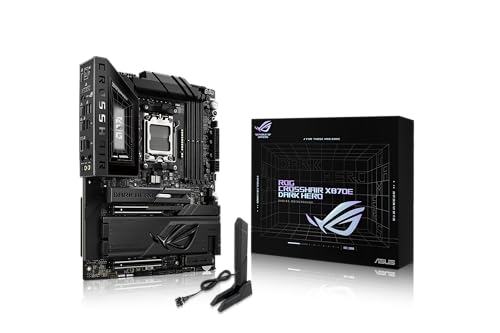


What Makes a Motherboard Good for Audio
Onboard audio shares a board with fast processors, memory, and graphics slots, all of which create electrical noise. Better boards keep the audio circuit away from that noise by placing it on its own layer, surrounding it with a shield, and using separate power filtering. The result is a lower noise floor, which you notice in quiet passages and with sensitive headphones.
The codec is the main chip that converts digital audio to analog. Many boards use a Realtek codec from the ALC family, and premium models add a separate DAC and amplifier for the front and rear outputs. Listings rarely give measured noise figures, so treat the chip names as clues, not guarantees.
Who Should Buy an Audio Focused Motherboard
Audio boards suit builders who want good sound from the PC itself: music listeners using headphones at the desk, streamers who record voice and game sound together, and hobby producers who monitor on headphones or powered speakers without a separate interface.
Professional recording is different. A USB interface, with its own preamps and converters, will outperform any motherboard audio, and it also keeps analog circuits outside the noisy case. If you record microphones or instruments regularly, plan on an interface and treat motherboard audio as a bonus.
Key Features to Compare
- Codec and DAC: look for a named premium codec, and a separate DAC chip on higher end boards.
- Headphone amplifier: some boards advertise support for high impedance headphones, which matters for studio models.
- Audio capacitors and shielding: dedicated audio capacitors and a visible shield or separated audio zone.
- Outputs: rear line out, front panel audio header, and optical S/PDIF if you use a digital receiver.
- Line in or mic in: useful for hobby recording and for connecting older gear.
- USB: stable ports for an interface, with enough rear ports that you do not need hubs.
Planning the Rest of the Build
Audio quality depends on the whole build, not only the board. A fanless or quiet case and good cooling keep noise out of any microphone in the room. A power supply with clean output reduces electrical hiss, and a short, well routed front panel audio cable avoids picking up interference from graphics cards and drives.
Check the processor socket, memory type, and form factor first, since those decide which boards fit. Small builds can use a compact board, and our guide to best itx motherboards covers that path. For older AMD systems, see best motherboards am4. For a build centered on music production, compare the best motherboards for audio production.
Headphones, Speakers, and What Each Needs
Headphones with low impedance, such as most consumer and gaming models, work well straight from the board, and a good headphone amplifier simply gives them cleaner volume headroom. High impedance studio headphones need more output voltage, and a board that mentions high impedance support helps there. If your headphones sound quiet at full volume, the board is the limit, not the headphones.
Powered speakers connect through the rear line out, ideally with balanced or well shielded cables and the speakers plugged into the same power strip as the PC. Digital receivers and soundbars connect through optical S/PDIF, which sends the signal as light and avoids ground noise entirely, though it limits sample rates on some systems.
Wireless headsets bypass the board audio, so motherboard quality matters mostly for wired listening. If you mainly use a USB headset, put your budget into processor, memory, and graphics instead.
Onboard Audio vs. Interface vs. Sound Card
Onboard audio is convenient and free of extra cables, and a good board handles stereo playback very well. A dedicated PCIe sound card moves conversion to its own board and can add headphone gain, though modern USB DACs usually do the same job with fewer driver problems. A USB audio interface is the right choice when you need microphone preamps or multiple outputs.
A practical approach is to buy a board with strong audio, use it for everyday listening, and add an interface later if recording becomes a real need. You will not waste the board, and you will hear the difference immediately.
Drivers, Settings, and Common Problems
Install the latest audio and chipset drivers from the board maker before judging the sound. Set the output format in Windows to a rate your files use, and disable effects you do not need. If you hear a faint whine that changes when the graphics card works, route the front panel audio cable away from the card, try a rear port, or add a ground loop isolator.
Recheck settings after major Windows updates, since drivers can be replaced, and keep a copy of the working driver package. Note which port your headphones use too, because rear and front jacks can differ in output level.
Mistakes to Avoid
The most common mistake is paying for a flagship board only for audio when the price difference could buy a good external DAC. Another is trusting a feature name without checking the listing for the actual codec. A third is ignoring case and cable layout, which affects noise as much as the codec does.
Also check compatibility lists and BIOS versions before buying, since a newer processor may need an update on some boards.
Frequently Asked Questions
Does onboard audio sound as good as a sound card?
On a good modern board, onboard audio is excellent for stereo listening with ordinary headphones and speakers. A card or USB DAC may add power for demanding headphones and cleaner analog stages.
Do I need a premium board just for audio?
Not usually. A mid range board with a decent codec is enough for most listening. Premium boards make sense when you want other flagship features as well.
What is a DAC on a motherboard?
A DAC is the chip that converts digital audio into the analog signal sent to your headphones or speakers. Some boards use a separate DAC chip in place of the codec's built in converter.
Why does my PC audio buzz?
Buzz usually comes from interference through the front panel cable, a ground loop between devices, or a noisy power source. Try a rear port, a different USB port, or a different outlet.
Is motherboard audio good enough for recording?
For voice notes and simple recording, yes. For regular recording with condenser microphones or instruments, a USB interface gives better preamps and quieter inputs.
Final Thoughts
The best audio motherboards pair a premium codec and clean audio layout with the socket, memory, and form factor your build needs. Compare the boards in the product table above, check the audio details in each listing, and plan for an external interface if recording is a serious goal.


