
Best Android Phones for Emulation: A First Time Buyer's Guide for 2026
Disclosure: We may earn a commission when you buy through links on this page, at no extra cost to you. As an Amazon Associate I earn from qualifying purchases. Learn more

Shopping for the best android phones for emulation for the first time? Learn the terms, compare options, and avoid rookie mistakes with this easy guide.
Buying your first phone for classic game emulation can feel confusing, because normal phone advice focuses on cameras and call quality. The best android phones for emulation need something different, mainly strong processing power, a clear screen, and enough storage for your game library. This guide starts with the plain basics and helps you match a phone to the systems you actually want to play.
Work through the sections in order, note the specs that matter for your favorite era of games, and then check the product table to see how current phones line up. A sensible first purchase is rarely the most expensive model, and it is usually the phone that stays cool in play.



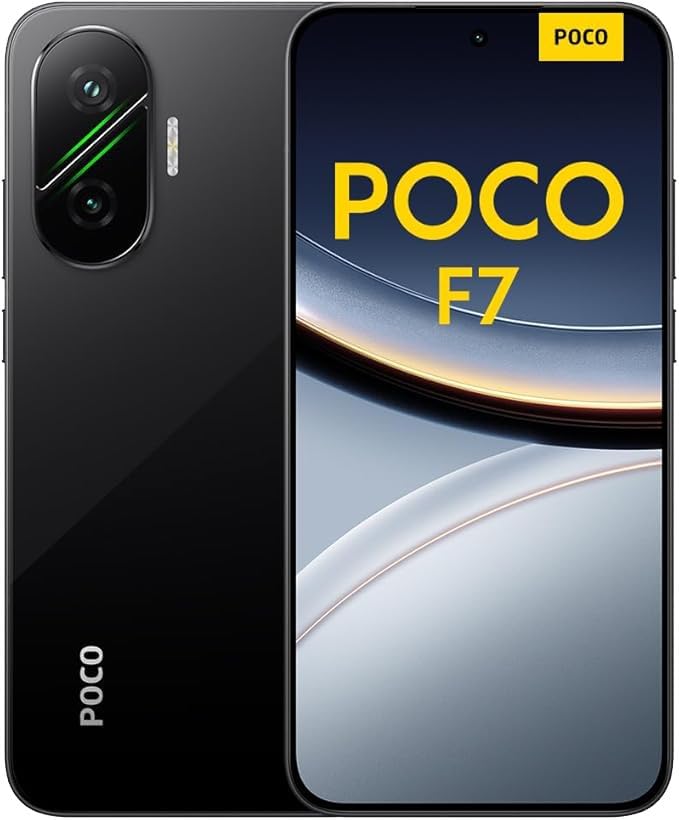

Android Phones 101: The Basics for Emulation Beginners
An Android phone runs the Android operating system, which lets you install apps from a store or load apps directly from files you trust. Emulation apps are normal Android apps that recreate an older game console in software, so one phone can stand in for several classic systems. You add your game files and play on the same screen you use for messages and photos.
Because the console is recreated in software, your phone works harder than the original hardware did. Early cartridge systems from the 8 bit and 16 bit eras place a light load on almost any modern phone, while later 3D consoles and disc based systems are far more demanding. Only load copies of games you own.
The Few Specs That Decide Emulation Speed
Spec sheets look intimidating, but only a handful of numbers decide how well a phone handles emulation.
Features That Matter for Emulation Performance
Emulation depends first on processor speed for a single task, because most emulators lean heavily on one or two processor cores rather than spreading work across all of them. Graphics driver support matters just as much, since poor drivers can cause glitches even on a fast chip. A recent chip with wide emulator support beats an older top tier chip with neglected drivers.
Display Size and Quality for Classic Games
A screen of about 6 to 7 inches gives classic games room to breathe without making the phone awkward to hold with a clip on controller. OLED panels show dark scenes with deep contrast, and strong brightness keeps the picture clear outdoors. A 120Hz refresh rate makes menu scrolling feel smooth, while most classic games output at lower rates. Tall screens leave black bars beside 4 by 3 games, so a wider phone gives those titles a larger picture.
Build, Durability, and Water Resistance for Play Anywhere
Weight matters more than most first time buyers expect, because a heavy phone in a controller clip can tire your wrists during a long session. A textured case improves grip when glass backs feel slippery, and toughened front glass helps the screen survive everyday drops. An IP68 rating means the phone resists dust and short immersion in water. That seal weakens after hard drops and repairs, so treat it as backup protection only.
Storage Options for a Growing Game Library
Start with 128GB if you mainly play cartridge era games, since those files are usually only a few megabytes each. Disc images are far larger, often one to several gigabytes per game, and box art and save files add up quietly. Choosing 256GB gives a disc heavy library room to grow. A microSD card slot is the cheapest way to expand later. Phones without a slot cannot gain space, so buy the larger tier from the start.
Processor and Everyday Performance Beyond Games
Your emulation phone is still your daily phone, so everyday speed counts too. Around 8GB of RAM lets you swap between an emulator, a browser guide, and your messages without the game closing in the background, while 12GB suits heavier multitasking. If raw speed is your top priority, see our guide to the best performing android phones for models built around peak performance.
Battery Life and Cooling for Long Emulation Sessions
Look for a battery of about 4500 to 5500 mAh, because emulation keeps both the processor and graphics busy and drains a charge faster than video playback does. Heat is the hidden limit, since a warm phone may slow itself down to cool off after about 20 to 30 minutes, and frame rates drop with it. Playing while charging adds more warmth, so charge before a long session and pause if the back feels hot.
Best Android Phones for Specific Needs
The right phone depends on which era of games sits at the center of your library. A player devoted to early cartridge classics needs far less power than a player chasing the last generation of disc based consoles, and paying for unused power wastes money.
Best Android Phones for Emulation Gaming: Tips for First Time Buyers
For gaming focused use, judge a phone by sustained speed rather than short burst speed, because a long boss fight should run as smoothly in minute forty as in minute one. A phone that pairs easily with Bluetooth and USB C controllers and responds quickly to touch will feel better in play than a faster chip in a dim, slippery body. Shoulder button comfort matters too, since many classic action games use those buttons constantly.
If your list stops at cartridge systems and early 3D titles, lower priced phones handle them well and leave money for a good controller. Shoppers comparing value options can see our guide to the best inexpensive android phones for capable phones that cost less. Save the bigger spend for later disc based systems.
Rookie Mistakes to Avoid
Most first purchase regrets come from avoidable errors.
- Buying for camera quality first leaves too little budget for the processor, so demanding games stutter.
- Choosing 128GB with no card slot fills up fast with disc images, so you end up deleting games you still play.
- Ignoring heat means a phone that benchmarks well slows down mid session, so long games become choppy.
- Skipping a controller makes touch controls your only option, so precise platforming games feel clumsy and tiring.
- Downloading game files from random sites risks broken files and unsafe software, so your phone can end up harmed.
Setting Up Your Phone for Its First Game Library
When the phone arrives, charge it fully, connect to your home WiFi, and install every system update before adding your games, because updates often improve graphics drivers. Install one emulator for the system you play most, create a clearly named folder for your game files, and copy over a small starter library first. Confirm saving and loading work before copying everything across.
Next, fit a case and a screen protector, since a phone used daily for play gets handled far more than most. Pair a Bluetooth controller or clip on a USB C model, then try the buttons in a simple game you know well. To keep your emulator one tap away, see our guide to the best widgets for android phones for home screen shortcuts. Set the emulator to stay active in battery settings so the system does not close it mid game.
Care and Maintenance for Your Emulation Phone
Back up your save files to a computer or cloud folder regularly, because saves live apart from game files and losing a forty hour adventure to a broken phone is painful. Keep the charging port free of lint with a soft dry brush, and wipe the screen after long sessions. Leave some storage space free, since a nearly full phone can slow down and make updates fail.
Frequently Asked Questions
What features matter most in android phones for emulation for first time buyers?
Processor speed and graphics driver support matter most, followed by cooling and storage space. A useful first check is to pick the hardest system you want to play, then confirm that owners of a phone with the same chip run its emulator well. Also weigh controller comfort, because a fast phone that hurts your hands will sit unused.
Should I buy an unlocked android phone for emulation?
Yes, an unlocked phone is usually the smarter buy for emulation, because it works on any carrier and often receives updates without carrier delay. Unlocked models are also easier to sell later. Just confirm the phone supports the bands your carrier uses before you order.
How much storage does an android phone for emulation need?
Most first time buyers do well with 256GB when disc based games are part of the plan, while 128GB suits cartridge only libraries. Save states stay tiny, but screenshots, video captures, and box art grow steadily. If you record gameplay clips, budget extra space or move clips to a computer each month.
Is a mid range android phone good enough for emulation?
Yes, a current mid range phone is good enough for emulation of cartridge systems and many early 3D consoles. It gives ground to flagship models on the newest disc based systems, where frame rates can dip in busy scenes. If your favorite games come from older hardware, a mid range phone plus a quality controller is a balanced way to spend.
How many years of software updates should an android phone for emulation get?
Aim for at least four years of software updates so your emulators keep working as Android changes its rules for file access and app permissions. Longer support also keeps banking apps running on the same phone. Check the promise for the exact model, since support varies widely between brands.
Do I need 5G on an android phone for emulation?
No, you do not need 5G for emulation itself, because games run locally on the phone and play fully offline. A 5G connection only helps when you download large files away from home or stream games from a home computer. If a 4G model with a better chip costs the same, choose the stronger chip.
Our Verdict
For a first purchase, put the processor and its driver support first, cooling second, and storage third, then let screen size and price settle the rest. Players of early classics can spend modestly, while players chasing demanding disc based systems should pay for sustained speed. Whichever group you fall into, the best android phones for emulation are the ones matched to your library rather than to a spec sheet, so compare your shortlist in the product table before you decide.


