
Best AMD Motherboards: Sockets, Chipsets and Features for 2026
Disclosure: We may earn a commission when you buy through links on this page, at no extra cost to you. As an Amazon Associate I earn from qualifying purchases. Learn more

A plain guide to the best AMD motherboards: AM5 sockets, chipsets, board sizes and the features worth paying for.
The motherboard decides which processor, memory and storage you can use, so choosing among the best AMD motherboards is one of the most important steps in a PC build. Today most new builds use the AM5 socket for Ryzen 7000, 8000 and 9000 processors, with DDR5 memory and fast PCIe storage. This guide explains sockets, chipsets, sizes and the features worth paying for. Compare the boards in the product table as you read.
The cheapest board is not always the best value, but the most expensive one rarely makes a mainstream PC faster. Match the board to your processor and your plans for upgrades.


Socket and Chipset Basics
AM5 vs AM4
AM5 is AMD's current platform, using DDR5 memory and supporting the latest Ryzen chips. AM4 is older, uses DDR4 and is only worth considering if you already own compatible parts. For a new build, AM5 gives a longer upgrade path.
Chipset Tiers
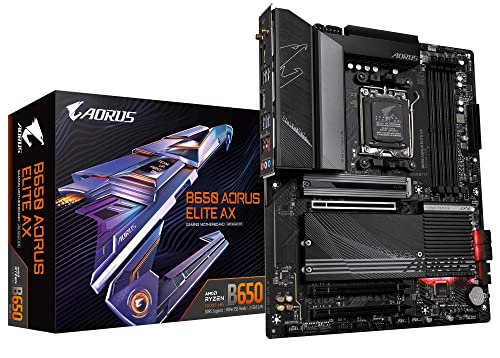
The chipset sets features such as the number of fast storage slots, USB ports and overclocking support. Entry A620 boards cover basics. B650 and B850 boards are the sweet spot, with strong power delivery and PCIe 5.0 support on many models. X670 and X870 boards add more connectivity and are aimed at enthusiasts.
BIOS Compatibility
New processors sometimes need a BIOS update before a board will recognize them. Many boards include a BIOS flashback button that lets you update without a processor installed. Check the maker's support list for your exact CPU.
Board Sizes
ATX
ATX is the standard full size board, with four memory slots and several expansion slots. It gives the most room for graphics cards, storage and capture cards, and it is the easiest to build in.
Micro ATX
Micro ATX boards are shorter, fit smaller cases and usually cost less. They have fewer expansion slots, which is fine for a single graphics card and a couple of drives.
Mini ITX
Mini ITX boards suit compact builds and small form factor cases. They pack features into a small footprint, with two memory slots and a single expansion slot. Our guide to the best AMD ITX motherboards covers this category.
Features That Matter
Power Delivery
The voltage regulator modules feed the processor. Strong power stages and heatsinks keep high core count chips stable under long loads. For a mid range processor, a mid range board is plenty, but a top end processor deserves a well cooled design.
Memory Support
AM5 boards use DDR5. Look for support for the speeds you plan to buy, and check the qualified memory list if you want to run fast kits. Four slots allow future upgrades.
Storage and Expansion
Count the M.2 slots, since most builders want at least two. A PCIe 5.0 slot for the main drive or graphics card helps future proofing, while heatsinks on the M.2 slots keep fast drives cool.
Connectivity
Wi-Fi and Bluetooth are built into many boards, and 2.5 gigabit Ethernet is common. USB C ports, including a high speed front panel connector, add convenience. Count rear ports to avoid buying a hub later.
Looks and Extras
White boards, RGB lighting and debug displays are optional. If a color scheme matters, see our guide to the best white AMD motherboards.
Choosing by Budget
Around $120 to $180: Solid Mainstream Boards
This range covers B650 boards with good power delivery, two or more M.2 slots and Wi-Fi on some models. It suits mid range Ryzen builds and gaming PCs.
Around $180 to $260: Feature Rich Boards
You gain better power stages, more USB ports, and newer B850 or entry X870 chipsets. These boards suit high core count processors and creators.
$260 and Up: Enthusiast Boards
Premium boards add top end power delivery, many M.2 slots, faster networking and polished design. They suit overclockers and high end builds, but are not necessary for most users. For a wider look at Ryzen options, see our guides to the best AMD Ryzen motherboards and best motherboards for AMD processors.
Common Mistakes to Avoid
- Buying an AM4 board for an AM5 processor, since the sockets are not compatible.
- Ignoring the BIOS version, which can stop a new processor from starting.
- Overspending on a top end chipset your processor cannot use.
- Forgetting the case size, which limits ATX or mini ITX choices.
- Choosing too few M.2 slots for future storage.
Installing and Maintaining Your Board
Build on a non conductive surface and touch the case to discharge static. Install the processor and memory before mounting the board, and use the standoffs supplied. After the first boot, update the BIOS and enable the memory profile so your RAM runs at its rated speed.
Keep dust out of the heatsinks and check cable connections now and then. If you ever need to rebuild a system, keep the manual and the I/O shield.
How to Choose Among the Best AMD Motherboards
Start with the processor. Pick the Ryzen chip that fits your work or games, then choose the cheapest board that can feed it properly. A mid range six or eight core processor runs happily on a B650 or B850 board, and spending more on the board rarely changes frame rates or render times.
Then look at your case and cooling. A full size ATX board needs a larger case, while a mini ITX build has tight clearances for coolers and graphics cards. Check where the M.2 slots sit, because a drive placed under the graphics card can run warmer.
Think about upgrades. If you plan to add a second drive, a capture card or faster networking later, choose a board with spare slots and ports rather than one that is full from day one. Check the number of fan headers and USB ports as well, since running out is an annoying and avoidable problem.
Finally, compare the boards in the product table on price, features and warranty, and read the BIOS support page for your exact processor. Following these steps, the best AMD motherboards for your build usually stand out quickly, and you will not pay for features you never use.
Frequently Asked Questions
Which chipset is best for most people?
B650 or B850 offers the best balance of features and price for gaming and general use. X870 is for users who need extra connectivity.
Do I need Wi-Fi on my board?
Only if you cannot use a cable. Boards with built in Wi-Fi save buying a card, and the cost difference is usually small.
Can I use DDR4 on an AM5 board?
No. AM5 boards use DDR5 memory only.
How many M.2 slots do I need?
Two is enough for most users. Creators and gamers with large libraries may want three or more.
Will my board work with future processors?
AMD has supported AM5 for several generations, but check the maker's CPU support list before buying.
Write down the board model and BIOS version after the build. If you add parts later, that note makes troubleshooting and compatibility checks much easier.
Final Thoughts
Choose AM5 for a new build, pick a chipset that matches your processor and plans, and check size, M.2 slots and connectivity. Compare current boards in the product table with those priorities. The best AMD motherboards give your processor a stable foundation and room to grow.


