
Best Affordable Laptops for Sims 4 2026 Buying Guide
Disclosure: We may earn a commission when you buy through links on this page, at no extra cost to you. As an Amazon Associate I earn from qualifying purchases. Learn more

Choose the best affordable laptops for sims 4 that handle the base game, expansions, and mods smoothly without lag or long loading times.
The Sims 4 is kinder to a budget than most games, but a cheap laptop can still choke once you add expansion packs, large lots, and a folder full of custom content. This guide shows how to pick the best affordable laptops for sims 4 without paying for power the game never uses, so builds load quickly and families keep moving.
The product table below lists current options. Use the sections here to decide which specs matter for your playstyle: base game and a few packs, a big collection of expansions, or a heavily modded save.

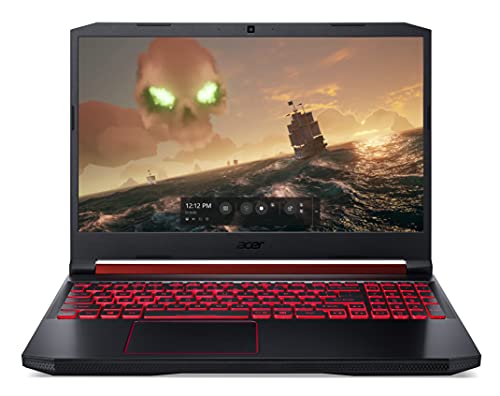


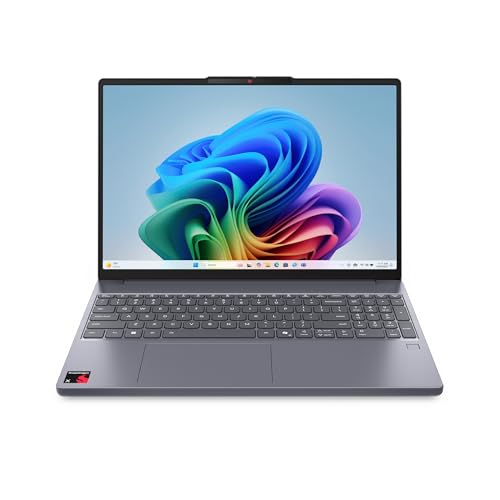


What Sims 4 Actually Asks of a Laptop
The base game runs on modest hardware, which is why a plain office laptop with a recent processor and an SSD can handle it. The load grows with every pack you install, every large world, and every mod. Build mode on a big lot with many objects is where weak graphics and low memory show up first, as stutter and slow camera movement.
Think of three player types. A casual player with the base game and a few packs can use integrated graphics. A collector with most expansions benefits from a modest dedicated graphics chip. A modder who keeps hundreds of items of custom content needs the most memory and storage, because the game scans those files every time it loads.
How to Choose the Best Affordable Laptops for Sims 4
Memory
Sixteen gigabytes of RAM is the sweet spot. Eight gigabytes can run the base game, but expansions, a browser, and a mod manager together push it hard. Many budget laptops have soldered memory that cannot be upgraded, so buy the amount you need on day one.
Graphics
Integrated graphics on current Intel and AMD chips handle the game at medium settings. A dedicated chip such as a GTX 1650 or RTX 3050 class card adds smoother build mode, higher settings, and room for heavier worlds. It also raises weight, heat, and price, so choose it only if you play with many packs.
Storage
Install the game on an SSD. Loading a household or a world from a hard drive is painfully slow, and the difference is bigger than any processor upgrade at this price. A 512 GB drive gives room for the game, expansions, screenshots, and saves, while a 256 GB drive fills quickly.
Processor and Cooling
A recent mid range processor is enough, since the game leans on a few fast cores rather than many. Cooling matters more than the badge: a laptop that runs hot throttles during long sessions, and the game gets choppy. Gaming style models usually cool better than thin office machines.
Screen and Keyboard
A full HD display shows build details and colors clearly. Build mode involves long sessions of typing codes and moving objects, so a comfortable keyboard and a decent trackpad matter, although most players plug in a mouse.
Types of Laptops That Suit Sims 4
| Type | Best for | Trade off |
|---|---|---|
| Everyday laptop with integrated graphics | Base game and a few packs | Lower settings on large lots |
| Entry gaming laptop | Many expansions and large worlds | Heavier, shorter battery life |
| Laptop with 16 GB RAM and large SSD | Custom content collections | Costs more than basic models |
| Convertible or thin laptop | Casual play on the go | Runs hot under long sessions |
Price follows the same ladder. Around $400 to $600 buys a solid everyday laptop for light play. Around $600 to $900 reaches a better processor, 16 GB of RAM, and sometimes an entry graphics chip. Above that, gaming models add the most comfortable frame rates for big worlds.
Setup and Care Tips
- Install on the SSD. Keep the game and your mods on the fastest drive for shorter loading screens.
- Add mods in small batches. A broken mod can corrupt a save, and small batches make the culprit easy to find.
- Back up your saves. Copy the saves folder to an external drive or cloud folder before adding packs or updates.
- Keep vents clear. Dust slows the fans and causes heat throttling during long sessions.
- Update graphics drivers. Fresh drivers fix many stutters without any cost.
Mistakes to Avoid
The most common mistake is buying the minimum specification. A laptop that just meets the listed requirements will feel fine with the base game, then struggle as expansions pile up. Leave headroom in memory and storage so the machine still feels quick a year from now.
Another mistake is paying for a high end graphics chip while skimping on memory and storage. For this game a balanced laptop with 16 GB of RAM, an SSD, and a modest graphics chip beats an expensive card paired with 8 GB of RAM. Finally, do not ignore the charger and battery. Gaming on battery drops performance on most laptops, so plan to play plugged in.
Budget Tiers at a Glance
Around $400 to $600
This tier suits the base game and a handful of packs. Expect integrated graphics, 8 GB or 16 GB of RAM, and a 256 GB or 512 GB SSD. Favor the models with 16 GB of RAM and a full HD screen, and keep mods minimal.
Around $600 to $900
This is the value zone for most Sims fans. You can find a recent processor, 16 GB of RAM, a 512 GB SSD, and on some models an entry graphics chip that smooths out build mode. It handles most expansions and a reasonable amount of custom content.
Above $900
At this level gaming laptops bring stronger graphics, better cooling, and faster screens. That is more than the game strictly needs, but it makes sense if you also play other titles or stream your gameplay. For Sims alone, the middle tier usually gives better value.
Frequently Asked Questions
Can Sims 4 run on an affordable laptop?
Yes. Many affordable laptops with an SSD and enough memory run the game well. Expansions and mods raise the demands, so aim above the minimum requirements for a smoother experience.
How much RAM do Sims 4 mods need?
Sixteen gigabytes gives comfortable room for mods and expansions together. Eight gigabytes can work for light mod use, but large collections may stutter. If you love custom content, put memory ahead of other upgrades.
Does Sims 4 need a gaming laptop?
No, it does not require a high end gaming laptop. A modest dedicated graphics chip helps with many packs and big builds, while casual players are happy with a general laptop. Match the laptop to the number of packs you plan to own.
Why does Sims 4 load slowly?
Slow loading usually comes from a hard drive, a large mod folder, or a nearly full drive. Moving the game to an SSD speeds it up dramatically. Removing broken or duplicate mods also helps, and keeping at least a fifth of the drive free keeps updates smooth.
How do I back up Sims 4 saves?
Copy the saves folder to an external drive or cloud folder on a regular schedule. Back up before adding packs, major mods, or game updates, and label the copies by date so you can restore a known good version.
Final Thoughts
Put memory and an SSD first, add a modest graphics chip if you own many packs, and keep cooling in mind for long evenings of building. Check the product table above, compare the specs against your expansions, and choose the best affordable laptops for sims 4 that fits your playstyle. For more ideas, see the guides to the best laptops for sims 4 and the best laptops for sims 4 with mods.


