Best 5GHz Routers: A First Time Buyer's Guide for 2026
Disclosure: We may earn a commission when you buy through links on this page, at no extra cost to you. As an Amazon Associate I earn from qualifying purchases. Learn more

A first time buyer guide to the best 5ghz routers: WiFi basics, key specs, coverage and smart setup tips.
Buying your first router sounds technical, but the core ideas are simple once someone explains them without jargon. A router takes your internet connection and shares it around your home as WiFi, and the 5 GHz band is the fast lane of that WiFi. This guide to the best 5ghz routers walks you from the basics to a confident purchase, one plain concept at a time.
You will learn what the WiFi standards mean, how to match a router to your internet plan and home size, and which mistakes catch first time buyers out. You get criteria and price guidance you can apply to any short list, starting with the product table below the intro.




5ghz Routers 101: The Basics
A router broadcasts WiFi on radio bands, and most modern routers are dual band, meaning they offer both 2.4 GHz and 5 GHz networks. The 2.4 GHz band travels farther and passes through walls more easily, which suits smart plugs and cameras at the edges of your home. The 5 GHz band is faster and less crowded, which suits streaming, gaming, and video calls, but its signal fades sooner with distance and walls.
Your devices pick a band automatically on most routers, a feature often called band steering, so you see one network name and the router sorts out the rest. Two more terms complete the basics. Your internet plan sets the maximum speed entering your home, and no router can exceed it. And your modem, sometimes combined with the router in one box from your provider, is the device that connects your home to the street. A standalone router usually offers better coverage, faster WiFi, and more settings than a free provider box. If you want a wider view of the router market, our guide to the best reviewed routers surveys the main categories.
Key Specs Explained in Plain English
WiFi Standard (WiFi 6, 6E, 7)
The WiFi standard is the generation of technology inside the router. WiFi 6 is the current mainstream choice and handles many devices at once with ease. WiFi 6E adds a third band at 6 GHz, which is very fast over short distances but only works with newer phones and laptops that support it. WiFi 7 is the newest step, promising higher speeds and lower delay, at higher prices. For a first purchase, WiFi 6 covers most homes well and costs far less. Choose 6E or 7 only if you own or plan to buy devices that can use the extra band, and expect to keep the router for many years.
Speed Ratings vs Your Internet Plan
Router boxes advertise ratings such as AX3000, and that number is the combined theoretical speed of all bands under standard conditions. Real speeds in your home will be lower, often much lower, and that is normal. The useful comparison is against your internet plan. If your plan offers about 300 Mbps, a mid range WiFi 6 router can deliver that speed near the router and sensible speeds across a typical apartment. Paying for a flagship router on a slow plan adds little, while a cheap router can bottleneck a gigabit plan. Match the router tier to the plan you actually pay for.
Wired Ports (Multi Gig, WAN and LAN)
Wired ports still matter in a wireless world. The WAN port connects the router to your modem, and LAN ports connect devices such as a desktop PC, a games console, or a TV box that benefit from a stable cable. Most routers include gigabit LAN ports, which are plenty for everyday use. A multi gig port rated at 2.5 Gbps earns its place if your internet plan runs above gigabit speed or you move large files to a home server or network storage. Count your wired devices before you buy, since running out of ports means adding a small network switch later.
Coverage and Home Size
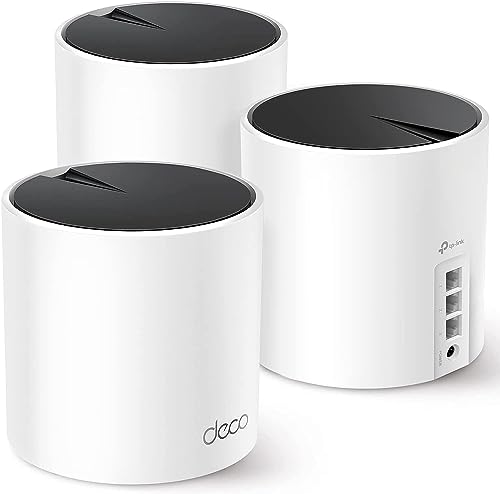
Coverage claims in square feet are rough guides, because wall materials, floors, and metal appliances all weaken WiFi. As a starting point, a single router suits most apartments and small homes up to about 1500 square feet when placed centrally. Larger homes, long layouts, and homes with thick masonry walls often need a mesh system, which uses two or three units that work together as one network. Place any router in the open, raised on a shelf, away from thick walls and large metal objects. Shoppers on cable plans can also compare provider specific advice in our guide to the best routers for spectrum.
Setup and App Management
Modern routers set up through a phone app that walks you through naming your network and choosing a password. Look for an app that also handles firmware updates, shows which devices are connected, and offers a guest network for visitors. Security settings matter too. WPA3 is the current WiFi password standard, and your router should support it, with WPA2 fallback for older gadgets. Quality of Service, or QoS, settings let you prioritize video calls or gaming over background downloads, which helps busy households during work hours. For a plain language overview of home networking terms, see our guide to the best wlan routers.
Best 5ghz Routers for Specific Needs
Best 5ghz Routers under 50
Shopping with a ceiling of about $50 means focusing on the essentials and skipping extras you will not miss. At this level, prioritize a WiFi 6 dual band model over an older WiFi 5 design, since the newer standard handles crowded networks better. Expect gigabit ports on better examples, basic app setup, and coverage suited to an apartment or a small home. You will give up multi gig ports, the 6 GHz band, and advanced gaming features. That trade suits a single person home, a student apartment, or a spare room upgrade very well.
Best Range 5ghz Routers
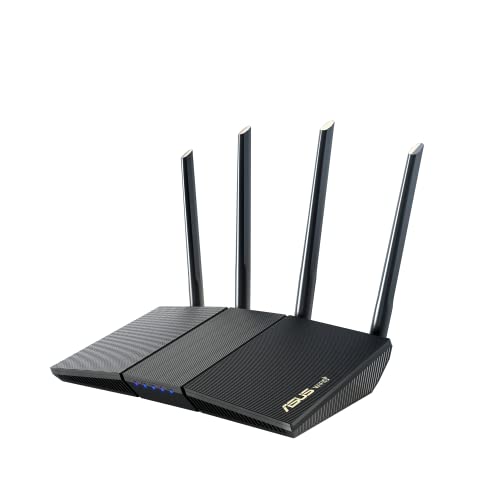
If your priority is the best range 5ghz routers can offer, remember that the 5 GHz band is naturally shorter range than 2.4 GHz, so placement and design matter more than headline speed. Look for routers with well designed external antennas, strong transmit power within legal limits, and beamforming, which aims the signal toward your devices. In a large or multi story home, a mesh system with a dedicated wireless link between units usually beats one powerful router. Test coverage room by room after setup, and move a unit rather than buying more hardware first.
Rookie Mistakes to Avoid
- Buying by the biggest speed number on the box, instead of matching the router to your internet plan and home size.
- Hiding the router in a cupboard or behind the TV, which blocks the 5 GHz signal and creates the dead zones you blame on the router.
- Keeping the default router password and admin login, which leaves your home network open to easy attack.
- Paying for WiFi 7 or a 6 GHz band when none of your devices can use them yet.
- Forgetting to check provider compatibility and required settings before you buy. Cable customers, for example, can confirm modem and plan details in our guide to the best routers for comcast.
Getting Started: Setup and First Use
When your router arrives, connect the WAN port to your modem with the included cable, power both devices on, and restart the modem if the router cannot find the internet. Place the router centrally and elevated, ideally on a shelf near the middle of your home rather than in a corner. Run the app setup, choose a strong password you have not used elsewhere, and turn on automatic firmware updates. Update firmware regularly from then on, since updates patch security flaws and sometimes improve stability. Finally, walk your home with your phone and check signal strength in the rooms that matter, then nudge the router position before you consider extra hardware.
FAQs
Mesh or a single router: which is better?
A single router is better for apartments and small homes, because it costs less and sets up in minutes. Mesh is better for large, long, or multi story homes where one router leaves dead zones, since extra units carry the signal around corners and floors. Start with one good router placed centrally. Add mesh only when a room by room check shows weak spots that repositioning cannot fix.
Do I need WiFi 7 yet?
No, most households do not need WiFi 7 yet. WiFi 6 already handles streaming, gaming, and dozens of smart devices comfortably, and many phones and laptops still ship without WiFi 7 support. Consider WiFi 7 if you are buying a premium router to keep for six years or more, or if your plan exceeds gigabit speed and your devices support the standard.
How often should I replace my router?
Replace your router about every four to six years, or sooner if it stops receiving security updates. Other signs include frequent dropouts that a restart only fixes briefly, speeds well below your plan even when wired, and new devices that cannot join the network. A router is your home gateway to the internet, so running one long past its update life is a security risk worth avoiding.
Will a new router speed up my internet?
A new router can speed up your WiFi up to the limit of your internet plan, but it cannot exceed that plan. If your old router is a slow WiFi 5 provider box, an upgrade often feels dramatic, with faster speeds in distant rooms and fewer dropouts. If speed tests wired to the modem already fall short of your plan, call your provider first, because the fault sits outside the router.
Final Thoughts
Match the WiFi standard to your devices, the speed tier to your internet plan, and the coverage style to your home, and your first router purchase becomes straightforward. WiFi 6 dual band covers most homes, mesh solves large layouts, and careful placement fixes more problems than extra spending does. When you are ready to choose, the best 5ghz routers for your home are compared in the product table above, and you now know exactly which specs to check before you buy.