
Best 4K Soundbars in 2026: Which One Fits the Way You Use It?
Disclosure: We may earn a commission when you buy through links on this page, at no extra cost to you. As an Amazon Associate I earn from qualifying purchases. Learn more

Connection type, channel count and bar size explained to help you choose the best 4k soundbars for your TV and room.
No single bar suits every room, TV and viewing habit, and paying more does not fix a poor match. The best 4k soundbars pass a 4K picture cleanly to your TV while giving you clearer dialogue, fuller movie sound and simpler control than TV speakers alone. Use the comparison table below to match connection type, channel count and bar size to your room first.
Start with how you watch most nights. A film fan in a large room needs width and bass that an apartment viewer may find overwhelming at low volume. A gamer needs clean passthrough for a console, while a news viewer may value voice clarity above all else.


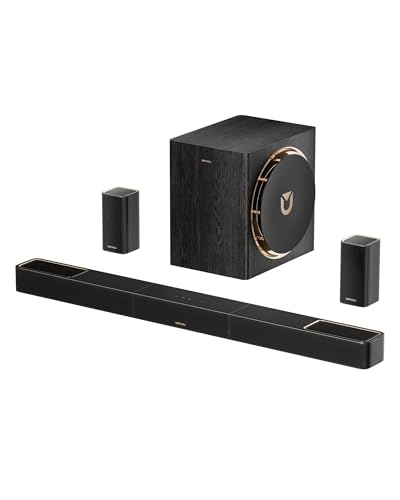


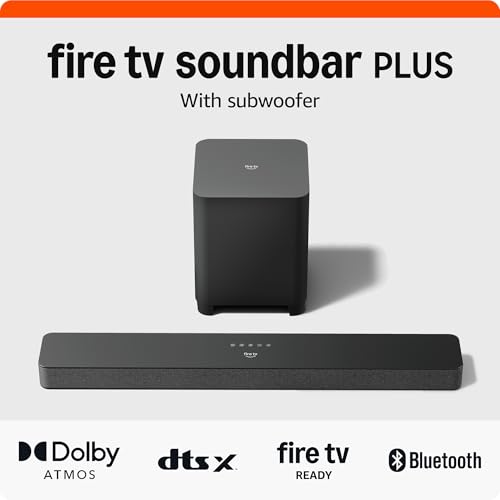
Who Should Buy Which 4K Soundbars?
Pick by the room you sit in and the source you play most often. The same bar can feel generous in one home and boomy in another, and your main use should decide where your money goes.
Movie Lovers with a Large Living Room and a 4K TV
You watch films and dramas on a TV of 55 inches or more and sit about 8 to 12 feet away. Prioritize a wide bar with a dedicated center channel and a separate wireless subwoofer, plus Dolby Atmos support if your source offers height effects. This layout spreads effects across the room front and keeps voices anchored to the screen.
Apartment Viewers Who Need Clear Dialogue at Low Volume
You mostly watch news, sitcoms and sports in a small space and keep volume modest so neighbors are not disturbed. Choose a compact bar of about 32 to 38 inches with a strong center channel or a clear voice mode and modest built in bass. You gain speech you can follow without raising overall volume, and you avoid bass that travels through walls at night.
Gamers and Sports Fans Using a Console with a 4K TV
You split time between games, sports and shows, and your console may run through the bar before the TV. Prioritize 4K passthrough at 60 Hz or higher and a sound mode that keeps commentary clear during crowd noise. A mid sized bar with a subwoofer gives impact for games without crowding a media console.
Key Features to Compare
Your short list of best 4k soundbars should start with the connection to your TV, because that one choice limits the picture and audio formats the bar can ever receive. Cross off any bar that fails an early factor below.
4K Passthrough and HDR Format Support
A bar with HDMI inputs can take a console or disc player first and pass the picture on to the TV. Check that passthrough supports 4K at 60 Hz and the HDR formats your TV uses, such as HDR10 and Dolby Vision, so the picture arrives unchanged. If a bar passes only part of that chain, your source may drop to a lower resolution or lose HDR.
HDMI eARC, ARC and Optical Connections
HDMI eARC is the preferred link between TV and bar because it carries full quality audio from TV apps and sources, and it lets the TV remote control bar volume. Older ARC carries a narrower range of formats, while optical suits basic stereo and standard surround and cannot carry Dolby Atmos. Many bars also add Bluetooth and WiFi for music from a phone, separate from TV sound quality.
Channel Count and a Dedicated Center Channel
Numbers such as 2.1, 3.1 and 5.1.2 describe channels and, after the dot, subwoofer and height counts. The center channel matters most for daily viewing because it carries most dialogue, so a 3.1 bar often sounds clearer for speech than a 2.1 bar at the same price. Extra channels help films in larger rooms, yet they add little in a narrow room. If pure sound quality is your top priority, see our guide to the best sounding soundbars.
Audio Formats for Movies and Shows
Dolby Atmos and DTS:X use height information to place effects above and around you, while Dolby TrueHD and similar lossless formats carry more detail from discs and premium apps. A bar must decode the formats your sources send, or it will play a simpler mix that loses placement cues. Confirm the formats you actually play, because a format you never use adds cost without benefit.
Subwoofer Style and Bass for Your Room Size
A separate wireless subwoofer near the front wall gives deeper and more even bass for action films, and you can lower its level for late viewing. Built in bass keeps a small setup tidy and suits dialogue led viewing, but it rarely moves as much air in a large room. Match output to room size, and see our guide to the best soundbars and subwoofers if a separate subwoofer is central to your plan.
Bar Width, Placement and Your TV Size
A bar should sit centered under the screen and no wider than the TV stand, and its height must stay below the picture and the remote sensor. TVs of 43 to 55 inches pair well with bars of about 32 to 42 inches, while larger TVs suit bars of about 42 to 50 inches. A bar that blocks the sensor or hangs past the stand edge can sound uneven.
How to Place and Connect a 4K Soundbar
Measure the stand depth and the space below the screen before you order. Place the bar at the front edge of the furniture, centered on the middle seat, with its front clear of the stand lip so sound is not blocked. For a deeper look at pairing a bar with the TV itself, see our guide to the best soundbars for 4k tvs.
Connect the TV eARC port to the bar eARC port with a certified HDMI cable, then turn on eARC and external speaker output in the TV sound menu, since many TVs ship with TV speakers selected. Plug sources into the TV for the simplest setup, or into the bar if it offers enough passthrough inputs. One major TV brand uses different menu names, so see our guide to the best soundbars for samsung 4k tv for that brand specific path.
Common Mistakes to Avoid
These errors are common because the box highlights channels and power more than fit and connection.
- Buying a bar wider than your TV stand leaves the ends unsupported and makes the setup look and sound unbalanced.
- Using an optical cable as your main link limits the audio formats you can receive and removes TV remote volume control.
- Placing a soundbar inside a closed cabinet muffles dialogue and traps heat around the electronics.
- Turning the subwoofer to its highest level for every show makes speech hard to follow and annoys nearby rooms.
- Skipping the TV sound menu after connecting the cable leaves the TV speakers active and the bar silent or out of sync.
How to Care for Your 4K Soundbar
Dust the top and front grille with a dry microfiber cloth and keep liquids away from the speaker openings. Use a soft brush around the grille if dust builds up, and never push cloth into the openings, since drivers sit close behind the cover. Keep the bar out of long direct sun and away from heaters, because heat ages electronics over time.
Check HDMI cables twice a year for looseness or damage, and update bar firmware through the manufacturer app when an update addresses connection faults. If sound drops or speech drifts from lip movement, power the TV and bar off at the wall for a minute first, because a clean restart clears many handshake faults.
4K Soundbars: Your Questions Answered
Does a 4K soundbar change the picture quality on a 4K TV?
No, a 4K soundbar does not improve picture quality on its own. With eARC, the TV handles the picture and the bar only receives audio, so sharpness and color stay as the TV produces them. The one exception is a source plugged into the bar first, where passthrough limits can lower the signal if the bar supports less than your source sends.
How wide should a 4K soundbar be for a 65 inch TV?
A 65 inch TV is about 57 inches wide, so look for a bar of about 48 to 54 inches for a balanced front stage. A much shorter bar can make film sound feel narrow beside a large picture. Measure the gap between the TV feet as well, because some wide bars only fit if the TV is wall mounted.
Can a 4K soundbar work with an older TV that lacks eARC?
Yes, a 4K soundbar can work with an older TV that lacks eARC in most setups. Use ARC if the TV offers it, or optical for basic sound, and expect standard formats rather than full Atmos from TV apps. A useful workaround is to plug a streaming device into the bar passthrough input, which lets the bar decode richer audio while the TV shows the picture.
Does a 4K soundbar need a separate subwoofer for apartment viewing?
No, a 4K soundbar does not need a separate subwoofer for apartment viewing. Many compact bars let you reduce bass at night while keeping dialogue clear, which suits thin walls better than a large subwoofer at full level. If you add one later, choose a model from the same system family, because subwoofers are rarely interchangeable between brands and product lines.
How long does a 4K soundbar usually last?
A 4K soundbar usually lasts about five to eight years in normal home use. Speakers change slowly, so the part that dates first is usually the connection standard or app support rather than the drivers. Buying eARC and current HDR passthrough today gives the bar a better chance of working with your next TV without adapters or lost formats.
Wrapping Up
Match the connection to your TV first, then choose channel count for dialogue and subwoofer style for your room size. Those three decisions matter more than extra modes you may never open. Use the product table above to compare width, connections and formats before you decide.
Choosing the best 4k soundbars by use, rather than by the longest feature list, means you pay for sound you hear every night. Pick the bar that fits your room, your TV and your main seat, and set it up once with care.


