
Best 3LCD Projectors (2026): Rooms, Brightness and Throw
Disclosure: We may earn a commission when you buy through links on this page, at no extra cost to you. As an Amazon Associate I earn from qualifying purchases. Learn more

How to choose the best 3lcd projector: standard, short throw and portable setups, plus brightness advice.
Movie night in a real house rarely means a perfect dark room. Someone leaves a lamp on, the kids sit at odd angles, and the screen shares a wall with everyday life. That is exactly where the best 3lcd projector earns its place, because this design sends light through three separate LCD panels, one each for red, green and blue, so color stays rich even when the room is not fully dark. This guide helps you choose by room, users and budget, and the comparison table below sums up the main types at a glance.
You do not need a dedicated theater to enjoy a big image at home. A living room, a bedroom or a home office can all work, as long as throw distance, brightness and sound fit the space. Our overview of the best projector options shows how 3LCD models sit alongside other designs before you narrow the field.


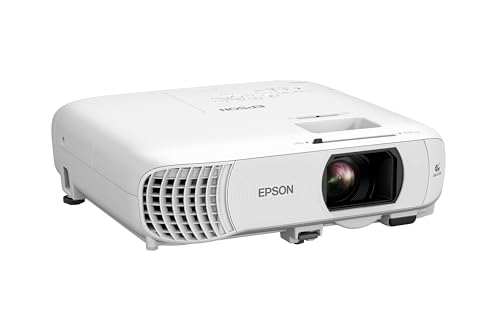


Quick Answer: The Short Version
Match the type to the room first and the specification sheet second. A standard throw model suits a living room or spare room where the projector can sit on a shelf or a mount several feet from the screen. A short throw or ultra short throw model suits smaller rooms and rentals where floor space is tight. A portable model suits shared family use and moving between rooms. Brightness, lens shift and quiet fan noise matter more for daily comfort than a long list of streaming apps.
Before You Buy: A Quick Checklist for Choosing a Projector
Work through the checklist below in order, because an early choice, such as screen size, limits later ones like throw distance and brightness.
Size: Match It to Your Space
Start with the wall or screen area you can actually use, then measure the distance to where the projector will sit. Standard throw models usually need about 8 to 14 feet for a 100 inch image, while short throw models fill the same screen from roughly 3 to 6 feet. Ultra short throw models sit on a low cabinet just inches from the wall. In a bedroom or office, a smaller 80 to 100 inch image often fits the furniture better.
Which Type Fits Your Routine
Think about how the projector will live in your home week to week. A fixed living room setup rewards a ceiling mount and a model with lens shift, since you align it once and leave it in place. A shared family projector that moves between rooms needs quick setup, modest weight and automatic keystone help. A home office model doubles for presentations, so clear text and a bright image under ceiling lights matter more than deep black levels.
Features Worth Paying For (and Ones to Skip)
Pay for lens shift, a useful zoom range and a quiet fan, because those three shape placement and comfort in every single session. WiFi and Bluetooth help with streaming sticks and wireless speakers, and built in speakers are fine for casual viewing in a small room. Skip paying extra for a long list of built in apps if you already own a streaming stick, and treat very high claimed contrast numbers with care, since room light washes out contrast quickly.
Screen Size for Your Room and Seating Distance
For a 100 inch screen, most viewers feel comfortable sitting about 9 to 13 feet back, at a distance where individual pixels stay invisible at 1080p. Measure your main seats first, then pick the screen size that fits that distance, not the other way around. In multi use rooms, leave space below the screen for a soundbar or speakers.
Light Source: Lamp or Laser
Most 3LCD models use either a lamp or a laser light source. Lamps cost less up front and you can replace them when they dim, but brightness fades slowly over a few thousand hours of use. Laser models hold brightness longer, turn on faster and usually need no lamp budget at all, though they cost more at purchase. For a family room used a few evenings a week, a lamp model often makes financial sense, while daily users tend to lean toward laser.
Brightness for Bright and Dark Rooms
Brightness is rated in lumens, and the room decides how much you need. A dark dedicated room can look great at about 1,500 to 2,000 lumens. A living room with lamps on and curtains drawn usually needs about 2,500 to 3,000 lumens for daytime viewing. For rooms with direct daylight on the screen, plan on curtains or a screen that rejects ambient light.
Smart Platform, Sound and Ports
Check the ports before the apps. You want at least two HDMI inputs for a streaming stick, a game console or a disc player, plus an optical output or HDMI ARC if you plan to add a soundbar. Built in speakers handle news and kids shows, but movie sound needs a soundbar or separate speakers in a living room. A smart platform with the services you already pay for saves one remote.
Realistic Budget Ranges
Entry 1080p 3LCD models run about $300 to $700 and suit bedrooms and casual viewing. The middle band, about $700 to $1,500, adds brightness, lens shift and quieter cooling, and it is where most family rooms should shop. Premium 4K capable models run about $1,500 to $3,000 and bring sharper detail, stronger HDR handling and laser light sources. Keep a little budget back for a mount, a screen and cables.
Three Types Compared: Which Setup Fits Your Home
The three broad types below cover almost every real home. None is best in the abstract; each one wins in a different room.
Standard Throw for Living Rooms and Spare Rooms
A standard throw 3LCD projector on a rear shelf or ceiling mount is the classic family room choice, and the natural starting point if you are building toward the best projector for home theater experience. It gives the widest choice of brightness and lens options, and the fan sits behind the seats, so noise bothers you less. The trade is planning: you need the throw distance and a power outlet near the mount.
Short Throw and Ultra Short Throw for Tight Spaces
These models place the image from a coffee table or a low cabinet, so nobody walks through the beam and shadows stay off the screen. Ultra short throw units pair well with a fixed screen and a soundbar in a tidy living room where a ceiling mount is not allowed, such as a rental. Alignment is less forgiving, because small bumps shift the image and the screen must be flat.
Portable Models for Shared Family Use
A compact 3LCD model that moves from room to room suits households that share one projector between movie night, homework and backyard screenings. If portability is your top priority, compare these against the best mini projector options as well, and note that smaller bodies usually mean lower brightness and smaller speakers. Choose a battery only if you truly will use it away from an outlet, since batteries add cost and weight.
How to Compare 3LCD Projectors Fairly
Compare models on the factors that change what you see and hear: picture quality, brightness and HDR handling, the smart platform and apps, sound, ports and connectivity, and value for the price. Use maker specification sheets for throw ratios and lumen ratings, and read buyer reviews for fan noise and reliability patterns rather than picture scores. Weigh the factors by your room: a bright living room ranks lumens first, while a dark spare room can trade lumens for contrast.
What We Like and What We Don't About 3LCD vs Other Projectors
Three chip 3LCD designs avoid the spinning color wheel that single chip DLP models use, so viewers who see rainbow flashes on DLP usually find 3LCD easier to watch. Colors stay saturated, which suits sports and family viewing with some light in the room. On the other side, DLP models often show deeper blacks in a dark room and smaller bodies at the same price. For a direct comparison of the two panel designs, read our dlp vs lcd projector breakdown.
- Rich color at full brightness, even with a lamp on in the room
- No rainbow artifacts, which helps sensitive viewers and kids
- A wide range of lens shift options for flexible placement
- Black levels trail good DLP and LCoS models in a fully dark room
- Dust can reach the light path on some designs, so filters need regular cleaning
- Bodies tend to run larger than compact DLP models
Common Buying Mistakes to Avoid
- Choosing screen size before measuring seating distance, which leaves viewers sitting too close with pixels visible.
- Buying on peak lumens alone and ignoring fan noise, which you will hear in every quiet scene.
- Mounting before checking the throw ratio, which can leave the image too big or too small for the screen.
- Relying on built in speakers for a large living room, which makes dialogue hard to follow.
- Skipping a screen and projecting on a textured colored wall, which dulls both color and sharpness.
- Forgetting the cost of a mount, cables and a replacement lamp when you set the total budget.
Cost of Ownership and Care
Running costs stay modest. A lamp model needs a replacement lamp every few thousand hours at about $100 to $300, while laser models skip that cost but ask more up front. Clean the air filter with a soft brush or a vacuum about once a month, since a clogged filter raises heat and fan noise. Keep the vents clear, and let the fan finish its cool down cycle before you unplug the projector after a session.
Your Questions, Answered
How to mount a projector?
Ceiling mounting starts with finding a joist or using anchors rated for the projector weight, because drywall alone can sag over time. Center the lens on the screen middle, not the mount plate, and keep some lens shift range in reserve for fine alignment. Run power and HDMI before final tightening.
How many lumens do I need?
Judge ratings by the ANSI standard where possible, because some listings use inflated marketing lumens that are not comparable between brands. Two models with equal ANSI ratings can still differ, since screen gain spreads light differently. When in doubt between two screen sizes, remember that the smaller image will always look brighter on the same projector.
How to connect phone to projector?
The simplest route is a cast enabled model or a streaming stick on the same WiFi network as your phone, then use the cast or mirror option inside the app. A wired USB C to HDMI adapter is more reliable for presentations and avoids network dropouts. Our step by step guide on how to connect phone to projector covers both routes for Android and iPhone.
How to set up a projector?
Place the projector square to the screen first and use zoom and lens shift before touching digital keystone, which softens fine detail. Focus after about 20 minutes of play, since a warm lens shifts focus slightly. Our full walkthrough on how to set up a projector also covers screen height and speaker placement.
Are 3LCD projectors worth it?
For shared family rooms, yes, because the design keeps color brightness equal to white brightness, so cartoons, sports and games stay vivid. They also suit households where one viewer sees rainbow flashes on DLP models. The value case weakens in a fully dark dedicated theater, where contrast focused designs pull ahead.
What is the best 3lcd projector?
There is no single winner, because the right choice follows your room measurements. Decide screen size and throw distance first, then brightness for your light level, then lens shift if the mount position is fixed. The model that meets those three numbers with the quietest fan at your budget is the right one for your home.
Final Thoughts
A projector turns an ordinary wall into the biggest screen in the house, and 3LCD is the design that keeps that picture colorful in real rooms with real light. Match the type to your space, respect the throw and brightness numbers, and the best 3lcd projector for your home stops being a guess and becomes a short list. Look again at the product table above before you order.


