Best 3 Inch Studio Monitors for 2026: Everything to Know Before Your First Purchase
Disclosure: We may earn a commission when you buy through links on this page, at no extra cost to you. As an Amazon Associate I earn from qualifying purchases. Learn more

Shopping for the best 3 inch studio monitors for the first time? Learn the terms, compare options, and avoid rookie mistakes with this easy guide.
Buying your first pair of small speakers for mixing can feel confusing, because the specs sound technical and the limits of a tiny woofer are easy to miss. The best 3 inch studio monitors give you clear, honest sound at close range without taking over a small desk. This guide explains each key factor in plain language and helps you read the product table below with confidence.
You do not need a large room or a big budget to learn how your mixes translate. You do need realistic expectations about bass, a sensible place to put the speakers, and controls that suit your desk and walls.




Who Should Buy 3 Inch Studio Monitors?
A studio monitor is a powered speaker built to sound flat and accurate, so you hear flaws in a recording instead of added bass or sparkle. When shoppers look for the best 3 inch studio monitors, they are usually choosing a compact near field pair for close listening in a tight space, not for filling a room at a party.
Bedroom Producers Working in Small Rooms
You record and mix where you sleep, often at low volume so you do not disturb others. A compact pair fits beside a laptop and lets you judge vocals, guitars, and synths clearly at close range. You accept limited deep bass as the trade for size, and you check low notes on headphones before you finish a track.
Podcasters and Video Editors on Tight Desks
You edit speech more than music, and clarity in the midrange matters most. A small pair places voices front and center, so cuts, breaths, and room noise are easy to hear and fix. The small cabinets leave room for a microphone arm and notes, and front controls make volume changes quick.
Learners Building a First Listening Setup
You are moving up from laptop speakers and want to hear what a mix really contains. A flat response may sound plain at first, and that honesty is the point, because it teaches you how balance and effects work. Start here if your desk is shallow and your budget is modest.
Key Features to Compare
Compare these factors in order, because placement and bass limits shape your result most.
Woofer Size and Low Frequency Limits
The woofer handles bass and the lower part of voices and instruments, and a 3 inch cone can only move so much air. Many models reach down to about 70 to 90 Hz before the level falls away, so kick drums and bass synths sound light rather than full. That limit is normal for the size. Choose it when your work centers on voice and midrange detail, and check the lowest notes another way.
Frequency Response and Sound Balance
Frequency response describes how evenly a speaker plays lows, mids, and highs, and a flatter result helps your decisions carry to other speakers. Look for a stated range with a tolerance, such as plus or minus 3 dB, because a range with no tolerance tells you little. A pair that boosts bass or treble can hide mud or harshness in your mix. Even balance at your normal volume matters more than a wide range on paper.
Tweeter and High Frequency Detail
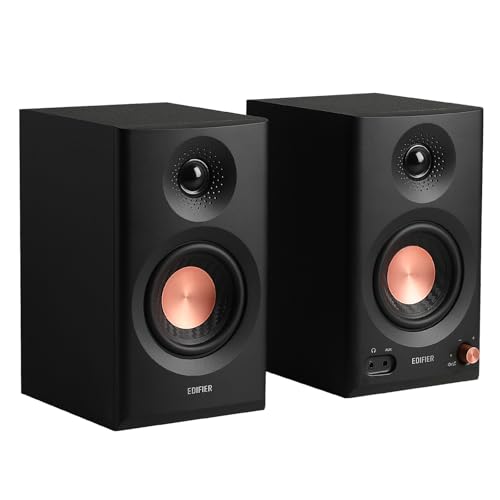
The tweeter is the small driver that plays cymbals, consonants in speech, and the air at the top of a recording. Most models here use a dome tweeter about 0.75 to 1 inch wide, made of silk or a light metal. Silk tends to sound smooth, while metal can sound crisp and, in some designs, a bit sharp at high volume. Waveguides around the tweeter spread highs wider, so you keep detail when you shift in your chair.
Ports, Placement, and Room Boundaries
Many small monitors use a port, a tuned opening that extends bass output from a small cabinet. A rear port needs space behind the speaker, often about 4 to 8 inches from a wall, or bass can swell and blur. A front port or a sealed cabinet is easier to place close to a wall. Your desk also reflects sound toward your ears, so a speaker that suits your placement will beat a stronger model forced into a poor spot.
Inputs and Tuning Controls
Inputs decide how cleanly you can connect your gear. Balanced TRS or XLR inputs reject hum from an audio interface, while RCA inputs suit simple home gear but can pick up noise on long cable runs. Some models add a 3.5 mm input or Bluetooth for a phone, handy for casual listening but not the best path for mixing. Bass and treble trim switches help you adjust for a wall or a reflective desk, and a front volume knob saves reaching behind the cabinet. Built in amplifier power of about 15 to 50 watts per pair is typical for this size, enough for clean sound at close volume with headroom for loud peaks.
How to Set Up 3 Inch Studio Monitors on a Small Desk
Place the two speakers and your head so they form a triangle with roughly equal sides, starting with the speakers about 3 feet apart and your ears about 3 feet from each one. Raise the cabinets so the tweeters point near ear height, using stands or foam pads if the desk leaves them too low. Angle each speaker inward toward your ears, and keep the pair at the same height and distance so stereo images stay centered.
Keep space behind the speakers, and avoid placing one in a corner while the other sits in open space, because uneven boundaries make the two sides sound different. Foam pads under the cabinets reduce vibration into the desk, which can add a boxy color to voices. If your room later grows, see our guide to the best 5 inch studio monitors, our guide to the best 6 inch studio monitors, and our guide to the best 8 inch studio monitors for the next sizes up. This category also appears under a slightly different name in our guide to the best 3 inch monitor speakers.
Common Mistakes to Avoid
- Expecting deep bass from a 3 inch woofer leaves kick and bass parts undermixed in your tracks.
- Placing rear ported speakers flat against a wall makes bass swell and masks midrange detail.
- Setting the speakers at very different heights shifts voices and instruments off center in the stereo image.
- Mixing at high volume in a small room causes ear fatigue and pushes you toward dull, quiet mixes.
- Connecting both speakers to a single side output leaves you editing in mono without realizing it.
- Judging a new pair only with favorite songs teaches you its flavor, not how your own work translates.
Care and Maintenance for 3 Inch Studio Monitors
Dust the cabinets and driver surrounds with a dry, soft cloth, and keep liquids and cleaning sprays away from the cones and ports. Never press on a tweeter dome to clean it, because a small dent can change how highs spread. Check that cables sit without strain at the plugs, and leave rear panels clear so the built in amplifiers can shed heat.
Turn the volume down before you switch sources or unplug a cable, because pops at full level can stress a small woofer. Power the speakers off when you will be away for days. If one side develops hum or crackle, swap the left and right cables first to learn whether the fault follows the cable or stays with the speaker.
FAQ
What room size suits 3 inch studio monitors best?
Small rooms suit 3 inch studio monitors best, especially bedrooms and home offices where you sit close to the desk. In a large open room the sound thins out before it reaches a distant chair. If your room has bare walls and a hard floor, a rug or curtains near your desk can calm reflections and make a small pair sound clearer.
How long do 3 inch studio monitors usually last?
A pair of 3 inch studio monitors usually lasts about 5 to 10 years with normal home use. The amplifier electronics tend to age before the drivers do, so heat and long hours powered on matter more than playing time alone. Using a switched power strip so the pair rests fully off overnight, rather than sitting warm in standby, is a simple habit that can extend that life.
Can 3 inch studio monitors produce enough bass for mixing?
They produce enough bass for mixing voice, acoustic instruments, and the upper part of most bass lines, but not for judging the deepest notes. You can still mix low heavy music if you learn where the roll off begins and cross check that region on good headphones. Keep a few reference tracks with known sub bass content, and note how they sound on your pair.
Do 3 inch studio monitors need a subwoofer?
No, 3 inch studio monitors do not need a subwoofer, and many first time buyers work better without one. A subwoofer adds the missing low range, yet in a small untreated room it often creates uneven bass that changes when you move your chair. If you add one later, place it near the desk, not in a corner, and set its level so you only notice it when you turn it off.
How far should you sit from 3 inch studio monitors?
Sit about 2 to 4 feet from 3 inch studio monitors for most desk work. Closer than that, the woofer and tweeter can sound like separate sources instead of one voice, and small head moves change the tone a lot. A quick test helps: play a centered vocal, lean forward and back slowly, and settle where the voice stays solid and centered with the least change in brightness.
Final Thoughts
For a first pair, focus on even balance, placement that fits your walls and desk, and inputs that match your interface. Accept the bass limit of the small woofer, sit close, and keep the volume sensible. Use the product table above to compare size, inputs, and controls side by side.
Chosen with those points in mind, the best 3 inch studio monitors for your desk will sound clear and honest every day. Start simple, learn your pair on music you know well, and upgrade only when your room or your work outgrows them.