Best 24 Inch TVs 2026 Buying Guide
Disclosure: We may earn a commission when you buy through links on this page, at no extra cost to you. As an Amazon Associate I earn from qualifying purchases. Learn more
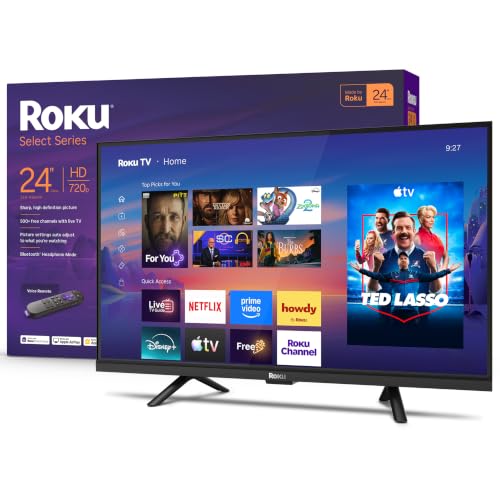
Best 24 inch TVs suit bedrooms, dorms and kitchens. Compare resolution, sound, ports and viewing distance to pick the right small screen.
Shopping for best 24 inch tvs starts with an honest look at the room where the screen will live. A 24 inch screen suits a bedroom, a kitchen counter, a dorm room, or a small office far better than a large screen squeezed into a tight corner. The product table shows the main options side by side, so you can weigh size, resolution, and price before you commit.
Measure your viewing distance first, because a screen that looks perfect in a store can feel cramped or overwhelming at home. At a typical bedroom distance of about 4 to 6 feet, a 24 inch screen fills the view without forcing your eyes to dart across the panel. Check the stand width too, since a wide stand may not fit a narrow dresser or shelf.
Who Should Buy the Best 24 Inch TVs
A 24 inch TV makes sense for a second room, a child bedroom with parental controls, a kitchen where you watch while cooking, or a small apartment where the sofa sits close to the wall. It also suits a guest room, where a modest screen keeps the room feeling open. If your main living room seats viewers 10 feet or more from the screen, a larger size will serve you better.
- Small bedrooms and dorm rooms
- Kitchens and home offices
- Guest rooms and caravans
- Budget conscious second screens
Key Features That Matter Most
Resolution matters more than brand at this size, so look for full HD if you watch films or stream in high quality, and accept HD ready only for casual news and background viewing. Sound is often thin on small sets, so check for a headphone socket or a digital audio output if you plan to add a soundbar later. Smart features vary widely, so confirm the streaming apps you actually use are built in before you buy.
Panel type affects viewing angle, which matters when more than one person watches from different seats. A VA panel usually gives deeper blacks, while an IPS panel keeps colors steady from the side. Check the number of HDMI ports as well, since a console, a streaming stick, and a soundbar can fill ports quickly.
Size, Placement, and Viewing Distance
Place the screen at eye level when seated, with the center of the panel roughly level with your eyes. Avoid mounting it high above a fireplace in a small room, because neck strain builds up fast during a long film. Leave space around the set for air flow, and keep cables tidy so the stand stays stable on a narrow surface.
If the room is bright, a matte screen or a spot away from direct window glare will help more than extra brightness alone. Curtains or a slight angle change can fix glare without spending anything. For a kitchen, mount the set where splashes cannot reach it and where you can still read subtitles from the cooking area.
Budget and Long Term Value
Small TVs are often priced from about $100 to $250, and spending at the top of that range usually buys a better panel and a smarter platform rather than a bigger screen. Check the warranty length and the return policy, because a dead pixel or a faulty remote is easier to deal with early. A set with regular software updates will stay useful longer than a cheap set with an abandoned platform.
Think about total cost as well, including a wall mount, a longer HDMI cable, or a soundbar if the built in speakers disappoint. Buying those extras later is fine, but a set with the right ports now saves a second purchase. Energy use is low at this size, so running costs rarely change the decision.
Common Mistakes to Avoid
The most common mistake is buying on price alone and ending up with a dim panel that washes out in daylight. Another is ignoring the stand footprint, which can overhang a small table. A third is assuming every smart TV carries every app, when some platforms drop apps over time. Read the app list and the port list before you order, and measure twice.
Planning for Everyday Use
Set up parental controls and sleep timers on day one if children will use the set, and save your streaming logins in a safe place. Keep the remote in a fixed spot, since small remotes are easy to lose between cushions. Wipe the screen with a soft dry cloth, and avoid harsh cleaners that can damage coatings. With simple care, a small TV can serve a bedroom or kitchen for many years.
Related Guides Worth Reading Next
- Best TVs of all time
- Best 24 inch smart TVs
- Best 24 inch LED TVs
- Best 55 inch TVs
- Best 65 inch TVs
A Final Check Before You Order
Before you order, recheck the three numbers that cause most returns: screen size against viewing distance, stand width against your furniture, and HDMI count against your devices. Write them on a note and compare them with the specification sheet, rather than trusting memory. A few minutes of checking now saves the hassle of repacking a television later.
Also confirm the smart platform carries the exact apps your household uses, including any niche streaming service or catch up app that matters to you. Platforms change app support over time, so a quick search for your must have apps is worthwhile. If an app is missing, a low cost streaming stick can fill the gap without changing your television choice.
Finally, think about who else will use the set and how they will control it. A simple remote, clear menus, and saved favorite channels make a small television far more pleasant for children, guests, and older relatives. Set up profiles and parental controls on the first evening, while the setup steps are still fresh in your mind.
Caring for Your Small TV Over Time
Keep the screen free of dust with a dry microfiber cloth, and avoid pressing hard on the panel while cleaning. Check cables every few months, since a loose HDMI connection causes more picture complaints than panel faults. If the picture looks washed out, revisit brightness and picture mode before assuming the set has failed, because room lighting changes with seasons.
Software updates keep apps working, so allow the set to update when prompted and restart it occasionally. If an app stops working, reinstalling it or using a streaming stick usually restores it without a repair. With simple care, a small television bought for a bedroom or kitchen can remain a reliable second screen for many years.
Frequently Asked Questions
What size room suits a 24 inch TV best?
A room where viewers sit about 4 to 6 feet from the screen suits a 24 inch TV best, such as a bedroom, a dorm room, or a small office. At longer distances the picture starts to feel small, and subtitles become harder to read. Measure your seat to screen distance before ordering, and choose a larger size if you sit further away.
Is full HD worth it on a 24 inch screen?
Full HD is worth it if you watch films, sport, or streaming in high quality, because text and fine detail stay sharper than on an HD ready panel. For casual news or background viewing, an HD ready set can still look fine. The price gap is usually small, so full HD is the safer default choice.
Do small TVs have good sound?
Built in sound on small TVs is often thin, because the speakers are small and face down or backward. A soundbar, a pair of powered speakers, or good headphones will improve dialogue a lot. Check for an audio output before you buy if you plan to add external sound.
Can I wall mount a 24 inch TV?
Most 24 inch TVs support a standard VESA mount, but check the mount pattern and the weight limit before ordering a bracket. A fixed mount suits a bedroom, while a tilt mount helps in a kitchen where you watch from standing height. Keep the bracket screws matched to the TV manual.
What should I check before I buy?
Check the resolution, the smart platform and its app list, the HDMI and audio ports, the stand width, and the viewing angle. Also confirm the return policy, since a panel that looks fine in a store can disappoint in your own lighting. A short checklist saves a return trip.
Can a 24 inch TV work as a computer monitor?
A 24 inch TV can work as a casual computer monitor for browsing and video, but text may look softer than on a dedicated monitor of the same size. Televisions often apply picture processing that blurs small text, so enable any PC or game mode to reduce it. For long document work, a proper monitor with sharp text is usually the better choice.
Do 24 inch TVs support 4K?
Most 24 inch TVs top out at full HD, since 4K on such a small screen offers little visible benefit at normal viewing distances. Full HD looks sharp at bedroom distances and keeps prices sensible. If you want 4K, consider a larger screen where the extra pixels are actually visible.
Can I use a 24 inch TV in a kitchen?
A 24 inch TV works well in a kitchen when mounted away from splashes and heat, with a viewing angle readable from the cooking area. Choose a tilt mount if you watch while standing, and keep the remote away from wet hands. A splash resistant placement matters more than extra features.
Final Thoughts
Choosing among the best 24 inch tvs comes down to room size, viewing distance, and the apps you actually use. Measure first, check the ports and the panel, and pick the set that fits your room rather than the largest screen your budget allows. The product table gives a useful starting point for comparing the main options side by side.