TP-Link
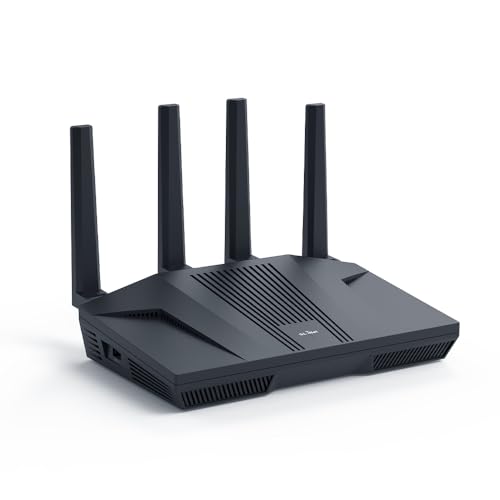
TP-Link Tri-Band BE9300 WiFi 7 Router (Archer BE550)
Disclosure: We may earn a commission when you buy through links on this page, at no extra cost to you. As an Amazon Associate I earn from qualifying purchases. Learn more
Highlights
- BE9300 Tri-Band Wi-Fi 7 Speeds: Archer BE550 features Multi-Link Operation, Multi-RUs, 4K-QAM, and 320 MHz channels, providing blazing-fast speeds of 5760 Mbps (6 GHz band), 2880 Mbps (5 GHz band), and 574 Mbps (2.4 GHz band).
- Unmatched Performance for Streaming and Gaming: Ensures seamless 4K/8K streaming, engaging AR/VR gaming, and ultra-fast downloads for an optimal user experience.
- Extend Your Coverage with EasyMesh: Add EasyMesh-compatible routers, range extenders, and wireless powerline adapters to form a seamless whole-home network that eliminates dead zones while reducing signal drops and lag when moving throughout your home.
- Full 2.5G WAN & LAN Ports for Future-Proof Networking: Archer BE550 is equipped with one 2.5G WAN port and four 2.5G LAN ports, enabling peak device performance and offering an ideal solution for future-proofing your home network.
- Enhanced Experience with Premium Components: Our proprietary Wi-Fi optimization technology, combined with six strategically positioned antennas and Beamforming, ensures higher capacity, stronger and more reliable connections, and reduced interference.
- TP-Link HomeShield: Provides comprehensive network protection, robust parental controls, and real-time IoT security when you are at home or on the go. A safer internet experience enhances your smart living.
- Private IoT Network for Better Security: Set up a separate WiFi network for IoT devices, using HomeShield and WPA3 encryption to boost security and protect both your IoT devices and home network from cyber threats.
- VPN Client & Server Support: Allows home devices to connect to remote VPN servers without needing to install VPN software on each device. Simultaneously supports both VPN and regular internet connections for enhanced security and flexibility.
- Easy Setup and Management: Quickly set up and manage your router using the free Tether App, available for both Android and iOS, in just a few minutes.
- Extensive Compatibility: Control this product with any Amazon Alexa or Google Assistant-enabled device. It is backward compatible with all WiFi generations and works with any internet service provider (modem is required for most providers).
Why You'll Love It
- Delivers tri-band speeds across three separate wireless bands for high-demand streaming and gaming
- Equipped with one 2.5G WAN port and four 2.5G LAN ports for high-bandwidth wired setups
- Uses six internal antennas with Beamforming and optimization tech to reduce signal interference
- Includes HomeShield protections, WPA3 encryption, and a dedicated network for IoT smart devices
- Supports whole-home coverage expansion using EasyMesh-compatible extenders, routers, or adapters
- Configures in minutes through the Tether app with integrated VPN client and server functions
Pros
- +Full 2.5G ports for both WAN and LAN
- +Tri-band wireless with dedicated 6 GHz channel
- +Built-in VPN client and server functionality
- +Dedicated IoT network with WPA3 protection
- +EasyMesh support for whole-home coverage expansion
Cons
- -Requires a separate modem for most internet providers
- -Managing advanced features requires a mobile app
Detailed Review
Upgrading your home connection with a modern tri-band WiFi 7 router gives you access to the newest wireless standards designed for high-throughput households. The TP-Link Archer BE550 delivers speeds across three bands: up to 5760 Mbps on the 6 GHz band, 2880 Mbps on 5 GHz, and 574 Mbps on 2.4 GHz. By employing 320 MHz channels, 4K-QAM, Multi-Link Operation, and Multi-RUs, it provides the wireless bandwidth needed for demanding tasks such as 4K and 8K video streaming, engaging AR and VR gaming sessions, and large file downloads without bogging down your general browsing.
Physical connections match the wireless capabilities thanks to an all-2.5G port array. Equipped with one 2.5G WAN port and four 2.5G LAN ports, the router ensures you can connect high-speed wired devices like gaming consoles, network storage, or desktop PCs without dropping back to standard gigabit bottlenecks. Internally, six strategically positioned antennas work alongside proprietary optimization technology and Beamforming to concentrate signals toward your active devices, improving capacity while actively reducing interference throughout your living space.
Network management and security are built directly into the operating experience. The router features TP-Link HomeShield, which provides real-time security protections, parental control tools, and network defense both at home and on the go. To keep smart home gadgets from exposing your personal data, you can set up a completely isolated IoT network using HomeShield and WPA3 encryption. Additionally, onboard VPN client and server support allows connected household devices to route traffic through remote VPN servers simultaneously alongside regular internet traffic, eliminating the need to install standalone VPN software on every individual phone, television, or laptop.
Every piece of hardware involves realistic trade-offs based on its design. While the Archer BE550 functions with any internet service provider, it remains a standalone router rather than a combined gateway, which means you still need a separate modem for most standard broadband installations. Furthermore, taking advantage of its specialized multi-gigabit wireless channels requires client devices that actually support the underlying WiFi 7 frequencies and wider bands.
Verdict: The TP-Link Archer BE550 is an excellent choice for power users who want multi-gigabit wired ports and next-generation wireless performance for gaming, streaming, and smart home isolation. If your home network relies on basic wireless speeds or you prefer a single combo modem unit from your provider, you may want to look elsewhere.
Specifications
- WiFi Generation: Wi-Fi 7 (BE9300)
- 6 GHz Band Speed: Up to 5760 Mbps
- 5 GHz Band Speed: Up to 2880 Mbps
- 2.4 GHz Band Speed: Up to 574 Mbps
- Wired Ports: 1x 2.5G WAN, 4x 2.5G LAN
- Antennas: 6 strategically positioned antennas
- Advanced Technologies: 320 MHz channels, 4K-QAM, Multi-Link Operation, Multi-RUs, Beamforming
- Security: TP-Link HomeShield, WPA3 encryption, Private IoT network
Who Should Buy It
A great fit if you:
- Want multi-gigabit wired speeds across all connected desktop computers, gaming systems, and network storage hubs via dedicated 2.5G ports.
- Need dedicated 6 GHz frequencies with 320 MHz channel support to reduce network congestion during high-bandwidth 4K or 8K streaming.
- Maintain smart home accessories and want to isolate them on a secure, separate IoT network with WPA3 encryption.
- Plan to build a unified mesh system across your home by linking EasyMesh-compatible routers, range extenders, or powerline units.
Consider something else if you:
- Need an integrated single-box gateway that includes a built-in cable or DSL modem to connect directly to your service provider line.
- Only require basic, everyday web surfing for older devices and would be better served by a simple, entry-level dual-band router.
Before You Buy
Confirm on the listing:
- Check whether your existing internet modem provides a multi-gigabit Ethernet output to maximize the 2.5G WAN input.
- Check the package contents to verify whether an Ethernet patch cable is included in the box for connecting to your modem.
- Check the physical dimensions and upright clearance required on your desk or shelf to accommodate the fixed vertical chassis.
- Confirm the compatibility of your current smart devices with voice controls if you plan to link Amazon Alexa or Google Assistant.
How to compare your options: Focus on wired throughput and wireless band allocation when evaluating routers in this category. The Archer BE550 differentiates itself by offering five total 2.5G ports alongside a tri-band WiFi 7 layout reaching up to 5760 Mbps on 6 GHz. If your household relies heavily on high-speed local data transfers or high-bandwidth streaming across multiple rooms, checking for EasyMesh support ensures you can expand coverage without replacing your primary unit down the road.
Getting the Most From It
- Download the free Tether app on your iOS or Android mobile device before unboxing to walk through the step-by-step setup routine.
- Place the unit in a well-ventilated, elevated location free from direct obstructions to help the six internal antennas distribute signals evenly with Beamforming.
- Create the dedicated IoT network immediately during setup to separate smart plugs, bulbs, and cameras from your primary personal devices.
- Configure the integrated VPN client in the router settings if you want specific household hardware, like media players or consoles, to bypass manual VPN software installations.
- Pair the unit with EasyMesh-compatible range extenders or powerline adapters if you notice coverage dips in distant rooms or outdoor living spaces.
FAQ
Do I need a separate modem to use this router?
Yes, a separate modem is required for most internet service providers. The Archer BE550 connects via its 2.5G WAN port directly to your existing broadband modem or fiber terminal.
Can I manage this router with a smartphone?
Yes, setup and routine network management are handled through the free Tether app, which is available on both Android and iOS devices.
Does it support voice commands?
Yes, you can control router functions using Amazon Alexa or Google Assistant-enabled devices on your home network.
Can older devices connect to this router?
Yes, the Archer BE550 is fully backward compatible with all previous WiFi generations and standards across its 2.4 GHz, 5 GHz, and 6 GHz bands.
What is the benefit of the built-in VPN client?
The router can connect directly to remote VPN servers, protecting connected home devices without forcing you to install separate VPN software on each phone, computer, or television.
Product Details
| Brand | TP-Link |
| ASIN | B0CJSNSVMR |