TP-Link
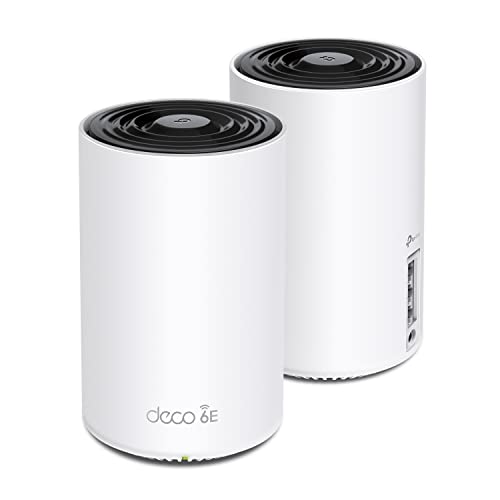
TP-Link Deco XE75 AXE5400 Tri-Band WiFi 6E Mesh System, 2-Pack
Disclosure: We may earn a commission when you buy through links on this page, at no extra cost to you. As an Amazon Associate I earn from qualifying purchases. Learn more
Highlights
- WiFi 6E Tri-Band Mesh WiFi – Cover up to 5,500 Sq.Ft with next-gen seamless WiFi and make dead zones and buffering a thing of the past
- New 6 GHz Band – The latest Wi-Fi frequency, eliminates interference from legacy devices. The 6 GHz band can work as a backhaul for stable connections between nodes by default. Switch to Wi-Fi mode and connect your WiFi 6E devices to the 6GHz Network³
- True Tri-Band Speed – All three WiFi bands work together to unleash your network’s total speeds up to 5,400 Mbps for 200 devices(6 GHz: 2402 Mbps (HE160);5 GHz: 2402 Mbps (HE160);2.4 GHz: 574 Mbps)
- Our Cybersecurity Commitment - TP-Link is a signatory of the U.S. Cybersecurity and Infrastructure Security Agency’s (CISA) Secure-by-Design pledge. This device is designed, built, and maintained, with advanced security as a core requirement.
- Unlock the Full Potential of WiFi 6E - Opening the 6GHz band changes the game for WiFi 6 bringing upgraded performance in network efficiency and capacity. The 6GHz band is available only for WiFi 6E, allowing WiFi 6 to achieve its full potential
- AI-Driven Mesh - Deco XE75 delivers smart WiFi that follows you wherever you are, without interruption. It automatically learns your network environment, client quality, and user behaviors
- Easy Setup and Management - The Deco app helps you set up your network in minutes with clear visual guidance and keeps you in control even when you are not home; Works with Alexa as well Turn on or off Guest Wi-Fi by simple voice commands
- TP-Link HomeShield – TP-Link's premium security services keep your home network safe with network and IoT protection. Free features: 1. Network Security Scan 2. Basic Parental Controls 3. QoS 4. Weekly/Monthly Reports 5. IoT Device Identification
- Works with all internet service providers, such as Comcast, Charter, ATandT, Verizon, Xfinity, Spectrum, RCN, Cox, CenturyLink, Frontier, etc.( a modem is required for most internet service providers)
Why You'll Love It
- Blankets spaces up to 5,500 square feet using two coordinated mesh units
- Uses the dedicated 6 GHz frequency band to avoid interference from older household devices
- Supports up to 200 connected devices with aggregate speeds reaching 5,400 Mbps across three bands
- Adapts roaming automatically by learning your home layout, device quality, and everyday usage patterns
- Secures your local network and smart hardware through built-in TP-Link HomeShield protection tools
- Works across major internet service providers with simple setup and Alexa guest network voice control
Pros
- +Covers homes up to 5,500 square feet
- +Dedicated 6 GHz band reduces legacy device interference
- +Tri-band speeds reach up to 5,400 Mbps
- +Handles up to 200 connected devices at once
- +Includes free basic HomeShield network security features
Cons
- -Requires a separate modem for most internet providers
- -Full 6 GHz client speeds need WiFi 6E devices
- -Only includes two mesh nodes in the box
Detailed Review
Eliminating home dead spots becomes significantly easier with a tri-band WiFi 6E mesh system like the TP-Link Deco XE75, built specifically for households handling heavy streaming, smart devices, and large floor plans. This two-pack spreads signal across up to 5,500 square feet, using multiple communication bands to keep household connections running smoothly without dropped calls or sluggish zones.
The defining technical upgrade here is access to the newly opened 6 GHz frequency band. By operating outside the crowded 2.4 GHz and 5 GHz spaces, the 6 GHz band avoids congestion caused by older tech. By default, the Deco XE75 uses this 6 GHz channel as a dedicated wireless backhaul to pass data cleanly between the two nodes. If you have newer client hardware, you can toggle Wi-Fi mode in the app to let compatible WiFi 6E devices connect directly to that clean 6 GHz airwave.
Across all three bands, the hardware delivers combined theoretical speeds of up to 5,400 Mbps. That breaks down into 2,402 Mbps on 6 GHz, 2,402 Mbps on 5 GHz, and 574 Mbps on the legacy 2.4 GHz band, with support for up to 200 simultaneous clients. To manage that heavy traffic, built-in AI mesh algorithms monitor your physical space, connection quality, and usage habits, automatically handing your device off to the strongest node as you move through rooms.
Network management is handled through the mobile Deco app, which guides the physical installation, permits off-site network adjustments, and ties into Amazon Alexa for quick voice commands like enabling a guest network. Security is integrated via TP-Link HomeShield, which comes standard with network scans, basic parental controls, quality of service settings, IoT device identification, and regular activity reports. TP-Link is also a signatory of the CISA Secure-by-Design pledge, indicating an intentional focus on baseline device security.
There are practical limits to plan around before purchasing. The system requires an existing modem or gateway from your internet service provider, as it does not replace your provider modem hardware. Furthermore, while your older phones and laptops will benefit from cleared congestion on 2.4 GHz and 5 GHz, they cannot directly access the 6 GHz band without native WiFi 6E support inside the client device.
Verdict: The TP-Link Deco XE75 is a smart match for busy households with large square footage that want reliable tri-band coverage and room to adopt modern WiFi 6E gadgets. Buyers in compact apartments or those who do not need multi-room coverage will be better served by a standard standalone router.
Specifications
- Product Type: Tri-band WiFi 6E mesh system
- Package Count: 2-pack
- Coverage Area: Up to 5,500 sq. ft.
- Total Bandwidth: Up to 5,400 Mbps
- 6 GHz Band Speed: 2402 Mbps (HE160)
- 5 GHz Band Speed: 2402 Mbps (HE160)
- 2.4 GHz Band Speed: 574 Mbps
- Device Capacity: Up to 200 devices
- Security Architecture: CISA Secure-by-Design pledge signatory, TP-Link HomeShield
- Voice Control: Works with Alexa
Who Should Buy It
A great fit if you:
- Live in a multi-story home or large layout up to 5,500 square feet that struggles with weak signals and dead zones.
- Own or plan to buy newer laptops and phones that support the dedicated 6 GHz frequency band.
- Manage a crowded smart home with dozens of IoT gadgets, streaming units, and up to 200 active devices.
- Want straightforward visual smartphone setup alongside hands-free Alexa voice toggles for guest network access.
Consider something else if you:
- Live in a smaller single-floor apartment where a single standalone wireless router provides sufficient signal reach.
- Need an all-in-one modem router unit rather than connecting a mesh node to a separate service provider modem.
- Only use older hardware and have no intention of using devices that communicate over WiFi 6E frequencies.
Before You Buy
Confirm on the listing:
- Check whether your existing internet provider supplies a standalone modem or modem-router combo to plug into the primary node.
- Verify what ethernet cables and power adapter plugs are supplied in the two-pack box.
- Confirm the physical dimensions of the individual nodes so you can reserve flat shelf space near wall power outlets.
- Review which of your primary smartphones, tablets, or computers feature built-in WiFi 6E compatibility.
How to compare your options: Mesh systems differ primarily by coverage capacity, number of frequency bands, and total throughput ratings. Look closely at whether competing units offer true tri-band operation with the 6 GHz band or rely solely on older dual-band channels. Consider your floor plan size and client count, as this two-node setup is sized specifically for spaces up to 5,500 square feet and up to 200 connected clients.
Getting the Most From It
Start by downloading the Deco app on your mobile device before unplugging your existing network equipment. Follow the step-by-step visual prompts to connect the first node directly to your internet modem, allowing the app to complete the initial network configuration.
Position your second node in an open area midway between the primary unit and your home dead zones. If you have thick walls or multiple floors, use the app diagnostics to evaluate node communication. By default, the system routes node-to-node backhaul traffic through the 6 GHz band, ensuring stable communication between units without cluttering user channels.
Explore the built-in HomeShield tools to label your connected IoT hardware, set basic parental controls, and prioritize important devices through Quality of Service controls. If you invite visitors regularly, enable the Alexa skill to switch the guest network on or off with quick voice commands.
FAQ
Will this mesh system work with my current internet service provider?
Yes, it works with all major internet service providers, including Comcast, Spectrum, AT&T, Verizon, Charter, Xfinity, Cox, Frontier, CenturyLink, and RCN. Note that a separate modem is required for most internet service providers.
How many total devices can connect to this mesh network at once?
The system supports network traffic for up to 200 devices across its three frequency bands.
What is the difference between the 6 GHz band and standard Wi-Fi bands?
The 6 GHz band is a newer frequency open exclusively to WiFi 6E hardware, which eliminates interference caused by older legacy gadgets. In this system, it can serve as a dedicated wireless backhaul between nodes or be switched to standard Wi-Fi mode for 6E client connections.
What free network security features are included with the system?
Free built-in HomeShield features include a network security scan, basic parental controls, quality of service settings, IoT device identification, and weekly or monthly network reports.
Can I control the mesh system using voice commands?
Yes, it works with Amazon Alexa, allowing you to turn the guest Wi-Fi on or off using simple spoken phrases.
Product Details
| Brand | TP-Link |
| ASIN | B09VW5JHPH |