EMEET
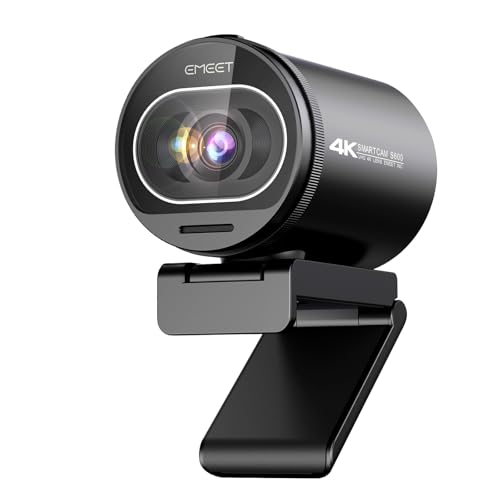
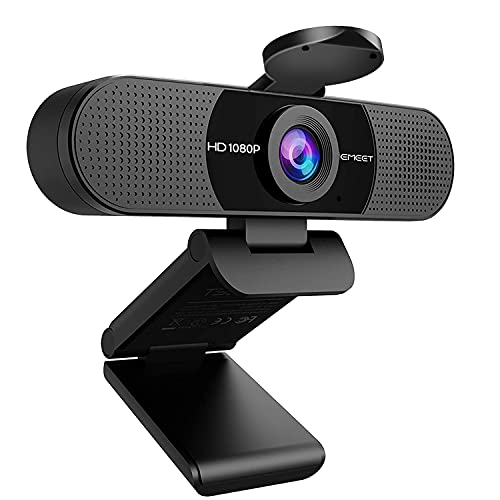
EMEET 1080P Webcam with Microphone, C960 Web Camera 2 Mics Streaming Webcam
Disclosure: We may earn a commission when you buy through links on this page, at no extra cost to you. As an Amazon Associate I earn from qualifying purchases. Learn more
Highlights
- Full HD 1080P Webcam with Cover for Video Calls - EMEET computer webcam provides design and Optimization for professional video streaming. Realistic 1920 x 1080p video, 5-layer anti-glare lens, providing smooth video. The fixed focal length makes the object in the focal length range of 11.8-118.1 inches, so as to provide a clearer image. The C960 usb webcam has a cover and can be removed automatically to meet your needs for protection. It is a great choice for home office.
- Built-in 2 Noise Reduction Mics - EMEET webcam with microphone for desktop is 2 built-in omnidirectional noise reduction microphones, picking up your voice and filtering out background noise to create an excellent radio effect.EMEET computer webcam enables you to enjoy crystal clear voice for communication. (When installing the web camera, remember to select EMEET C960 usb webcam as the default device for the microphones)
- Low Dependence on Light Condition - Automatic low-light correction technology is applied in EMEET HD webcam 1080p so that the streaming webcam could capture the image in dim light. EMEET C960 camera for computer also has low-light boost, color boost and adjust exposure so you look your best, even in dim and harsh lighting. Imagine you are working in front of a sunny window. Is it convenient for no need to draw the curtains first when a video call comes in to get a normal exposure picture?
- Plug-and-play & 90 Degrees Wide View - No driver required. EMEET C960 pc webcam can be used without drivers to realize plug and play for saving your trouble. The convenient foldable design of web camera allows you to take it anywhere, and the USB cord is long enough for any task. The 90° wide-angle lens of USB camera can accommodate more participants. In video calls, there is no need to frequently adjust the direction of the web cam to show people in different positions.
- High Compatibility & Multi Application - C960 webcam for laptop is compatible with Windows 10/11, MacOS10.14 or later, Linux, Android TV 7.0 or later. The compatibility of the streaming camera is super wide for major software like Zoom, Teams, Facetime, Google Meet, YouTube and more. Whether this web camera is used for online studying/ teaching, home office, conference, meeting or video calling, the web camera is perfectly suitable for you as a tripod-ready universal clip. (Tips: Incompatible with Windows Hello functions)
Why You'll Love It
- Full HD 1080p video with an anti-glare lens ensures crisp picture quality for your calls
- Dual omnidirectional noise-reduction microphones filter distracting background sounds for clearer speech
- Automatic low-light correction balances exposure and colors even in harsh or dim room lighting
- Wide 90-degree field of view fits multiple people into the frame without repositioning the camera
- Driver-free USB plug-and-play setup lets you start streaming or conferencing immediately
- Removable privacy cover provides peace of mind when the camera is not active
Pros
- +Sharp 1080p resolution with five-layer anti-glare lens
- +Two built-in noise reduction microphones
- +Simple driver-free USB plug-and-play installation
- +Wide 90-degree viewing angle for group calls
- +Built-in removable cover for instant privacy
- +Tripod-ready universal mounting clip included
Cons
- -Not compatible with Windows Hello facial recognition
- -Fixed focus requires staying within a set distance
- -Fixed wide angle cannot zoom digitally
Detailed Review
Upgrading your remote workspace starts with a reliable streaming webcam like the EMEET C960, which delivers realistic 1920 x 1080p video designed for professional streaming, remote classes, and daily office check-ins. The camera relies on a 5-layer anti-glare lens paired with a fixed focal length optimized for subjects positioned between 11.8 and 118.1 inches away. For desk workers, this ensures you stay crisp and clearly defined without the constant hunting or pulsing common to budget autofocus mechanisms.
Audio capture is handled by two built-in omnidirectional noise reduction microphones. These dual mics are configured to pick up your spoken voice while filtering out unwanted ambient background sounds, providing a solid radio effect for two-way conversations. You get clear vocal transmission on conference platforms, though you will want to remember to select the device as your default microphone in your system settings when setting it up for the first time.
Managing variable office lighting is often frustrating, but the C960 integrates automatic low-light correction alongside low-light boost, color boost, and exposure adjustment. If your desk faces a sunny window or you work late in a dimly lit den, the camera compensates automatically so you do not have to pause a meeting to draw curtains or reconfigure lamps. Its 90-degree wide-angle lens also accommodates multiple participants on screen at once, eliminating the need to physically turn the hardware during group sessions.
Hardware flexibility is another strong point, as the universal clip mounts easily onto laptops or monitors and is tripod-ready for freestanding placements. It also folds up neatly for travel and includes a removable privacy cover for peace of mind between meetings. However, buyers should note specific functional boundaries: the camera does not support Windows Hello facial recognition login, and because the focal range is fixed between 11.8 and 118.1 inches, holding small objects extremely close to the glass will result in a soft image.
Verdict: The EMEET C960 streaming webcam is a dependable, straightforward choice for home office workers, educators, and students who want crisp 1080p video, clear voice pickup, and reliable low-light compensation without installing software. If you require biometric Windows Hello authentication or close-up macro focusing, you will want to consider alternative designs instead.
Specifications
- Video Resolution: Full HD 1920 x 1080p
- Lens: 5-layer anti-glare lens
- Field of View: 90 degrees
- Focal Type: Fixed focus (11.8 to 118.1 inches range)
- Microphone: 2 built-in omnidirectional noise reduction mics
- Operating Systems: Windows 10/11, macOS 10.14 or later, Linux, Android TV 7.0 or later
- Mounting: Tripod-ready universal clip, foldable
Who Should Buy It
A great fit if you:
- Need a reliable plug-and-play desktop solution for daily Zoom, Microsoft Teams, or Google Meet video conferences.
- Work in rooms with tricky illumination, such as beside bright sunny windows or in dim evening lighting conditions.
- Want an integrated privacy cover that can be closed or removed whenever your video call finishes.
- Host collaborative huddles where a wide 90-degree field of view is needed to capture several seated colleagues.
Consider something else if you:
- Rely on Windows Hello facial authentication to log into your computer system each day.
- Require an autofocus camera that can bring close-up documents or small items held inches from the lens into focus.
- Need a narrow, tightly cropped field of view that hides your surrounding room from view.
Before You Buy
Confirm on the listing:
- Check the exact length of the integrated USB cable to ensure it reaches your floor-standing PC tower or hub.
- Confirm your computer runs Windows 10/11, macOS 10.14 or later, Linux, or Android TV 7.0 or later.
- Verify whether a desktop mini tripod is bundled in your specific package or if you must provide your own standard threaded tripod.
- Measure your seating distance to make sure you sit between roughly one foot and ten feet from the monitor.
How to compare your options: Focus on resolution, viewing angles, and audio capabilities when evaluating video peripherals. This model features Full HD 1080p video with a wide 90-degree view and dual noise-canceling microphones, making it suited for broad coverage and clear meetings. If your setup requires a narrow field of view or motorized tracking, balance those specialized needs against this unit's simple driver-free convenience.
Getting the Most From It
Position the camera on your monitor using the universal clip, or mount it to a compatible tripod if you prefer an eye-level angle away from your screen. Ensure you sit within the optimal focal distance of 11.8 to 118.1 inches to keep your picture sharp.
After plugging the USB cable into an open port on your computer, open your conferencing software settings. Manually designate the C960 as both your primary video device and your default microphone so the dual noise reduction mics handle your audio properly.
Let the built-in exposure and color correction adjust to your room light naturally before tweaking external lamps. When your meeting ends, snap or slide the included privacy cover over the 5-layer lens to keep your workspace secure and shield the glass from stray dust.
FAQ
Does this webcam require drivers to operate?
No, it is a plug-and-play USB device that requires no additional software or driver installation to run on supported operating systems.
Can I use this camera for Windows Hello facial recognition login?
No, the C960 is explicitly incompatible with Windows Hello functions.
Which operating systems are compatible?
It works with Windows 10 and 11, macOS 10.14 or later, Linux distributions, and Android TV 7.0 or later.
What video conferencing apps work with it?
It supports major communication and streaming platforms including Zoom, Microsoft Teams, FaceTime, Google Meet, and YouTube.
Does the camera come with a built-in privacy shield?
Yes, it features a removable protective cover designed to give you quick physical privacy whenever the camera is not in use.
Product Details
| Brand | EMEET |
| ASIN | B07M6Y7355 |