ASUS
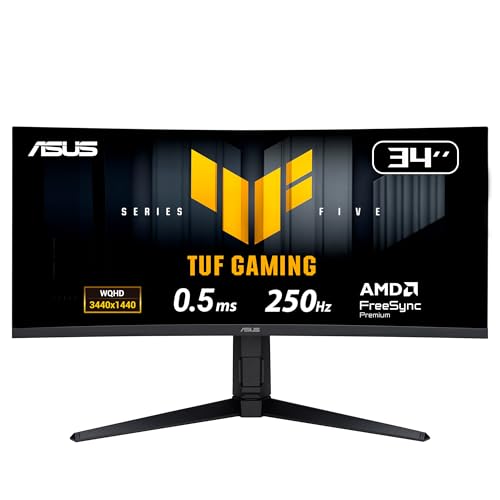
ASUS TUF Gaming VG34WQML5A 34 Inch 1440p 250Hz Ultrawide HDR Gaming Monitor
Disclosure: We may earn a commission when you buy through links on this page, at no extra cost to you. As an Amazon Associate I earn from qualifying purchases. Learn more
Highlights
- Ultra Wide QHD Curved Display: 34-inch WQHD (3440 x 1440) 1500R curved gaming monitor with overclock to 250Hz refresh rate designed for professional gamers and immersive gameplay
- Fast Response Time: 0.5ms(min) response time to further reduce ghosting creates fluid gaming experience
- FreeSync Premium Pro Technology: Delivers a seamless, tear-free gaming experience by enabling VRR (variable refresh rate) by default
- ASUS Extreme Low Motion Blur Sync: ELMB SYNC technology enables ELMB together with variable refresh rate, eliminating ghosting and tearing for sharp gaming visuals with high frame rates
- High Dynamic Range Support: HDR technology with DisplayHDR 400 compliance supports HDR-10 format to enhance bright and dark areas
- DisplayWidget Center: Enables easy OSD access and monitor settings adjustments with a mouse
- Free 3-month Adobe Creative Cloud Subscription: Receive complimentary access with the purchase of this product (offer valid to 8/31/2028)
- Complete Package Contents: Includes DisplayPort cable, HDMI cable, USB Type-B to A cable, Power cord, Quick start guide, and Warranty Card
- Wide Color Gamut Coverage: Features 95% DCI-P3 color space coverage for vibrant and accurate color reproduction in gaming and content creation
- Three Year Warranty: Backed by a comprehensive 3-year manufacturer warranty for peace of mind and product support
Why You'll Love It
- Expansive 34-inch curved view fills your peripheral vision with sharp 3440 x 1440 resolution
- Overclocked 250Hz refresh rate and 0.5ms minimum response deliver fluid, blur-free motion
- ELMB Sync and FreeSync Premium Pro keep visuals tear-free even at fast frame rates
- DisplayHDR 400 and 95 percent DCI-P3 gamut provide rich contrast and accurate colors
- DisplayWidget Center lets you tweak display settings directly using your mouse cursor
- Includes essential video cables and a complimentary 3-month Adobe Creative Cloud membership
Pros
- +High 250Hz overclocked refresh rate
- +Fast 0.5ms minimum response time
- +ELMB works alongside variable refresh rate
- +Broad 95 percent DCI-P3 color coverage
- +Includes DisplayPort and HDMI cables
- +Three-year manufacturer warranty coverage
Cons
- -DisplayHDR 400 offers modest HDR brightness
- -Curved ultrawide shape takes up significant desk depth
Detailed Review
Serious competitive play and immersive open worlds demand responsive hardware, and this ultrawide gaming monitor answers with high speed wrapped in a sweeping 34-inch format. Built with an ultrawide quad-HD resolution of 3440 x 1440 and a distinct 1500R curve, it brings peripheral areas into view without forcing you to constantly turn your head. It suits PC gamers who want wide horizontal real estate for flight sims, racing games, or multi-window productivity without losing competitive responsiveness.
Motion clarity is the primary focus of the display. It overclocks up to a 250Hz refresh rate and reaches down to a 0.5ms minimum response time to minimize trailing artifacts. ASUS implements its Extreme Low Motion Blur Sync technology, which lets backlight strobing run simultaneously alongside FreeSync Premium Pro variable refresh rate. That combination eliminates tearing while keeping fast-panning game environments crisp, addressing a classic compromise found on conventional panels.
Visual quality extends beyond pure velocity thanks to a 95% DCI-P3 color space profile. The wide color gamut reproduces deeper greens and reds, which benefits creative work alongside gameplay. It supports the HDR-10 format and meets DisplayHDR 400 requirements, helping to render detailed highlights and deep shadows in supported titles. Daily operation is also simplified through the DisplayWidget Center application, allowing you to reconfigure visual modes and panel settings using your mouse rather than fumbling with rear hardware buttons.
There are practical boundaries to keep in mind before choosing this model. The DisplayHDR 400 standard gives baseline dynamic range enhancement rather than the high-brightness impact of higher HDR tiers. In addition, pushing 3440 x 1440 pixels all the way to 250 frames per second requires substantial graphics processing power, so older or entry-level graphics setups will not fully leverage the top refresh rates.
Verdict: This ultrawide gaming monitor provides an impressive blend of rapid 250Hz motion clarity, synchronized variable refresh, and rich color coverage for enthusiasts. Gamers who prioritize vast visual immersion and quick reaction times will find it an excellent match, while those seeking peak HDR brightness may want to evaluate higher tiers.
Specifications
- Screen Size: 34 inches
- Resolution: WQHD (3440 x 1440)
- Curvature: 1500R
- Refresh Rate: Overclock to 250Hz
- Response Time: 0.5ms (min)
- Variable Refresh: FreeSync Premium Pro
- Motion Blur Reduction: ASUS ELMB SYNC
- Color Gamut: 95% DCI-P3
- HDR Standard: DisplayHDR 400 compliance, HDR-10 format
- Software: DisplayWidget Center
- Included Accessories: DisplayPort cable, HDMI cable, USB Type-B to A cable, Power cord
- Warranty: 3-year manufacturer warranty
Who Should Buy It
A great fit if you:
- You play fast-action titles and want the competitive edge of an overclocked 250Hz refresh rate paired with low motion blur.
- You appreciate sweeping 21:9 panoramas and want a 1500R curve that pulls the edges of the display into comfortable view.
- You handle visual editing tasks and need wide 95% DCI-P3 color reproduction alongside broad desktop working space.
- You want the convenience of adjusting brightness and color presets directly with a mouse instead of reaching for hardware controls.
Consider something else if you:
- You prefer a flat screen profile without any inward panel curvature for drafting straight architectural lines.
- You need high-tier peak brightness for intensive HDR viewing rather than baseline DisplayHDR 400 output.
- You run an entry-level graphics card that cannot push high framerates at a dense 3440 x 1440 resolution.
Before You Buy
Confirm on the listing:
- Measure your desk space to ensure you have adequate width and depth to comfortably house a 34-inch curved display.
- Check whether your computer graphics card features an available DisplayPort or HDMI port that supports high-bandwidth refresh rates.
- Review the terms and redemption instructions for the complimentary 3-month Adobe Creative Cloud membership, which requires activation before the August 31, 2028 expiration date.
- Confirm your mounting plans if you intend to use an aftermarket monitor arm rather than the included desk stand.
How to compare your options: When shopping for curved ultrawide screens, pay close attention to the balance between panel speed and color fidelity. Many widescreen alternatives stop at lower refresh thresholds, whereas this model offers an overclock to 250Hz along with synchronized blur reduction. Verify that the included video cables, color coverage percentages, and warranty terms match what you need for both work and play.
Getting the Most From It
- Connect the monitor using the included DisplayPort cable if you plan to achieve the maximum overclocked 250Hz refresh rate on your gaming rig.
- Plug in the included USB Type-B to A cable to enable communication between your operating system and the DisplayWidget Center utility.
- Install the DisplayWidget Center software so you can manage color profiles, contrast settings, and display shortcuts with your mouse.
- Activate FreeSync Premium Pro and ELMB Sync in the display menu to minimize visual artifacts and maintain smooth frame pacing during fast gameplay.
- Keep the screen clean by wiping the display surface gently with a soft microfiber cloth according to the care directions in the quick start guide.
FAQ
What connection cables come included with this monitor?
The package includes a DisplayPort cable, an HDMI cable, a USB Type-B to Type-A upstream cable, and the standard power cord.
Can I use motion blur reduction and variable refresh rate at the same time?
Yes, the built-in ASUS ELMB SYNC technology is engineered to run variable refresh rate and low motion blur simultaneously to eliminate tearing and ghosting together.
What is the curvature rating of the panel?
The display features a 1500R curvature across its 34-inch ultrawide diagonal viewing surface.
Does this monitor carry a manufacturer warranty?
Yes, the display comes backed by a 3-year manufacturer warranty and includes an official warranty card in the box.
How long is the Adobe Creative Cloud offer valid?
The complimentary 3-month Adobe Creative Cloud subscription offer included with the purchase remains valid until August 31, 2028.
Product Details
| Brand | ASUS |
| ASIN | B0F237K67L |