UGREEN
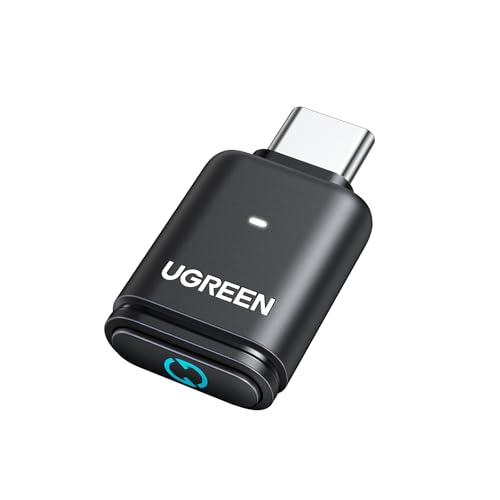
UGREEN USB-C Bluetooth Adapter for PS5 with APTX Low Latency/aptX-Adaptive
Disclosure: We may earn a commission when you buy through links on this page, at no extra cost to you. As an Amazon Associate I earn from qualifying purchases. Learn more
Highlights
- Plug and Play Bluetooth Audio: Connect your wireless headphones to your PS5 or other gaming consoles with the UGREEN adapter and enjoy hi-Q audio with no wires, drivers, or software required. Enable you to add Bluetooth audio capability to your Desktop, Computer, iMac with ease
- Advanced Audio Decoding Support: Support Key Switch APTX/APTX Adaptive Low Latency/APTX Adaptive High Quality/APTX HD/SBC with corresponding LED lights display. Equipped with Qualcomm chipset featuring gold-plated connectors for stable transmission of high-quality 24-bit dynamic audio. NOTE: The headphones you use must also support the same standard
- Wide Compatibility: Easily transmit audio wirelessly from your USB-C ported PS5, Switch, or PC/Laptop to your Bluetooth headphones or speaker. Compatible with Windows/macOS systems. Important Note: Not compatible with PS4, Linux, PS5 Portal, or AirPods Pro 2
- Low Latency Certification: Chip APTX-Adaptive with low latency encoder applied minimizes audio delay to less than 100ms. This Bluetooth audio adapter presents fully synchronized audio and video, enable you to enjoy hi-Q music wirelessly without disturbing others
- Portable Design & Easy Setup: Compact and lightweight design for on-the-go use. For PS5 users, select 'UGREEN-BT501' as audio output device in PS5 settings and turn off 'switch output device automatically' option for proper functionality. Double-click multifunction button to enable Bluetooth calling mode when needed
- Important Note of the microphone of the headset: Our transmitter defaults to audio mode, with the HFP protocol (Bluetooth calling) disabled by default. However, by double-clicking the multifunction button, Bluetooth calling mode can be enabled, and on the next power-up it will automatically revert to the previous mode
- Important Note 1 of the voice the product: Impact of Bluetooth Calling Function on Audio Quality: Enabling the Bluetooth calling mode can degrade audio quality. To ensure optimal sound output, it's advisable to disable the Bluetooth calling function. When doing so, using an external microphone for calls is recommended. Additionally, gamers using the PS5 should consider turning off the Bluetooth calling mode to experience clearer music and game background sounds
- Important Note 2 of the voice the product: Variations in Audio Device Recognition Across Platforms: The product appears as an audio device in the sound settings, supporting volume adjustments. However, due to differences in system recognition across various devices, the audio device may be identified differently. Users should refer to the product manual for guidance on configuring sound settings appropriately
- Important Note of the usage environment of the product: First, when connecting to a computer, the transmitter should be kept away from other USB devices to reduce signal interference; second, the pairing distance varies with different Bluetooth receiving devices—the better the receiving device's antenna performance, the longer the pairing connection distance, which depends on the receiving device's performance
Why You'll Love It
- Adds plug-and-play wireless audio to your PS5, Switch, or PC without installing extra drivers
- Uses aptX Adaptive low latency encoding to keep audio delay under 100ms during gaming
- Supports 24-bit dynamic audio transmission with a dedicated Qualcomm chipset and gold-plated connectors
- Lets you switch between codecs like aptX HD and SBC using clear LED indicators
- Includes a switchable calling mode for headset voice chat when needed
Pros
- +Under 100ms audio latency with aptX Adaptive
- +No drivers or software needed for setup
- +Clear LED indicator lights for audio codecs
- +Compact and lightweight for portable use
- +24-bit audio support via Qualcomm chipset
Cons
- -Not compatible with PS4, PS5 Portal, Linux, or AirPods Pro 2
- -Bluetooth calling mode degrades sound quality when active
- -Requires matching codec support on your headphones
Detailed Review
The UGREEN USB-C Bluetooth Adapter provides a simple way to connect wireless headphones or speakers to consoles and computers lacking native support. Built with a Qualcomm chipset and gold-plated connectors, it delivers 24-bit dynamic audio straight from your USB-C port without requiring third-party drivers or software installations.
For gamers and media viewers, audio synchronization is handled through aptX Adaptive decoding, which pushes latency down below 100ms when paired with compatible headphones. The adapter features key switching across several formats, including aptX, aptX Adaptive Low Latency, aptX Adaptive High Quality, aptX HD, and standard SBC, with onboard LED lights displaying the active codec.
Setup is straightforward on supported platforms like Windows, macOS, Nintendo Switch, and the PS5. Console users simply plug the unit into a USB-C port, select 'UGREEN-BT501' in the output settings, and disable automatic output switching. A multifunction button lets you toggle Bluetooth calling mode with a double-click, though the transmitter defaults to pure audio mode on startup.
There are a few key limitations to note before buying. Enabling the headset calling mode degrades overall sound quality, making a separate external microphone advisable for clear chat alongside game audio. Hardware compatibility is also strictly defined: this adapter does not work with the PS4, PS5 Portal, Linux systems, or AirPods Pro 2, and pairing range depends heavily on your receiving device antenna.
Verdict: This adapter is an ideal choice for PS5, PC, and Switch owners who want lag-free wireless audio through aptX-capable headphones. As long as you do not need compatibility with excluded hardware like the PS4 or AirPods Pro 2, it delivers reliable high-quality sound in a compact build.
Who Should Buy It
A great fit if you:
- Play games on a PS5, Nintendo Switch, or PC and want wireless headphone audio with low delay.
- Own headphones that support aptX, aptX HD, or aptX Adaptive audio codecs.
- Prefer a driver-free, plug-and-play USB-C audio setup.
- Want visible LED lights to confirm which audio standard is actively running.
Consider something else if you:
- Need a wireless audio transmitter for a PS4, PS5 Portal, or Linux computer.
- Use AirPods Pro 2 as your primary wireless listening device.
- Rely heavily on high-fidelity game sound while using your headset microphone simultaneously.
FAQ
How do I configure this adapter for the PS5?
Plug the adapter into your PS5 USB-C port, go to the console sound settings, select 'UGREEN-BT501' as the audio output device, and turn off the option to switch output devices automatically.
Can I use my headset microphone for voice chat?
Yes, you can enable Bluetooth calling mode by double-clicking the multifunction button. However, enabling this mode degrades audio quality, so using a separate external microphone is recommended for clearer game sound.
Which devices are incompatible with this adapter?
The adapter is not compatible with the PS4, PS5 Portal, Linux operating systems, or Apple AirPods Pro 2.
How do I know which audio codec is active?
The adapter features dedicated LED indicator lights that display the currently selected standard, such as SBC, aptX, aptX HD, or aptX Adaptive modes.
Product Details
| Brand | UGREEN |
| ASIN | B0D7CKV1J8 |