
Best Computer Headsets by Budget for 2026
Disclosure: We may earn a commission when you buy through links on this page, at no extra cost to you. As an Amazon Associate I earn from qualifying purchases. Learn more

Compare the best computer headsets by budget and see what each price band buys: clearer microphones, comfort, connection options, and call ready features.
Computer headsets range from under about $25 to well past $300, and the price gap is not obvious from a product photo. Two headsets can look identical while one makes you sound clear in every meeting and the other makes callers ask you to repeat yourself. This guide sorts the best computer headsets by budget, so you can see what each price band actually buys and where extra money stops helping. The focus is calls, meetings, and everyday computer work first, with gaming covered in its own section below.
Use the comparison table below to shortlist models in your band, then read the tier notes before you order. A headset is a working tool you wear for hours, so microphone quality, comfort, and the right connection matter more than any single headline spec.




Start With the Job the Headset Has to Do
Budget only makes sense after the job is clear. A headset bought for back to back calls lives a different life from one used for an hour of email and music. Readers setting up a dedicated workspace should compare best computer headsets for work alongside this guide, since full time work adds demands for durability, spare parts, and all day comfort that casual use never tests. If your day is meetings from morning to evening, weight and microphone quality outrank everything else in this article.
Students and hybrid workers split time between classes, calls, and media, so they need balance rather than extremes: a decent microphone, sound that flatters voices and video, and a cable or battery routine that survives a shared household. People in open or shared spaces have a third priority, keeping their own calls private and their ears shielded from nearby noise. Naming your group honestly keeps you from paying for features your day never uses, and it tells you which tier below deserves your money.
What Your Money Gets You at Each Price Tier
The product table above groups current headsets by price, and the three tiers below describe what that money buys in practice. Prices are approximate, since listings move, but the pattern across brands is steady: each step up buys microphone clarity, comfort, and connection options in that order.
The Basics Tier: About $25 to $60
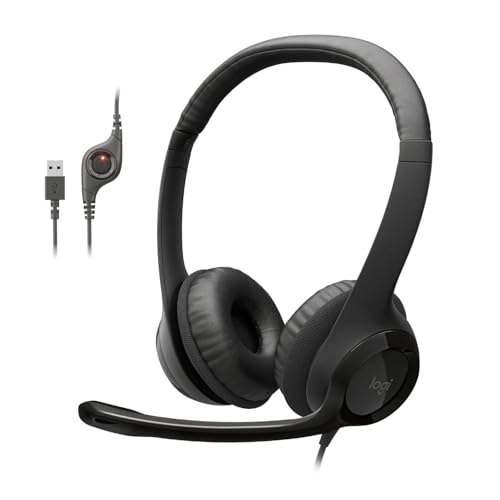
At this level you get a wired headset that handles calls and classes without fuss. Expect a simple boom microphone that sounds acceptable in a quiet room, foam ear cushions, and a 3.5 mm plug or a basic USB connection. What you give up is refinement: the microphone picks up keyboard noise and room echo, the headband padding is thin, and controls beyond volume and mute are rare. For occasional calls and short sessions, that trade is fair. For a full workday of meetings, the comfort limits show up by afternoon, and the microphone will be the first thing your coworkers notice.
The All Day Tier: About $60 to $150
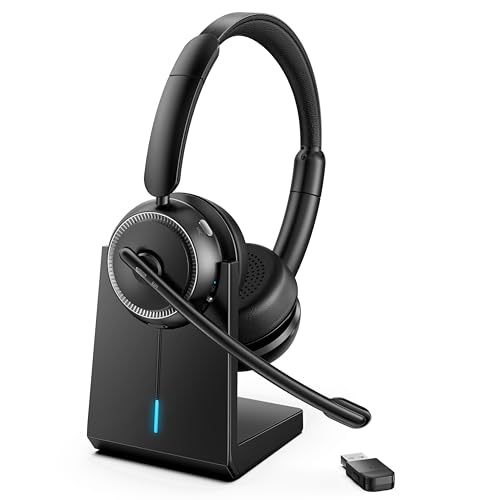
This is where headsets become genuine work tools. Microphones gain better noise handling, so your voice stays forward when a fan, a pet, or a family member shares the room. Cushions get thicker, headbands distribute weight instead of pressing on one spot, and USB models add inline controls for mute and volume that call software respects. Many models in this band also offer a wireless option with a USB dongle. If you spend three or more hours a day on calls, this tier returns its cost in fewer repeated sentences and a headset you forget you are wearing.
The Focus Tier: About $150 to $300
Premium money buys quiet and flexibility rather than a different job done. Active noise cancellation enters here, along with multipoint connections that hold a laptop and a phone at once, longer wireless battery life, and software for adjusting sidetone and equalizer settings. Build quality improves too, with metal reinforcement at the stress points that snap on cheaper headsets. This tier pays off for people in loud homes, frequent travelers who take calls in transit, and anyone whose employer reimburses gear. If your room is already quiet, much of what this band sells solves a problem you do not have.
Features That Decide a Work Headset
Microphone Quality Comes First
Judge a work headset by how you sound to other people, because that is the half of the call you never hear yourself. A boom that places the microphone near the corner of your mouth captures your voice with far less room noise than a microphone built into an ear cup. Noise handling in the microphone path matters as much as the microphone itself, since it keeps typing and household sounds from riding under your voice. Shoppers comparing microphone focused models can start with best computer headsets with microphone, then check that any finalist offers a hardware mute you can reach without looking.
Connection Classes: USB, 3.5 mm, and Wireless
Each connection class trades something. A 3.5 mm plug works with almost anything and never needs charging, but it relies on the computer sound hardware, which on some laptops adds hiss or low volume. USB headsets carry their own sound processing, so they sound consistent across computers and give you reliable mute and volume controls. Wireless models free you to stand and move during long calls, and a USB dongle connection is steadier than plain Bluetooth on many office computers. Readers set on cutting the cord can compare best wireless headsets for computer for the battery and range trade offs in detail.
Comfort for Long Wear
Comfort decides whether a headset survives a full workday, and two numbers drive it: weight and clamp force. A light headset with gentle clamp can disappear for hours, while a heavy one with a tight squeeze causes a headache by lunch. Ear cushion material matters too, since fabric breathes better in warm rooms and leatherette seals better against noise but can feel hot. People who wear glasses should look for cushions with a softer edge, because a firm cushion pressing a glasses arm into the temple is the most common comfort complaint in this category. Adjustable sliders and a rotating microphone boom help one headset fit different heads in a shared household.
Noise Cancellation and Isolation
Two different features hide behind similar wording. Passive isolation is just a well sealed ear cushion blocking sound physically, and it costs nothing extra. Active noise cancellation uses microphones and processing to reduce steady noise such as fans, traffic hum, and airplane style drone, and it works least well on nearby voices, which are irregular. Cancellation on the microphone side is separate again, and for call work it often matters more, since it cleans up what your callers hear. Our guide to best noise cancelling headsets explains the classes in more depth if a loud room is your main problem.
On Ear Versus Over Ear Styles
Cup style shapes both comfort and awareness. Over ear models surround the ear, seal better against room noise, and spread pressure over a wider area, which suits long calls in a busy home. On ear models rest on the ear itself, run cooler, and let you hear a doorbell, a child, or a coworker without removing the headset, which some office workers honestly prefer. The trade is isolation: on ear designs leak more sound in and out, so a shared quiet room may rule them out. If you split the day between focused calls and tasks where you need to stay aware of the room, that awareness is a feature rather than a flaw, and it costs nothing extra at any tier.
Sound Quality for Voices First
A computer headset earns its keep on speech, so tuning that keeps voices clear and natural beats heavy bass for this job. Very bass strong tuning can make male voices sound muddy and can bury consonants, which is where most spoken detail lives. Driver size numbers are maker figures and compare poorly across brands, so treat them as background rather than a ranking. Stereo imaging still matters for video and music breaks, and a headset that handles both speech and casual listening well is the practical goal in the middle tiers. If music is your main use and calls are occasional, headphones plus a separate microphone may honestly serve you better.
Computer Headsets for Specific Needs
Most buyers fit the tiers above, but two groups have sharper requirements. The first is call heavy roles such as support, sales, and dispatch, where the headset is on for entire shifts and a missed word costs money. Those readers should look closely at best headsets for computer calls, where quick mute access, a microphone that survives constant adjustment, and replaceable cushions matter more than sound tuning. The second group plays games on the same machine after work, and its needs differ enough to deserve a closer look.
Best Gaming Computer Headsets
Gaming shifts the priorities rather than replacing them. Directional sound matters more, because players use footsteps and effects as information, and virtual surround features aim at that job with mixed success. The microphone still matters for team chat, but comfort across a three hour session and a detachable or retractable boom for solo listening matter too. Gamers should also check platform limits before paying for wireless, since a dongle that suits a PC may not suit a console. Most midrange work headsets can game casually; players who compete regularly are the ones who gain from a gaming focused model.
Hearing Safety and Long Sessions
No headset prevents hearing damage, so the habits around it do the protecting. Keep call and listening volume at a level where you can still hear someone speak to you from across the room with the headset on. Take short breaks each hour, both for your ears and your posture, and treat ringing ears or muffled hearing after a session as a clear sign the volume was too high. Many operating systems offer a volume limit setting, and turning it on is a sensible default for anyone who wears a headset all day.
Long Term Costs to Factor In
The purchase price is not the whole cost of a headset. Ear cushions compress and crack with daily use, and replacement sets are a normal expense every year or two on a work headset. Wired models eventually wear at the cable near the plug, so a detachable cable is worth real money in the middle tiers. Wireless models carry battery wear: after a few years the battery holds less, and on sealed designs that can end the headset life. Warranty length and the availability of spare cushions and cables tell you how a maker expects the product to age, so check both before you buy. Anyone equipping a small team should also price a spare headset or two into the budget, because a failed microphone on a Monday morning costs more in lost calls than a backup unit costs on a shelf.
Computer Headset Questions Answered
Is USB or 3.5 mm better for computer calls?
USB is usually better for calls, because the headset carries its own sound processing and delivers the same voice quality on any computer you plug it into. It also gives you a dependable mute button that works even when call software is misbehaving. A 3.5 mm headset still makes sense if you switch between a computer and a phone or tablet often, or if your laptop jack is clean and quiet. One detail worth knowing: some USB headsets add sidetone, a touch of your own voice in your ears, which stops you from shouting on calls.
How much should a student spend on a computer headset?
About $40 to $80 covers a student well, buying a clear microphone for classes and group work without paying for cancellation features a dorm room rarely needs. Durability is the smart place to spend at this level, because a student headset gets stuffed into bags daily. A replaceable cable or a reinforced plug survives that life far better than a fixed thin cable. If classes are recorded and rewatched often, comfort for two hour sessions matters more than microphone polish, so prioritize light weight and soft cushions.
When should headset ear cushions be replaced?
Replace ear cushions when the surface starts flaking, the foam feels flat, or the seal against your head weakens enough that outside noise creeps in and bass thins out. On a daily work headset that point often arrives after about a year or two of use. Wiping cushions down weekly slows the breakdown, since skin oils and sweat are what age the material. Replacement sets are inexpensive compared with a new headset, and many makers sell them directly, so check availability for your model before assuming the whole headset is finished.
Can one computer headset serve two computers?
Yes, and the method depends on the connection. Multipoint wireless headsets hold two connections at once and switch to whichever device plays sound, which suits a work laptop beside a personal one. With wired headsets, a small USB switch or simply moving one plug does the same job more slowly. One catch: microphone priority follows the active connection, so a call starting on the second machine can pull your voice away mid task on the first. For shared family computers, a cheap second headset is often less frustrating than constant switching.
Why do callers say I sound far away on my headset?
A distant sound usually means the microphone is too far from your mouth or the computer input level is set too low. Move the boom so the microphone sits near the corner of your mouth, about two fingers away, then raise the input level in your sound settings until your voice peaks clearly without distortion. Room echo adds to the effect, so soft furnishings or even a bookshelf behind you can help. If the problem began suddenly, check that the computer has not switched to a webcam or laptop microphone by mistake, which happens after updates more often than people expect.
Final Thoughts
Pick the tier that matches your call load, then judge inside it by microphone quality, comfort, and connection fit, in that order. The basics tier serves light use honestly, the all day tier is where most workers should land, and the focus tier only earns its price in loud rooms or multi device days. Choose the best computer headsets your budget allows from the product table above, and you will hear the difference in your first meeting. Prices and availability can change, so check the product page before ordering.


