Best Coffee Lake Motherboards: Types Compared and How to Choose for 2026
Disclosure: We may earn a commission when you buy through links on this page, at no extra cost to you. As an Amazon Associate I earn from qualifying purchases. Learn more

Compare board types in this guide to the best coffee lake motherboards, covering chipsets, form factors, power delivery, and upgrade paths today.
Coffee Lake boards all share the LGA1151 socket, yet chipsets, sizes, and power delivery vary so much that the wrong pick can strand your processor or your upgrade plans. This guide compares the best coffee lake motherboards by type and chipset tier so the differences are clear before you spend. You will learn which boards suit budget gaming, high end graphics, and compact builds.
Because Coffee Lake is an older platform, many boards now come from the used and remaining stock market, which makes careful checking even more important. Use the product table for price ranges, then read the sections that follow.



Types of Coffee Lake Motherboards Compared
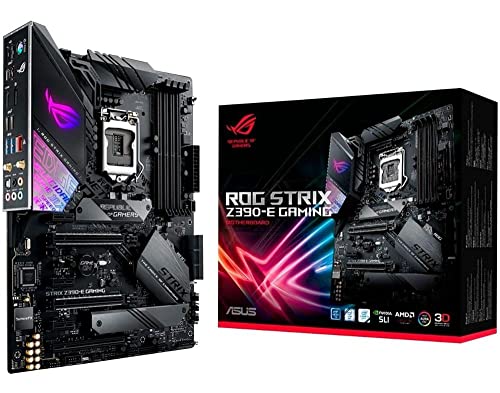
Three things define a Coffee Lake board type: the chipset, the form factor, and the quality of its power delivery section. Chipsets include Z390 and Z370 at the top, H370 and B360 in the middle, and H310 at the entry level, and all of them use DDR4 memory. Form factors run from full ATX through micro ATX down to mini ITX. Prices in remaining stock range from around $60 for a basic H310 board to around $250 or more for a premium Z390 model.
Boards for Prebuilt Gaming Desktops
Many prebuilt Coffee Lake desktops used B360 or H370 boards in micro ATX size, chosen for cost control rather than tuning options. These boards run locked and unlocked processors at stock speeds perfectly well and usually include enough USB and storage ports for daily gaming. Their limits show in expansion, with fewer slots, basic audio, and sometimes a proprietary front panel connector. If you are replacing a failed board in a prebuilt, match the form factor and check that the case uses standard connectors.
Boards for High End 4K Builds
High end 4K builds call for Z390 boards with strong power delivery, because an unlocked eight core processor feeding a flagship graphics card draws serious current. Look for reinforced primary graphics slots, at least two M.2 slots for NVMe SSD storage, and heatsinks on the power stages. These boards also tend to offer better networking and audio. Expect to pay around $180 to $300 in current remaining stock, and confirm the BIOS supports ninth generation processors before ordering.
Boards for Budget 1080p Builds
Budget 1080p builds are well served by B360 or even H310 boards paired with a quad core or six core processor. At 1080p the graphics card does most of the gaming work, so an entry board rarely holds back frame rates. Spend the savings on the graphics card and an SSD instead of chipset extras. Just confirm the board has the video outputs or slot layout you need, since the cheapest models trim ports aggressively.
Prebuilt Boards vs High End Boards: Which Should You Choose?
Start with your processor. If you own an unlocked K series chip and want to overclock, only Z370 and Z390 boards allow it, and that fact alone settles the question. If your chip is locked, a B360 board gives you the same stock performance for much less money. Next, count your storage and expansion needs, because high end boards add M.2 slots, USB ports, and stronger networking.
Power delivery is the third test, since sustained all core loads on high core count chips can overheat weak power stages and cause throttling. Aesthetics and lighting come last and should never outrank the first three checks. If you are cross shopping generations, our guide to the best motherboards for kaby lake explains why the older 200 series boards are not a safe substitute despite the shared socket name.
How to Choose the Right Coffee Lake Motherboard
CPU and GPU Pairing
Pair the board tier with the processor tier so neither side wastes money. A flagship unlocked processor belongs on Z390 with cooling to match, while a locked midrange chip runs happily on B360 for years. For gaming, put the graphics card first in the budget: a card aimed at 1080p, a stronger one for 1440p, and a flagship class card for 4K. The board only needs one healthy x16 slot to let any of them perform.
Warranty, Support, and Build Quality
On an older platform, support status matters as much as the original warranty. Check that the maker still hosts BIOS files and drivers for your board, and prefer sellers offering at least a short return window on used stock. Physically, look for solid capacitors, a reinforced graphics slot, and tidy soldering in listing photos. Boards for newer platforms show where support is heading, as our roundup of the best motherboards for alder lake makes clear.
Power Supply Quality
The board can only deliver what the power supply provides, so pair it with a quality unit with wattage headroom above your estimated load. A rating such as 80 Plus Gold signals efficient, stable output from reputable lines. Leave about 30 to 40 percent spare capacity if you plan a graphics card upgrade later. Cheap no name supplies are the most common hidden cause of random shutdowns under gaming load.
Upgradability and Standard Parts
Coffee Lake tops out at the ninth generation Core i9, so your upgrade path is real but finite. A Z390 board keeps that path fully open, while entry chipsets limit memory speed and expansion sooner. Prefer boards with four memory slots, standard ATX power connectors, and a common form factor so the case and supply can be reused. Avoid proprietary OEM boards from prebuilts if you ever plan to move the system into a new case.
Case Size, Airflow, and Aesthetics
Form factor must match your case: ATX for full towers and most mid towers, micro ATX for compact cases, and mini ITX for small form factor builds. Smaller boards concentrate heat, so plan case fans accordingly and keep cables clear of the graphics card intake. Lighting and board color are personal, and our picks among the best looking motherboards show how much style varies. Never let looks override chipset and power delivery for your processor.
Boards for Specific Needs
Best Coffee Lake Motherboards under 150: Which Type Works Best
If your ceiling is the best coffee lake motherboards under 150 dollars, focus on B360 and H370 boards in micro ATX form, which keep four memory slots on many models and solid stock performance. At this price, judge listings by BIOS version, included accessories like the IO shield, and seller return terms. A used Z370 can also appear under this line and adds overclocking, but inspect photos closely for bent socket pins before buying.
How to Make Your Coffee Lake Motherboard Last Longer
- Clean dust filters and fans every 3 months so power stages and drives stay cool under load.
- Update the BIOS carefully and only when a fix or processor support requires it, with stable power during the flash.
- Monitor temperatures with free tools after any hardware change to catch airflow problems early.
- Reseat memory and the graphics card if random crashes appear, since older slots can develop contact issues.
- Keep the spare IO shield, screws, and cables stored together so a future case move stays simple.
Frequently Asked Questions
How much RAM do I need for gaming on a Coffee Lake board?
Sixteen gigabytes of DDR4 in two matched sticks is the practical sweet spot for gaming on this platform. It enables dual channel mode, which lifts frame rates compared with a single stick. Thirty two gigabytes helps heavy multitasking, streaming, or large creative projects. Check your board limit and memory speed support, since entry chipsets cap speeds lower than Z series boards.
Air or liquid cooling: which is better for Coffee Lake?
A good tower air cooler is better value for most Coffee Lake processors and has no pump to fail. Liquid cooling earns its cost with unlocked high core count chips in compact or showcase builds where space or looks matter. Either way, case airflow decides real temperatures more than cooler type alone. Match cooler height or radiator size to your case before buying.
What GPU do I need for 1440p gaming?
For 1440p at high settings, aim for a mid to upper tier graphics card with at least 8 gigabytes of video memory. Your Coffee Lake board does not limit this choice, since its main graphics slot runs at full width. A six or eight core processor keeps frame pacing smooth in current games. Spend on the card before the board tier if gaming is the goal.
How long will a gaming PC on this platform stay relevant?
A Coffee Lake system with a six or eight core processor and a current graphics card remains capable for everyday gaming for several more years. The limits appear first in games that demand many fast cores and in the lack of newer storage and connectivity standards. It stays an excellent budget and secondary machine long after it leaves the flagship role. Plan upgrades around the graphics card first.
Is it cheaper to build or buy a prebuilt PC?
Building is usually cheaper on this platform because boards and processors appear widely in used listings, and you control every part. A prebuilt can win on convenience and a single warranty, especially during sales. Compare total cost with the operating system, case, and power supply included on both sides. If you already own a case and supply, building almost always costs less.
Wrapping Up
Let your processor decide the chipset, let your case decide the size, and let power delivery quality break any tie. Those three checks protect performance today and keep your limited upgrade path open tomorrow. Review the product table for current prices on each board type, then choose the best coffee lake motherboards option that matches your chip, your case, and your plans without paying for features the platform cannot use.