
Best Chairs for Lower Back: Buying Guide for 2026
Disclosure: We may earn a commission when you buy through links on this page, at no extra cost to you. As an Amazon Associate I earn from qualifying purchases. Learn more

Compare the best chairs for lower back comfort by support class, seat geometry, chair type and price band, with plain advice on setup, movement and fit.
A chair that leaves your lower back aching by midday is usually not broken. It is usually the wrong shape for your body, set at the wrong height, or missing the one adjustment your back keeps asking for. Shoppers comparing best chairs for lower back comfort are really comparing support shapes, seat geometry, and how much of the fit they can change after the chair arrives.
This guide walks through the support classes first, then setup geometry, chair types, and price bands, so you can match a chair to your body and your workday instead of to a marketing label. One honesty note before anything else: no chair fixes a back, and this guide makes no such promise. It covers sitting comfort and support feel only. The comparison table below gathers the shortlist in one place, and the sections after it explain what each feature actually does while you sit.


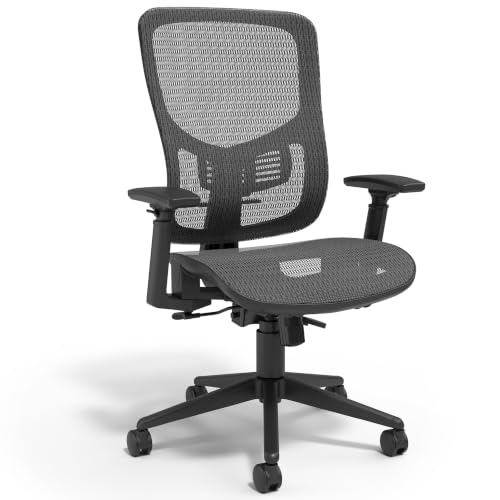

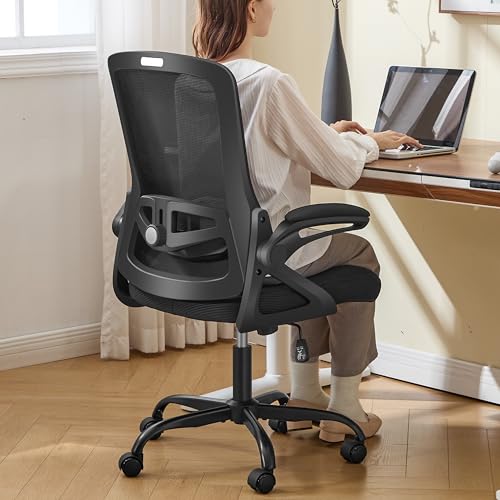


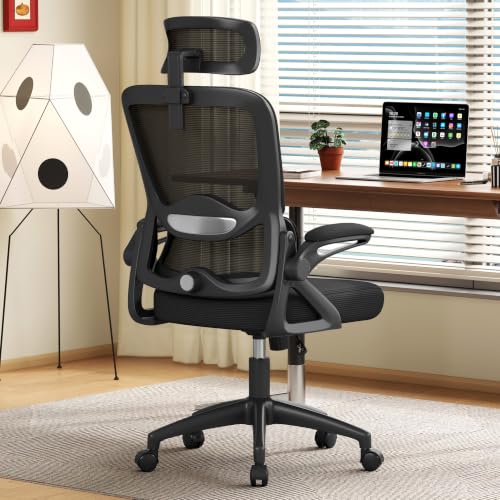
Price Bands: What Each Shelf Actually Buys
Prices in this category run from about $100 to $900 and beyond, and the money mostly buys adjustability and build quality rather than any special foam. Read the three bands below as classes. The product table above shows which current chairs sit in each one.
The Entry Shelf: About $100 to $250
Entry chairs usually offer a fixed lumbar curve molded into the backrest, basic seat height adjustment, and a simple tilt, with thinner foam and shorter warranties. This shelf suits a spare room, a student desk, or a few hours of sitting a day. It is a weak match for full workdays, because nothing about the support can be tuned when the molded curve lands in the wrong spot on your back.
The Middle Shelf: About $250 to $500
The middle shelf is where lower back shopping gets serious: lumbar support becomes adjustable in height, depth, or both, tilt tension can be set for your weight, and seat foam gets denser or gives way to a full mesh back and seat. For most full time desk workers, this band holds the best balance of fit range and price. It is also where a generous return window matters most.
The Upper Shelf: About $500 to $900
Upper shelf chairs widen every adjustment range, use stronger frames and bases, and carry longer warranties on parts that wear, such as the lift cylinder and the casters. What the extra money does not buy is a different category of comfort. A middle shelf chair adjusted carefully for your body will feel better than an upper shelf chair left at factory settings, so budget time for setup, not just money.
How to Choose: Support, Geometry, and the Details That Matter
Support Classes: Fixed Shaping, Adjustable Lumbar, and Separate Cushions
Every chair in this category supports the lower back in one of three ways, and the class matters more than the brand name on the box. The first class shapes the backrest itself, molding a curve that presses gently into the inward curve of your spine. The second class adds a separate lumbar unit you can move or firm up. The third class is not a chair feature at all: a loose cushion placed behind you, which can rescue a chair you already own.
| Support approach | How it works | Best suited to | Watch out for |
|---|---|---|---|
| Fixed molded curve | The backrest is shaped at the factory and cannot be changed | Average builds, light daily use, tight budgets | The curve may sit too high or too low for your back |
| Adjustable lumbar unit | A pad or band moves up and down, and sometimes in and out | Full workdays, shared chairs, backs that change day to day | Cheap units drift out of position or feel like a hard lump |
| Separate cushion | A portable pad sits between you and any chair | Testing what support feels like before buying a chair | It slides, adds seat depth problems, and suits one chair at a time |
If two people will share one chair, the adjustable class is close to mandatory, because a fixed curve can only match one spine. If you are unsure what support feels like, a cushion is a cheap experiment first.
Setup Geometry Comes Before Features
A chair can only support a back that is sitting in the right position, so set the geometry before judging any feature. Raise or lower the seat until your feet rest flat on the floor and your knees sit roughly level with your hips. Check the seat depth next: you want a small gap, about the width of two or three fingers, between the seat edge and the back of your knees. Then bring the backrest forward or recline it slightly until its curve meets the inward curve of your lower back without pushing you forward.
Finish with the desk. Your screen top should sit near eye level and your elbows should rest near a right angle with shoulders relaxed. If your chair lives at a desk all day, the companion guide to best office chairs for lower back looks at desk setups in more depth. Geometry is free, it takes ten minutes, and it explains more comfort complaints than any single feature on a product listing.
Movement Breaks: The Larger Half of Comfort
Here is the plain truth this whole category tends to bury: no chair makes an unmoving ten hour sit comfortable. Your back is built to move, and the larger half of sitting comfort is how often you stand, walk, stretch, and change position, not which chair you bought. Treat the chair as the support for the sitting stretches between movements, and set a rhythm you can keep, such as standing whenever you take a call. A tilt mechanism that moves with you helps spread the load, but it never replaces getting up.
Ergonomics and Adjustability
Beyond the lumbar unit, three adjustments earn their keep. Armrests should at least move up and down so your shoulders can hang relaxed, while tilt lock lets you fix a slight recline for reading and tilt tension decides how hard you must lean to move at all. A seat depth slider, common on middle and upper shelf chairs, slides the seat pan forward or back and is the quiet hero for very short or very tall sitters. Headrests belong to a different conversation about the neck and shoulders, and they do nothing for the lower back.
Comfort and Cushioning: Foam, Mesh, and the Long Sit
Seat padding comes in two broad families: high density foam, which starts firm and gives a stable platform that keeps your hips level, and mesh, which suspends you, breathes far better in warm rooms, and spreads pressure without a cushion layer. Neither family is better for every back. What matters is that the seat keeps your pelvis from rolling backward, because that roll is what flattens the lower back curve and loads it. If a seat feels wonderful for ten minutes and tiring by lunch, the shape is wrong for you, not the material.
Materials and Upholstery
Mesh backs stay cool and hold their shape well, but offer a springier, less padded feel against the spine. Fabric upholstery grips clothing slightly, which helps you stay put, while polyurethane leather wipes clean in seconds yet can feel warm and may crack sooner in dry rooms. Genuine leather sits mostly on premium chairs and ages well with occasional conditioning. For lower back comfort the covering matters less than what sits under it, so choose the surface for your room and climate, and judge support by the structure beneath.
Style, Room Fit, Warranty, and Assembly
Measure before you fall for a chair: note the space behind your desk for recline, the doorway the box must pass through, and the clearance under your desk for armrests. Compact models trade padding and adjustment range for a smaller footprint, which can be the right trade in a bedroom office. On warranty, read what is covered rather than the headline number, since frame and base coverage matters most, followed by the lift cylinder, and keep the return terms in view because fit is personal. Assembly on most chairs runs about 20 to 40 minutes with the included tool.
Types of Chairs in This Category
The labels below describe build classes rather than price tags, although the two often travel together. Match the class to your room and your sitting hours first, then compare individual chairs inside it.
Compact and Space Saving Models
Compact chairs shrink the footprint with a narrower seat, a lower backrest, and often arms that fold away or are left off entirely, so they slide into bedroom offices where a full ergonomic chair would crowd the room. The trade is real: less padding, a shorter adjustment range, and lumbar shaping that is usually fixed. For a few hours of sitting a day in a tight space, that trade is fair. For full workdays, most backs will ask for more chair.
Budget Models
Budget models keep the essential shape of a task chair and cut the extras: simpler tilt, fixed arms or none, thinner foam, and shorter warranties. The good ones still get the basic geometry right, with a backrest curve in a sensible place and a seat that is not absurdly deep. Quality varies more on this shelf than on any other, so buy where the return policy lets you send it back after a week of real sitting.
Ergonomic Models
Ergonomic models are the adjustment rich class: movable lumbar support, seat depth sliders, multi way armrests, and tilt systems that follow your movement. They suit full time sitters and shared chairs, because the fit can be rebuilt for each body. The catch is choice overload. A chair with nine adjustments set badly feels worse than a simple chair that happens to fit, so this class rewards the ten minutes of setup described earlier in this guide.
Premium and Executive Models
Premium and executive chairs run larger, with taller backs, deeper seats, leather or high grade fabric, and frames built for long service and higher weight capacities. They suit bigger bodies, formal offices, and buyers who keep a chair for a decade. The support on offer is the same three classes found elsewhere in this guide, executed with better materials and wider ranges. Pay for build and fit range here, not for any promise about your back.
Choosing a Chair for Your Situation
Most shoppers arrive with a situation rather than a feature list in mind. The four situations below cover the searches we see most often, and each one shifts which features deserve your money.
Best Computer Chairs for Lower Back
Computer work pins you in one posture for long stretches, with your hands forward and your eyes fixed ahead. That posture asks for a seat depth that keeps you upright without effort, armrests that meet your elbows at keyboard height, and a backrest curve that fills the space behind your belt line. A tilt that allows small rocking helps during reading and calls. If you type all day, weight these fit points above cushion softness, because softness fades by afternoon while geometry keeps working.
Best Chairs for Lower Back Issues
When your back is already sensitive, the buying rules change in one important way: the trial matters more than the feature list. Favor chairs with a firm, clearly felt support you can adjust in depth, because sensitive backs notice small differences. A long home trial with free returns is worth more than any feature list, since only your back can vote. And keep the framing honest: a chair can make sitting more comfortable, but ongoing issues deserve a clinician's input, not a furniture purchase alone.
Best Chairs for Lower Back and Neck Pain
Shoppers with discomfort at both ends of the spine should split the problem: the lower back is served by the support classes and geometry covered in this guide, while the neck is served by screen height, a headrest that meets the back of the head when you lean back, and breaks that let you move both areas. Choose the chair for the lower back first, then set the desk for the neck. Persistent pain in either place is a reason to see a doctor, as the warning section below explains, and no chair in this guide claims to change that.
Best Chairs for Lower Back Trouble
Intermittent trouble, the kind that flares on long days and settles by morning, calls for versatility. An adjustable lumbar unit you can firm up on a bad day and soften on a good one suits this pattern better than any fixed shape. A seat with medium firmness and a tilt you can unlock for gentle movement covers the rest. Keep the rest of your routine in the picture too: the chair handles your sitting hours, while walking and regular movement handle the flare pattern itself.
When a Chair Is Not the Answer
A chair is furniture: it can make sitting more comfortable, and that is the whole of its job, so back symptoms that are not comfort problems should never be answered with a purchase. See a doctor promptly if back pain persists or keeps getting worse, spreads down a leg, or comes with numbness or weakness in a leg or foot. The same applies if pain follows an injury, arrives with fever, or appears alongside any change in bladder or bowel control. Those signs need medical care, and a clinician can also tell you whether specific seating or support advice applies to your situation.
How to Make Your Chair Last Longer
A chair that is cared for keeps its support shape for years, while a neglected one sags out of adjustment long before its frame gives up. Five habits cover most of it.
- Tighten the bolts every few months. The screws joining the backrest, arms, and base loosen slowly with daily movement, and a two minute check keeps the chair solid and silent.
- Vacuum fabric and mesh, and wipe smooth coverings. Grit worked into upholstery abrades the fibers and foam beneath, so a weekly vacuum and a damp cloth for polyurethane or leather keep surfaces from wearing early.
- Keep leather coverings out of direct sunlight. Sun and heat dry leather and polyurethane until they crack, so position the chair away from bright windows where you can.
- Clear hair and grit from the casters. Wheels that cannot roll drag instead, which strains the base and scratches floors; a quick clean restores the glide.
- Use the height lever gently. Dropping your full weight onto the seat while pulling the lever shocks the lift cylinder, the part most likely to fail first.
Chairs: Your Questions Answered
What features matter most in chairs for lower back?
The fit between the backrest curve and your own lower back matters most, followed by seat depth and the return window. One point shoppers miss: measure where your lower back curve sits while seated, roughly at belt height for most adults, and compare that with where the chair places its support. A chair whose lumbar pad adjusts through that zone can be tuned to you. A fixed chair either lands there by luck or never will.
How long should a good chair last?
A good chair should serve about seven to ten years of daily use before the structure tires. The seat foam usually softens first, often years before the frame or base shows wear, and a chair that starts to feel flat is often telling you the cushion is done rather than the whole chair. The classic mechanical failure is a lift cylinder that slowly sinks during the day, and on many models that cylinder can be replaced on its own.
What features matter most for long hours?
For long hours, movement features matter most: a tilt that follows you as you shift, and tension you can set light enough to encourage small changes of posture. A breathable mesh back earns its place in warm rooms, where heat buildup alone can make a seat feel tiring. Armrests that drop or swing away also help, because resting your arms in one fixed spot all day loads the shoulders. None of these features replaces standing breaks, which remain the single biggest factor in all day comfort.
Is an expensive chair worth it?
An expensive chair is worth it when you sit in it daily and actually use its adjustments. The premium buys a wider fit range, stronger parts, and a longer warranty, and those pay off over years of use. It is hard to justify for a guest room or a few hours a week. A useful test: a middle priced chair fitted carefully to your body will outperform a premium chair left at factory settings, so spend on the tier only when you will spend the ten minutes to set it up.
How do I choose the right size?
Start with three measurements taken while you wear your usual shoes. Floor to the back of your knee gives the seat height you need, the width of your hips plus a small margin gives the seat width, and your weight checked against the rated capacity, with room to spare, gives the frame class. Tall and petite shoppers should look for chairs sold in explicit size ranges rather than one size designs, because a standard seat depth is the most common reason a chair feels wrong from the first day.
Final Thoughts
Choosing well comes down to three things: a support class that can meet your back where it curves, geometry set so your feet rest flat and your knees sit level, and a routine that gets you out of the chair regularly. The best chairs for lower back comfort are simply the ones that get those three things right for your body and your day. Use the product table above to compare the shortlist against them. If your concern runs beyond the lower back, our guide to best chairs for back covers the wider topic.


