
Best Chairs for Long Hours Made Simple: A Clear Buying Guide for 2026
Disclosure: We may earn a commission when you buy through links on this page, at no extra cost to you. As an Amazon Associate I earn from qualifying purchases. Learn more

Compare the best chairs for long hours by seat fit, adjustability, materials and warranty, and learn why movement breaks matter as much as the chair itself.
Buying a chair you will sit in for most of the day is different from buying a chair for a dining table or a spare room. The hours add up, and small fit problems that feel fine for twenty minutes can dominate your afternoon. This guide walks first time buyers through the basics in plain language, so you can compare best chairs for long hours with confidence instead of guessing from photos.
One point belongs at the start: a chair is sitting comfort furniture, and nothing more. A good chair does not fix posture, treat pain, or undo the effects of sitting still. It gives your body decent support while you work, and the rest of the job belongs to fit, habits, and movement. The comparison table below lays out the main classes side by side, and the sections after it explain what each spec actually means for a long day.


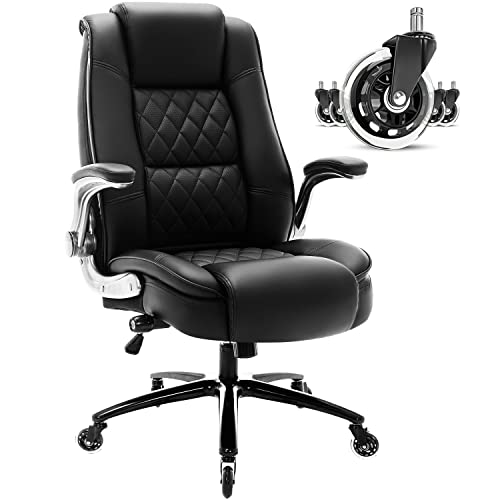


Chairs 101: The Basics
Start with the movement box, because it decides more than any single feature. No chair makes a full day of still sitting healthy, whatever the marketing claims. Standing up, walking to get water, and changing position through the day are the larger half of comfort, and a chair that lets you shift, tilt, and get up easily supports those habits instead of fighting them.
Plan movement into the day itself. A common pattern is to stand or walk for a few minutes every half hour or so, but any regular rhythm you will actually keep beats a perfect schedule you abandon. If your work allows it, a short walk at lunch and brief standing breaks between tasks do more for how your back and legs feel at six in the evening than any cushion upgrade.
A clinician line belongs early, before any talk of foam or frames. Pain, numbness, or tingling in the legs, arms, or back that persists, keeps returning, or gets worse is a reason to talk with a clinician, not a reason to buy a more expensive chair. The same goes for pain that wakes you at night or follows an injury. A chair can be part of comfort; it is never a diagnosis or a treatment.
The basic vocabulary is simple. The seat pan is the part you sit on, and its depth and width decide fit. The backrest supports your spine, lumbar support is the shaped or adjustable section that meets the curve of your lower back, and the gas lift is the cylinder that sets seat height. Armrests, a tilt mechanism, and a headrest are options whose value depends entirely on how you sit and what you do all day.
Key Specs Explained in Plain English
Features That Matter for Long Hours
Think of fit like clothing: a long hours chair is fitted to one body, and the measurements that matter are yours. Seat depth decides whether the front edge presses behind your knees, and you want a small gap of about two to three fingers there. Seat height decides whether your feet rest flat with knees near a right angle, and seat width decides whether your hips sit without squeeze or sloppy sideways room.
Weight capacity is a fit spec too, not fine print. Choose a chair rated comfortably above your weight, because a chair near its limit flexes, sinks, and wears its lift and foam faster. Buyers who share a chair between household members should fit it to the larger and taller person, then adjust down for the other.
Ergonomics and Adjustability
Adjustability is how one chair fits the body you actually have. The useful adjustments are seat height, backrest tilt with a tilt lock that holds the angle you choose, lumbar support that moves or firms up, and armrests that change height at minimum. Armrests that also slide and angle, often sold as 4D, help when you switch between typing, writing, and calls, but height adjustment alone covers most desks.
Set the chair in this order: height first so feet rest flat, then seat depth or backrest position, then lumbar against the small of your back, then arms low enough that shoulders stay relaxed. If your feet dangle after the seat fits your legs, a footrest is a cheap and honest fix, and a desk that is too high causes the same problem from the other direction.
Warranty and Return Policy
For a chair used eight or more hours a day, the warranty is part of the product. Look at what is covered separately: the frame usually carries the longest term, the gas lift and mechanism a shorter one, and foam and fabric the shortest. A chair with a long frame warranty and clear parts availability is a safer long term buy than a slightly cheaper chair with a single vague promise.
The return policy matters just as much, because you cannot judge a long hours chair in ten minutes. Sitting through two or three full workdays is the real test, so favor sellers that allow a genuine trial window and check who pays return shipping. Keep the box and every bolt until the trial ends, because returns without packaging are a common and avoidable headache.
Materials and Upholstery
The three common coverings trade comfort, heat, and care. Mesh backs breathe and suit warm rooms and buyers who run hot, but mesh quality varies and a sagging panel loses support. Fabric cushions feel soft and grip clothing less, while PU leather wipes clean and looks formal, yet it traps heat and can crack or peel after a few years of daily use in sunlit rooms.
Foam is the hidden half of the seat. High density foam holds its shape under daily load far longer than soft low density foam, which can feel plush in a showroom and flatten within a year. Under the cover, ask what the shell is made of: a plywood or solid frame outlasts the thin board shells used in the cheapest chairs, and the difference shows up as creaks and wobble long before anything breaks.
Build Quality and Frame
The frame and base carry everything. Steel frames and metal bases handle daily load and heavier users with less flex than plastic shells and nylon bases, though a well made reinforced nylon base is fine for average weights. The gas lift is graded by class, and a class 4 lift is the heavy duty end of the range and the one to look for in a chair bought for years of full time sitting.
Check the small things in the product details: caster wheels suited to your floor, a tilt mechanism with metal rather than plastic housing, and bolt hardware that can be tightened later. A chair that can be serviced, with replacement lifts, arms, and casters sold separately, will outlast two chairs that cannot. Wobble that grows month by month usually traces back to these parts, not to the seat itself.
Best Chairs for Specific Needs
Best PC Chairs for Long Hours
Shoppers comparing best pc chairs for long hours are usually at a desk with a keyboard, a mouse, and one or more screens. The pc specific points are armrests that drop low enough to slide under the desk, a seat that stays comfortable in a fairly upright working position, and a backrest height that supports the shoulder blades. A compact footprint helps in small rooms, because a chair that cannot roll back from the desk makes every break harder to take.
Compare the options like best desk chairs for long hours when the desk is a standard office desk, since desk chairs are tuned for upright task sitting rather than reclining. Buyers who split the day between a laptop at the desk and calls on the sofa should weigh easy height changes more than deep recline.
Best Chairs for Long Hours at Computer
The group shopping for best chairs for long hours at computer screens tends to sit the longest unbroken stretches of all. For this use, breathability and a backrest that supports small posture shifts matter more than thick padding, and a tilt that rocks gently helps you change position without standing. Screen work also means your eyes and neck depend on monitor height, which the chair cannot fix, so pair the chair with a screen at a sensible height.
Guides to best computer chairs for long hours focus on this all day screen routine, and they are the right comparison point if your working day is one long session at a monitor. Whichever class you choose, judge it after a full day at the screen, not after a short sit.
Best Executive Chairs for Long Hours: Tips for First Time Buyers
Readers weighing best executive chairs for long hours usually want a taller backrest, a more formal look, and a seat that suits meetings as much as solo work. The executive specific traps are soft deep padding that feels luxurious for ten minutes and tiring by mid afternoon, and fixed padded arms that hold your shoulders too high. Look for the same fit measurements as any other class first, then judge the finish.
Executive chairs also tend to be larger and heavier, so measure the room and the doorway before ordering. A high back with a headrest suits taller buyers and people who lean back to think or take calls, but it adds nothing for a shorter buyer whose head never reaches it.
Best Comfy Chairs for Long Hours: Tips for First Time Buyers
The hunt for best comfy chairs for long hours starts with softness, and that is exactly where the trap sits. A very soft seat lets your hips sink, tilts the pelvis, and leaves your back doing extra work, so by evening the comfy chair feels worse than a firmer one. Comfort over hours comes from support in the right places plus a surface that does not fight you, not from plushness alone.
If you read, study, or do paperwork away from a desk, the reading and study classes are worth comparing too, including best chairs for studying long hours, which are shaped for books and laptops at a table. For pure relaxation breaks, a separate lounge chair for short sits can serve you better than asking one chair to do everything.
Rookie Mistakes to Avoid
- Judging by the first sit: a chair that feels wonderful for five minutes can fail by hour three, so use the full trial window before deciding.
- Buying the gaming look for office work: deep bucket seats and fixed wings can crowd shoulders, though classes like best gaming chairs for long hours suit buyers who genuinely recline to play after work.
- Ignoring measurements: seat depth and height decide fit, and skipping them is the most common reason a well reviewed class of chair disappoints.
- Expecting the chair to fix pain: ongoing pain is a clinician question, and no feature list changes that.
- Forgetting the room: a chair that cannot roll clear of the desk or fit through the door will annoy you daily, whatever its specs.
Getting Started: Setup and First Use
Assembly is part of the purchase, so set aside unhurried time and lay out every part before you begin. Attach the base and lift first, then the seat and back, and leave the bolts slightly loose until everything is aligned. Tighten in a cross pattern, sit and test, then snug each bolt again, because new chairs settle during the first week of use.
Once the chair is built, adjust it at your actual desk. Set the height so your feet rest flat on the floor, bring the lumbar support to the curve of your lower back, and set armrests so your shoulders hang rather than shrug. Retighten the bolts every few months, wipe casters clean of hair and grit, and keep the chair out of direct sun to slow fabric and foam aging.
Give yourself an honest trial. Use the chair for your real working days, take the movement breaks described earlier, and note when discomfort appears and where. A pattern that points to one adjustment is useful information, and changing how you sit is part of the same picture as the chair: guides to best chairs for sitting long hours cover the sitting routine itself in more depth.
Frequently Asked Questions
What features matter most in chairs for long hours?
Fit measurements matter most: seat depth, seat height, and a backrest that meets the curve of your lower back. After fit, look at adjustments you will truly use, foam that holds its shape, and a frame and lift rated for daily use. One extra worth knowing is that a chair you can return after real workdays is worth more than a longer feature list, because your own long day is the only test that counts.
Is an expensive chair worth it?
An expensive chair is worth it when the money buys durability and fit rather than decoration. Higher prices usually bring stronger frames, better foam, longer warranties, and replaceable parts, which matter at eight hours a day. They do not guarantee comfort for your body, though, and a mid priced chair that fits you well beats a premium chair that does not. Spend first on fit, then on the parts that wear.
How do I choose the right chair size?
Measure yourself sitting down: the length from your back to behind your knees sets seat depth, and your lower leg length sets seat height. Compare those numbers with the chair ranges, not with photos of people sitting in it. If you fall between sizes, choose based on seat depth first, because a seat that is too deep cannot be fixed with a cushion alone, while a small height gap can be solved with a footrest.
How long should a good chair last?
A good chair used full time should last about five to ten years before major parts wear out, with foam and casters usually going first. Gas lifts can be replaced cheaply, and a chair with spare parts available stays useful far longer. What many buyers miss is that daily load shortens every estimate: a chair rated for occasional use will age in two years under a full time routine, so match the duty class to your hours.
How often should I get up during long hours of sitting?
Stand up and move briefly every half hour or so, even if it is only a walk to fill a water glass. Short regular breaks beat one long break, because stiffness builds during the unbroken stretches. A detail worth adding: set a reminder rather than relying on willpower, since focus makes hours pass unnoticed. If your job chains you to a screen, standing for calls and messages is an easy way to build the habit.
The Bottom Line
Keep the order straight: fit first, movement always, features second. Measure your seat depth and height, choose adjustments you will use, and check the frame, lift class, and warranty before the fabric. Then judge the chair across real workdays, using the product table above to compare the classes that match your routine.
Whichever class you pick, the best chairs for long hours are the ones that fit your body, survive your routine, and make it easy to stand up often. Buy the fit, keep the trial honest, and let the chair do its one job well: comfortable support while you work.


