
Best Cameras for Rental Property: Budget, Midrange, and Premium Picks for 2026
Disclosure: We may earn a commission when you buy through links on this page, at no extra cost to you. As an Amazon Associate I earn from qualifying purchases. Learn more

Learn how to choose the best cameras for rental property by budget, with clear guidance on lenses, sensors, weather sealing, and ownership costs.
Camera prices stretch from under $100 to several thousand dollars, and the gap can leave a landlord unsure where extra money actually helps. The right choice depends on the work you do most, from move in condition records to listing photos. This guide walks through the best cameras for rental property buying decisions by budget, so you stop paying for power you will never use.
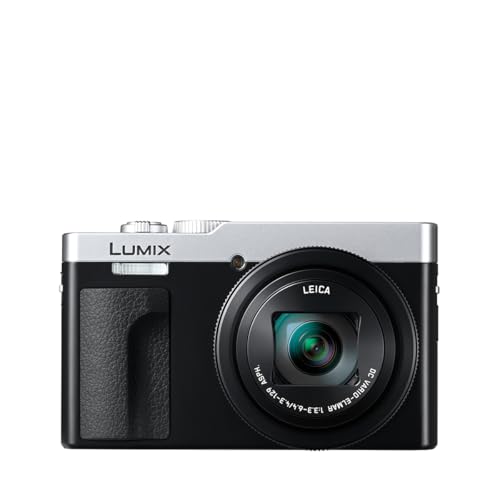
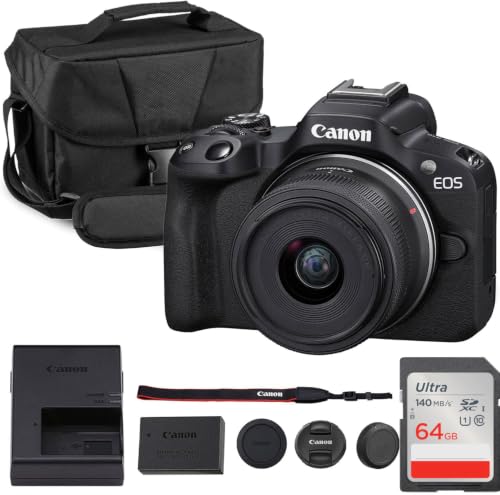
Start with the comparison table below to see how the main options differ, then read on for what each price tier includes and which features earn their cost.




Who Should Buy Which Kind of Camera?
Before you compare sensors and lenses, name your main job. A camera that shines for polished listing photos may be more than you need for condition records, while a basic model can struggle in a dark hallway.
Owners of One or Two Units Doing Their Own Records
If you manage a small number of units yourself, your camera mostly shoots condition photos at move in and move out. You need clear, well lit images, a wide view that fits a whole room from the doorway, and simple controls. A good point and shoot compact or an entry level mirrorless camera covers this work without a steep learning curve.
Managers Handling Frequent Turnovers
When several units turn over each year, speed and consistency matter more than artistic range. You want fast autofocus, dependable performance in mixed indoor light, and a screen you can tilt while shooting a low cabinet or a high ceiling corner. Midrange models usually fit this pace best.
Teams Shooting Listing Photos That Must Sell the Space
Listing photos carry a different burden, because they compete with every other rental a shopper scrolls past. Bright, straight, spacious looking images help a unit rent faster. If photography is part of your marketing, a larger sensor, a quality wide angle lens, and strong low light results justify a premium budget. Everyone else on the team can still use a simpler camera for daily records.
What Your Money Gets You at Each Price Tier
Price tiers here are really about light, lens quality, and handling speed. The product table above gives the current lineup at a glance, and the tiers below explain what changes as you spend more.
Budget Tier: What to Expect
Cameras around $100 to $300 cover basic documentation well. Expect a small sensor, a fixed zoom lens, and decent results in daylight or bright rooms. Trade offs show up in dim interiors, where images get grainy, and in slower autofocus. For condition records and simple exterior photos, this tier is honest value, as long as you accept its limits in poor light.
Midrange Tier: Where Most Rental Buyers Land
Spending about $300 to $800 brings a clear step up. Sensors grow larger, autofocus locks on faster, and many models add a tilting screen, better video, and stronger image stabilization for handheld shots. Most landlords and small teams get the best return here, because the gains show up in everyday shooting.
Premium Tier: When Spending More Pays Off
Above about $800, and often past about $1,500 once lenses are included, you pay for large sensors, excellent low light results, and lenses that keep room edges straight and sharp. The payoff is real for marketing photos and for large portfolios where one camera serves many listings. Premium gear also demands more skill, so the upgrade only pays when someone on your team will use its strengths.
Features Worth Paying For and Ones to Skip
Spec sheets reward careful reading. Some features change your photos every single shoot, while others sound impressive and rarely matter for rental work. When you compare the best cameras for rental property side by side, the five factors below separate real value from brochure padding.
Sensor Size and Image Quality
Sensor size drives image quality more than megapixel count does. A larger sensor gathers more light, so it produces cleaner photos in dim rooms. Small sensors in budget compacts do fine in good light, APS C sensors in midrange models handle interiors with ease, and full frame sensors serve demanding listing work. Extra megapixels mainly help if you crop heavily, which rental photos seldom require.
Lens and Zoom Range
The lens decides whether a small bathroom fits in one frame. Look for a zoom that starts wide, around 24 mm in full frame terms, so rooms look spacious without distortion at the edges. Optical zoom uses real glass to magnify, so it keeps detail, while digital zoom simply enlarges the image and softens it. A bright maximum aperture, shown as a low f number, helps in dark interiors. Long telephoto reach is the feature to skip, since rental shooting happens up close.
Durability and Weather Sealing
Rental work happens in empty units, dusty renovations, and rainy exterior shoots. Weather sealing around buttons and dials keeps out drizzle and dust. A weatherproof rating is worth paying for if you shoot exteriors in all seasons. If your camera lives indoors for paperwork photos only, basic build quality is enough, and money is better spent on the lens.
Features That Matter for Rental Property Work
Certain features map directly onto rental tasks. Reliable autofocus keeps a whole room sharp when you shoot quickly between appointments. Image stabilization steadies handheld shots in stairwells and basements where a tripod is awkward. WiFi transfer lets you send a damage photo to a tenant or contractor from the driveway. If monitoring a vacant unit is also on your list, see our guide to the best security cameras for rental property, and compare the broader roundup in our guide to the best property cameras as well.
Battery Life and Charging
A turnover day can eat through a small battery fast. Look for at least a few hundred shots per charge, and favor models that charge over USB C so a power bank in the car can rescue a low battery between units. A spare battery costs little and prevents a missed move out record.
How to Document a Unit Well
Technique matters as much as gear. A midrange camera used with a steady routine beats a premium camera used carelessly, and consistent photos protect you when a deposit dispute turns on the condition of a floor.
A Repeatable Move In and Move Out Routine
Shoot every room from the same doorway positions each time, then take close views of floors, walls, counters, and appliances. Turn on all the lights, open blinds for even light, and keep the camera level so walls stay vertical. Photograph serial numbers on appliances and readouts on meters. Save the files in folders named by unit and date, and back them up the same day.
Listing Photos That Show Rooms Honestly
For listings, clear the counters, shoot at about chest height, and use the wide end of the zoom without pushing into distortion. Daylight from windows usually flatters a room more than flash. Take one establishing shot per room plus one detail shot, such as a renovated kitchen finish. If you also shoot personal projects beyond rentals, our guide to the best digital cameras covers general purpose models in more depth. For exterior monitoring, see our guide to the best outdoor security cameras for rental property.
Long Term Costs to Factor In
The camera price is only the first line of the real cost. Budget for a memory card, a spare battery, a protective case, and, for interchangeable lens models, at least one wide angle lens suited to interiors. Add small ongoing costs such as a replacement charger or a sensor cleaning after dusty renovation shoots. Total these costs before choosing a tier, since a premium body with no lens budget serves you worse than a midrange kit ready to shoot.
Common Mistakes to Avoid
- Buying on megapixels alone, which leaves you with a small sensor that struggles in dim rooms.
- Choosing a zoom that starts too narrow, so small rooms never fit in a single frame.
- Skipping a spare battery, then losing the end of a move out record to a dead camera.
- Using heavy digital zoom for detail shots, which produces soft images that prove very little.
- Storing condition photos only on the camera card, so one lost card erases your only evidence.
- Paying for advanced video features you never use, while underfunding the wide angle lens you need daily.
How to Make Your Rental Property Camera Last Longer
Care for the camera itself, not the properties it photographs. Keep it in a padded case during transport, and use a wrist strap during shoots so a drop onto tile is less likely. Wipe the lens with a clean microfiber cloth rather than a sleeve, and keep the lens cap on between rooms. Store the camera in a dry place, and remove the battery during long gaps between turnovers. After a dusty renovation shoot, blow loose grit off the body before wiping. Charge batteries before they sit empty for months.
Frequently Asked Questions About Rental Property Cameras
What features matter most in cameras for rental property work?
A wide starting zoom, dependable autofocus, and clean results in indoor light matter most for rental property cameras. Together they let you capture a whole room, keep it sharp, and do it fast during a busy turnover. One point many buyers miss is screen visibility outdoors, so check that the rear screen stays readable in bright sun.
How much should a landlord spend on a first camera for a rental property?
A landlord buying a first camera for a rental property should plan on a budget of about $300 to $600 for a midrange model that will not need replacing soon. That range buys a sensor large enough for dim interiors and a lens wide enough for small rooms. If your budget is tighter, buy the budget camera now and put the savings toward a spare battery first.
What camera specs matter most for beginners photographing rental units?
For beginners photographing rental units, the specs that matter most are sensor size, the wide end of the zoom range, and the shots per charge battery rating. Ignore long spec lists beyond those three until you have shot a few turnovers. A helpful extra is an automatic scene mode that handles mixed window and ceiling light while you learn.
Which camera type handles low light rooms best in a rental property?
A mirrorless camera with an APS C or full frame sensor handles low light rooms best in a rental property, because the larger sensor gathers more light before grain builds up. A bright lens helps just as much, so the pairing matters more than either part alone. Raising the sensitivity setting works in a pinch, though very high settings add grain that can hide wall detail.
Is a smartphone enough instead of a dedicated camera for rental property photos?
A smartphone is enough for quick repair photos and casual updates. A dedicated camera pulls ahead for consistent move in records, wide room coverage without distortion, and reliable results in dark interiors. One practical divide is storage, since a camera keeps work photos off your personal phone and makes it simpler to hand the archive to a manager.
What should I photograph at move in and move out?
Photograph every room from the doorway, then take close views of floors, walls, counters, appliances, windows and any existing damage. Shoot appliance serial numbers and meter readings too, and save the files in folders named by unit and date. Matching move in and move out sets taken from the same positions make a deposit discussion much simpler.
Final Thoughts
Choose by the job first, the sensor and lens second, and the price tier third. A wide zoom, a sensor that handles indoor light, and a battery plan you can trust will cover nearly every rental shoot. Look back at the product table above to compare the current options against those priorities, and you will land on the best cameras for rental property choice for your portfolio without overspending. Prices and availability can change, so check the product page before ordering.


