
Best Bluetooth Label Printers: Types Compared and How to Choose for 2026
Disclosure: We may earn a commission when you buy through links on this page, at no extra cost to you. As an Amazon Associate I earn from qualifying purchases. Learn more

Compare the best bluetooth label printers by type, label size, app support and running cost for shipping, product and home labels.
Shopping for a label printer gets confusing fast because the word label covers shipping labels, product stickers, file folder tags, and tiny pantry labels. Each job suits a different machine, and Bluetooth adds another layer because app quality matters as much as print quality. This guide compares the main types of best bluetooth label printers so you can match the type to your labels first, then compare models in the comparison table below.
The most useful question is not which printer has the longest feature list. It is which printer handles your label size, your label material, and your weekly volume without wasting supplies or slowing you down.


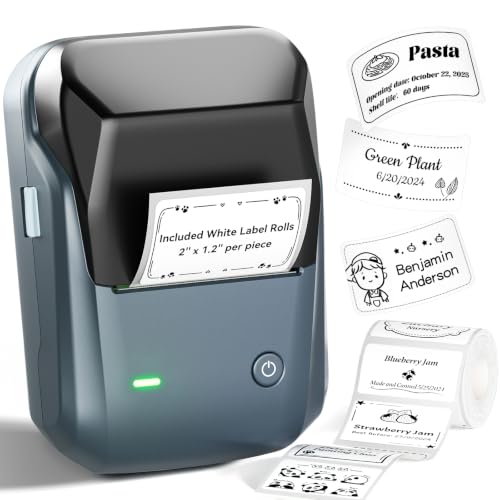


Types of Bluetooth Label Printers Compared
Most Bluetooth label printers fall into three types. Desktop direct thermal printers print on heat sensitive rolls and need no ink, which makes them the default for shipping and barcode work. Portable label makers print narrow tape labels for organizing, and thermal transfer printers use a ribbon for labels that must survive heat, sunlight or chemicals.
Price gives a rough map. Portable label makers often cost around $30 to $80, desktop thermal printers around $80 to $250, and thermal transfer or higher volume units about $250 to $600 or more.
Desktop Direct Thermal Printers
A desktop direct thermal printer is the usual choice for 4 by 6 inch shipping labels, barcodes and address labels. It prints one label in a few seconds with no ink or toner, and most current models print from a phone app or a computer. The trade off is that direct thermal labels fade with heat and sunlight, so they suit shipping and short term storage rather than labels that must last for years.
Portable Label Makers
Portable label makers print narrow tape labels for pantry jars, cables, file folders, toolboxes and storage bins. Many connect by Bluetooth to a phone app that offers fonts, icons and saved templates. They are compact and cheap to run for small jobs, but the narrow tape cannot handle shipping labels, so choose one only for organizing and small product tags.
Thermal Transfer Printers
Thermal transfer printers melt a ribbon onto the label, which gives prints that resist smudging, heat and moisture for years. They suit asset tags, outdoor bins, equipment labels and businesses that need durable barcodes. They cost more and need ribbons as well as label rolls, so they make sense only when label life matters.
Direct Thermal vs Thermal Transfer: Which Should You Choose?
Choose direct thermal if you print shipping labels or short term tags and want the simplest setup. There is no ribbon to change, supplies are widely available and running cost is low. Choose thermal transfer if labels must stay readable for years or face heat, light or chemicals, and accept the extra cost and ribbon changes.
If you only label shelves, jars and cables at home, a portable label maker is cheaper and simpler than either. For a broader look at dedicated models, see our guide to the best label printers.
How to Choose the Right Label Printer
Printer Type and Label Method
Start with the label itself. Shipping labels are usually about 4 by 6 inches, so the printer must accept that width, and many compact label makers cannot. Product labels may need color or waterproof media, which points to a color capable unit. If color is central to your packaging, our guide to the best color label printers explains that route in more depth.
Knowing how long your label must stay readable will narrow the type faster than any other single question.
Reliability and Support
A label printer is only as good as its driver and app support. Check that the maker still updates its app for current phone systems, because a Bluetooth printer with an abandoned app becomes frustrating within a year or two. Look for clear setup guides, easy label calibration, and replacement parts such as print heads and cutters that you can actually buy.
Reviews from sellers and warehouse users are useful here because they reveal jams, peeling issues, and support quality over months of use. A slightly higher price from a brand with active support usually beats a bargain unit with no firmware updates. Keep the manual and a spare roll or sheet pack on hand so a supply problem never stops a shipping day.
Connectivity and Mobile Printing
Bluetooth range is typically about 30 feet in open space, and walls shorten it, so plan where the printer will sit relative to your packing bench or desk. A good app should let you import addresses, save label templates, print from PDF files, and adjust darkness and size without guesswork. If you also print from a computer, confirm the printer supports your system and not only phones.
Some buyers actually need WiFi more than Bluetooth, because WiFi lets several people share one printer across a room or office. If that sounds like your setup, compare the options in our guide to the best bluetooth printers and think about how many devices will connect each day. Marketplace sellers should also check platform support, since label formats from selling platforms must match the printer width and app import tools.
Ease of Setup and Calibration
Good label printers learn the gap between labels automatically, which prevents the skipped and half printed labels that waste rolls. Look for auto calibration, a clear paper path, and loading that works without threading labels through tight slots. Your first setup should include a sample print, a darkness adjustment, and one real label before you trust a full run.
Print one test label every time you change a roll or sheet type. Media thickness and coating change how dark and sharp the print looks, and one test label costs far less than a ruined batch of fifty. Save a template for each label size you use so you never rebuild the layout from scratch.
Print Speed and Resolution
Speed is usually listed in inches per second for thermal printers, and around 4 to 6 inches per second is plenty for most small sellers. Higher speeds matter when you print hundreds of labels a day, because a slow printer becomes the bottleneck at packing time.
Resolution is listed in DPI, and 203 DPI is standard and fine for shipping labels and barcodes. Choose 300 DPI if you print small text, tiny barcodes, or detailed logos, because the extra sharpness keeps scanners reading codes on the first pass. Sellers on auction and marketplace platforms can find platform specific notes in our guide to the best label printers for ebay, including label size habits that save returns.
How to Make Your Label Printer Last Longer
Clean the print head regularly with a cleaning pen or a soft cloth lightly dampened with isopropyl alcohol, because adhesive and dust buildup cause faint streaks. Store thermal rolls away from heat and sunlight so the coating stays printable. Use labels made for your print method, since the wrong coating can leave residue that shortens print head life.
If you lean toward a dedicated thermal unit, our guide to the best thermal label printers covers care habits for that type in more detail. Keep spare rolls on hand, and wipe the platen roller when labels start to feed unevenly.
FAQs
Direct thermal or thermal transfer: which lasts longer?
Thermal transfer lasts much longer, because the ribbon image resists heat, light and moisture. Direct thermal labels fade over months in warm or sunny places, which is fine for shipping labels but poor for asset tags and outdoor bins.
Which label printer type is easiest for beginners?
A desktop direct thermal printer is usually easiest for shipping labels, because loading a roll and printing from an app takes minutes. A portable label maker is easiest for home organizing, with simple tape cartridges and preset fonts.
Do Bluetooth label printers work with iPhone and Android?
Most do, through a free app, but check the supported system versions before you buy. Confirm that the app can import your addresses and save templates, and that the maker still updates it.
What does cost per page mean for label printing?
Cost per label means the total cost of rolls, ribbon and any tape divided by the number of finished labels. For direct thermal printers the roll is the only cost, which makes the math simple and usually low. Count wasted labels from misprints and calibration too, because a printer that wastes fewer labels can cost less overall than a cheaper model with sloppy feeding.
The Bottom Line
Match the printer type to your label first, then weigh app quality, label width, and running cost. Desktop thermal units win for shipping, thermal transfer wins for durability, and portable label makers win for organizing. Use the product table above to compare current models against those priorities, and choose the best bluetooth label printers option that fits the labels you print every week, not the ones you might print someday.


