
Best Bluetooth Keyboards for iPad 2026: A Practical Buying Guide
Disclosure: We may earn a commission when you buy through links on this page, at no extra cost to you. As an Amazon Associate I earn from qualifying purchases. Learn more

Compare the best bluetooth keyboards for ipad by size, key feel, battery life, and case fit, with advice for students, writers, and travelers.
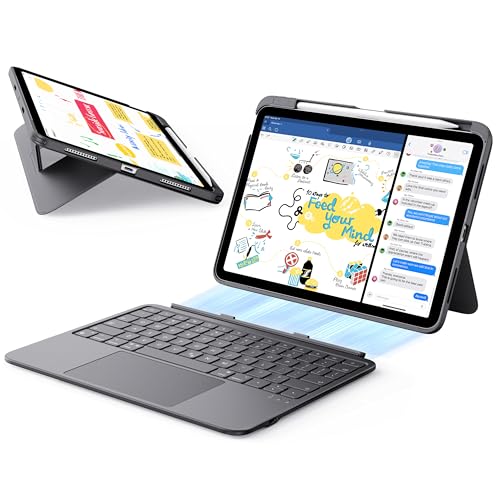
An iPad turns into a real writing tool once you add a keyboard, and the best bluetooth keyboards for ipad are the ones that pair reliably, feel good over a long session, and match the way you carry your tablet. This guide explains the choices that matter, from keyboard cases to slim standalone boards, so you can shop with a clear plan.
The comparison table below shows the main options side by side. Start with how you will use the iPad, then match size, key feel, and battery life to that routine.




Who Should Buy Which Type of iPad Keyboard
Students and note takers usually do best with a light standalone board, because it slips into a bag next to the tablet and works with any iPad size. Writers and remote workers who type for hours should look at keyboard cases with a trackpad, which add a stand and screen protection in one piece. Travelers who also use a phone benefit from a multi device board that switches between the iPad and a phone with one key.
If you only type occasionally, a simple low cost board is enough. If the iPad replaces a laptop for part of your week, spend more on key feel and a stable stand.
Key Features of Bluetooth Keyboards for iPad
Size and Compatibility
Keyboard cases are made for one iPad size and generation, so check your model number in iPad settings before you order. Standalone Bluetooth keyboards pair with any iPad, which makes them the safer choice if you plan to upgrade the tablet later.
Key Feel and Layout
Full size keys with clear travel suit touch typists, while compact layouts shrink arrows and punctuation first. Scissor switches are quiet and stable, and backlit keys help in dim rooms. A row of function keys for brightness, search, and media saves repeated reaches for the screen.
Battery Life and Charging
Most Bluetooth keyboards last weeks on a charge, and backlit models with a trackpad need charging more often. USB C charging lets one cable serve both the tablet and the keyboard, and a power switch stops keys waking inside a bag.
Pairing and Multi Device Use
Look for Bluetooth 5.0 or newer and a keyboard that reconnects as soon as the iPad wakes. Multipoint boards store two or three devices, which is handy if you switch between an iPad, a phone, and a computer during the day.
Stand, Weight, and Protection
A case keyboard protects the screen and holds a steady angle, but it can add one to two pounds to the iPad. A standalone board keeps the bag light and lets you place the screen on a separate stand at eye level, which is kinder to your neck.
If you are comparing larger tablets, see our guides to the best bluetooth keyboards for ipad pro and the best bluetooth keyboards for ipad air. For a cover that combines protection and typing, our guide to the best ipad keyboard cases goes deeper.
Using Your iPad Keyboard Well
Pair the keyboard once, open a notes app, and check that the shortcut keys behave as expected. iPadOS supports many shortcuts for switching apps, searching, and copying text, and a few minutes with the shortcut list pays off every day. Keep the keyboard charged, wipe the keys with a barely damp cloth, and store it flat in a sleeve.
Common Mistakes to Avoid
- Ordering a keyboard case without checking the exact iPad model it fits.
- Choosing a heavy case for a tablet you mostly carry for reading.
- Ignoring key size and spacing, which slows touch typists the most.
- Skipping the return terms when you have not yet tried the layout.
- Paying for backlight and a trackpad you will rarely use.
Budget and Value
Simple standalone boards cost about $20 to $50, while keyboard cases with a trackpad run about $70 to $350 depending on the maker. Mid priced options usually add backlight, better keys, and a sturdier stand. Choose the tier that matches how many hours you type each week rather than the one with the longest feature list.
Frequently Asked Questions
Do Bluetooth keyboards work with every iPad?
Yes, a standalone Bluetooth keyboard pairs with any iPad that runs a current version of iPadOS. Keyboard cases are different, because they fit only the iPad size and generation they were made for. Check the compatibility list before you order a case.
Is a keyboard with a trackpad worth it?
A trackpad is worth it if you edit documents, work in spreadsheets, or move between apps often, because precise pointer control is faster than reaching for the screen. If you mostly write notes, a plain keyboard saves weight and money.
Can I use the same keyboard with my iPad and my phone?
Many Bluetooth keyboards remember two or three devices and switch between them with a key press. Check that switching is quick and that the shortcut keys still make sense on each device.
How long does a Bluetooth iPad keyboard battery last?
Most boards run for weeks on a charge with the backlight off, and for days with bright backlight and a trackpad in constant use. Turn the power switch off in your bag and charge before long trips.
Should I buy a keyboard case or a standalone keyboard?
Choose a case if you want protection and a single piece to carry. Choose a standalone board if you upgrade tablets often, type at a desk, or want the lightest bag.
Final Thoughts
Match the keyboard to your iPad size, your typing hours, and the way you carry the tablet. Comfort and reliable pairing matter more than extra features, and the product table above helps you compare the practical differences.
Take your time with the shortlist, check the return terms, and the best bluetooth keyboards for ipad for your routine will be easy to spot.


